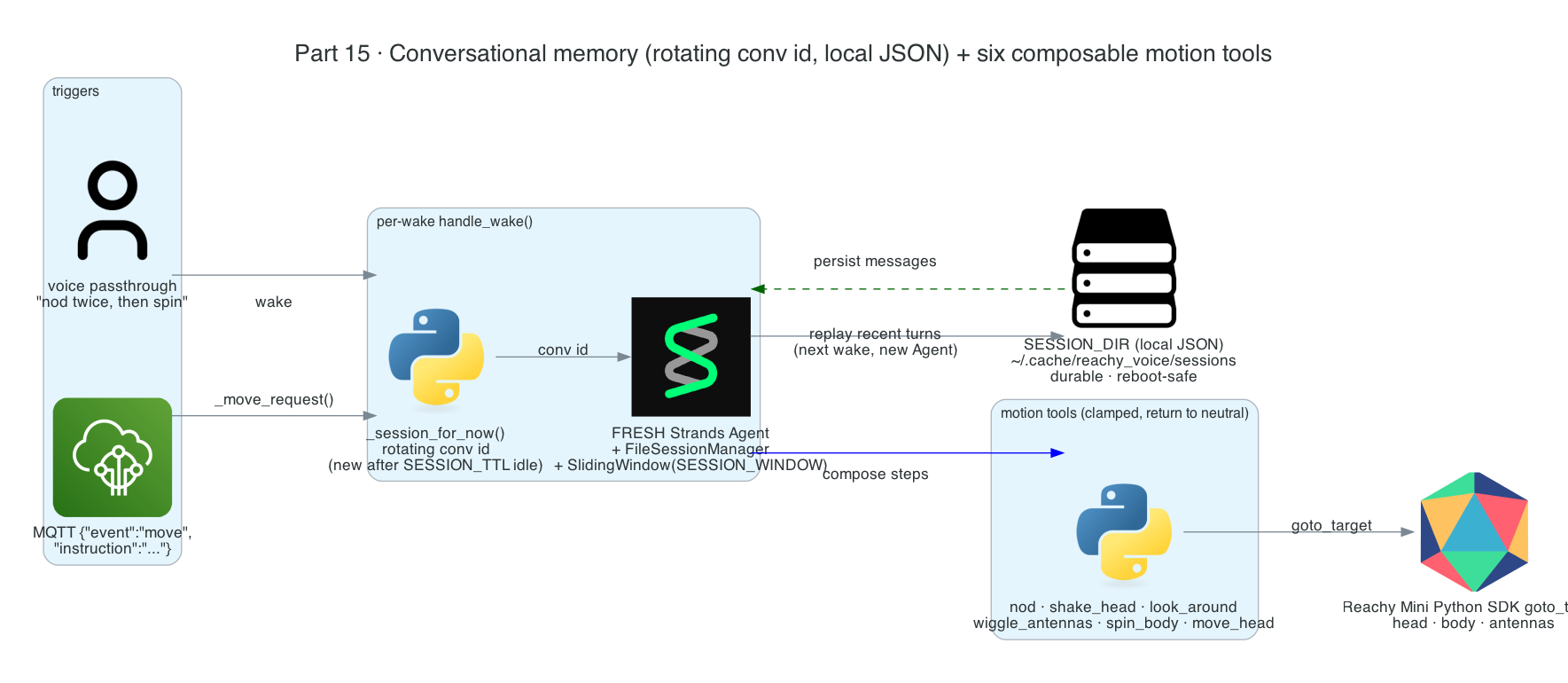
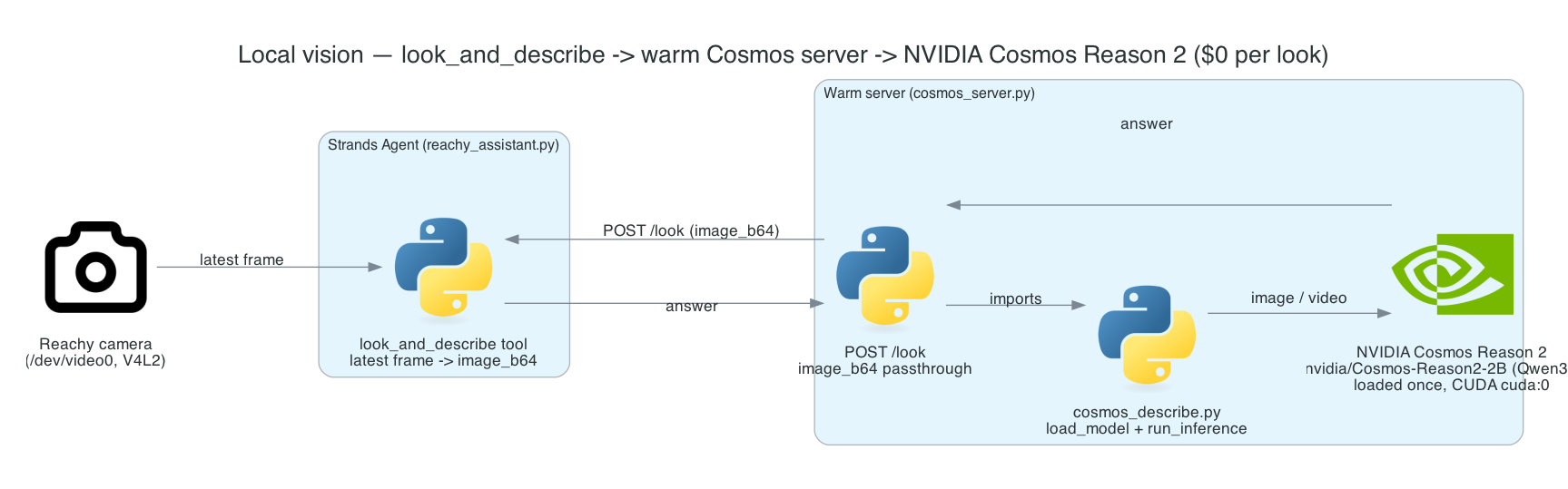
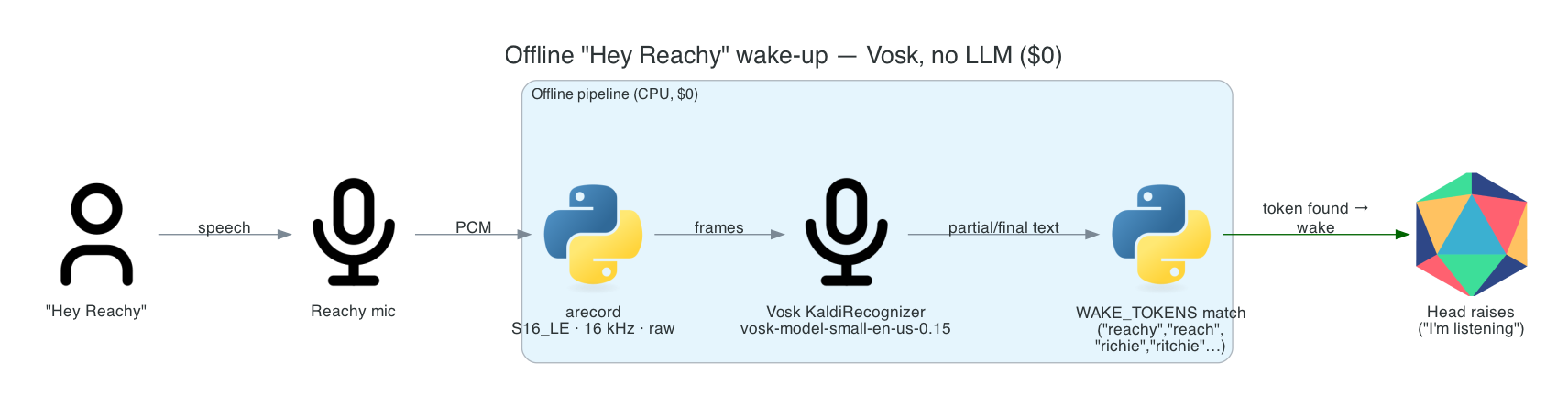
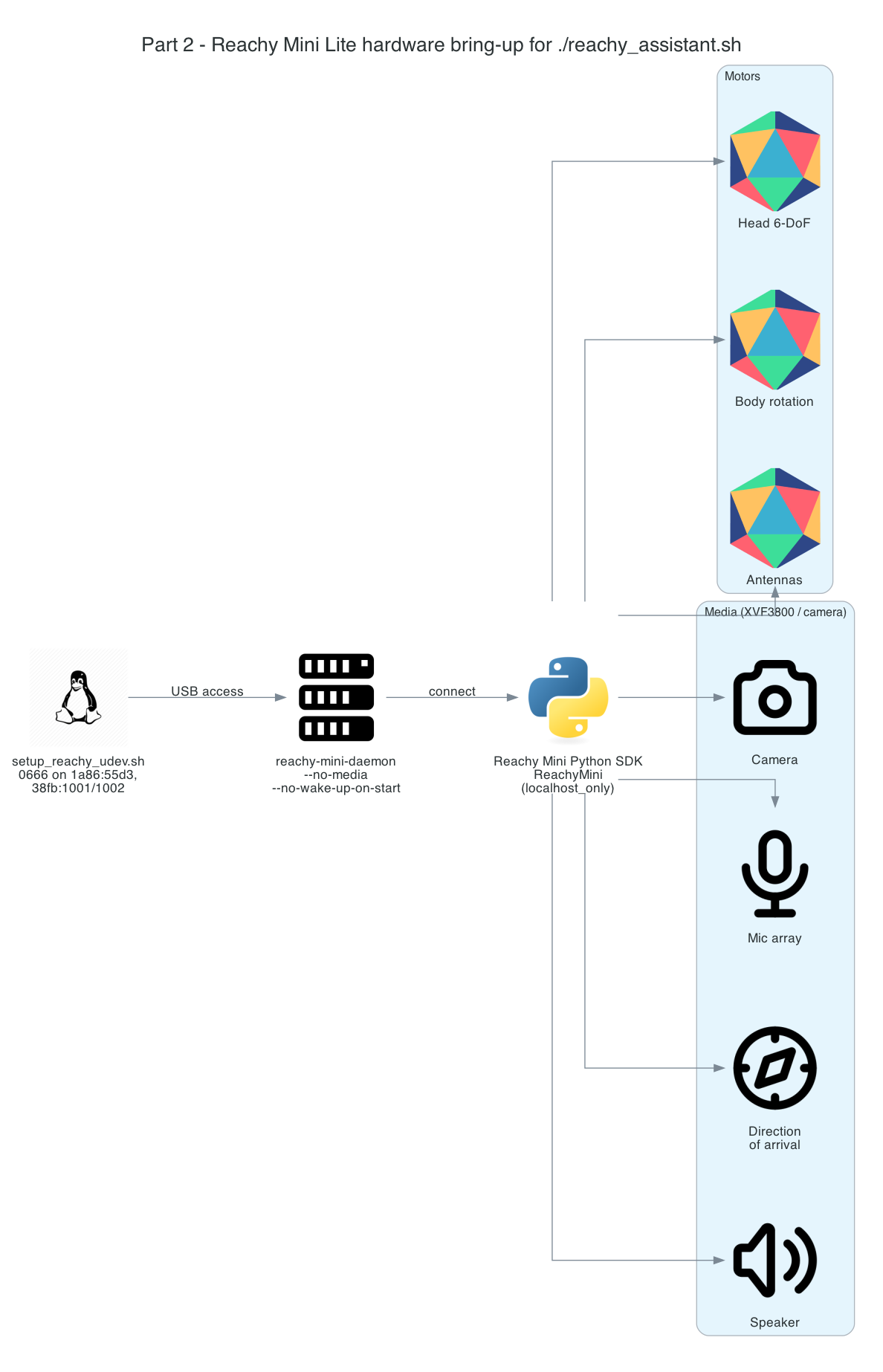
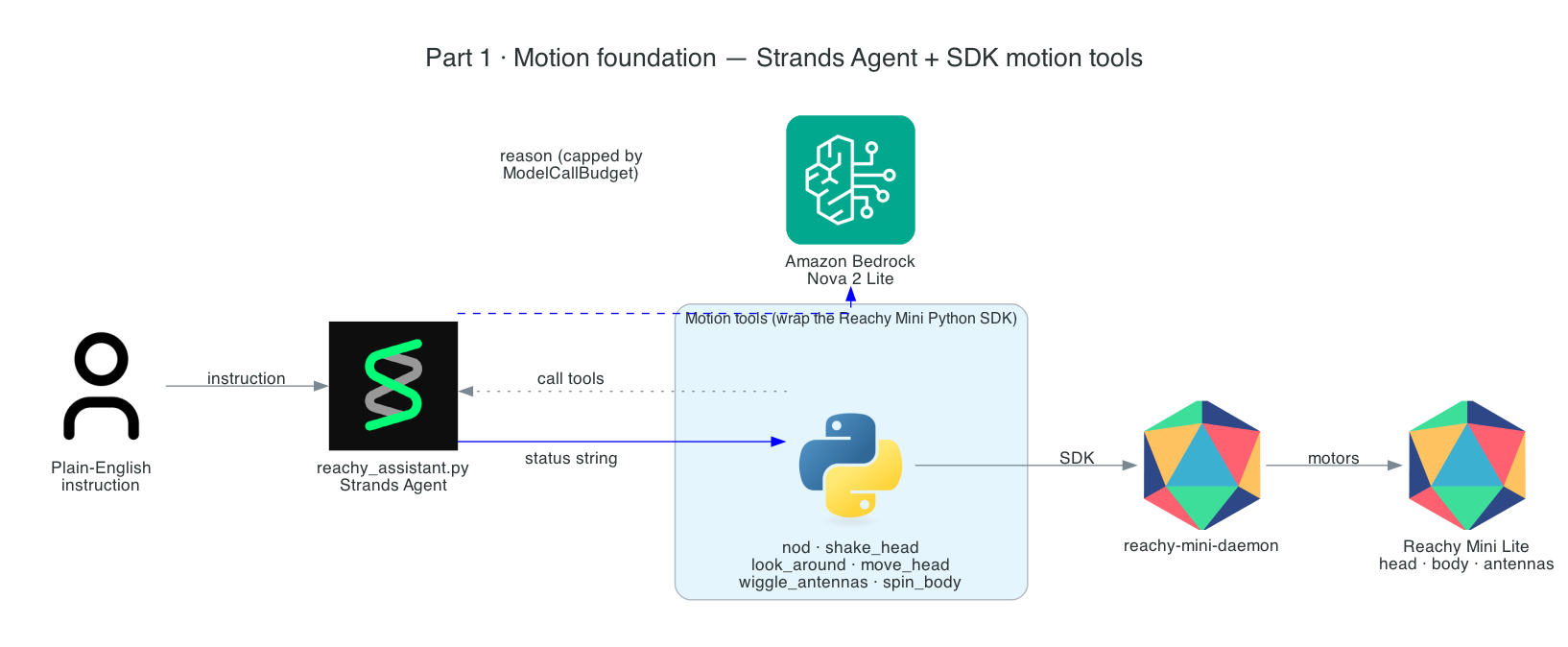
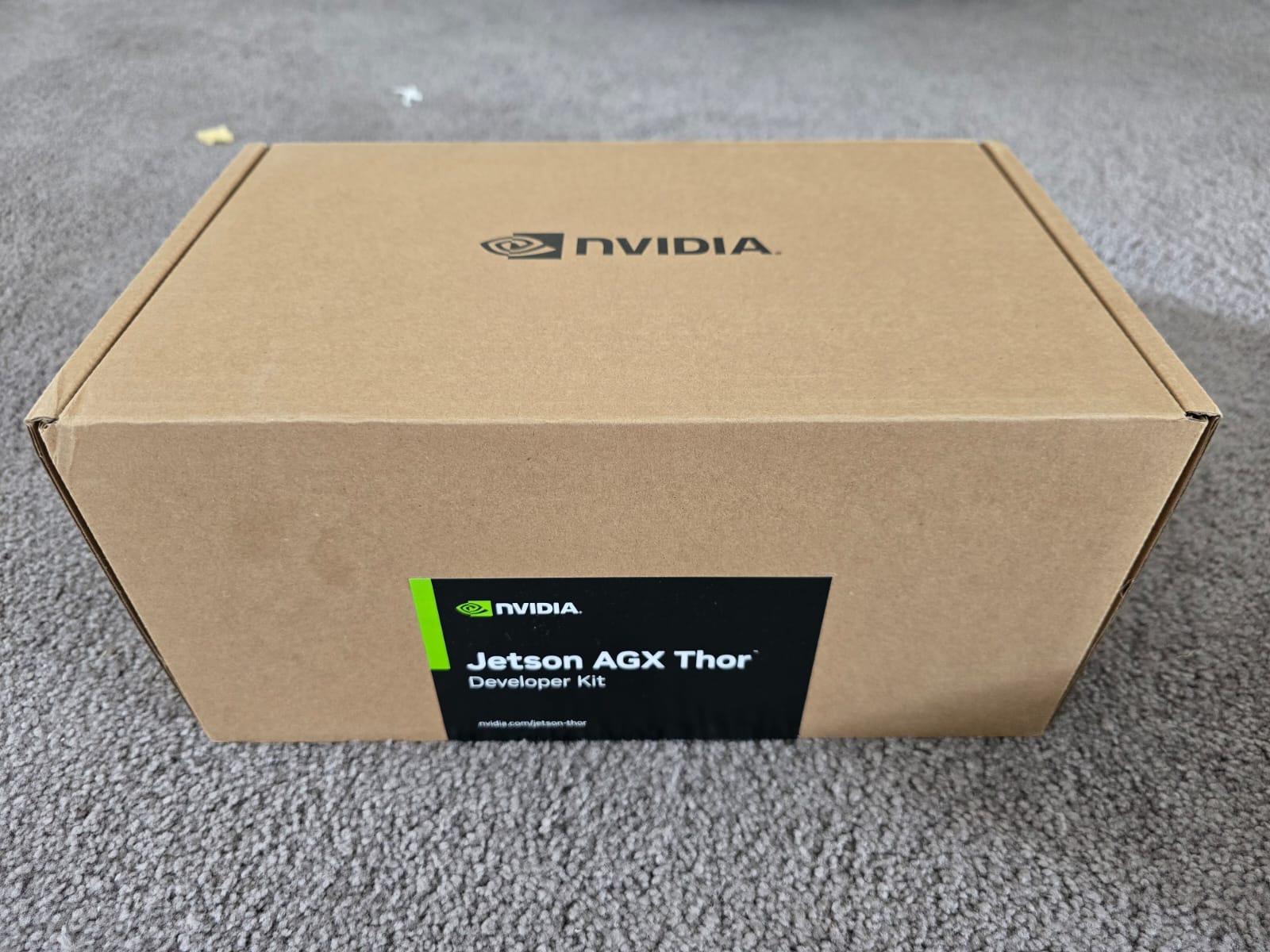
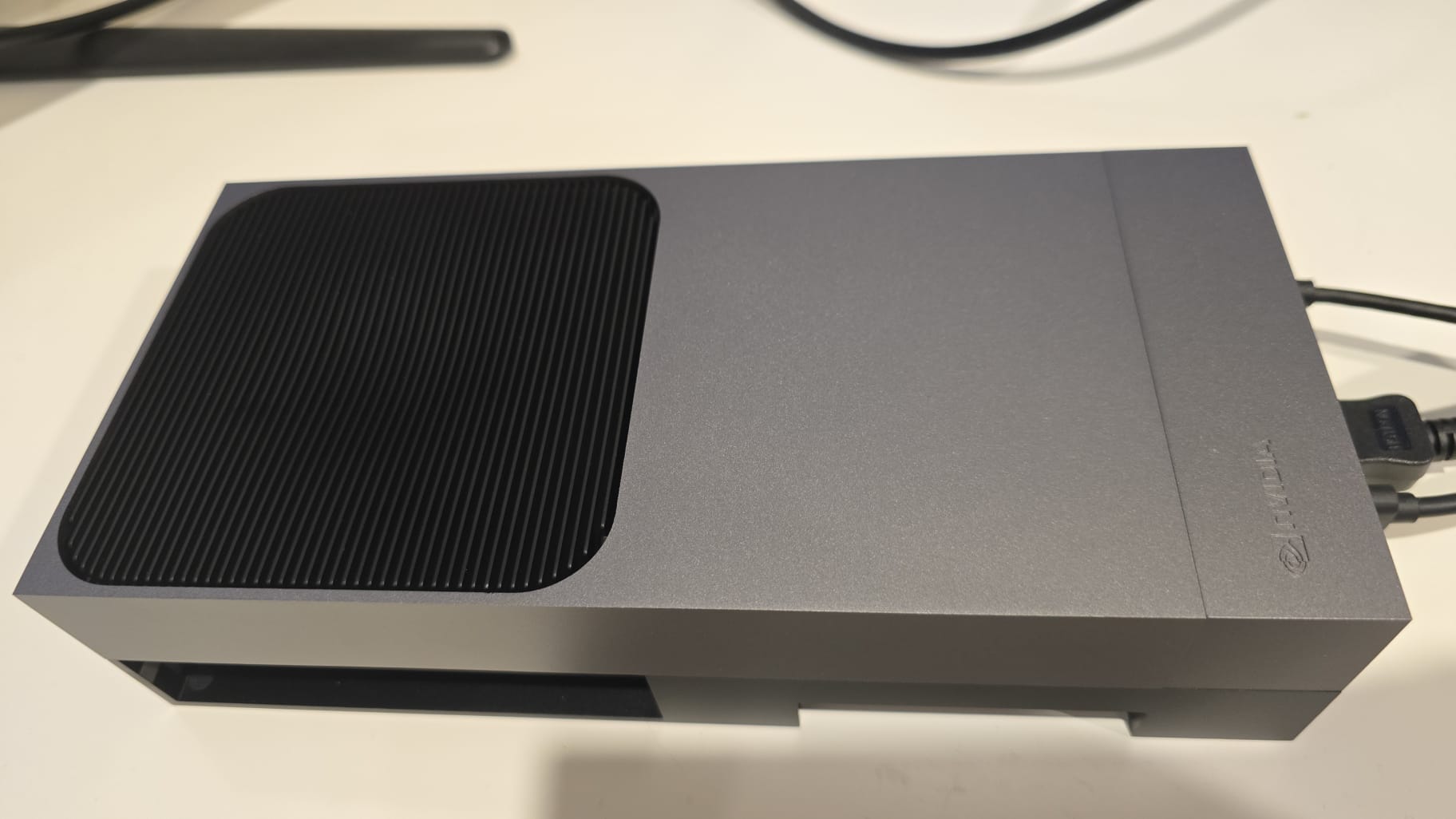
This is Part 15, the final post in the series. Throughout the build, every wake has created a brand-new agent and destroyed it — which keeps idle at $0 but means the robot forgets everything the instant it replies. This post fixes that without giving up the cost-minimal lifecycle: the robot gains conversational memory across wakes, so you can ask a follow-up — "…and what was the first thing I said?" — and the fresh per-wake agent recalls it. It also rounds out the agent's body with six composable motion tools it can chain into novel gestures.
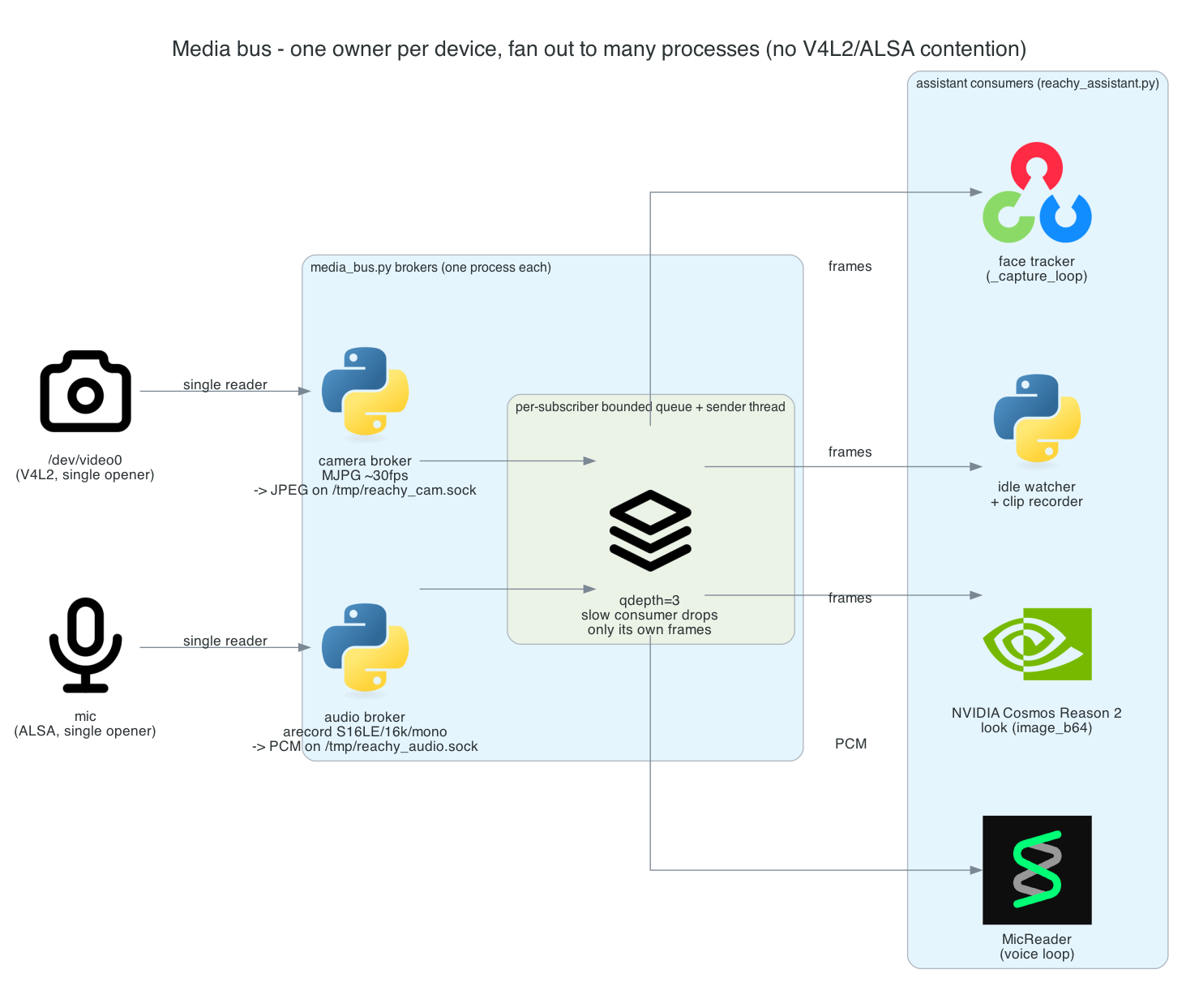
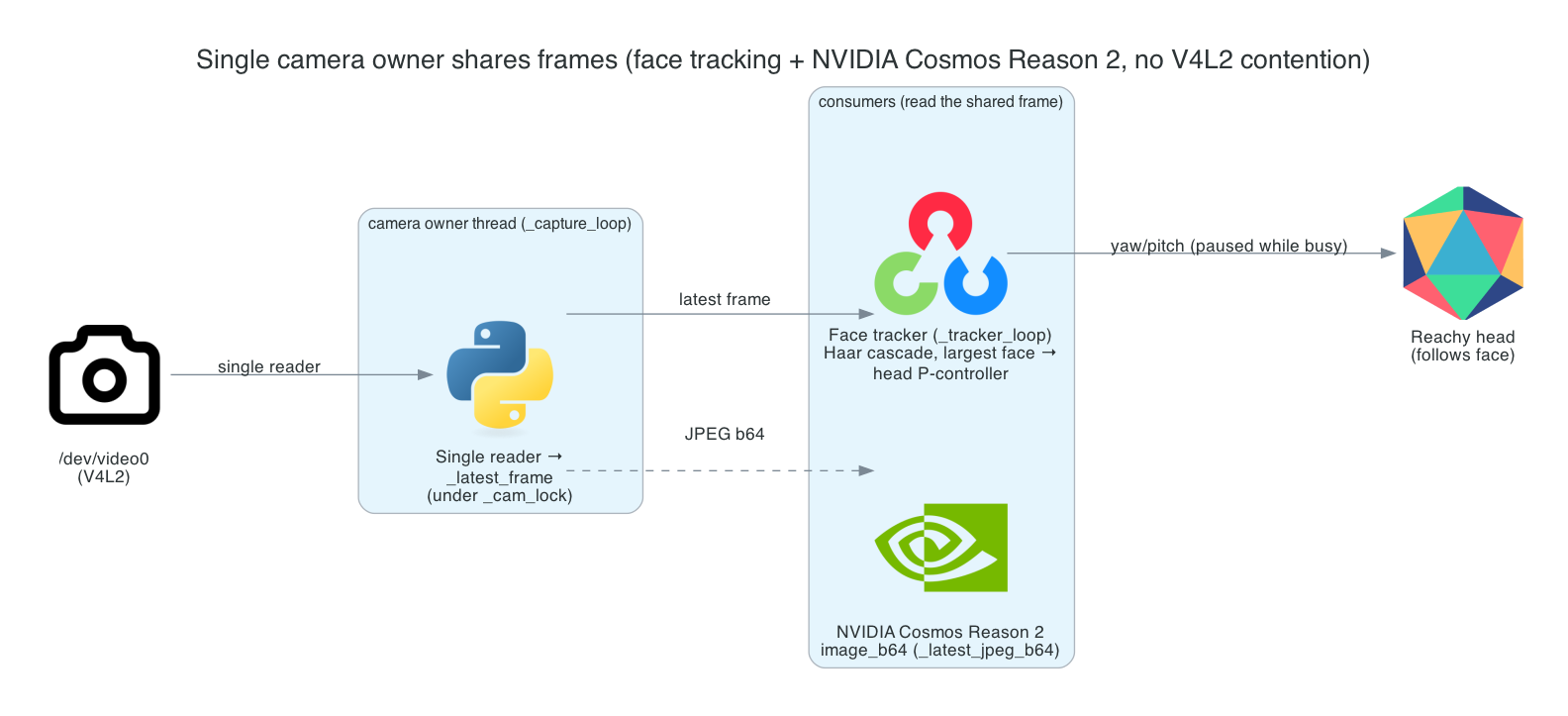
This is Part 14 of the series. Several features now want the camera — face tracking, the idle watcher, Cosmos vision, clip recording — and the voice loop wants the mic. But /dev/video0 and the ALSA mic are single-opener devices: once one process holds either, no one else can. Until now everything that needed a device had to live as a thread inside the one process that opened it.
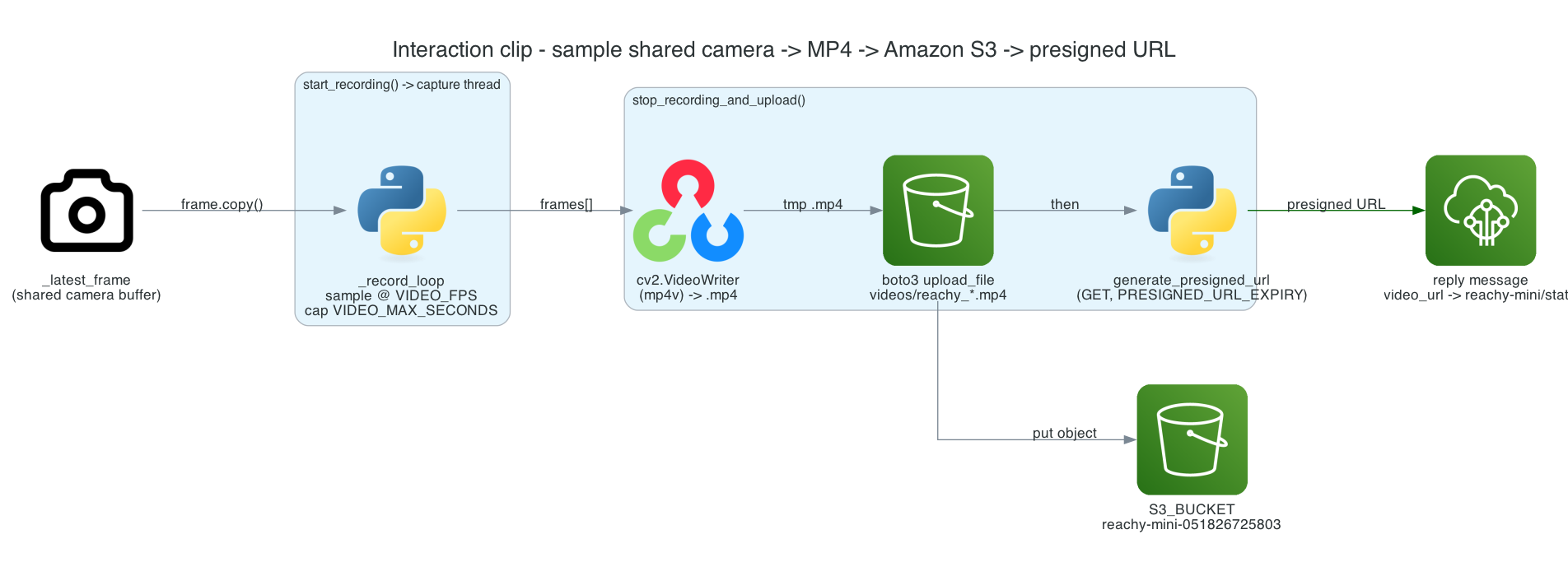
This is Part 13 of the series. The telemetry from Part 12 tells a subscriber what the robot did — but not what it saw. This post adds that: each interaction (and each presence detection) is recorded to a short MP4, uploaded to Amazon S3, and a presigned download URL is attached to the outgoing message, so whoever receives the event can watch the exact clip.
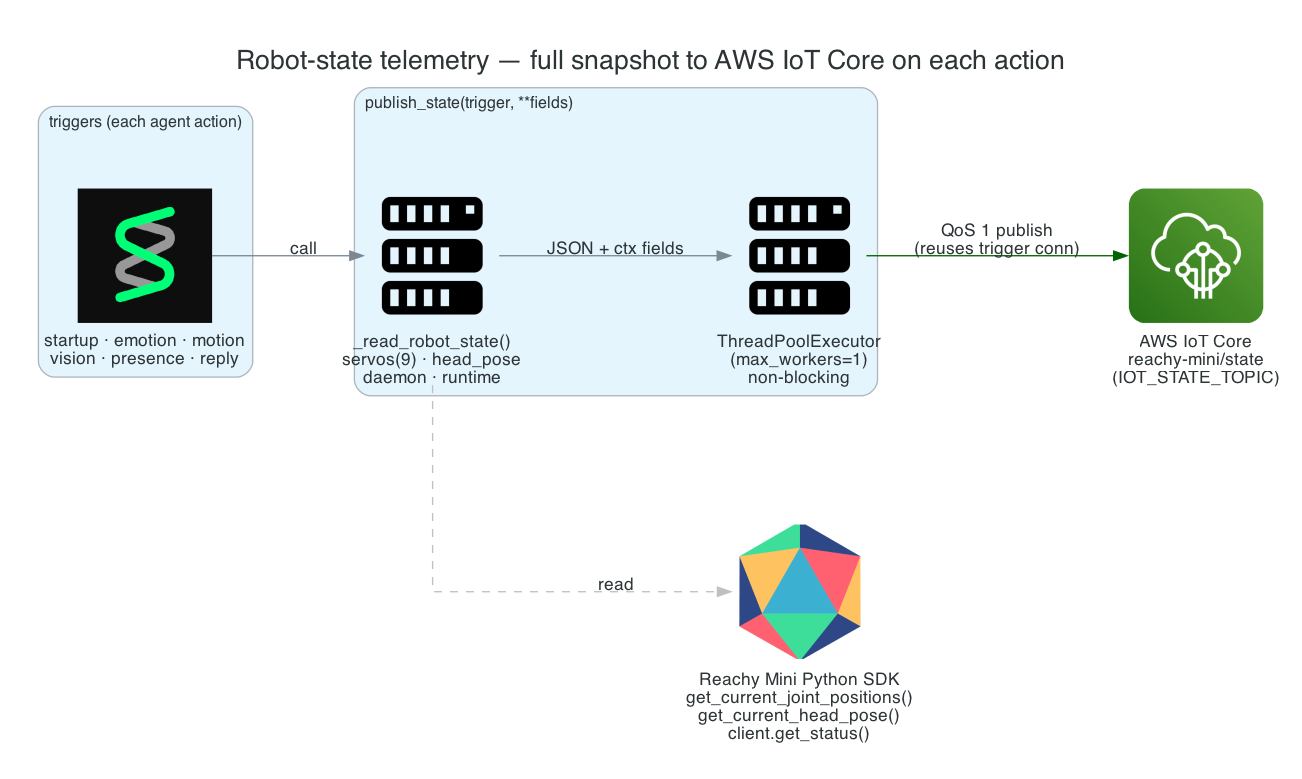
This is Part 12 of the series. The robot now does a lot — moves, looks, emotes, answers, notices presence. I want an external system (a dashboard, a data lake, another robot) to be able to follow exactly what Reachy is doing in near-real-time. So every agent action uploads a full snapshot of the robot's state — servos, head pose, daemon status, runtime flags — to AWS IoT Core.
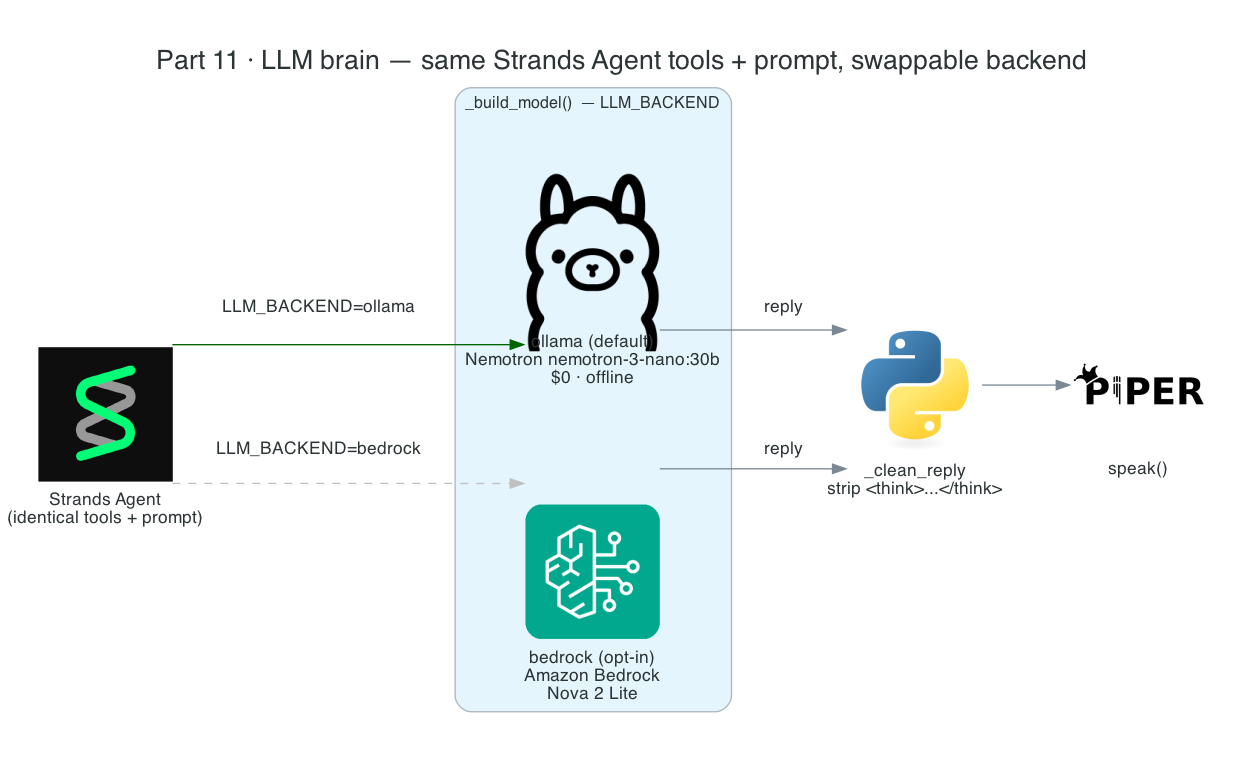
This is Part 11 of the series. The robot's vision has been local since Part 4, but its brain — the reasoning model the Strands Agent runs on — has been Amazon Bedrock. This post moves the brain on-device too: local Nemotron served by Ollama becomes the default, and Amazon Bedrock is demoted to a single opt-in env var.
This is Part 10 of the series. The robot can already look on demand with Cosmos vision and notice who's around while idle. Now I want it to feel present: its head should follow your face in real time — and it has to do that while Cosmos vision and the idle watcher are also using the camera.
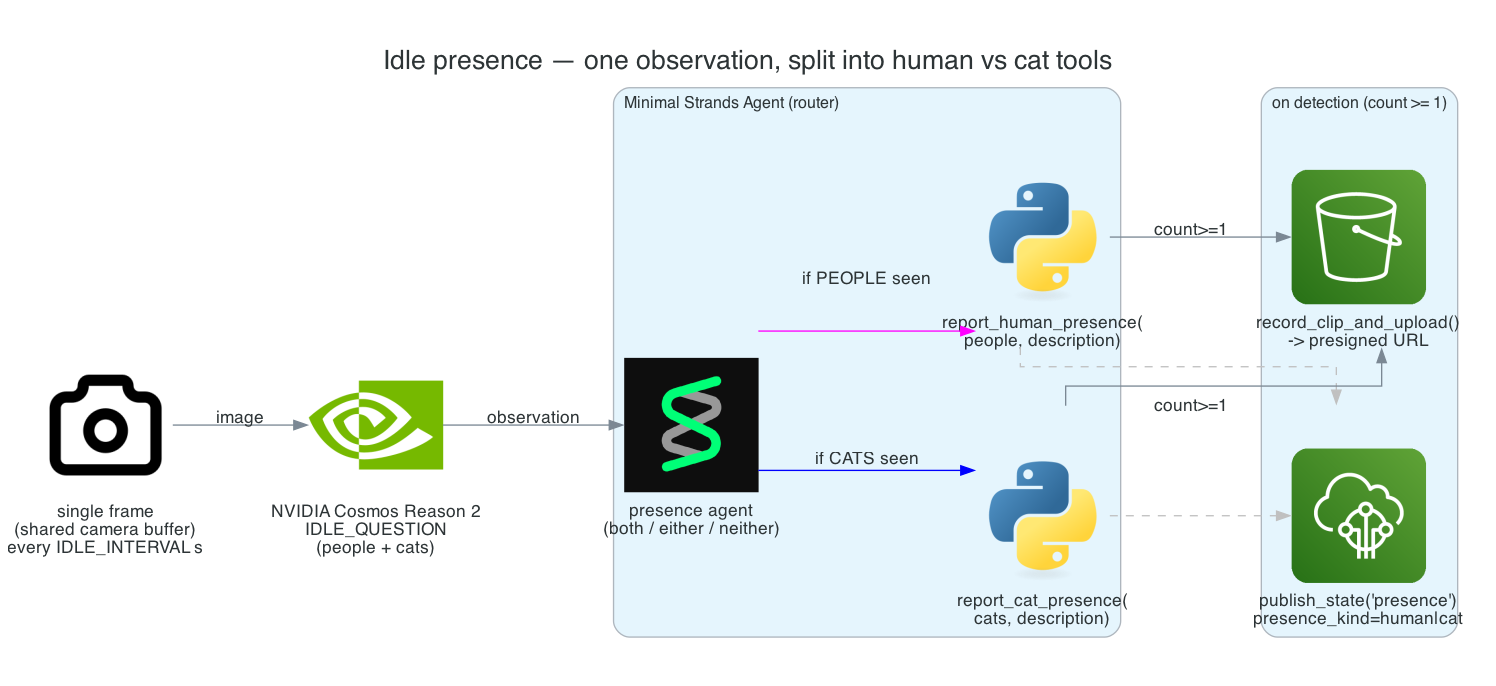
This is Part 9 of the series. So far the robot only acts when triggered — a wake word or an MQTT message. Now I want it to show a little life between interactions: while resting, it should quietly notice who's in the room and have a place to hang future reactions — greet a person, perk up at a cat.
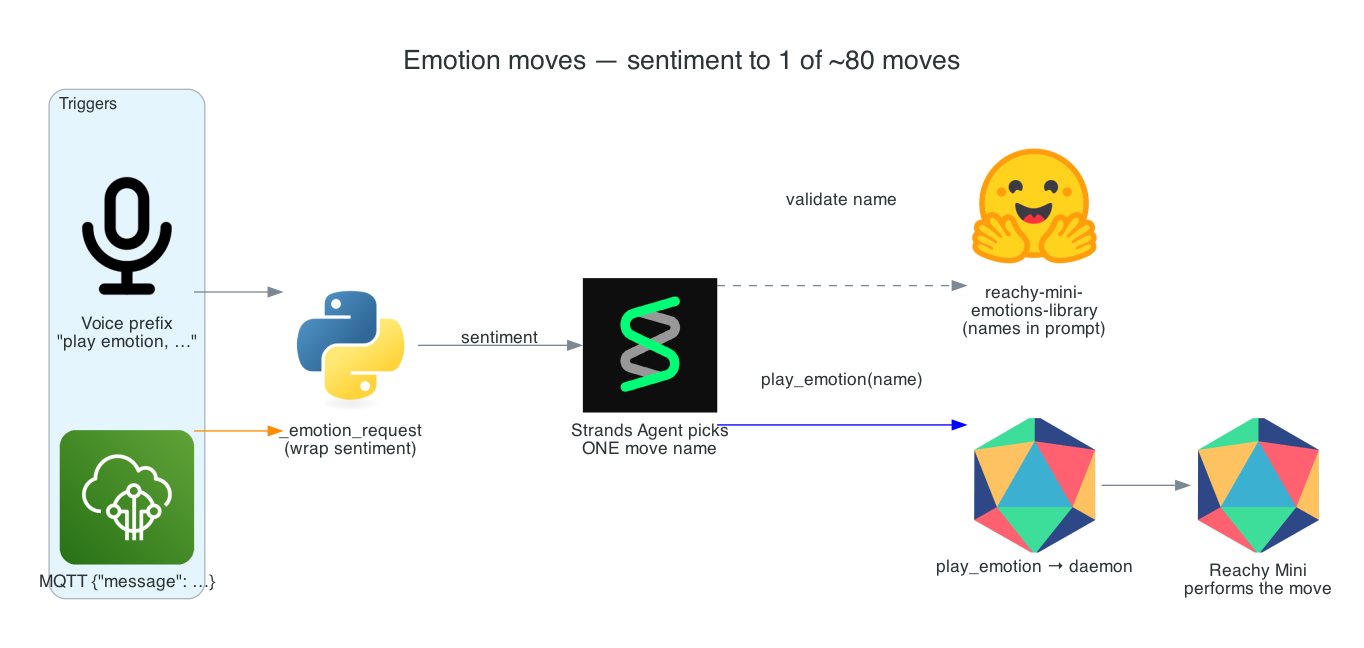
This is Part 8 of the series. The robot can move with primitive gestures, but those are deliberate, literal motions. For expression — reacting to good news, bad news, a greeting, a joke — I want something richer: a library of ~80 pre-choreographed emotion moves that the agent picks from to match the mood.
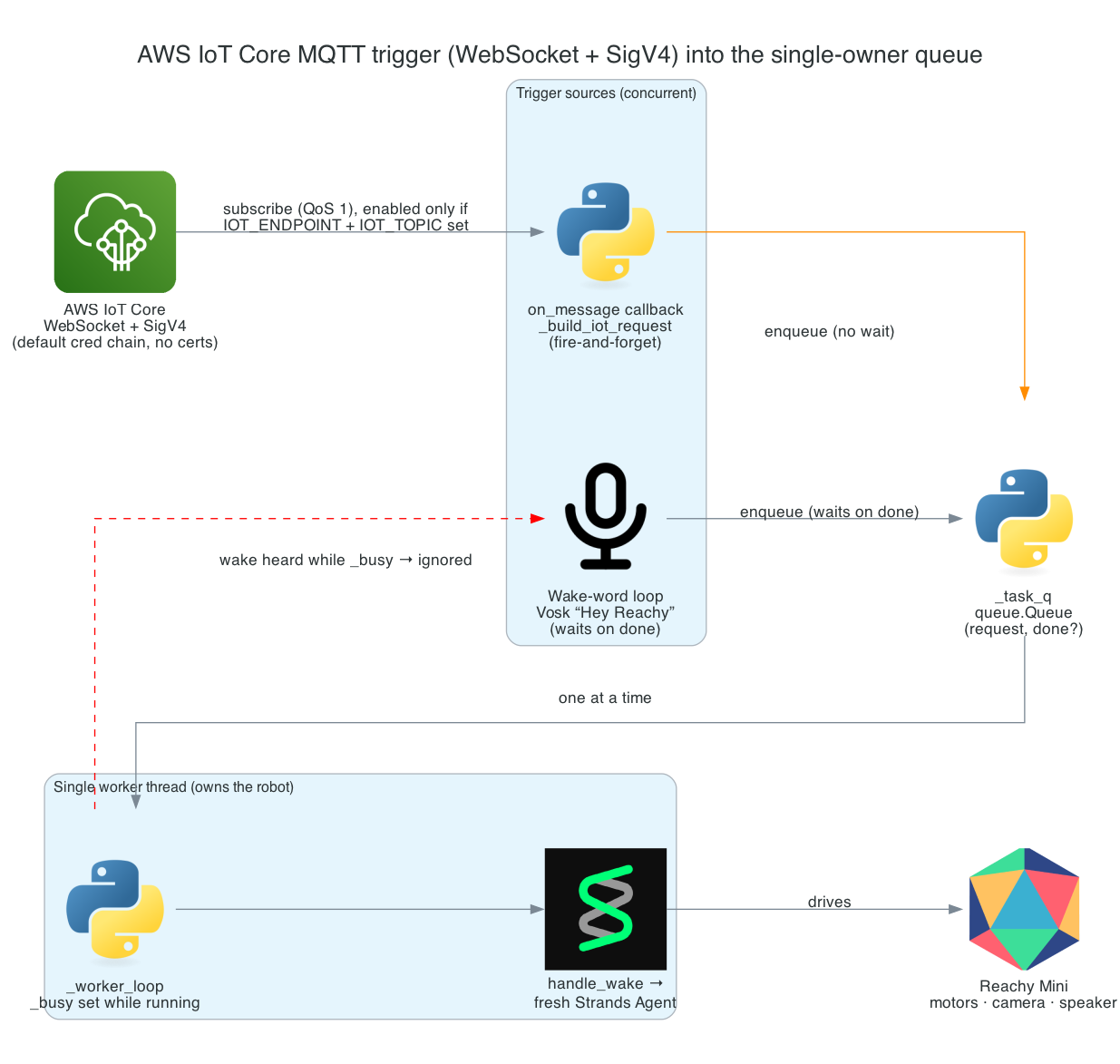
This is Part 7 of the series. The robot already wakes to "Hey Reachy" and runs the full per-wake loop. Now I want a second way to trigger it — a message published to AWS IoT Core — so another system (a home-automation rule, a sensor, a script) can ask Reachy to look, move, or react without anyone speaking.
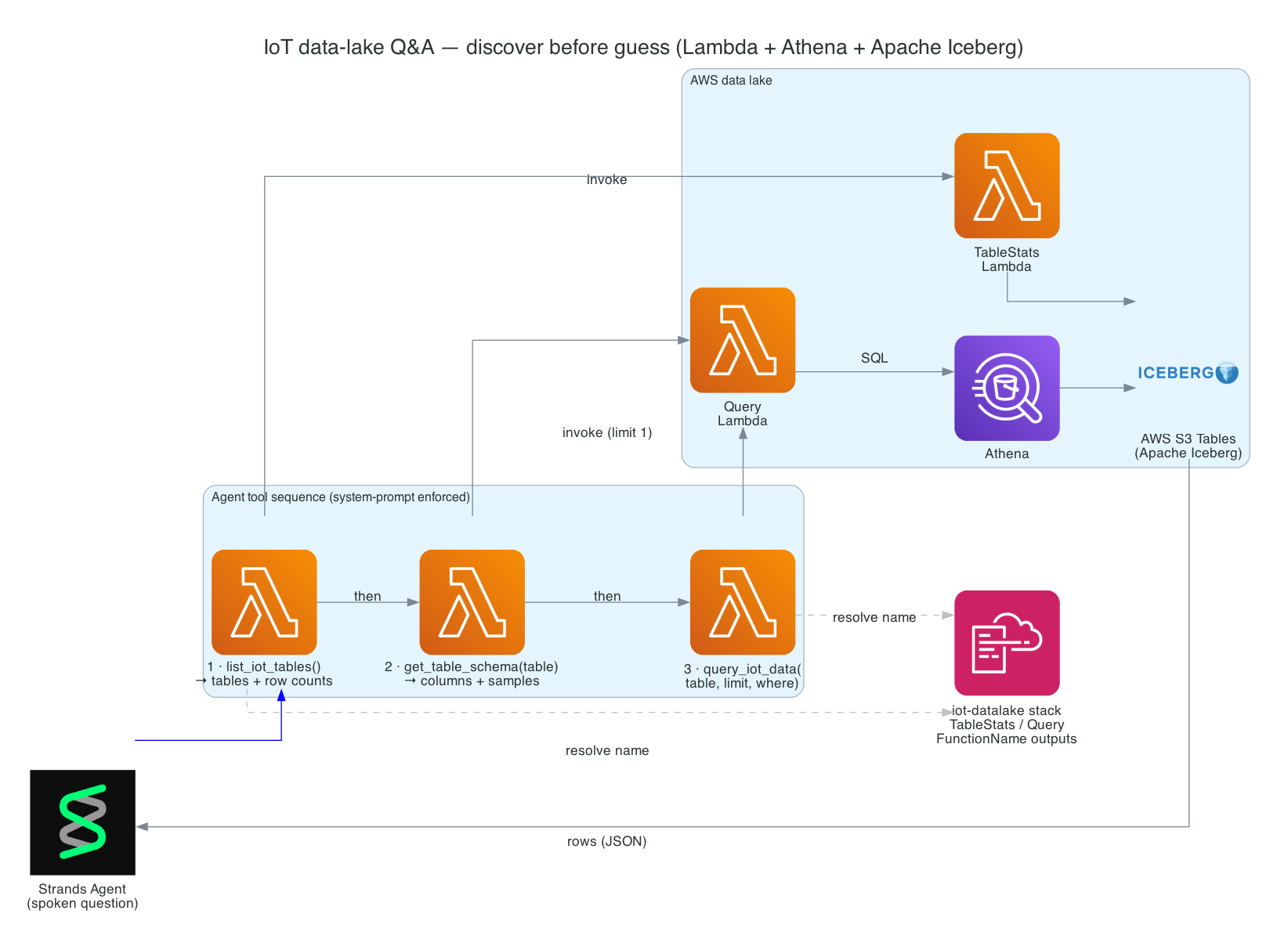
This is Part 6 of the series. So far the robot can move, see, and run the full per-wake loop. Now I want it to answer questions about real data — "Hey Reachy, has the kitchen water sensor tripped today?" — by querying an AWS data lake of IoT sensor readings, and speaking the answer back in one sentence.
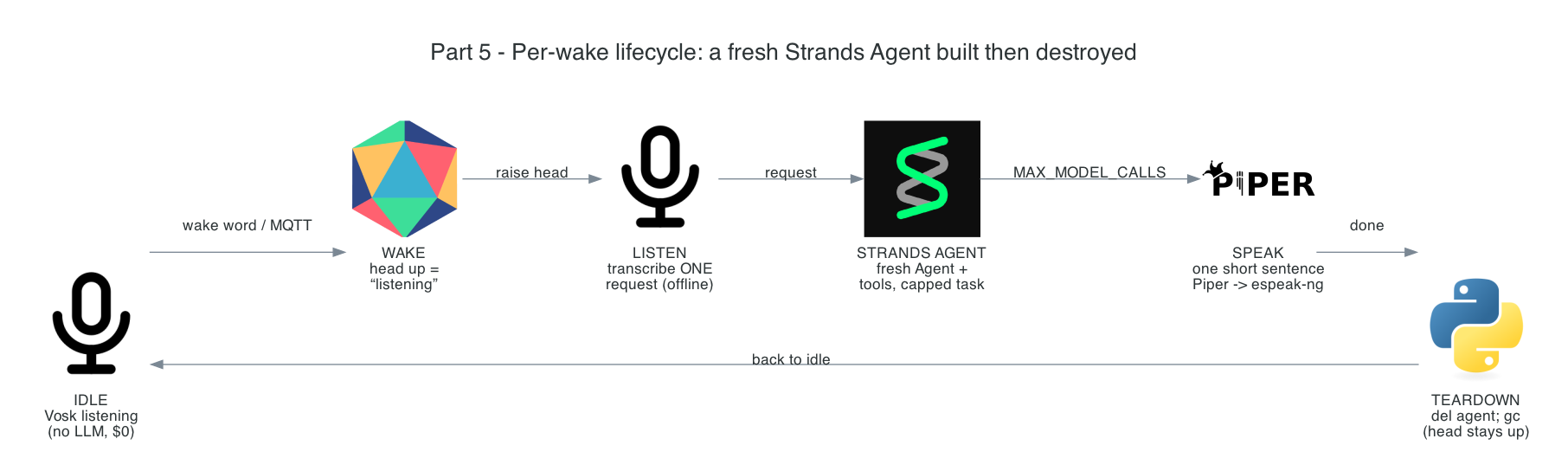
This is Part 5 of the series — and the centerpiece. Part 3 gave the robot ears and Part 4 gave it eyes. This post is the loop that ties them — and everything still to come — together: "Hey Reachy" → transcribe → a fresh per-wake Strands Agent that picks a tool → speak one short sentence → tear down.
This is Part 4 of the series. In Part 3 the robot learned to listen. Now I want to give it eyes: the ability to look through its camera and answer a question about the room — identify an object, read visible text, count things, or describe what a person is doing — entirely on-device.
This is Part 3 of the series. In Part 2 I proved the hardware works — the head moves, the mic hears, the camera sees. Now the robot can start listening. This post covers the lowest layer of the voice stack: the "Hey Reachy" wake word, running fully offline with no LLM and no network.
This is Part 2 of the series building a local-first voice & vision robot on an NVIDIA Jetson Thor. In Part 1 I covered the motion foundation — a Strands Agent given motion tools that drive the robot. But all of that assumes one thing: that the host can actually reach the robot, and that the hardware underneath works. This post is about earning that assumption.
This is Part 1 of a series that builds a Reachy Mini Lite desk robot driven by a Strands agent running entirely on-device on an NVIDIA Jetson Thor. Say "Hey Reachy" (or publish an MQTT message) and a fresh agent wakes up, decides which tool it needs — move its head and body, see the room with a local vision model, express an emotion, or answer questions about IoT sensor data in an AWS data lake — speaks one short sentence, and tears itself down. Idle is pure-local and $0: no cloud, no LLM tokens, just an offline wake-word listener.
These are the slides from my talk at the AWS User Group Wellington meet-up on 26 May 2026, walking through how I built a real-time pipeline that listens to spoken commands in the browser and drives a Sphero RVR — exact distances, exact angles — with live telemetry streaming back into the UI.
Tip: click into the slides and use the arrow keys to navigate, or hit the fullscreen button for the best experience.
arduino-aws-iot — ESP32-S3 firmware. The talk focuses on the sphero_rvr device group, including the new maneuver executor (forward, reverse, turn, cancel) layered on top of the existing drive D-pad.
cdk-iot-sphero-rvr-streaming — AWS CDK stack that filters the RVR telemetry MQTT topic, flattens the nested payload in Lambda, and forwards it as a GraphQL mutation to an Amplify-managed AppSync API.
amplify-react-nova-sonic-voice-chat-sphero-rvr — React + AWS Amplify Gen 2 frontend. The same Cognito identity is used for Bedrock streaming, IoT publish, and the AppSync subscription that surfaces live telemetry.
Big thanks to the AWS User Group Wellington organisers and everyone who came along — happy to chat about any of the code, the maneuver framework, or where the project goes next.
These are the slides from my talk at the AWS User Group Wellington meet-up on 29 April 2026, walking through how I built a real-time pipeline that listens to speech in the browser and drives a robotic hand to fingerspell the words in American Sign Language (ASL).
Tip: click into the slides and use the arrow keys to navigate, or hit the fullscreen button for the best experience.
This is Part 3 of a 3-part series covering a real-time voice-to-sign-language translation system. In Part 1, I covered the React frontend that captures speech, processes it with Amazon Nova 2 Sonic, and publishes cleaned sentence text via MQTT. In Part 2, I covered the AWS CDK stack that routes IoT Core messages through Lambda to AppSync for real-time GraphQL subscriptions.
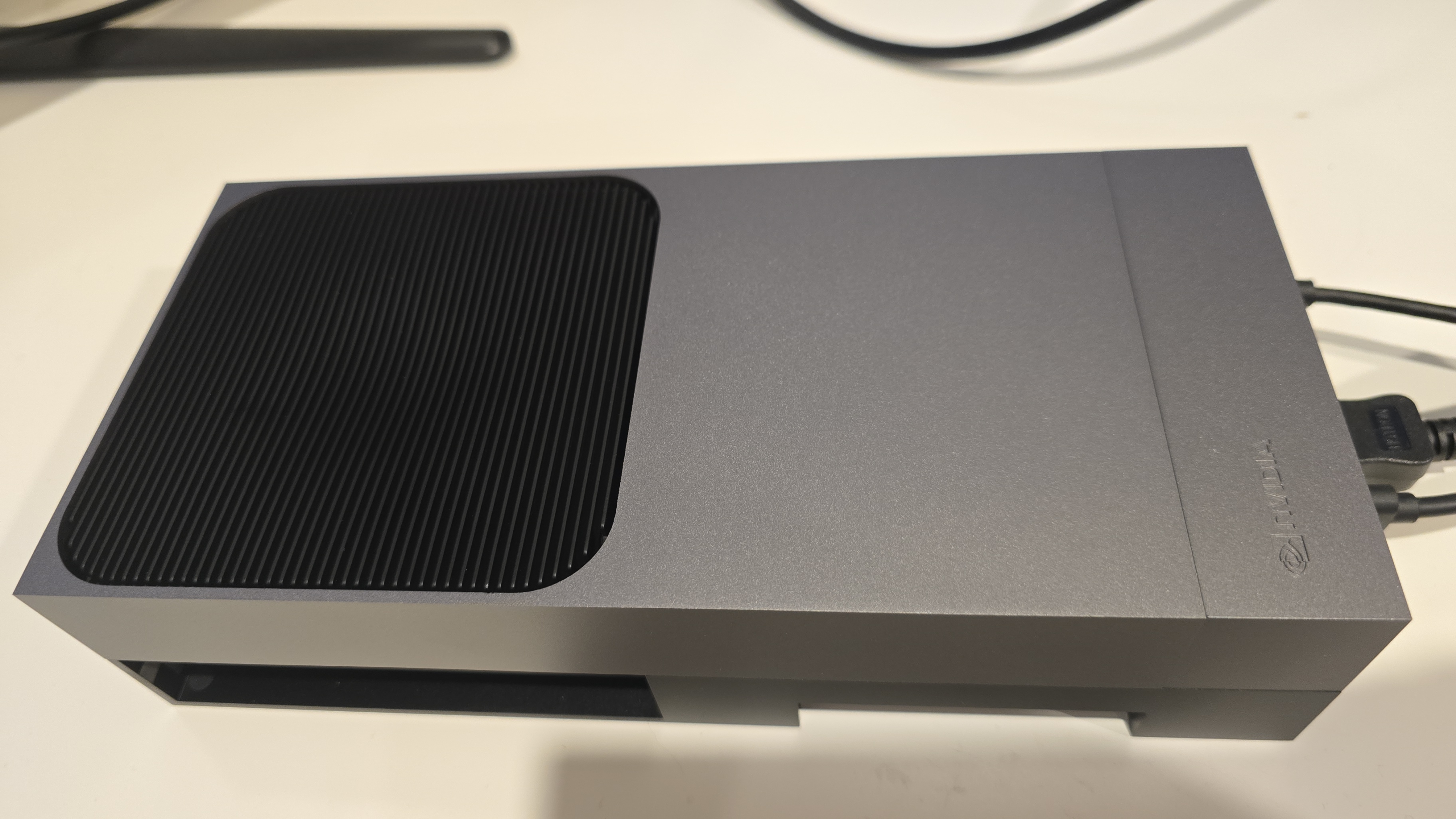
This post covers the final piece — the edge AI agent that actually makes the physical hand move. It is a Strands Agent running on an NVIDIA Jetson that subscribes to MQTT commands from the frontend, uses Amazon Nova 2 Lite to invoke the fingerspell tool, drives the Pollen Robotics Amazing Hand's Feetech SCS0009 servos for ASL fingerspelling letter by letter, records video of the hand in action, uploads it to S3, and publishes hand state back to IoT Core — which Part 2's infrastructure routes through to the frontend via AppSync.
This post (Part 3) - Edge AI Agent (strands-agents-amazing-hands) — Strands Agent powered by Amazon Nova 2 Lite on NVIDIA Jetson that translates sentence text to ASL servo commands, drives the Amazing Hand, and publishes state back
Goals
Receive MQTT commands from the React frontend (plain text or JSON with sentence field) and drive the Amazing Hand servos for ASL fingerspelling
Use the Strands Agents framework with Amazon Nova 2 Lite (us.amazon.nova-2-lite-v1:0) to invoke the fingerspell tool — the LLM passes the incoming text verbatim to the tool for letter-by-letter ASL spelling
Fingerspell text using the 26-letter ASL alphabet (A-Z), with each letter held for 0.8 seconds and spaces adding a 0.4-second pause
Control 8 Feetech SCS0009 servos (4 fingers x 2 joints) on the Pollen Robotics Amazing Hand via serial bus at 1M baud using the rustypot library
Record video of the hand via OpenCV during each fingerspelling sequence, encode to H.264 MP4 via imageio-ffmpeg, upload to S3, and include a presigned URL in the state message
Publish real-time hand state (servo angles, letter, video URL) to IoT Core over MQTT — which Part 2's CDK stack routes to AppSync for the frontend to consume
Authenticate to AWS IoT Core using mTLS with X.509 device certificates
Create a fresh agent instance per MQTT message to prevent conversation history accumulation and unbounded token growth
Handle graceful shutdown with servo torque disable on SIGINT/SIGTERM
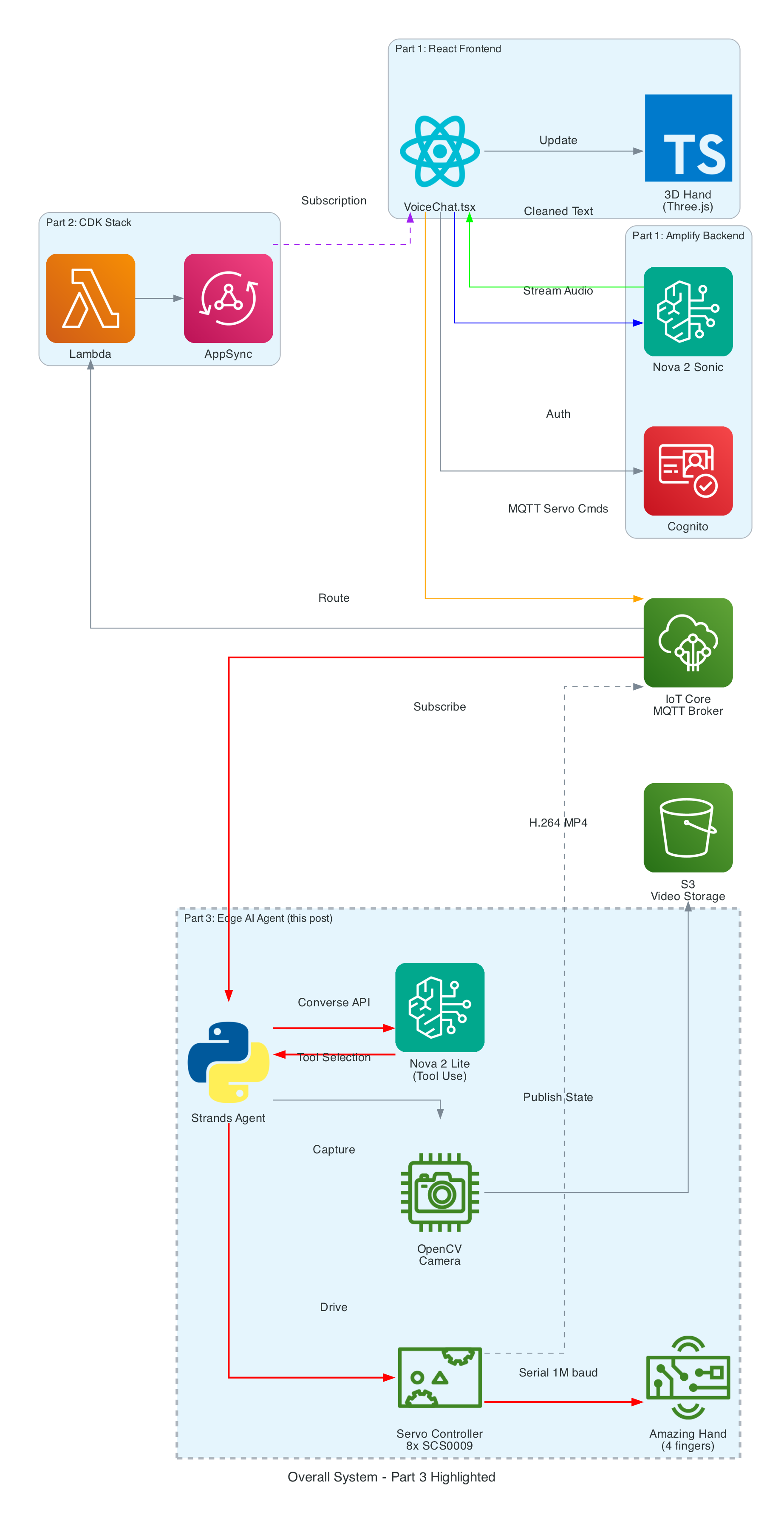
The Overall System
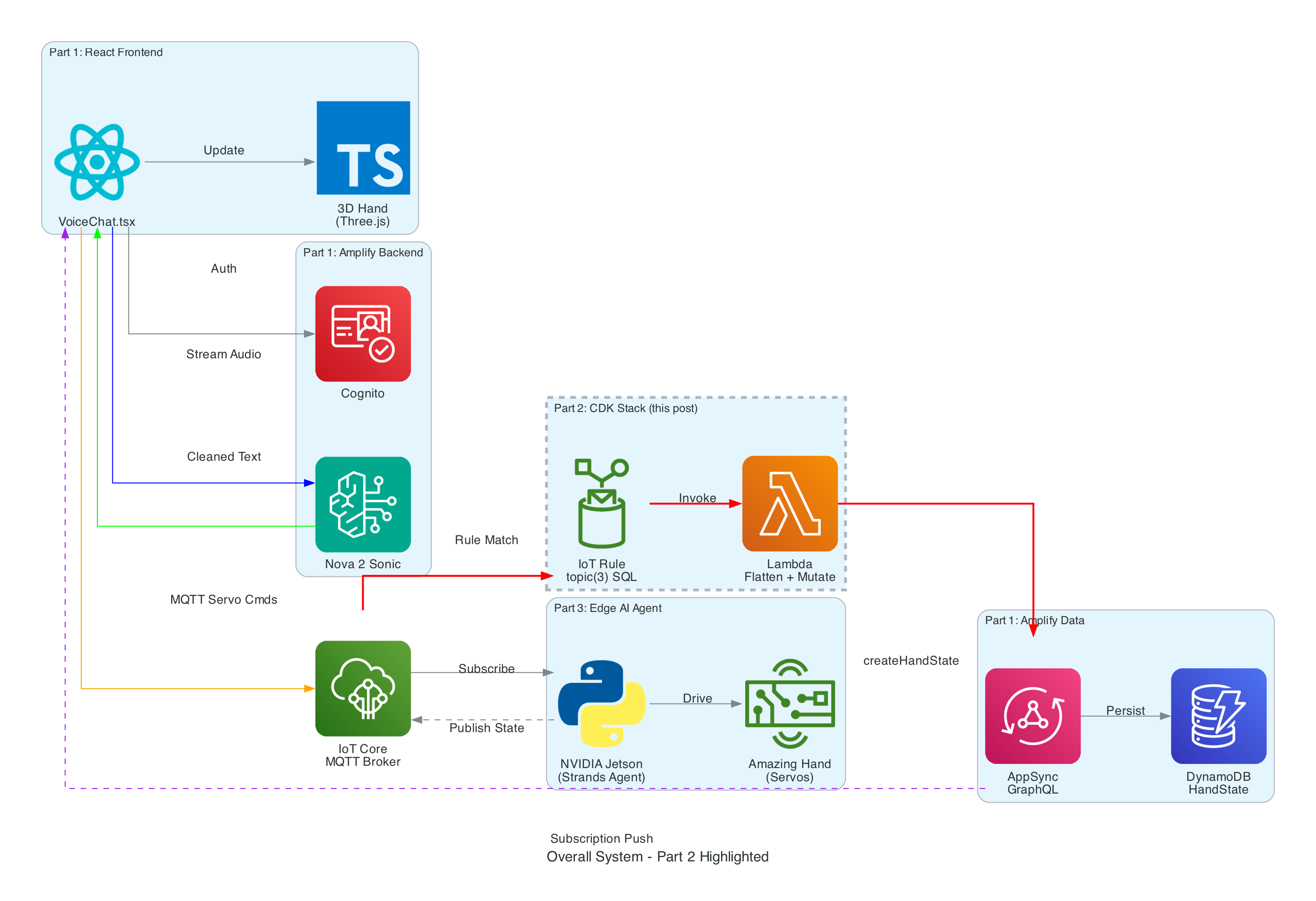
This diagram shows the complete end-to-end system. Part 3 is the edge device highlighted on the right — the NVIDIA Jetson running the Strands Agent that controls the Amazing Hand.
How Part 3 fits in:
Part 1 (Frontend) publishes cleaned sentence text to the-project/robotic-hand/{deviceName}/action via MQTT
Part 3 (This agent) subscribes to the /action topic, processes the command through the Strands Agent, drives the servos, records video, and publishes state back to /state
Part 2 (Infrastructure) picks up the /state messages and routes them through Lambda to AppSync, where the frontend receives them via GraphQL subscriptions
Architecture
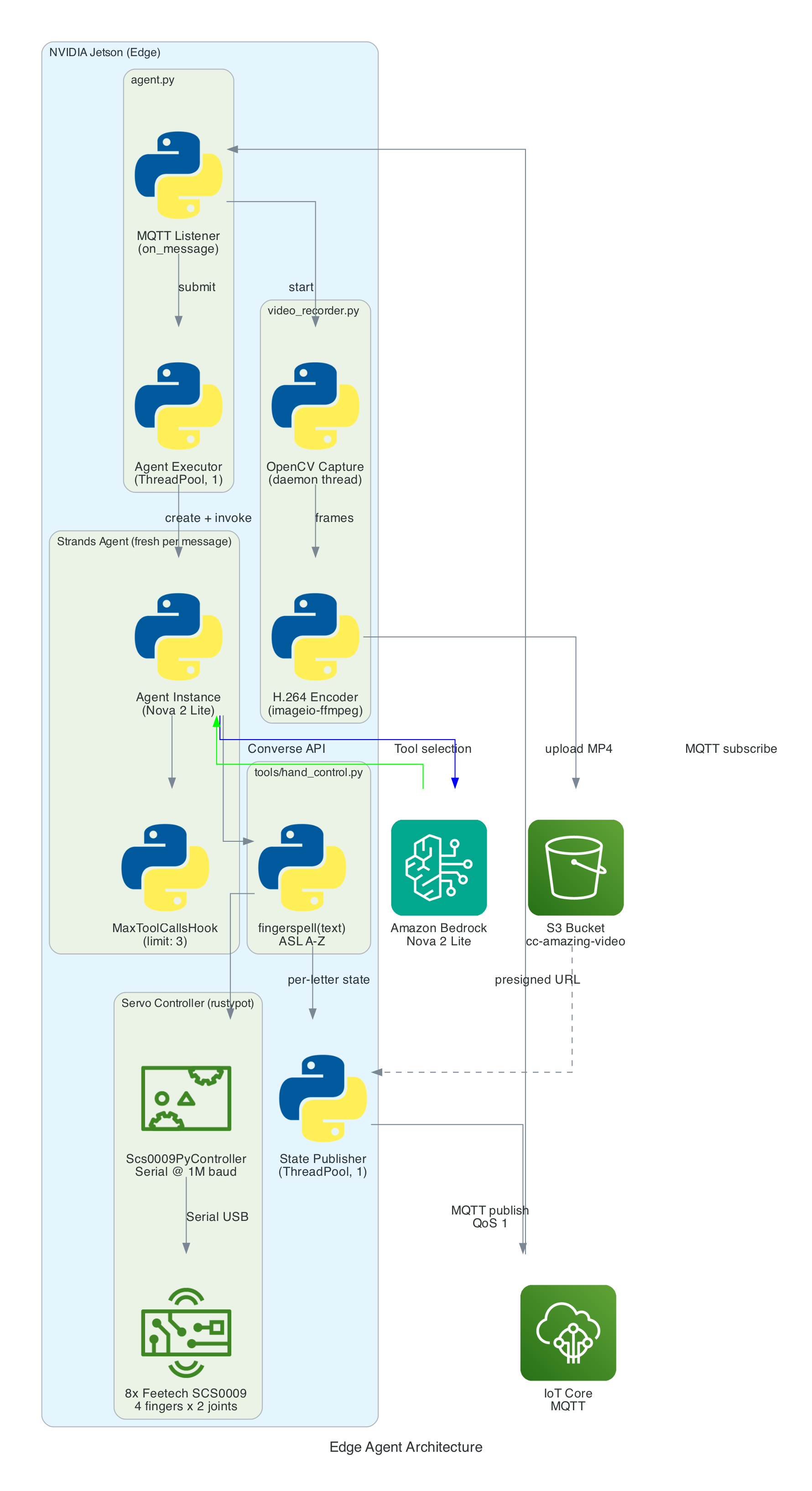
The agent is a Python application built on the Strands Agents framework. It runs as a long-lived MQTT listener on the NVIDIA Jetson, creating a fresh agent instance for each incoming message to keep memory bounded.
MQTT Listener (agent.py) — Subscribes to the action topic, parses incoming messages (plain text or JSON), and submits each action to a single-threaded agent executor to keep the AWS CRT MQTT event loop free
Strands Agent — A fresh Agent instance created per message with Amazon Nova 2 Lite as the model, the fingerspell tool as the available action, and a MaxToolCallsHook (limit 3) to prevent runaway tool-call loops
Fingerspell Tool (hand_control.py) — A @tool decorated function that the LLM invokes to spell text letter-by-letter using the 26-letter ASL alphabet
Servo Controller — Uses rustypot.Scs0009PyController to communicate with 8 Feetech SCS0009 servos over serial at 1M baud. Each finger has two servos controlled by dedicated move functions (Move_Index, Move_Middle, Move_Ring, Move_Thumb)
Video Recorder (video_recorder.py) — Background daemon thread captures frames via OpenCV, encodes to H.264 MP4 via imageio-ffmpeg, uploads to S3, and returns a presigned URL (1-hour expiry)
State Publisher — Non-blocking MQTT publisher on a separate thread that sends hand state (finger angles, letter, video URL) to the /state topic with QoS 1
The agent subscribes to an MQTT action topic (e.g. the-project/robotic-hand/XIAOAmazingHandRight/action) using mTLS authentication with X.509 device certificates. The first connection uses clean_session=True to flush any stale session state, then reconnects with clean_session=False for normal operation.
When a message arrives, the handler tries to parse it as JSON and extract the sentence field. If JSON parsing fails, it treats the entire payload as plain text. The action is then submitted to a single-threaded executor (agent_executor) to keep the AWS CRT MQTT event loop free:
The Strands Agents framework provides the core AI reasoning loop. A fresh agent instance is created for every MQTT message — this is deliberate to prevent conversation history from accumulating across messages, which would cause unbounded token growth over time.
The agent uses Amazon Nova 2 Lite (us.amazon.nova-2-lite-v1:0) via the Bedrock Converse API. Nova 2 Lite was chosen for its low-latency tool-use responses, which is critical for real-time servo control. The agent is configured with a MaxToolCallsHook that cancels tool calls beyond 3 to prevent infinite LLM tool-call loops.
The agent runs in fingerspell-only mode — only the fingerspell tool is available. The system prompt instructs the LLM to pass the entire message verbatim to the fingerspell tool without shortening or modifying it. State messages include a letter field identifying the current ASL letter being signed.
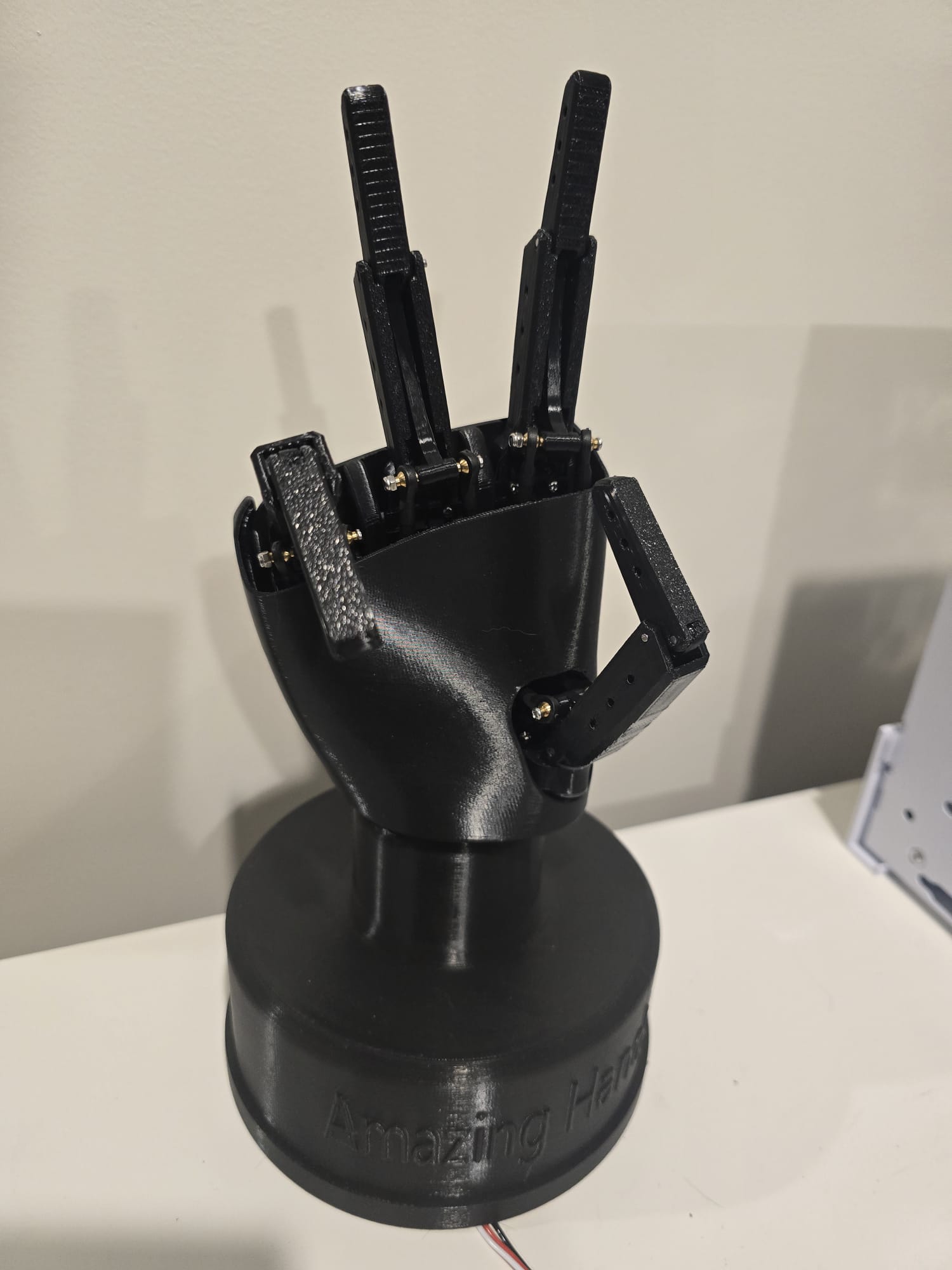
The Amazing Hand — an open-source robotic hand designed by Pollen Robotics and manufactured by Seeed Studio — has 4 fingers (index, middle, ring, thumb — no pinky) with 2 Feetech SCS0009 servos per finger (8 servos total) connected via a Waveshare driver board over serial USB at 1,000,000 baud.
Each servo has an angle range of -90 to +90 degrees. Per-servo calibration offsets (MiddlePos) are applied during move operations to account for physical alignment:
MiddlePos =[-17,8,-16,-4,-12,10,-9,9]
The control sequence for each finger:
Set goal speed for both servos (write_goal_speed) with a 0.2ms sleep between each speed write for serial bus timing
Convert angle to radians with calibration offset: np.deg2rad(MiddlePos[i] + angle)
Set goal position for both servos (write_goal_position)
5ms sleep after positions are set before the next finger's commands
The fingerspell(text) tool is decorated with @tool from the Strands framework, making it callable by the LLM during inference. It spells text letter-by-letter using the ASL alphabet. Each of the 26 letters (A-Z) is mapped to servo angle tuples for all 4 fingers. Each letter is held for 0.8 seconds, spaces add a 0.4-second pause, and non-letter characters are skipped. A state message with the current letter field is published after each letter.
Since the Amazing Hand has no pinky finger, ASL letters that require a pinky use the ring finger instead.
Video is recorded concurrently with each fingerspelling sequence:
Start recording — Before the agent is invoked, start_recording() launches a background daemon thread (video-capture) that captures frames from OpenCV VideoCapture(0) at the camera's native FPS (typically 30)
Stop and encode — After the agent completes, stop_recording_and_upload() stops the capture thread, converts frames from BGR (OpenCV) to RGB, and encodes to H.264 MP4 using imageio.v3 with the libx264 codec. The temp file is named hand_YYYYMMDD_HHMMSS_
Upload to S3 — The MP4 is uploaded to the configured S3 bucket (default: cc-amazing-video) with key videos/hand_YYYYMMDD_HHMMSS.mp4
Presigned URL — A presigned URL is generated with 1-hour expiry and appended to the last state message, which is re-published to the /state topic
After each servo movement, the tool publishes a state message to the MQTT /state topic (e.g. the-project/robotic-hand/XIAOAmazingHandRight/state) with QoS 1. Publishing is non-blocking — it submits to a dedicated _publish_executor thread to avoid blocking the servo tool.
The last published state is cached so that publish_state_with_video_url() can re-publish it with the presigned URL appended after video upload completes — without needing to re-read servo angles.
This state payload is what Part 2's CDK stack picks up via the IoT Rule, flattens in Lambda, and pushes into AppSync for the frontend to consume.
Problem: Strands Agents maintain conversation history by default. Over time, as hundreds of MQTT messages are processed, the token count grows unboundedly, increasing latency and cost.
Solution: A fresh Agent instance is created for every MQTT message. This discards all prior conversation history, keeping each invocation lightweight. Token usage (input, output, total) is logged after each invocation for monitoring.
Problem: The LLM might enter a loop of calling tools repeatedly — for example, calling fingerspell then deciding to call it again with modified text, then again.
Solution: A custom MaxToolCallsHook implementing the Strands HookProvider interface. It counts tool calls per agent invocation and cancels any tool call beyond the limit of 3. This is injected into the agent via hooks=[MaxToolCallsHook()].
Problem: The Pollen Robotics Amazing Hand has only 4 fingers (index, middle, ring, thumb) — no pinky. Several ASL letters require specific pinky positions (e.g. I, J, Y).
Solution: ASL letters that require a pinky use the ring finger instead. The 26-letter ASL alphabet is manually mapped to 4-finger servo angle tuples, approximating the correct hand shape with the available fingers.
Problem: Sending servo commands too quickly over the serial bus causes missed commands or erratic movement. The Feetech SCS0009 protocol requires time between operations.
Solution: A 0.2ms sleep is inserted between speed writes, and a 5ms sleep is added after both goal positions are set, giving the serial bus time to process each command before the next finger's sequence begins.
The agent will connect to IoT Core, subscribe to the action topic, and wait for commands. When a message arrives, it will process it through the Strands Agent, drive the servos, record video, and publish state back.
Summary
This post covered the edge AI agent — the final piece of the voice-to-sign-language translation system:
Strands Agents framework with Amazon Nova 2 Lite for tool-use — a fresh agent per MQTT message prevents history bloat, with MaxToolCallsHook limiting calls to 3
ASL fingerspelling with the 26-letter alphabet (A-Z), each letter held for 0.8 seconds — the fingerspell tool is decorated with @tool for LLM invocation
8 Feetech SCS0009 servos on 4 fingers controlled via rustypot over serial at 1M baud, with per-servo calibration offsets
Video pipeline captures via OpenCV in a background daemon thread, encodes to H.264 MP4 via imageio-ffmpeg, uploads to S3, and includes a 1-hour presigned URL in the final state message
Non-blocking threading with 2 thread pools (agent executor off MQTT event loop, state publisher) and a daemon thread for video capture
Real-time state publishing to IoT Core after every servo movement — which Part 2's CDK stack routes through Lambda to AppSync, completing the feedback loop to the React frontend in Part 1
Graceful shutdown disables servo torque on SIGINT/SIGTERM to release the servos and prevent power draw
This is Part 2 of a 3-part series covering a real-time voice-to-sign-language translation system. In Part 1, I covered the React frontend that captures speech, processes it with Amazon Nova 2 Sonic, and publishes cleaned sentence text via MQTT. But there is a missing piece — how does the frontend know what the physical hand is actually doing?
The answer is this repository: a small but critical AWS CDK stack that acts as the bridge between the edge device and the React frontend. It routes real-time hand state data from IoT Core to AppSync, enabling the frontend to receive live updates via GraphQL subscriptions — so the 3D hand animation stays synchronised with the physical Amazing Hand — an open-source robotic hand designed by Pollen Robotics and manufactured by Seeed Studio.
This post (Part 2) - Cloud Infrastructure (cdk-iot-amazing-hand-streaming) — AWS CDK stack that routes IoT Core messages through Lambda to AppSync for real-time GraphQL subscriptions
Part 3 - Edge AI Agent (strands-agents-amazing-hands) — Strands Agent powered by Amazon Nova 2 Lite on NVIDIA Jetson that translates sentence text to ASL servo commands, drives the Amazing Hand, and publishes state back
Goals
Route real-time hand state data from IoT Core MQTT to AppSync using an IoT Rules Engine SQL query and Lambda
Flatten nested MQTT finger angle payloads into a flat GraphQL schema for the createHandState mutation
Enable the React frontend to receive live hand state updates via AppSync onCreateHandState GraphQL subscriptions
Extract the device name dynamically from the MQTT topic path using topic(3) in the IoT Rule SQL
Define all infrastructure as code using AWS CDK in TypeScript
Integrate with the existing Amplify Gen 2 managed AppSync API and DynamoDB table from Part 1
The Overall System
This diagram shows the complete end-to-end system. Part 2 is the infrastructure highlighted in the middle — the IoT Rule, Lambda, and AppSync connection that enables real-time state feedback from the edge device back to the frontend.
How Part 2 fits in:
Part 1 (Frontend) publishes cleaned sentence text to the-project/robotic-hand/{deviceName}/action and subscribes to AppSync onCreateHandState for live updates
Part 3 (Edge Device) receives sentence text, translates it to ASL servo commands via the Strands Agent powered by Amazon Nova 2 Lite, drives the Amazing Hand, and publishes state back to the-project/robotic-hand/{deviceName}/state
Part 2 (This stack) listens on the /state topic, transforms the payload, and pushes it into AppSync — completing the real-time feedback loop
Architecture
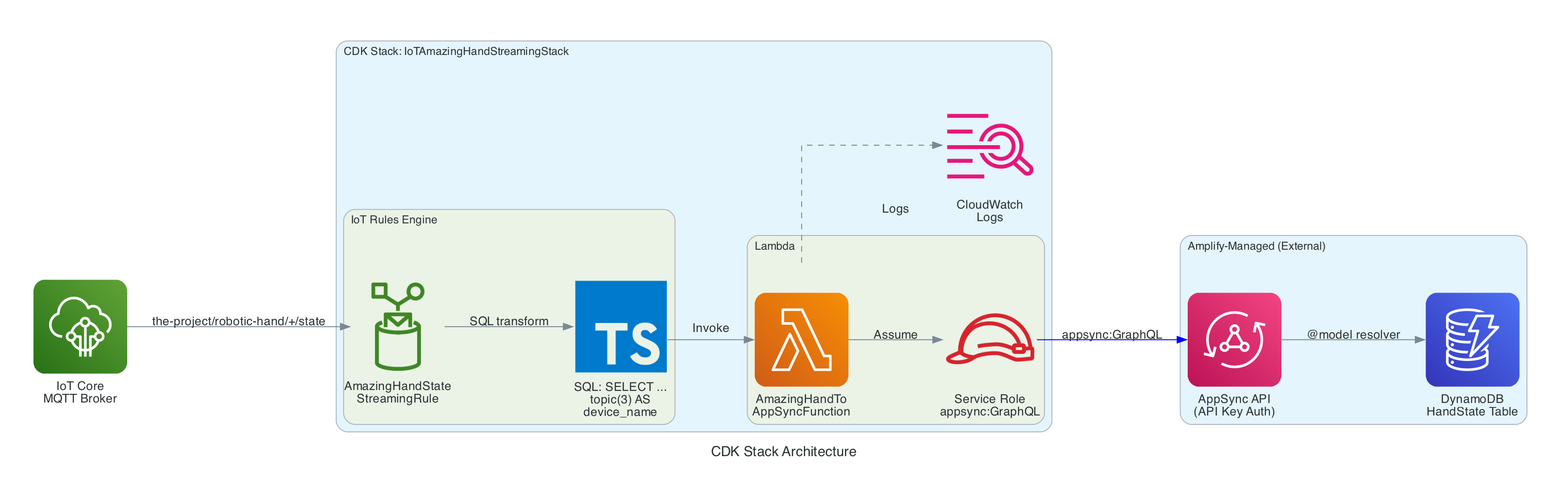
The stack is intentionally small — a single IoT Rule, a single Lambda function, and the IAM glue to connect them. The AppSync API and DynamoDB table are managed by the Amplify Gen 2 backend in Part 1, so this stack only needs to call the existing createHandState mutation.
IoT Topic Rule (AmazingHandStateStreamingRule) — Matches MQTT messages on the-project/robotic-hand/+/state using SQL SELECT gesture, letter, ts, fingers, video_url, topic(3) AS device_name, then invokes the Lambda function
Lambda Function (AmazingHandToAppSyncFunction) — Node.js 18 function that receives the IoT event, flattens the nested fingers object into individual angle fields, and calls the AppSync createHandState GraphQL mutation using the Amplify v6 SDK with API Key authentication
Lambda IAM Role — Service role with AWSLambdaBasicExecutionRole for CloudWatch Logs and an inline policy granting appsync:GraphQL on the AppSync API
Lambda Permission — Allows the IoT service (iot.amazonaws.com) to invoke the Lambda function
Resources managed externally (by Amplify Gen 2 in Part 1):
AppSync API — GraphQL API with HandState model, createHandState mutation, and onCreateHandState subscription
DynamoDB Table — HandState table with auto-generated resolvers from the @model directive
The IoT Rule is the entry point. It listens on the MQTT topic pattern the-project/robotic-hand/+/state where + is a single-level wildcard matching any device name (e.g. XIAOAmazingHandRight).
The SQL query (using AWS IoT SQL version 2016-03-23) selects specific fields from the MQTT payload and enriches them with metadata extracted from the topic path:
The fingers object uses a nested structure with angle_1 and angle_2 per finger — representing the two joints of each finger on the Amazing Hand. This nested format is natural for the edge device to produce but needs to be flattened for the GraphQL schema.
The Lambda calls this mutation to persist the hand state and trigger the real-time subscription:
mutationCreateHandState($input:CreateHandStateInput!){ createHandState(input:$input){ id deviceName gesture letter indexAngle1 indexAngle2 middleAngle1 middleAngle2 ringAngle1 ringAngle2 thumbAngle1 thumbAngle2 timestamp videoUrl createdAt } }
When AppSync receives this mutation, two things happen:
The hand state record is persisted to DynamoDB via the auto-generated @model resolver
The onCreateHandStatesubscription is triggered, pushing the new record to all subscribed clients — including the React frontend from Part 1, which uses this data to update the 3D hand animation, signed letter history, and video feed in real-time
The entire stack is defined in approximately 74 lines of TypeScript. The stack accepts the AppSync API URL, API key, and API ID as props, which are injected via environment variables during deployment:
The stack creates the Lambda function with the AppSync connection details as environment variables, grants it appsync:GraphQL permissions scoped to the specific API, creates the IoT Topic Rule with the SQL query, and grants IoT permission to invoke the Lambda.
Two stack outputs are exported for reference:
AmazingHandIoTRuleArn — The IoT Rule ARN
AmazingHandLambdaFunctionArn — The Lambda function ARN
The project includes a GitHub Actions workflow (.github/workflows/aws-cdk-deploy.yml) that automates deployment:
Triggers on pushes to main and dev branches
Authenticates using OIDC (no static AWS credentials stored in GitHub)
Automatically discovers the AppSync configuration by:
Reading the Amplify App ID from SSM Parameter Store (/iot/amplify/amazinghand)
Finding the Amplify data CloudFormation stack
Extracting the AppSync API ID from CloudFormation stack resources, then querying the AppSync API directly for the URL and API key
Runs cdk deploy with the discovered values
This means the stack automatically stays connected to the correct AppSync API without manual configuration.
Technical Challenges & Solutions
Challenge 1: Flattening Nested IoT Payloads for GraphQL
Problem: The edge device publishes finger angles in a nested JSON structure (fingers.index.angle_1), but the AppSync GraphQL schema uses flat fields (indexAngle1). The IoT Rules Engine SQL can select nested objects but cannot rename nested fields into flat ones.
Solution: The Lambda function handles the transformation. It receives the nested fingers object from the IoT Rule and manually flattens each field with safe defaults (0 for missing angles, null for optional fields). This keeps the IoT Rule SQL simple and the edge device payload natural.
Challenge 2: Connecting to Amplify-Managed AppSync
Problem: The AppSync API is managed by Amplify Gen 2 in Part 1's repository, not by this CDK stack. The API URL, API key, and API ID change between environments and deployments.
Solution: The CI/CD pipeline automatically discovers the AppSync configuration at deploy time by reading from SSM Parameter Store and CloudFormation stack outputs. For local development, the values are passed via environment variables in deploy.sh. The CDK stack accepts them as typed props, keeping the infrastructure code clean.
Challenge 3: Extracting Device Name from MQTT Topic
Problem: The device name is part of the MQTT topic path (the-project/robotic-hand/XIAOAmazingHandRight/state), not the message payload. The Lambda needs it to set the deviceName field in the GraphQL mutation.
Solution: The IoT Rules Engine SQL function topic(3) extracts the 3rd segment of the topic path and aliases it as device_name. This is passed to the Lambda as part of the event, so the Lambda does not need to parse the topic itself. The wildcard + in the topic filter means this works for any device name without configuration changes.
git clone https://github.com/chiwaichan/cdk-iot-amazing-hand-streaming.git cd cdk-iot-amazing-hand-streaming npminstall cd lambda/amazing-hand-to-appsync &&npminstall&&cd../..
Deploy:
./deploy.sh
This bootstraps CDK (if needed) and deploys the stack with the AppSync configuration.
What's Next
In Part 3, I will cover the edge AI agent (strands-agents-amazing-hands) — a Strands Agent powered by Amazon Nova 2 Lite running on an NVIDIA Jetson that subscribes to the MQTT sentence text published by the frontend in Part 1, translates them into physical servo movements on the Pollen Robotics Amazing Hand for ASL fingerspelling, records video, and publishes hand state back to IoT Core — which this Part 2 stack routes through to AppSync for the frontend to consume.
Summary
This post covered the cloud infrastructure layer of the voice-to-sign-language translation system:
IoT Rules Engine listens on the-project/robotic-hand/+/state and extracts device name from the topic path using topic(3)
Lambda function flattens nested finger angle payloads (fingers.index.angle_1 → indexAngle1) and calls the AppSync createHandState GraphQL mutation
AppSync persists to DynamoDB and broadcasts onCreateHandState subscriptions to connected React clients in real-time
CDK stack is intentionally small (~74 lines) — it creates only the IoT Rule, Lambda, and IAM glue, relying on the Amplify-managed AppSync API from Part 1
CI/CD pipeline automatically discovers AppSync configuration from SSM Parameter Store, CloudFormation stack resources, and direct AppSync API calls — no manual configuration needed
The stack completes the real-time feedback loop: edge device publishes state → IoT Core → Lambda → AppSync → React frontend updates 3D hand animation
This is Part 1 of a 3-part series covering a real-time voice-to-sign-language translation system. The complete solution spans three separate repositories, each responsible for a distinct layer of the system:
This post (Part 1) - Frontend and Voice Processing — The React web app that captures speech, streams it to Amazon Nova 2 Sonic on Bedrock, publishes cleaned sentence text via MQTT, and renders a real-time 3D hand visualisation
Part 3 - Edge AI Agent (strands-agents-amazing-hands) — The Strands Agent powered by Amazon Nova 2 Lite running on an NVIDIA Jetson that receives MQTT sentence text, translates it to ASL servo commands, drives the Pollen Robotics Amazing Hand for fingerspelling, and streams video and state back
In this post, I focus on how speech enters the system, how Amazon Nova 2 Sonic processes and cleans up the spoken input, and how the frontend publishes cleaned sentence text over MQTT — setting the stage for Parts 2 and 3.
The key idea is that Nova 2 Sonic is not used as a chatbot here — it is configured as a dumb speech-to-text relay pipe that cleans up grammar, removes filler words like "um" and "uh", translates non-English speech to English, and forwards the cleaned text via a forced tool invocation (send_text) on every single utterance. The frontend then publishes the cleaned sentence text to AWS IoT Core over MQTT for the edge device to translate into ASL servo commands.
Goals
Capture speech in the browser and stream it to Amazon Nova 2 Sonic via bidirectional streaming — no backend servers required
Use Nova 2 Sonic's forced tool use (send_text) with toolChoice: { any: {} } to relay cleaned text on every utterance, not as a conversational chatbot
Publish cleaned sentence text to AWS IoT Core over MQTT for the edge device to translate into ASL servo commands
Subscribe to real-time hand state updates via GraphQL (AppSync) and synchronise a 3D Three.js hand animation with the physical hand
Use AWS Amplify Gen 2 for infrastructure-as-code backend definition in TypeScript (Cognito, AppSync, IAM policies)
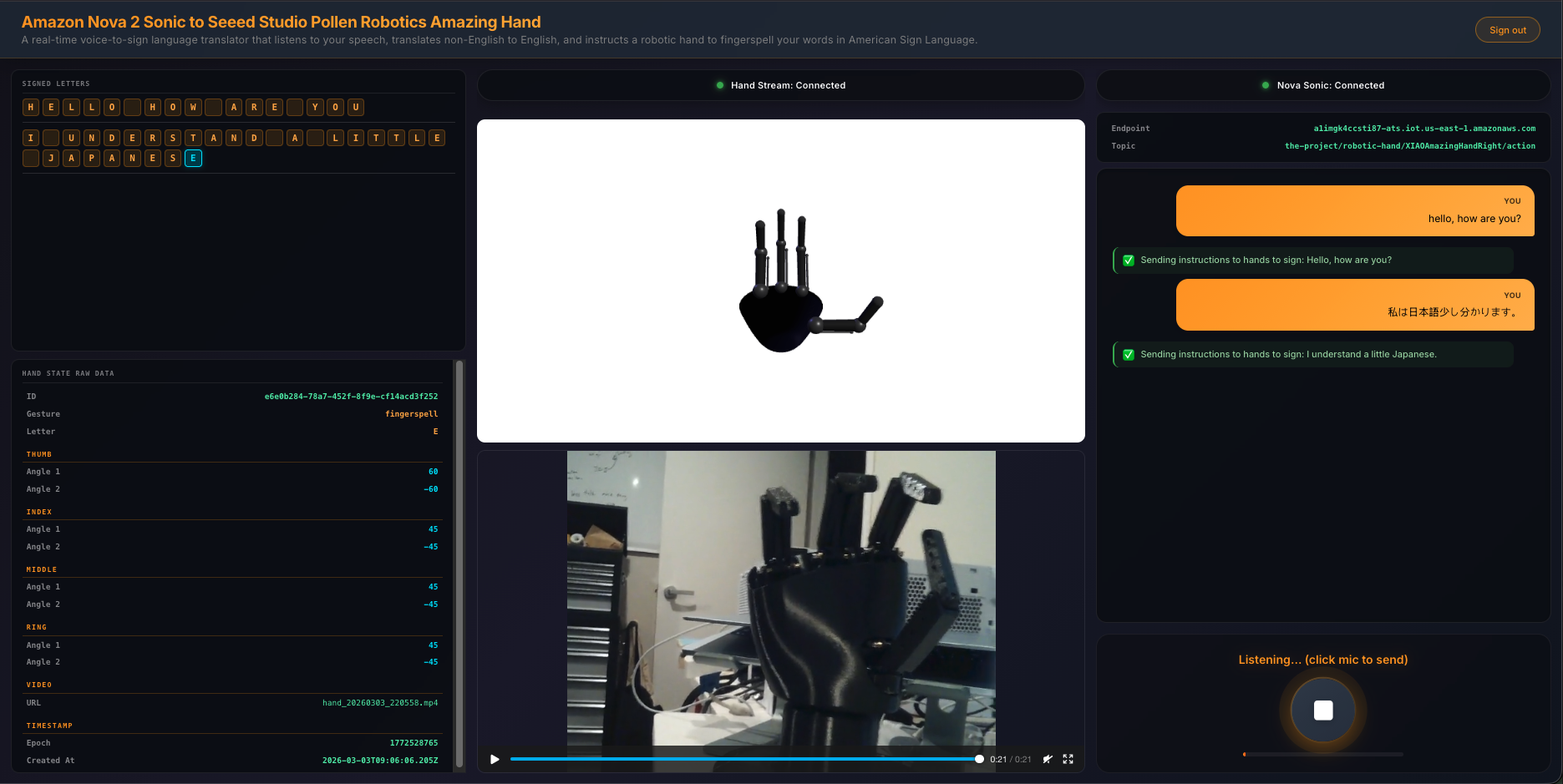
Display a 3-column UI with signed letter history, 3D hand animation with video feed, and live transcript with microphone controls
The Overall System
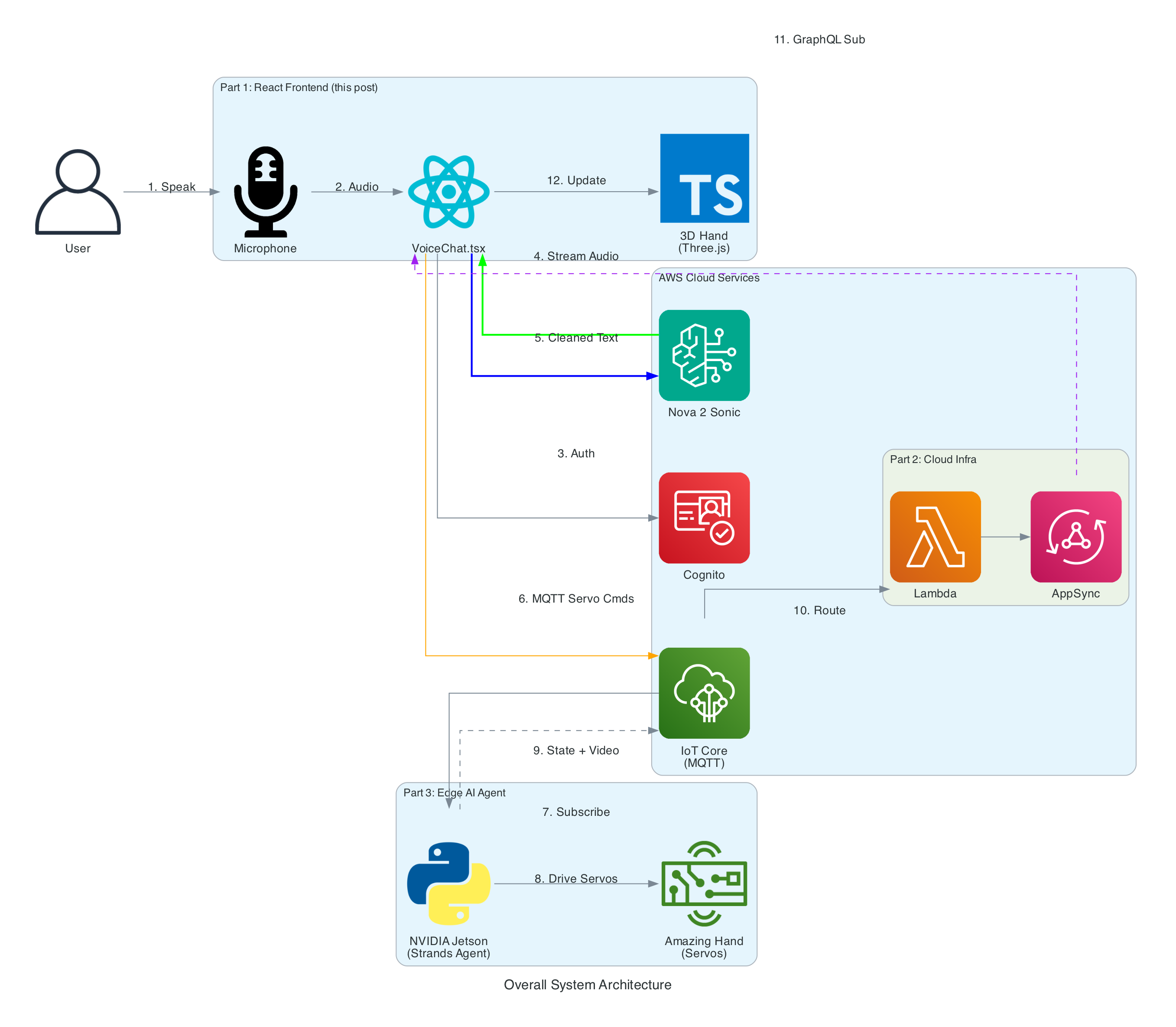
The end-to-end system takes spoken words from a browser microphone all the way through to physical ASL fingerspelling on an Amazing Hand — an open-source robotic hand designed by Pollen Robotics and manufactured by Seeed Studio — passing through cloud AI, IoT messaging, and an edge AI agent along the way.
System Components:
React Frontend (this post) - Captures speech, streams to Bedrock, publishes cleaned sentence text to MQTT, renders 3D hand animation synchronised with the physical hand via GraphQL subscriptions
Cloud Infrastructure (Part 2) - AWS CDK stack with IoT Core rules that route MQTT messages through Lambda to AppSync, enabling real-time GraphQL subscriptions between the edge device and the frontend
Edge AI Agent (Part 3) - Strands Agent powered by Amazon Nova 2 Lite on an NVIDIA Jetson that receives MQTT sentence text, translates it to ASL servo commands, drives the Amazing Hand for fingerspelling letter by letter, records video, and publishes hand state back via IoT Core
From user speech to ASL fingerspelling on the Amazing Hand
0/13
User
Browser
Bedrock
IoT Core
Jetson
Hand
Milestone
Complete
Total: 13 steps across 6 components (3 repos)
Speech → Sentence → Edge AI → ASL Fingerspelling
Architecture
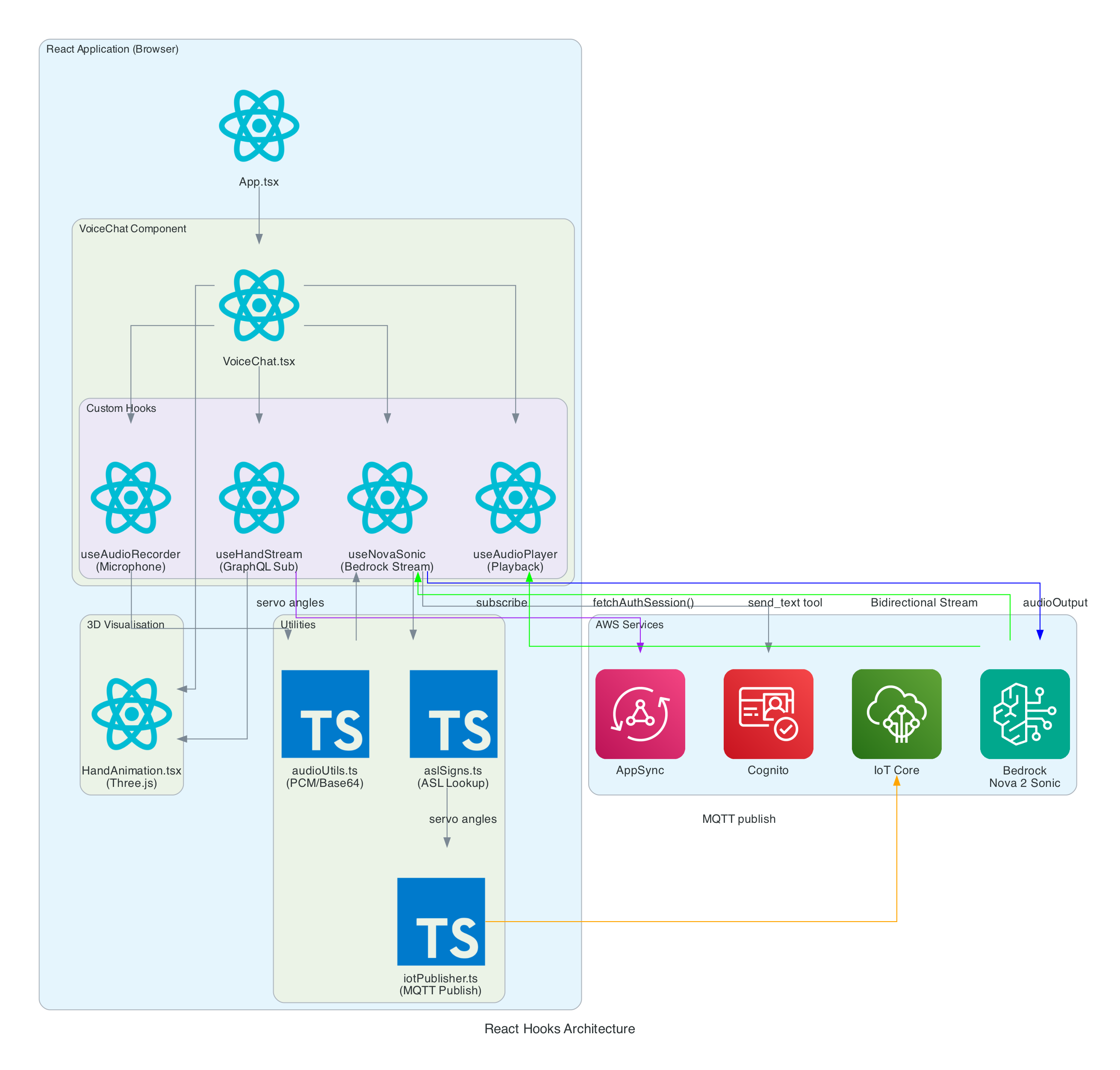
The frontend is built with React 19, Vite 7, and TypeScript 5.9. The application is structured around a main VoiceChat.tsx component that orchestrates four custom hooks, three utility modules, and a Three.js-based hand animation component.
VoiceChat.tsx - Main UI component with a 3-column responsive layout. Coordinates all hooks, renders the transcript feed, microphone controls, signed letter history, hand state data grid, video feed, and 3D animation. Collapses to a single column on screens under 1100px
useNovaSonic - Core hook managing the Bedrock bidirectional stream with InvokeModelWithBidirectionalStreamCommand. Handles authentication via Cognito, the Nova 2 Sonic event protocol (session/prompt/content lifecycle), the async generator input stream with backpressure, and send_text tool use responses. The tool is configured with toolChoice: { any: {} } to force tool invocation on every utterance
useAudioRecorder - Captures microphone input using an inline AudioWorklet running in a separate thread. Accumulates 2048 samples per buffer, resamples from the device sample rate (typically 48kHz) to 16kHz, converts Float32 to PCM16, and Base64 encodes for transmission
useAudioPlayer - Provides audio playback capability (FIFO queue of AudioBuffers at 24kHz). In the current implementation, Nova 2 Sonic's audio output is intentionally discarded since only the cleaned text via tool use is needed — the hook is available but not actively fed audio data
useHandStream - Subscribes to AppSync GraphQL onCreateHandState subscription filtered by device name. Fetches the last 20 hand states on mount and maintains a real-time list of 8 servo angles (thumb, index, middle, ring — each with two joint angles), letters, and video URLs
iotPublisher.ts - Publishes MQTT messages to the topic the-project/robotic-hand/XIAOAmazingHandRight/action. Publishes cleaned sentence text as { id, sentence, ts } payloads and handles IoT policy attachment to the Cognito identity
HandAnimation.tsx - Procedurally generated 3D robotic hand using Three.js with no external 3D models. The palm is built with LatheGeometry (curved cup shape), and each finger has a dual-joint rig (proximal + distal) with synchronised linkage. Uses WebGL rendering with PCFSoftShadowMap shadows, OrbitControls, and industrial-style materials with metalness/roughness
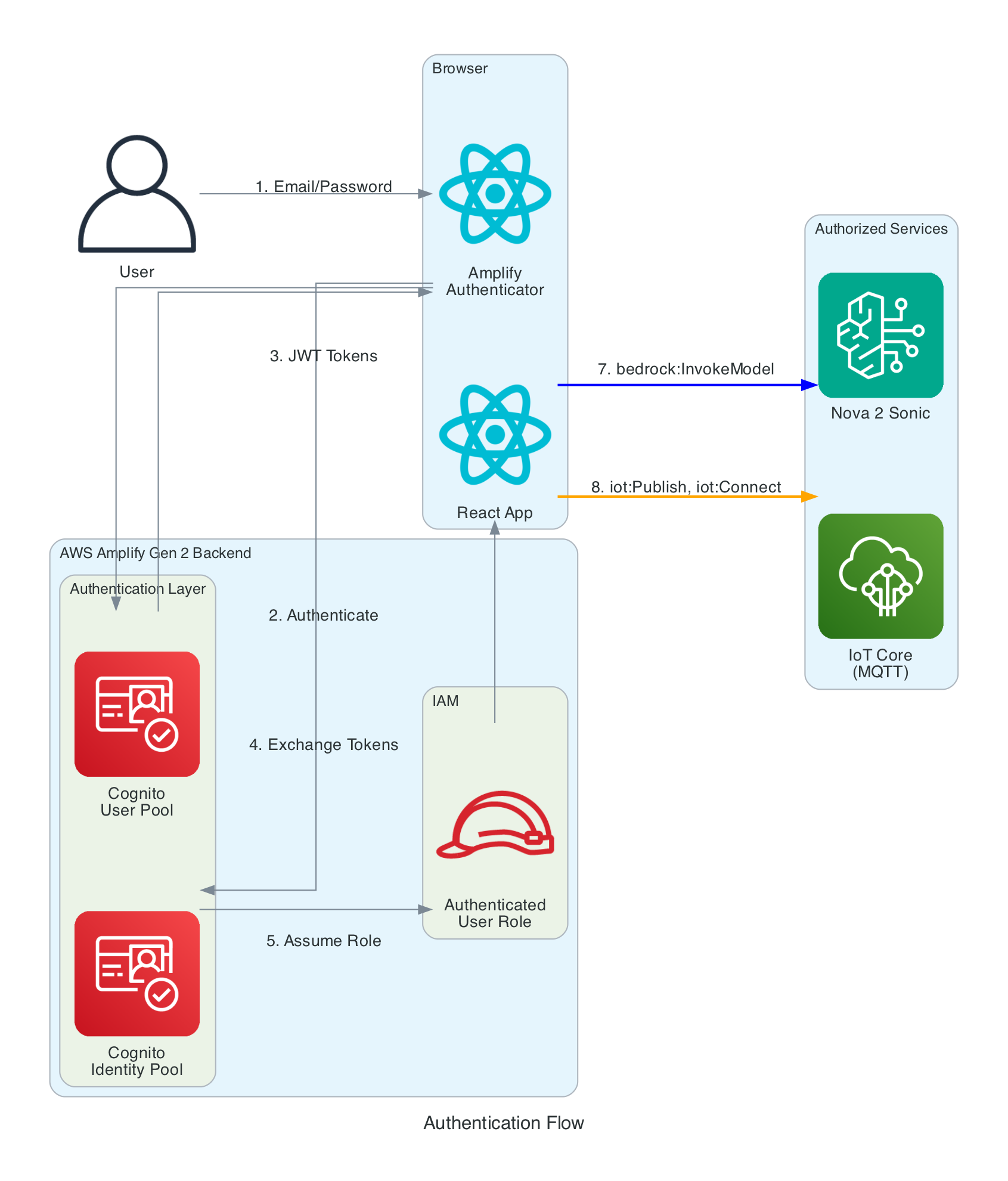
The frontend needs temporary AWS credentials to call both Bedrock (for Nova 2 Sonic streaming) and IoT Core (for MQTT publishing). No long-term credentials are stored in the browser.
Authentication Layers:
Cognito User Pool - Handles user registration and login with email/password. Configured via Amplify Gen 2 defineAuth with preferredUsername as an optional attribute
Cognito Identity Pool - Exchanges JWT tokens from the User Pool for temporary AWS credentials (access key, secret key, session token). Credentials are automatically refreshed by the Amplify SDK before expiration
IAM Role - The authenticated user role grants two sets of permissions: bedrock:InvokeModel and bedrock:InvokeModelWithResponseStream scoped to amazon.nova-2-sonic-v1:0 in us-east-1, and iot:Publish, iot:Connect, iot:DescribeEndpoint, and iot:AttachPolicy for IoT Core MQTT access. An IoT Core policy (RoboticHandPolicy) is also attached to the Cognito identity at runtime to authorise MQTT publishing to the the-project/robotic-hand/* topic pattern
The browser captures audio from the microphone using the Web Audio API and an AudioWorklet running in a separate thread. The AudioWorklet avoids main-thread blocking and processes audio in real-time with echo cancellation and noise suppression enabled.
Input Processing (Recording):
Microphone - Browser calls getUserMedia() to capture audio at the device's native sample rate (typically 48kHz) with mono channel, echo cancellation, and noise suppression enabled
AudioWorklet - An inline AudioCaptureProcessor (loaded as a Blob URL to avoid CORS issues) runs in a separate thread. It accumulates samples in a buffer and posts a Float32Array message to the main thread every 2048 samples
Resample - Linear interpolation resampling converts from 48kHz to 16kHz (Nova 2 Sonic's required input rate). The ratio is calculated dynamically from the actual device sample rate
Float32 to PCM16 - Floating point samples in the range [-1, 1] are converted to 16-bit signed integers. Negative values are multiplied by 0x8000 and positive values by 0x7FFF
Base64 Encode - The binary PCM data is encoded to Base64 text for JSON transmission to Bedrock via a custom uint8ArrayToBase64() utility that iterates bytes into a binary string and then calls btoa()
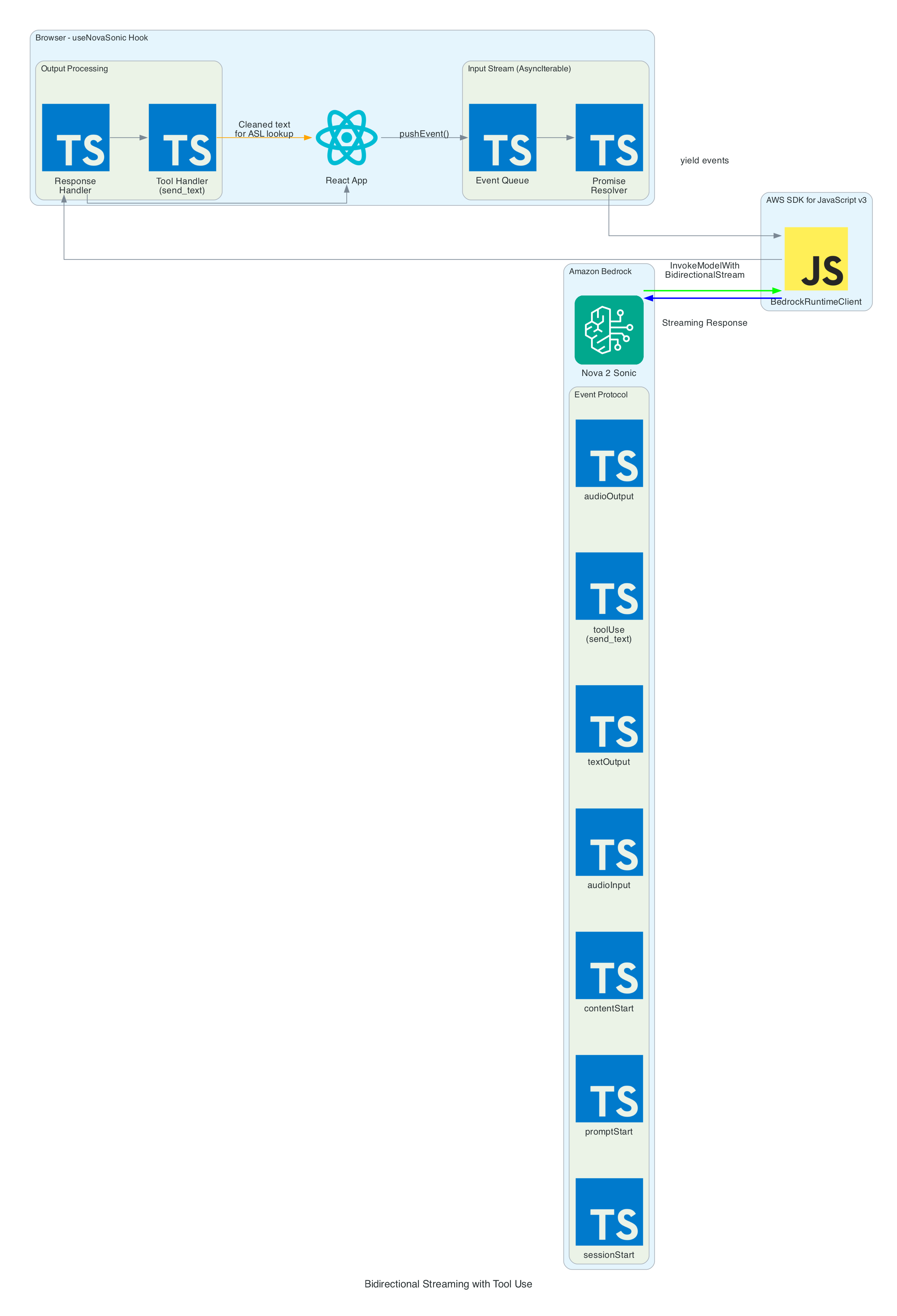
The heart of the system is the bidirectional stream to Amazon Nova 2 Sonic using InvokeModelWithBidirectionalStreamCommand. Nova 2 Sonic is configured not as a chatbot, but as a speech relay that cleans up input and forwards it via forced tool use.
Input Events (sent to Bedrock):
sessionStart - Initialises the session with inference configuration: maxTokens: 1024, topP: 0.9, temperature: 0.7
promptStart - Configures audio output format: audio/lpcm at 24kHz, 16-bit, mono, voice matthew, Base64 encoding. Also defines the send_text tool with toolChoice: { any: {} } to force tool invocation on every utterance
contentStart (TEXT) - Sends the system prompt that instructs Nova 2 Sonic to act as a "dumb speech-to-text relay pipe" — clean up grammar, remove filler words, translate non-English to English, call send_text with the cleaned text, then respond with only "Sent"
contentStart (AUDIO) - Marks the beginning of audio input content
audioInput - Streams Base64-encoded 16kHz PCM audio chunks in real-time as the user speaks
contentEnd / promptEnd / sessionEnd - Lifecycle events to terminate content blocks, prompts, and sessions
Output Events (received from Bedrock):
textOutput - Returns transcribed user speech and the generated AI response text ("Sent")
toolUse - The send_text tool invocation containing the cleaned text in { sentence: "..." } format. This is the primary output — the frontend publishes the sentence to MQTT for the edge device to translate into ASL servo commands
audioOutput - Synthesised voice response as Base64-encoded 24kHz PCM. In the current implementation, audio output is intentionally discarded since only the cleaned text via tool use is needed
Tool Use — send_text:
The tool is defined with toolChoice: { any: {} }, which forces Nova 2 Sonic to call it on every single utterance without exception
The tool accepts a single sentence parameter — the cleaned-up, well-formed sentence
When the tool invocation arrives, the frontend extracts the sentence and publishes it as { id, sentence, ts } to IoT Core via MQTT using publishSentence(). The edge device then translates the sentence into ASL servo commands
A JSON tool result ({ "status": "success", "sentence": "..." }) is sent back to Nova 2 Sonic to complete the tool use cycle
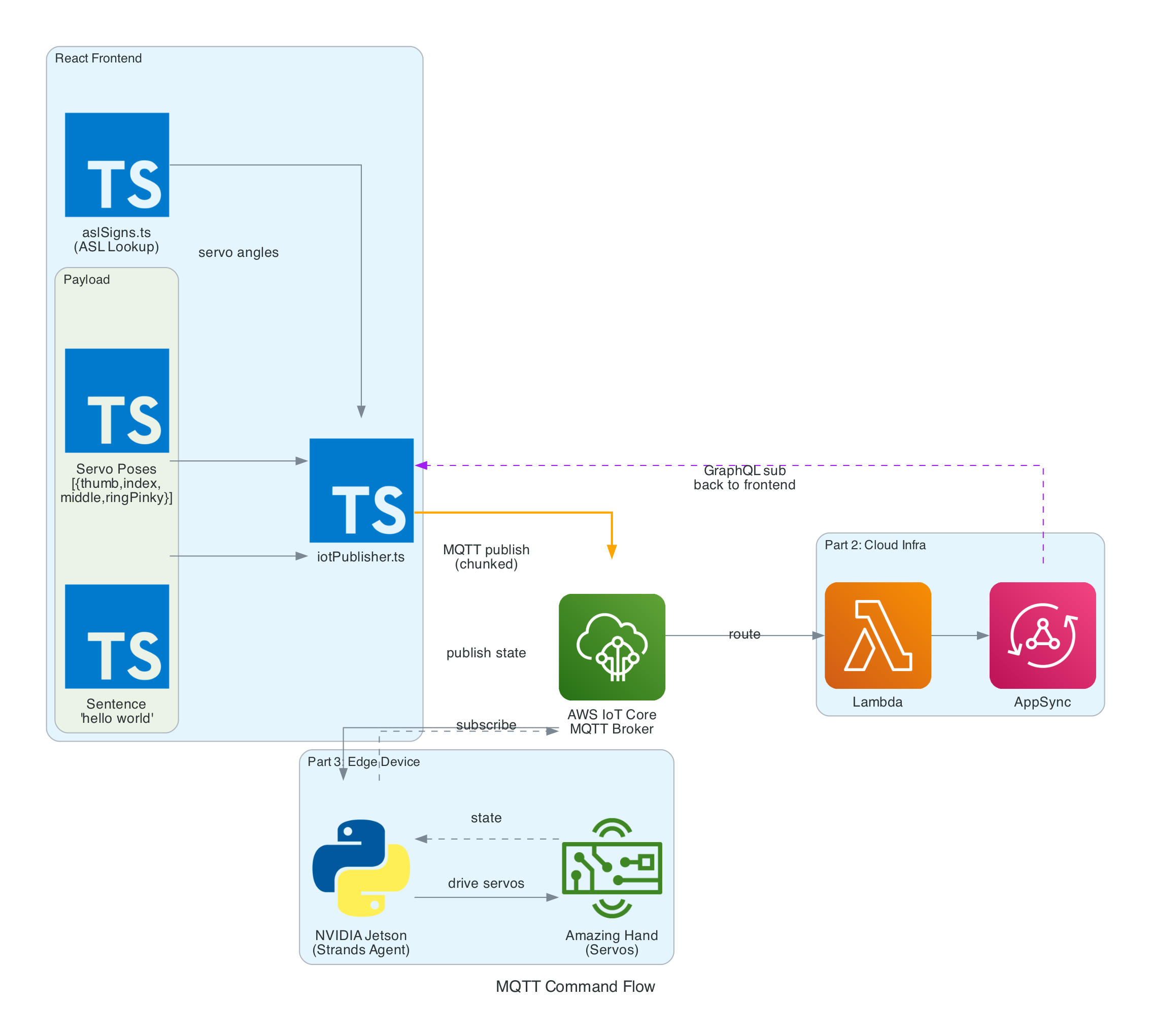
Once the cleaned sentence is extracted from the send_text tool invocation, iotPublisher.ts publishes it to the MQTT topic the-project/robotic-hand/XIAOAmazingHandRight/action via AWS IoT Core.
The payload is a simple JSON object containing:
id - A UUID for the message
sentence - The cleaned sentence text from Nova 2 Sonic
ts - Unix timestamp in seconds
The edge device (covered in Part 3) receives this sentence and is responsible for translating it into ASL servo commands and driving the physical hand.
From Nova 2 Sonic text output to IoT Core sentence publish
0/7
Nova
Hook
VoiceChat
Publisher
IoT Core
Milestone
Sentence Publish Pipeline
Speech → Nova 2 Sonic cleanup → send_text tool use → publishSentence → MQTT to edge device
The browser console logs the performance breakdown for each utterance through the voice-to-IoT pipeline. In this example, the end-to-end time from speech detection to IoT publish is approximately 2.9 seconds — with the majority spent on Speech-to-Text (2228ms) as Nova 2 Sonic processes the audio, followed by Text-to-Tool extraction (423ms) and IoT Publish (243ms):
The frontend subscribes to AppSync's onCreateHandState GraphQL subscription to receive real-time updates from the edge device. Each update includes the device name, current letter being signed, all 8 servo angles (thumb, index, middle, ring — each with two joint angles), a timestamp, and an optional video URL.
On mount, the hook fetches the last 20 hand states to populate the UI immediately. New states arrive in real-time as the edge device publishes them back through IoT Core → Lambda → AppSync. The data is displayed in both the signed letter history panel and the raw hand state data grid.
The HandAnimation.tsx component renders a procedurally generated 3D robotic hand using Three.js — no external 3D models are loaded. The entire hand is built from code:
The palm uses LatheGeometry to create a curved cup shape that tapers from a narrow wrist (radius 0.18) to wide knuckles (radius 0.56)
Each finger has a dual-joint rig with proximal and distal segments, knuckle joints, linkage bars, and fingertips. The thumb is mounted on the side of the palm and rotates on the Z-axis, while the index, middle, and ring fingers are mounted on the front rim and rotate on the X-axis
The distal joint automatically follows the proximal joint at 50% of its angle, simulating a synchronised linkage mechanism
Materials use industrial-style metalness/roughness: dark gray frame (0x2a2a2a), light gray joints (0x888888), and darker gray tips (0x555555)
The scene includes PCFSoftShadowMap shadows, ambient lighting (0.8), directional light (1.0), and a fill light (0.4), with OrbitControls for interactive zoom and rotation
Servo angle updates from the GraphQL subscription drive the finger rotations in real-time, keeping the 3D animation synchronised with the physical Amazing Hand.
The useAudioPlayer hook provides a FIFO queue-based audio playback capability for Web Audio AudioBuffer objects at 24kHz. However, in the current implementation, Nova 2 Sonic's audio output is intentionally discarded — the onAudioOutput callback is set to a no-op since only the cleaned text via the send_text tool use is needed to drive the MQTT pipeline. The hook remains available for future use if audio feedback is desired.
Problem: Loading an AudioWorklet processor from an external JavaScript file fails with CORS errors on some deployments, particularly when using Amplify Hosting.
Solution: Inline the AudioWorklet code as a Blob URL. The processor code is defined as a string, converted to a Blob with type application/javascript, and loaded via URL.createObjectURL(). The object URL is revoked after the module is added:
Problem: Nova 2 Sonic is a conversational model by default — it wants to chat and respond naturally. But in this system, it needs to act as a pure relay, forwarding every single utterance as cleaned text without adding commentary or refusing any messages.
Solution: A combination of system prompt engineering and forced tool use. The system prompt explicitly instructs Nova 2 Sonic to act as a "dumb speech-to-text relay pipe" and never add commentary. The send_text tool is configured with toolChoice: { any: {} }, which forces the model to invoke a tool on every response. After calling the tool, it is instructed to only respond with "Sent".
Problem: The system needs to transmit the user's intent from the frontend to the edge device reliably via IoT Core MQTT.
Solution: Rather than translating text to servo commands on the frontend (which would require large payloads with many servo poses), the frontend publishes only the cleaned sentence text as a compact { id, sentence, ts } JSON payload. The edge device is responsible for translating the sentence into ASL servo commands, keeping the MQTT messages small and the frontend simple.
Enable Nova 2 Sonic in Bedrock Console (us-east-1 region)
Clone and Install:
git clone https://github.com/chiwaichan/amplify-react-nova-sonic-voice-chat-amazing-hand.git cd amplify-react-nova-sonic-voice-chat-amazing-hand npminstall
Start Amplify Sandbox:
npx ampx sandbox
Run Development Server:
npm run dev
Open Application:
Navigate to http://localhost:5173, create an account, and start talking. Note that the full system requires Parts 2 and 3 to be deployed for the physical hand to respond — but the frontend will still capture speech, process it through Nova 2 Sonic, and display the 3D hand animation independently.
What's Next
In Part 2, I will cover the cloud infrastructure layer — the AWS CDK stack (cdk-iot-amazing-hand-streaming) that routes IoT Core MQTT messages through Lambda to AppSync. This is the bridge that enables real-time GraphQL subscriptions, allowing the frontend to receive hand state updates from the edge device as they happen.
In Part 3, I will cover the edge AI agent (strands-agents-amazing-hands) — a Strands Agent powered by Amazon Nova 2 Lite running on an NVIDIA Jetson that subscribes to the MQTT sentence text published by this frontend, translates them into physical servo movements on the Pollen Robotics Amazing Hand for ASL fingerspelling, records video of the hand in action, and publishes state back through IoT Core.
Summary
This post covered the frontend and voice processing layer of a real-time voice-to-sign-language translation system:
Amazon Nova 2 Sonic is used not as a chatbot but as a speech relay — configured via system prompt and toolChoice: { any: {} } forced send_text tool use to clean up grammar, remove filler words, translate to English, and forward every utterance as text
Audio pipeline captures at 48kHz via AudioWorklet, resamples to 16kHz, converts to PCM16 Base64 for Bedrock input. Nova 2 Sonic's audio output is intentionally discarded since only the cleaned text is needed
MQTT publishing sends cleaned sentence text as { id, sentence, ts } to AWS IoT Core for the edge device to translate into ASL servo commands
Real-time feedback via GraphQL subscriptions keeps the 3D Three.js hand animation synchronised with the physical Amazing Hand using 8 servo angles (thumb, index, middle, ring — each with two joints)
Fully serverless frontend using AWS Amplify Gen 2 with Cognito authentication, no backend servers — direct browser-to-Bedrock and browser-to-IoT Core communication
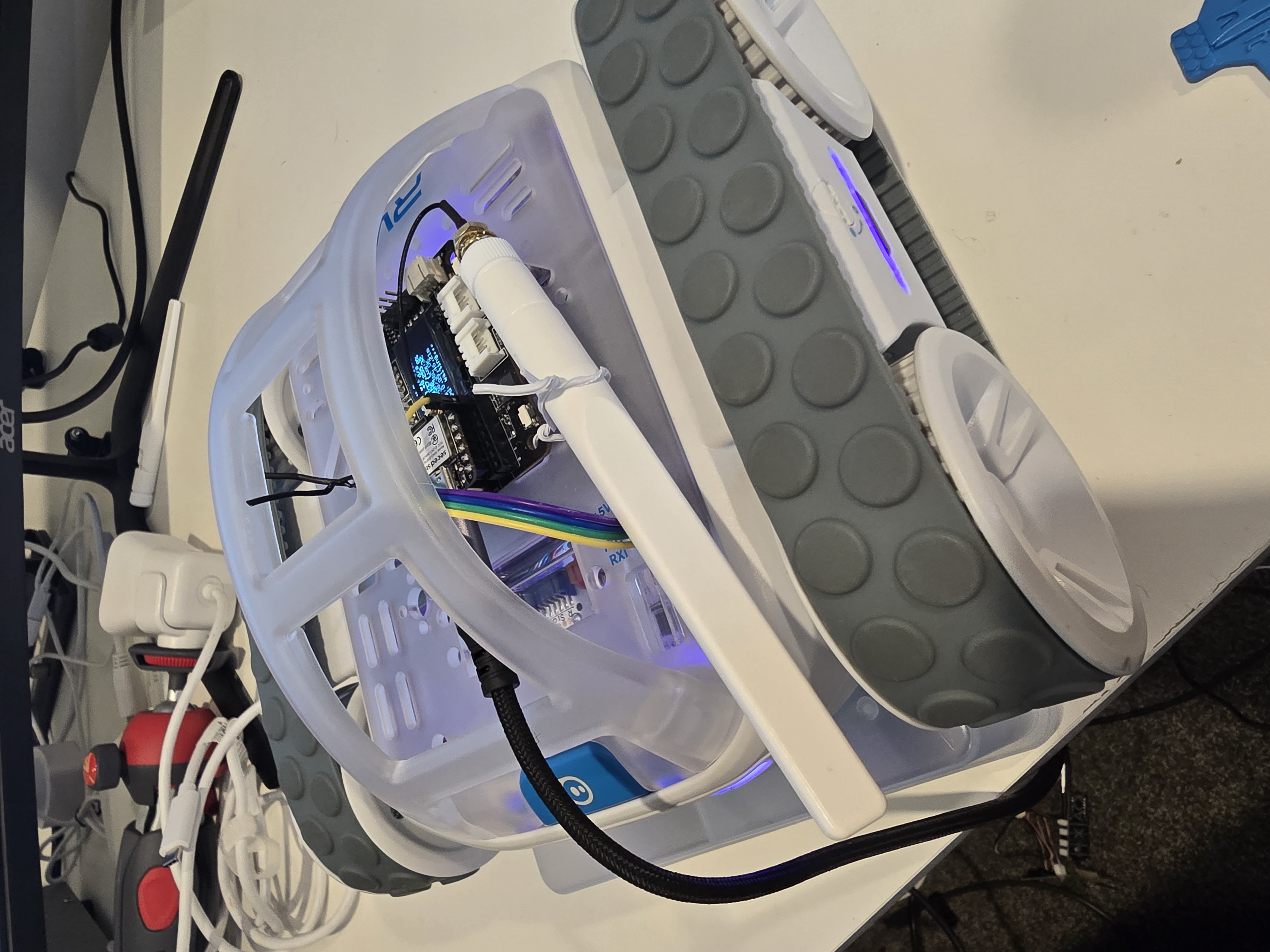
A Sphero RVR integrated with a Seeed Studio XIAO ESP32S3 with telemetry uploaded into, and also, basic drive remote control commands received from any where leveraging AWS IoT Core.
Lately I have been aiming to go deep on AI Robotics, and last year I have been slowly experimenting more and more with anything that is AI, IoT and Robotics related; with the intention of learning and going as wide and as deep as possible in any pillars I can think of. You can check out my blogs under the Robotics Project to see what I have been up to. This year I want to focus on enabling mobility for my experiments - as in providing wheels for solutions to move around the house, ideally autonomously; starting off with wheel based solutions bought off-shelve, followed by solutions that I build myself from open-sourced projects people have kindly contirbuted online, and then ambitiously designed, 3D Printed and built all from the ground up - perhaps in a couple of years time.
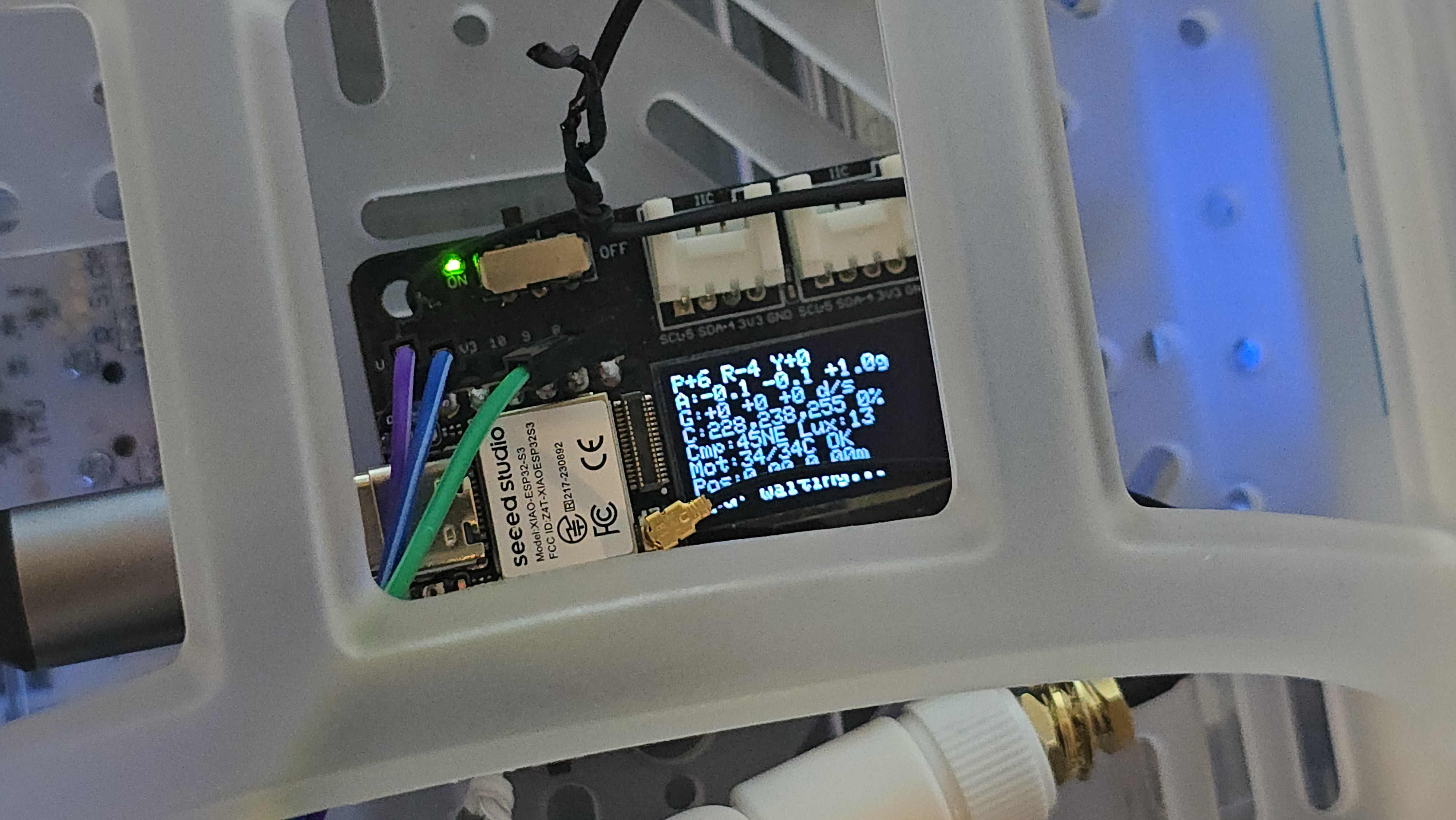
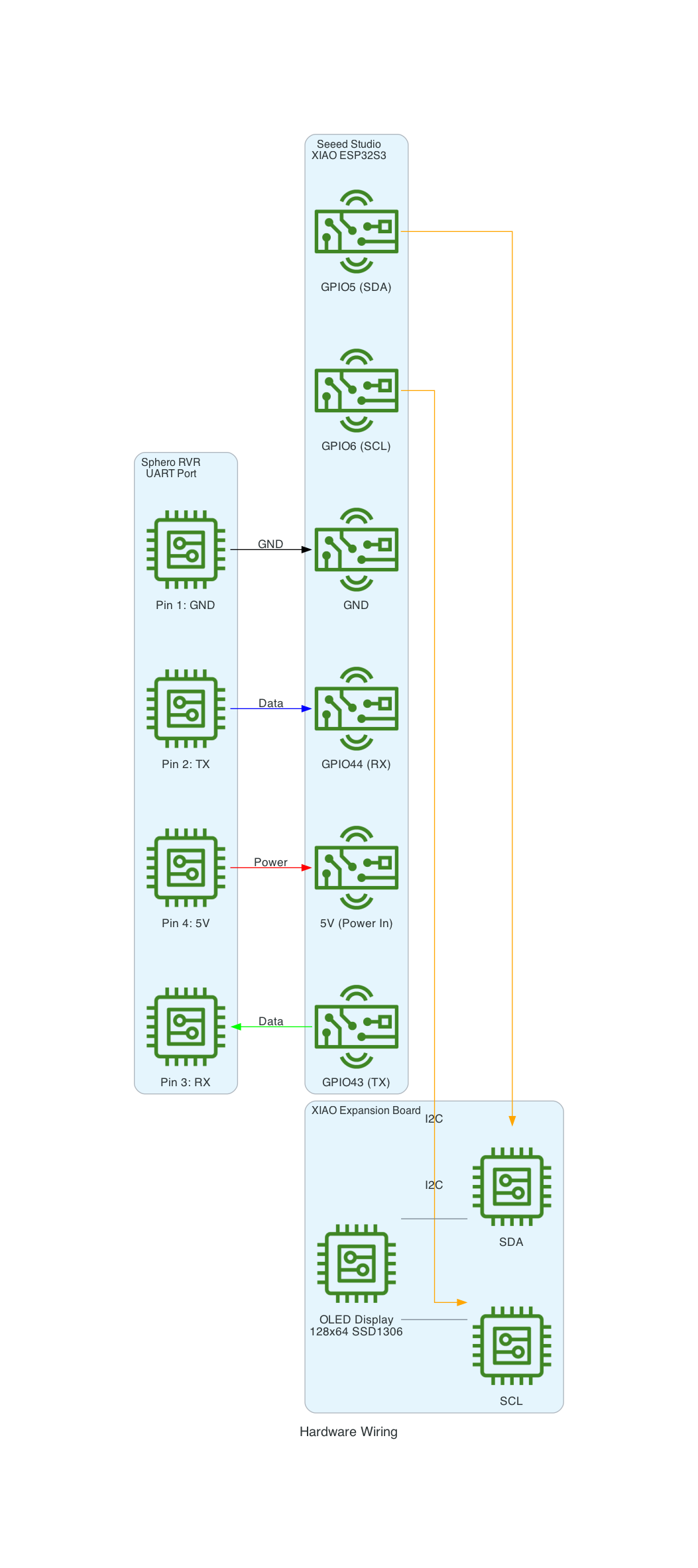
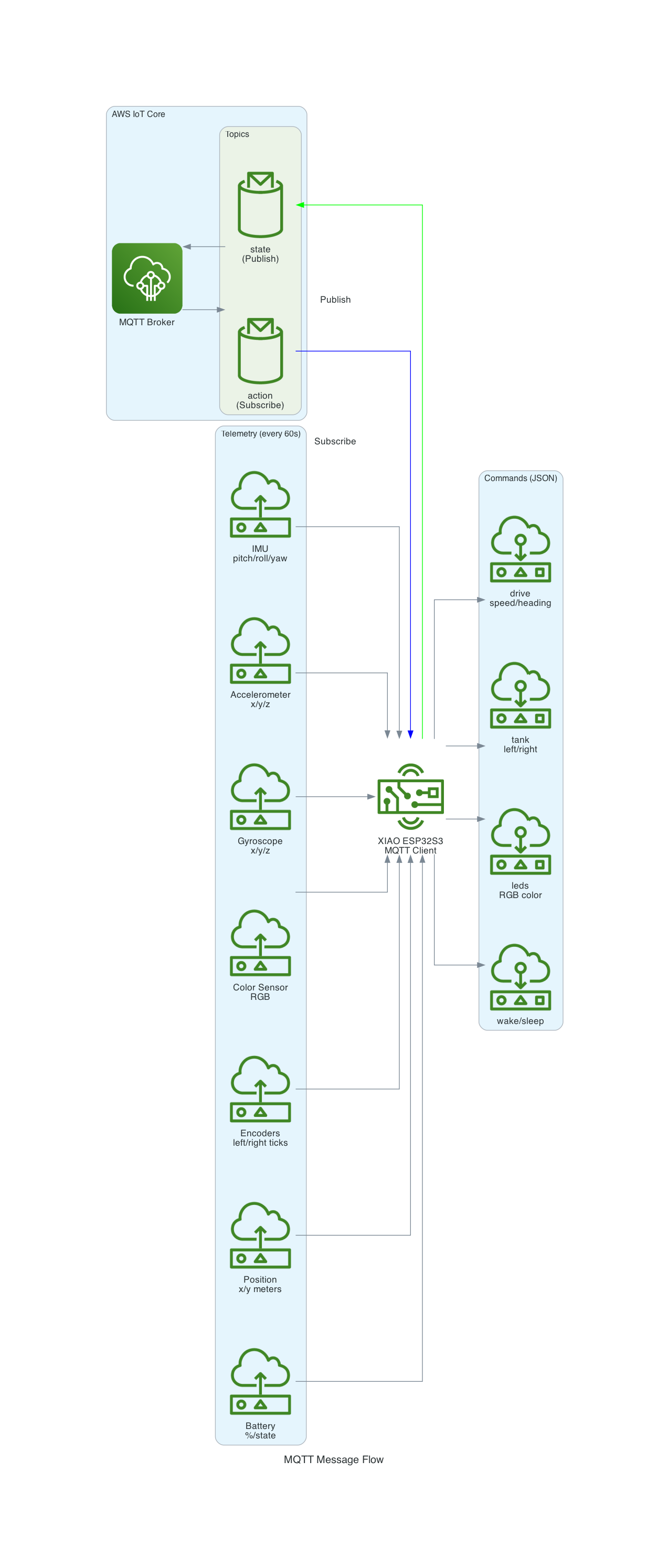
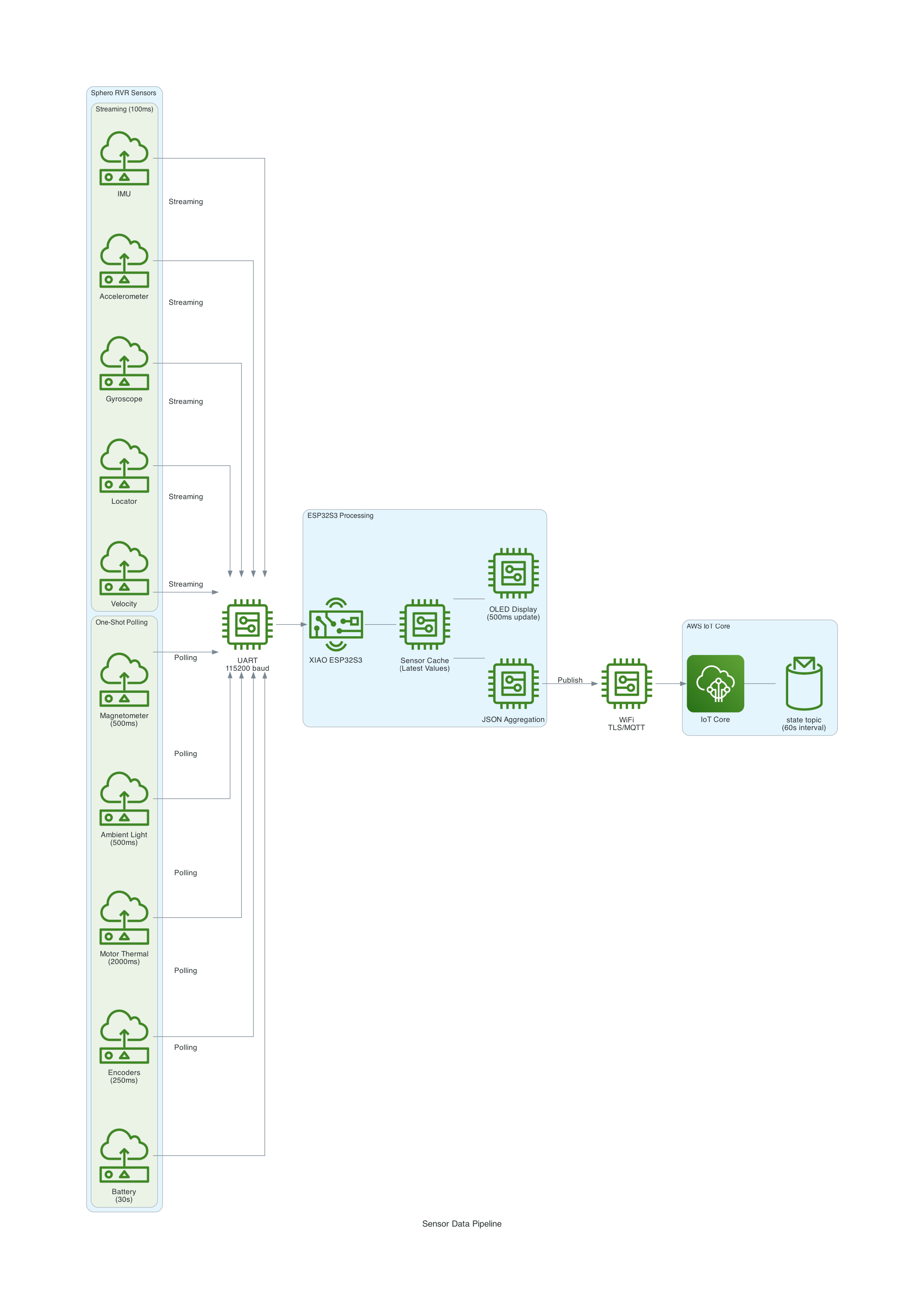
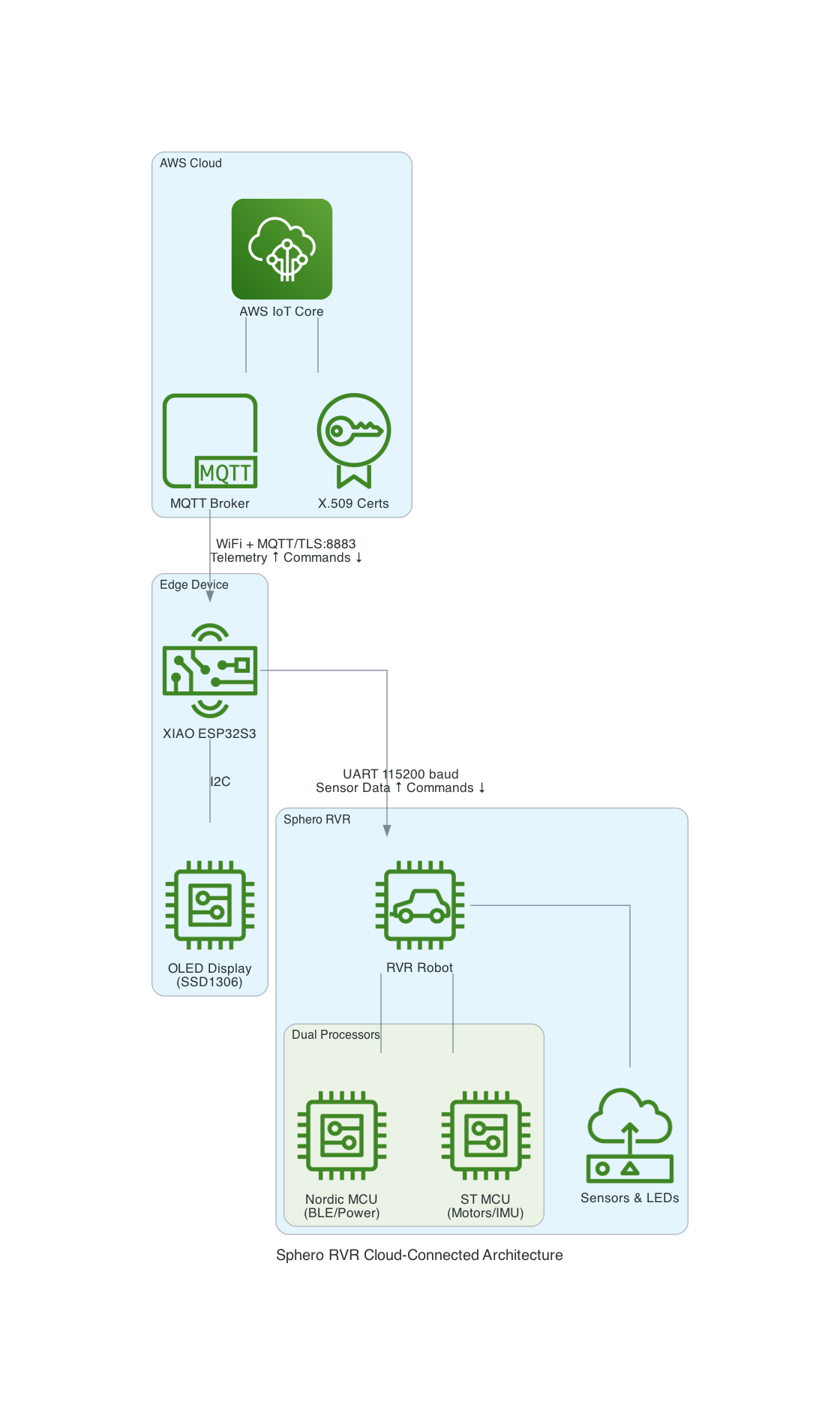
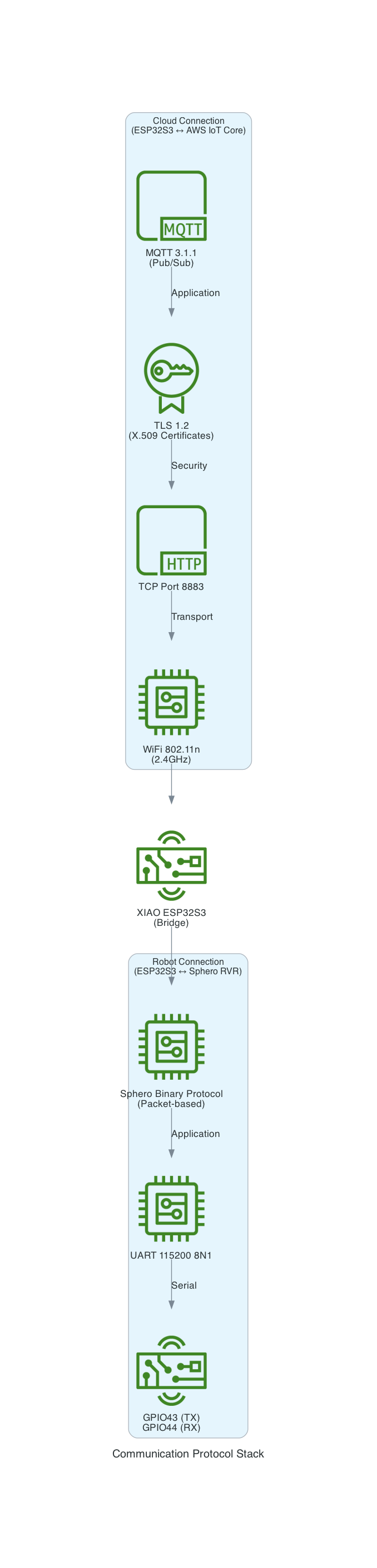
This project uses a Seeed Studio XIAO ESP32S3 microcontroller to communicate with a Sphero RVR robot via UART, while simultaneously connecting to AWS IoT Core over WiFi. The system publishes real-time sensor telemetry and accepts remote drive commands through MQTT.
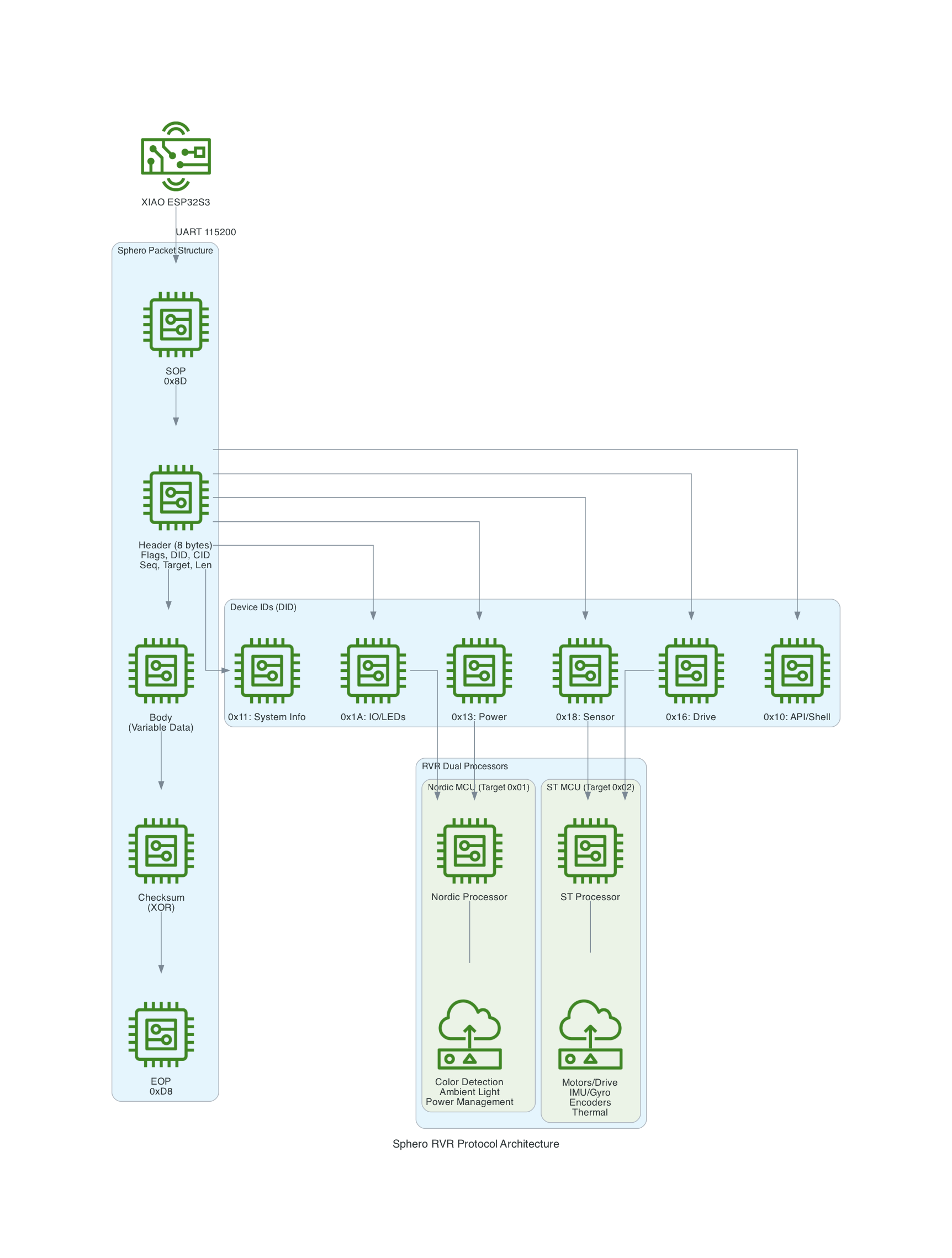
The Sphero RVR uses a binary packet-based protocol over UART. Each packet contains a start-of-packet byte (0x8D), an 8-byte header with device ID and command ID, variable-length data body, checksum, and end-of-packet byte (0xD8). The RVR has two internal processors: Nordic (handles BLE, power, color detection) and ST (handles motors, IMU, encoders).
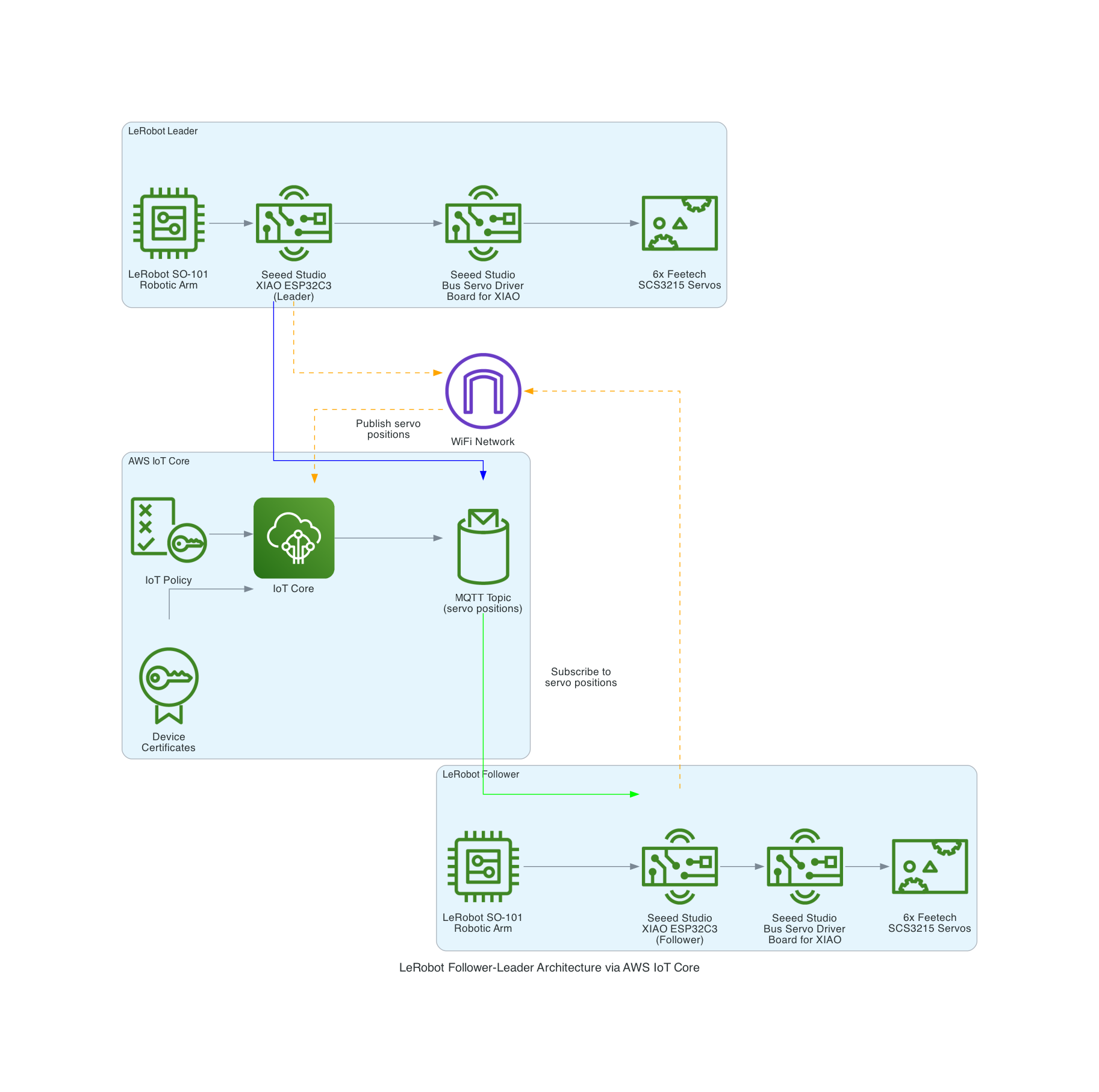
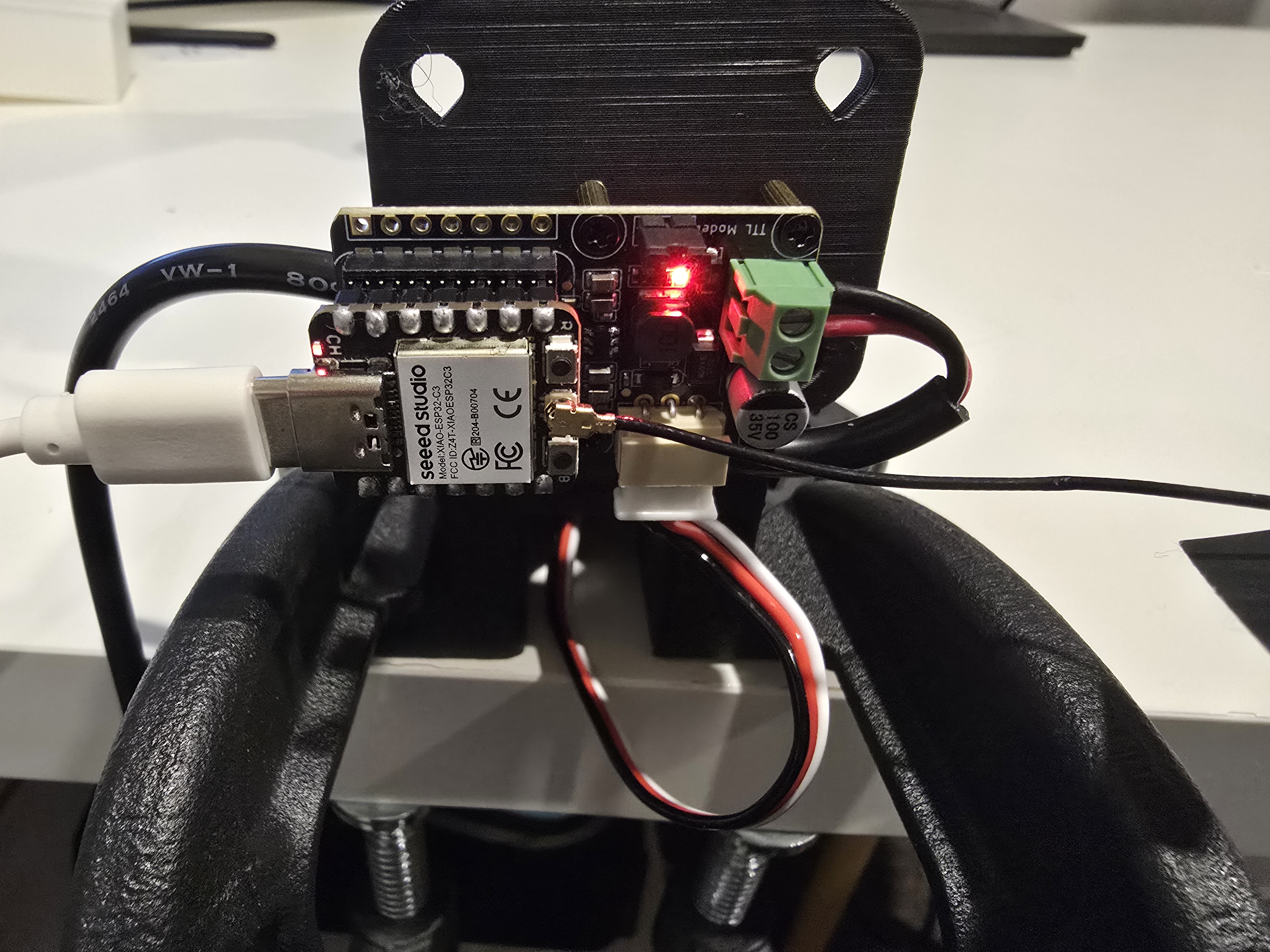
The LeRobot Follower arm is subscribed to an IoT Topic that is being published in real-time by the LeRobot Leader arm over AWS IoT Core, using a Seeed Studio XIAO ESP32C3 integrated with a Seeed Studio Bus Servo Driver Board, the driver board is controlling the 6 Feetech 3215 Servos over the UART protocol.
In this video I demonstrate how to control a set of Hugging Face SO-101 arms over AWS IoT Core, without the use of the LeRobot framework, nor using a device such as a Mac nor a device like Nvidia Jetson Orin Nano Super Developer Kit. Only using Seeed Studio XIAO ESP32C3 and AWS IoT.