Reachy Mini x Strands Agent on Jetson Thor - Part 6: Asking the Robot About IoT Data in S3 Tables — Athena & Iceberg Q&A

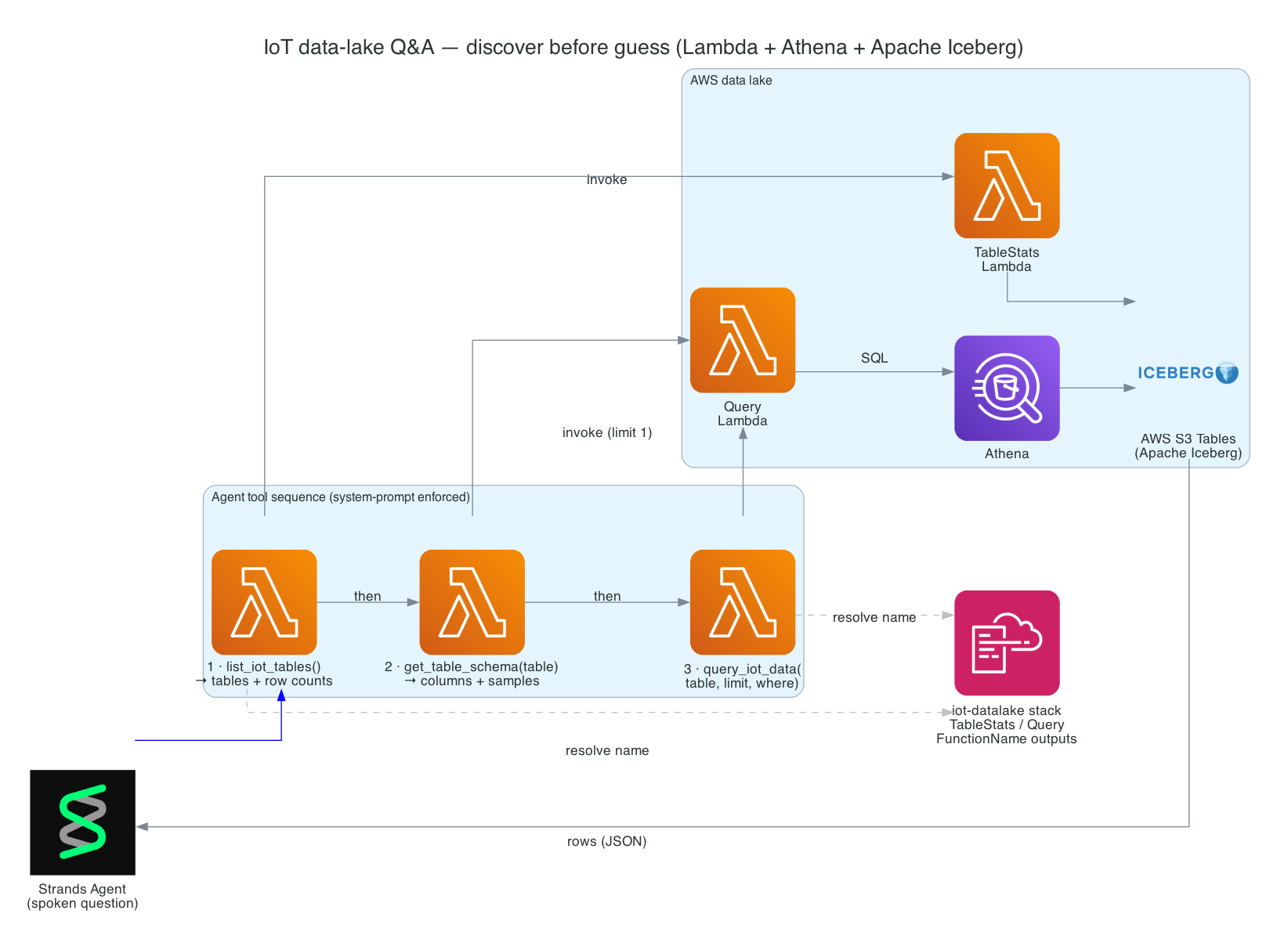
This is Part 6 of the series. So far the robot can move, see, and run the full per-wake loop. Now I want it to answer questions about real data — "Hey Reachy, has the kitchen water sensor tripped today?" — by querying an AWS data lake of IoT sensor readings, and speaking the answer back in one sentence.
IoT sensor data lands in a data lake built on AWS S3 Tables (Apache Iceberg). The agent never touches the lake directly. It's given three Strands Agent tools that resolve and invoke Lambda functions; the Lambdas run Athena queries against the Iceberg tables and return rows as JSON. All three tools live in reachy_assistant.py and are part of the same twelve-tool agent from Part 5.
The important design choice is discover-before-guess. Table and column names are not hard-coded into the agent — they'd drift, and the LLM would hallucinate them. Instead the system prompt forces a fixed order: list the tables, inspect a table's schema, then query with the right columns. The agent learns the lake's shape at runtime before it ever writes a filter.
Goals
- Let the agent answer natural-language questions about IoT sensor data in an AWS data lake (S3 Tables / Apache Iceberg)
- Keep the agent off the lake directly — go through three tools that invoke Lambda → Athena
- Enforce a discover-before-guess flow (
list_iot_tables→get_table_schema→query_iot_data) so the agent never invents a table or column - Resolve Lambda function names from CloudFormation stack outputs, not hard-coded ARNs
- Handle the data model honestly — every column value is a string, so
WHEREclauses must quote their values - Speak the result as one short sentence, never a JSON or row dump
The Overall System
A data-lake question is a three-step tool walk on top of the per-wake agent. Each tool resolves a Lambda function name from the iot-datalake CloudFormation stack, invokes the Lambda, and the Lambda runs an Athena query against the Iceberg tables. The rows come back as JSON, and the agent distils them into one spoken sentence.
System Components:
- Three tools in
reachy_assistant.py—list_iot_tables,get_table_schema,query_iot_data _get_lambda_name— resolves a function name from the CloudFormation stack outputs_invoke_lambda— shells out toaws lambda invokeand parses the JSON body- Two Lambdas — a TableStats function (counts) and a Query function (schema + rows)
- Athena + S3 Tables / Apache Iceberg — the SQL engine and the IoT sensor data lake it queries
Interactive Sequence Diagram
Step through "has the kitchen water sensor tripped today?" — discover the tables, inspect the schema, run the filtered query, and answer in one sentence.
Discover-Before-Guess: A Spoken Question to an Athena Query
The agent walks list -> schema -> query before answering in one sentence
Architecture
| Tool | Arguments | Returns | Backed by |
|---|---|---|---|
list_iot_tables() | none | table names, row counts, last ingestion times | TableStatsFunctionName |
get_table_schema(table) | table | each column name with a sample value | QueryFunctionName (limit=1) |
query_iot_data(table, limit, where) | table, limit (default 20), where | matching rows + row count | QueryFunctionName |
The system prompt forces the discovery order so the agent never guesses a schema:
Discover first, never guess: call list_iot_tables to see what tables exist, then
get_table_schema to see a table's columns, then query_iot_data with the right
table, limit, and an optional SQL WHERE clause. All column values are strings, so
quote them (e.g. motion_detected = 'true').
How it works
Resolving the Lambda names from CloudFormation
Rather than hard-coding ARNs, _get_lambda_name reads the stack outputs and returns the function name for a given output key:
def _get_lambda_name(output_key: str) -> str:
    result = subprocess.run(
        ["aws", "cloudformation", "describe-stacks",
         "--stack-name", DATALAKE_STACK, "--region", DATALAKE_REGION,
         "--query", "Stacks[0].Outputs", "--output", "json"],
        capture_output=True, text=True, timeout=15,
    )
    outputs = json.loads(result.stdout)
    return next(o["OutputValue"] for o in outputs if o["OutputKey"] == output_key)
TableStatsFunctionName backs list_iot_tables, and QueryFunctionName backs both get_table_schema and query_iot_data. get_table_schema reuses the Query Lambda with limit=1 and an empty where, then keeps just the column names and one sample value from the single returned row — a cheap way to teach the agent a table's shape.
Lambda → Athena → S3 Tables
_invoke_lambda shells out to aws lambda invoke, writes the response to a temp file, parses the JSON body, and raises if statusCode is not 200:
result = subprocess.run(
    ["aws", "lambda", "invoke",
     "--function-name", function_name,
     "--payload", json.dumps(payload),
     "--region", DATALAKE_REGION,
     "--cli-binary-format", "raw-in-base64-out",
     tmpfile],
    capture_output=True, text=True, timeout=30,
)
The Query Lambda turns the table/limit/where payload into an Athena SQL query against the Iceberg tables; the TableStats Lambda returns per-table counts. Both the stack name and region are env-configurable:
| Env var | Default |
|---|---|
DATALAKE_STACK | iot-datalake |
DATALAKE_REGION | us-east-1 |
One spoken sentence, never JSON
Each tool returns a JSON string, but the agent must not read it aloud. The system prompt closes with a hard rule:
After using tools, ALWAYS reply with ONE short, natural spoken sentence stating
the answer — never read raw JSON, table dumps, or column lists aloud.
So "has the kitchen water sensor tripped today?" walks the three tools, runs an Athena query like water_detected = 'true' over the Iceberg table, and comes back as a single spoken sentence rather than a row dump.
Technical Challenges & Solutions
Challenge 1: The agent hallucinating tables and columns
Problem: If table and column names were baked into the prompt, they'd go stale as the lake evolves, and an LLM asked to filter an unknown schema will confidently invent column names.
Solution: A discover-before-guess contract enforced by the system prompt and the tool design — list_iot_tables then get_table_schema then query_iot_data. The agent always learns the real tables and columns at runtime before composing a filter, so its queries reference columns that actually exist.
Challenge 2: Brittle, hard-coded function ARNs
Problem: Hard-coding Lambda ARNs into the assistant couples it to one deployment and breaks on every redeploy.
Solution: _get_lambda_name resolves function names from the iot-datalake CloudFormation stack outputs (TableStatsFunctionName, QueryFunctionName) at call time. Redeploy the stack and the assistant picks up the new functions with no code change.
Challenge 3: Everything is a string
Problem: In these Iceberg tables every column value is stored as a string. A WHERE water_detected = true (unquoted) would fail or match nothing.
Solution: The schema tool surfaces a sample value per column, and the system prompt explicitly tells the agent that all values are strings and must be single-quoted (water_detected = 'true'). The agent writes valid filters because it's told the data model, not left to assume it.
Challenge 4: A query flow that needs several round-trips
Problem: A single data-lake question is three tool calls plus reasoning — more model calls than a simple gesture or look.
Solution: The per-wake ModelCallBudget (default 12, from Part 5) is sized precisely so a full discover → schema → query → answer cycle fits inside it, while still bounding any runaway.
Getting Started
GitHub Repository: https://github.com/chiwaichan/chiwaichan-reachy-mini-strands-agent-jetson-thor
Prerequisites
- An AWS account with the
iot-datalakeCloudFormation stack deployed (S3 Tables / Iceberg, Athena, and the two Lambdas), and AWS credentials on the default profile - The assistant running via
./reachy_assistant.sh
Ask it
./reachy_assistant.sh
Then: "Hey Reachy, has the kitchen water sensor tripped today?" — the agent discovers the table, inspects its schema, queries with a WHERE clause, and speaks the answer. Override the stack or region with DATALAKE_STACK and DATALAKE_REGION.
What's Next
In Part 7 - AWS IoT Core MQTT Trigger, I add a second wake source alongside the voice word: an MQTT subscription that turns published messages into agent tasks — so another system can ask Reachy to look, move, or react, all through the same single-owner worker.
Summary
This post covered the data-lake Q&A capability:
- Three discover-before-guess tools —
list_iot_tables→get_table_schema→query_iot_data, so the agent never invents a table or column - Lambda → Athena → S3 Tables (Iceberg) — the agent stays off the lake; Lambdas run the SQL and return JSON rows
- CloudFormation-resolved function names —
_get_lambda_namereadsTableStatsFunctionName/QueryFunctionNamefrom theiot-datalakestack, so there are no hard-coded ARNs - String-typed data — every column value is a string, so
WHEREclauses are single-quoted (water_detected = 'true'), with the schema tool surfacing a sample value per column - One spoken sentence — the system prompt forbids reading JSON, dumps, or column lists aloud, so a sensor question comes back as a single natural answer