Reachy Mini x Strands Agent on Jetson Thor - Part 4: Local Vision with NVIDIA Cosmos Reason 2

This is Part 4 of the series. In Part 3 the robot learned to listen. Now I want to give it eyes: the ability to look through its camera and answer a question about the room — identify an object, read visible text, count things, or describe what a person is doing — entirely on-device.
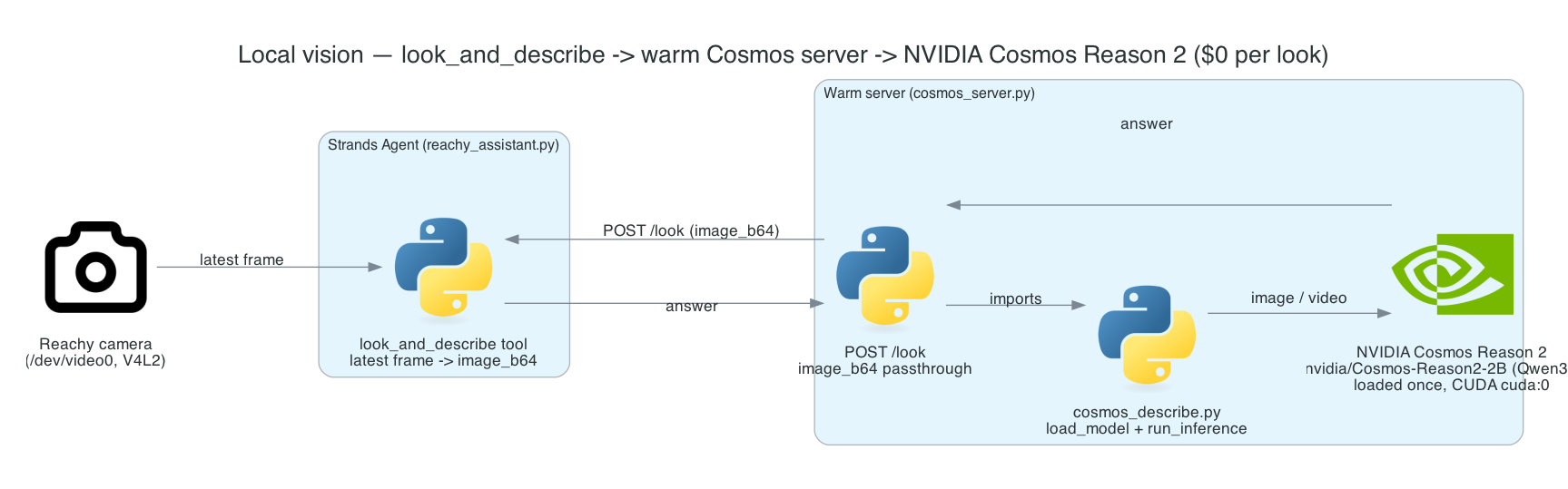
The robot sees through a look_and_describe tool that runs NVIDIA Cosmos Reason 2, a Qwen3-VL vision-language model, locally on the Jetson Thor GPU. There is no cloud call and no per-image API fee — vision is $0 per look. The same idle-is-free principle from the wake layer holds here: the GPU only does work when the agent actually calls the tool.
Two things make this practical on an edge device. First, a warm resident server keeps the ~5 GB model loaded so a look never pays a cold start. Second, the tool reuses the camera frame that face tracking already has in hand rather than opening the camera itself — so vision never fights the camera owner for the device.
Goals
- Give the agent a
look_and_describe(question)tool for scene description and visual Q&A - Run a real VLM — NVIDIA Cosmos Reason 2 (
nvidia/Cosmos-Reason2-2B, a Qwen3-VL model) — locally on the Thor GPU, $0 per look - Avoid cold starts by keeping the model resident in a warm HTTP server loaded once at startup
- Avoid camera contention by passing the shared latest frame as
image_b64, so the server never opens/dev/video0when a frame is supplied - Pin the model fully onto the GPU to dodge the Jetson unified-memory offload trap
- Degrade gracefully — fall back to a one-shot subprocess if the warm server is down, and self-capture if no camera owner is up
The Overall System
Vision is split across three files that share one code path. The look_and_describe tool (in reachy_assistant.py) grabs the shared frame and POSTs it to the warm cosmos_server.py, which runs inference through the shared cosmos_describe.py code on the Thor GPU and returns the answer. The heavy CUDA stack lives in its own .venv-cosmos.
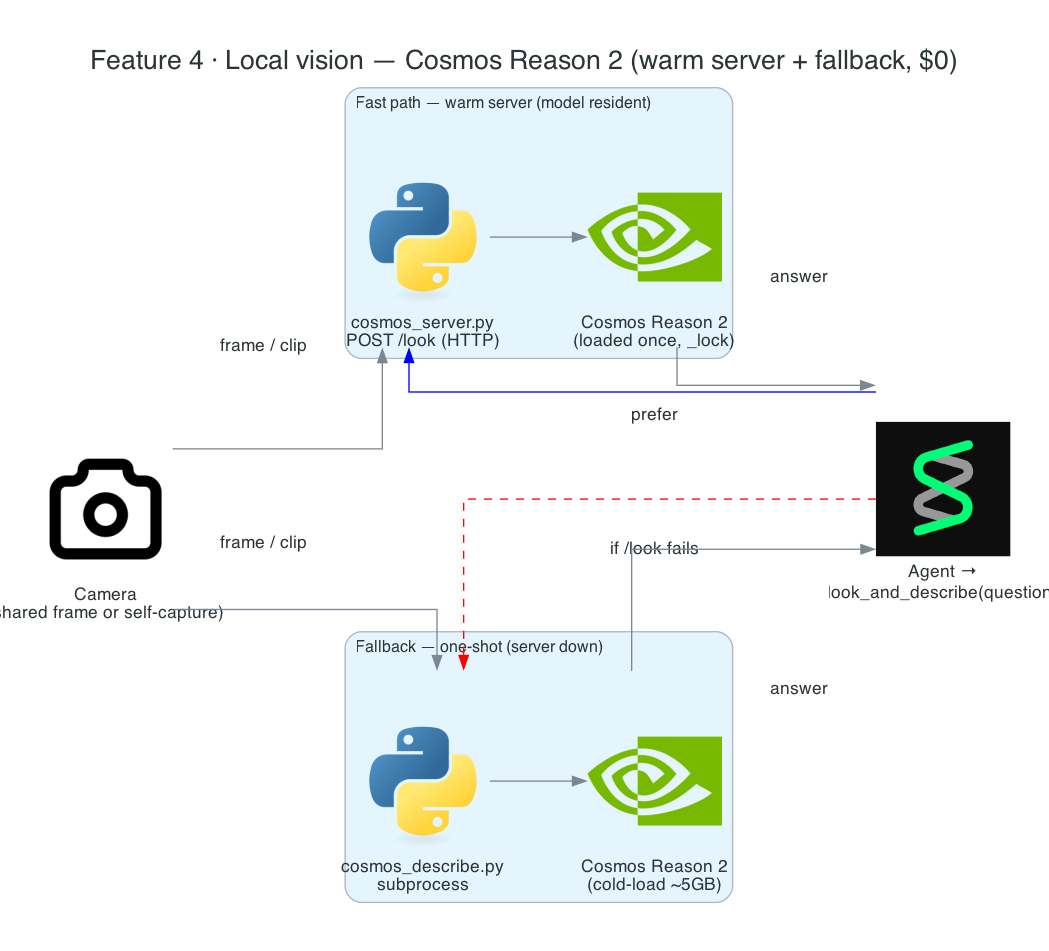
System Components:
look_and_describe(tool inreachy_assistant.py) — grabs the shared frame, POSTs to the server, returns one short answer to the agentcosmos_server.py— loads the VLM once and keeps it resident behind a stdlib-only localhost HTTP APIcosmos_describe.py— the shared model-load and inference code path (also usable as a standalone CLI)- Cosmos Reason 2 (
nvidia/Cosmos-Reason2-2B) — a Qwen3-VL VLM running on the Jetson Thor GPU .venv-cosmos— the dedicated CUDA PyTorch environment the server runs in
Interactive Sequence Diagram
Step through one look — from the agent calling the tool, to grabbing the shared frame, to GPU inference, to the answer coming back. Note the server never opens the camera when a frame is supplied.
A Local Look: look_and_describe to Cosmos Reason 2 and Back
The agent gets a scene answer from the GPU with no cloud call and no camera contention
Architecture
| Piece | File | Role |
|---|---|---|
| Tool | reachy_assistant.py (look_and_describe, _look_via_server, _latest_jpeg_b64) | The agent's vision entry point; frame grab + HTTP call + fallback |
| Warm server | cosmos_server.py | Loads the model once; serves /health and /look over localhost |
| Shared inference | cosmos_describe.py | load_model, run_inference, capture_frame/capture_clip, frame_question — one code path for CLI and server |
| CUDA env | .venv-cosmos (provisioned by cosmos_describe.sh) | Jetson cu130 PyTorch + transformers + qwen-vl-utils |
The server importing the CLI's functions is deliberate — the loading and inference logic exists once, so the warm path and the one-shot subprocess fallback can never drift apart:
from cosmos_describe import (
    capture_clip, capture_frame, frame_question, load_model, run_inference,
)
How it works
The look_and_describe tool
look_and_describe(question) is what the agent calls whenever a request needs the robot's eyes. Crucially, the tool does not open the camera itself. Face tracking already owns the camera in-process and keeps _latest_frame fresh, so the tool calls _latest_jpeg_b64() to grab the most recent frame, encodes it as base64 JPEG, and hands that to the warm server as image_b64. The server never touches /dev/video0 when a frame is supplied, so there is no V4L2 contention with head tracking or clip recording:
b64 = _latest_jpeg_b64()              # shared frame if the camera owner is up
if b64:
    answer = _look_via_server(q, image_b64=b64)
else:
    answer = _look_via_server(q)      # no owner -> server captures a clip itself
_look_via_server POSTs to COSMOS_URL/look (default http://127.0.0.1:8077) and returns the answer, or None if the server is down — in which case the tool falls back to a one-shot subprocess that cold-loads the model.
The warm Cosmos server
cosmos_server.py is started by reachy_assistant.sh and loads the VLM once, keeping it resident so each look avoids a ~5 GB cold start. It serves a stdlib-only localhost HTTP API:
| Endpoint | Behaviour |
|---|---|
GET /health | 200 {"ready": true} once the model is loaded, 503 before |
POST /look | runs a look and returns {"answer", "seconds", "mode"} |
The /look body is JSON: question, seconds, fps, max_new_tokens, plus the capture switches. When image_b64 is present, the server decodes it to a JPG and runs inference on that frame without opening the camera; otherwise image: true self-captures a single frame, and the default is a clip. A _lock serializes inference because the GPU and camera are single-tenant.
Cosmos Reason 2 on the Thor GPU
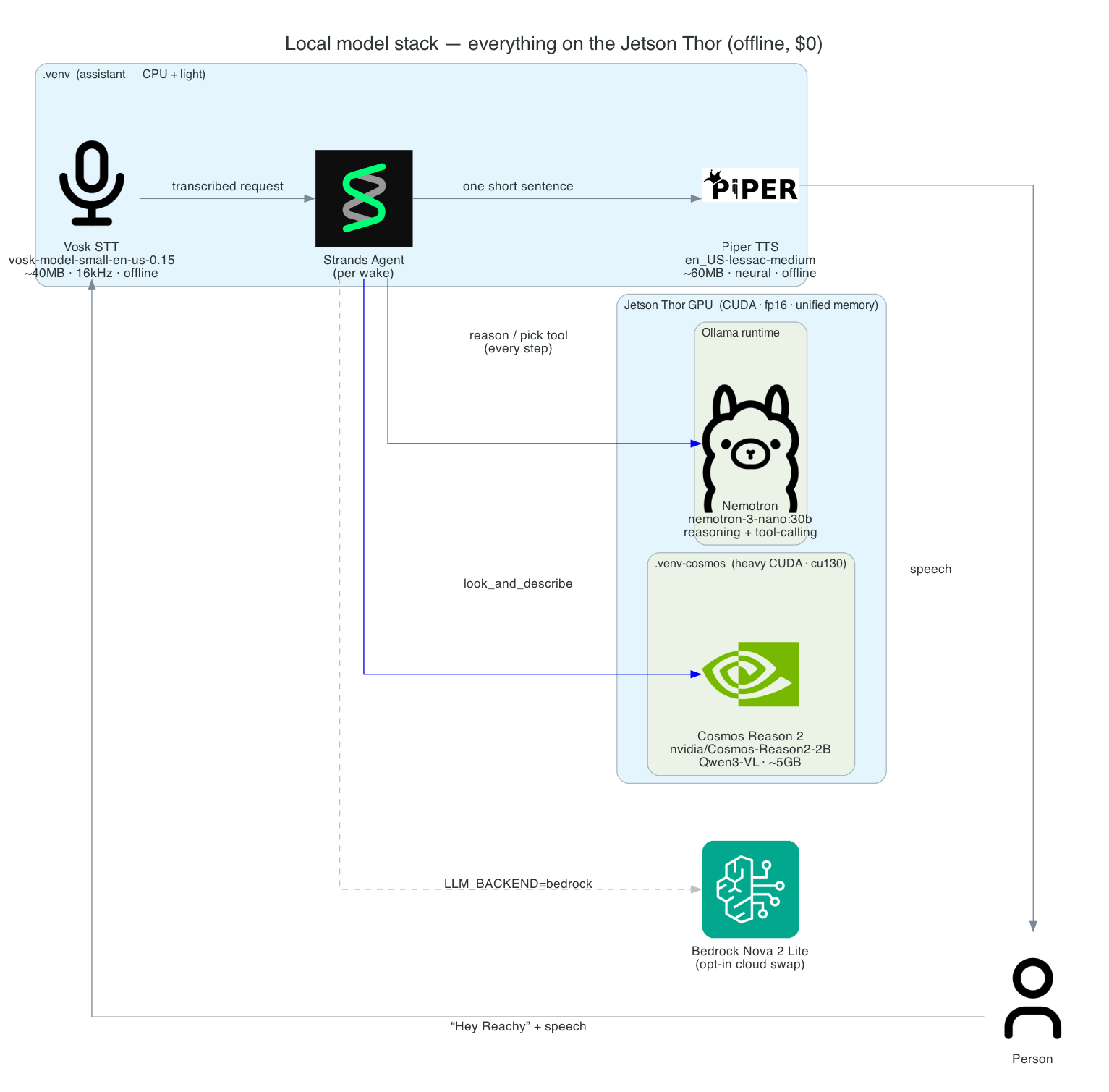
The shared code in cosmos_describe.py is what actually runs the model. load_model loads nvidia/Cosmos-Reason2-2B via Qwen3VLForConditionalGeneration and AutoProcessor from transformers, and raises if torch.cuda.is_available() is false — CUDA is required.
The weights are forced fully onto the GPU with device_map={"": "cuda:0"} and dtype=torch.float16. On Jetson's unified memory, device_map="auto" wrongly offloads parameters to the CPU (the meta device), which is slow — so the device is pinned explicitly. run_inference builds a chat message from the supplied media plus a text prompt, generates with do_sample=False, and decodes only the newly generated tokens. Its media_type selects "image" (just the one uploaded frame) or "video" (a whole clip with its fps).
Cosmos Reason 2 emits <think>...</think> before its answer, so the reasoning is split off and the answer returned separately. frame_question reshapes a bare question like "what color is the mug?" into a scene-grounded prompt so it is answered specifically instead of triggering a generic description; an empty question falls back to the default describe prompt.
The CUDA venv
.venv-cosmos is the heavy CUDA stack the server runs in. It is provisioned once by cosmos_describe.sh, which installs CUDA PyTorch (Jetson cu130, torch==2.11.0) plus transformers, qwen-vl-utils, and opencv-python. reachy_assistant.sh checks for it and refuses to start if it is missing, so run this bootstrap once before the first run. Keeping it separate from the lighter assistant venv (.venv) means the SDK/Vosk/Strands/Piper deps and the multi-gigabyte CUDA stack don't have to coexist.
Technical Challenges & Solutions
Challenge 1: A ~5 GB cold start per look
Problem: Cosmos Reason 2 is several gigabytes. Loading it from scratch on every look_and_describe would make each glance take many seconds — unusable for an interactive robot.
Solution: cosmos_server.py loads the model once at startup and keeps it resident behind a localhost HTTP API. Each look is a cheap POST to an already-warm model. reachy_assistant.sh waits on GET /health before serving, and a one-shot subprocess remains as a fallback only when the server is down.
Challenge 2: Vision fighting the camera owner
Problem: /dev/video0 is a single-opener V4L2 device. Face tracking already owns it. If the vision server also opened the camera, the two would collide and frames would stall.
Solution: The tool passes the already-captured shared frame as image_b64, and the server runs inference on that without opening the camera. Head tracking, clip recording, and vision all read from the one camera owner — no contention. Only when no owner is up does the server self-capture.
Challenge 3: The Jetson unified-memory offload trap
Problem: On the Thor's unified memory, transformers' convenient device_map="auto" mis-detects the layout and offloads parameters to the CPU/meta device, making inference crawl.
Solution: Pin the whole model to the GPU explicitly with device_map={"": "cuda:0"} and dtype=torch.float16. The weights stay on the GPU where they belong, and inference runs at full speed.
Challenge 4: Reasoning tokens leaking into the answer
Problem: Cosmos Reason 2 is a reasoning model — it emits a <think>...</think> block before the actual answer. Spoken verbatim, that would make the robot read its own internal monologue aloud.
Solution: The inference code splits the <think> block off and returns only the answer, and frame_question grounds a bare question into the scene so the model responds specifically rather than rambling a generic description.
Getting Started
GitHub Repository: https://github.com/chiwaichan/chiwaichan-reachy-mini-strands-agent-jetson-thor
Prerequisites
- An NVIDIA Jetson Thor (or another CUDA box) —
cosmos_describe.pyaborts if CUDA isn't available - The
.venv-cosmosCUDA environment provisioned once viacosmos_describe.sh
Try vision on its own, or via the assistant
# standalone: capture a clip and run Cosmos locally
./cosmos_describe.sh --seconds 5 --question "What is the person doing?" --show-thinking

# or the full assistant — starts (or reuses) the warm Cosmos server, waits on /health
./reachy_assistant.sh
With the assistant running, say "Hey Reachy" and ask it to look — for example "what's on the desk?" — and the agent calls look_and_describe, which runs Cosmos Reason 2 locally on the Thor GPU.
What's Next
In Part 5 - The Voice Assistant Loop, I tie the pieces together: "Hey Reachy" → transcribe → a fresh per-wake Strands Agent that picks a tool (vision, motion, or more) → speak. This is the centerpiece that turns the wake layer and the vision tool into a working assistant.
Summary
This post covered the robot's local vision — eyes that cost nothing per look:
look_and_describetool — the agent's vision entry point for scene description and visual Q&A, answered in one short sentence- NVIDIA Cosmos Reason 2 (
nvidia/Cosmos-Reason2-2B, Qwen3-VL) running locally on the Thor GPU, $0 per look, no cloud - Warm resident server —
cosmos_server.pyloads the ~5 GB model once and serves/healthand/look, so no look pays a cold start - Shared-frame design — the tool passes the camera owner's latest frame as
image_b64, so the server never opens the camera and there's no V4L2 contention - GPU pinning —
device_map={"": "cuda:0"}+ fp16 dodges the Jetson unified-memory offload trap thatdevice_map="auto"falls into - Graceful degradation — one-shot subprocess fallback when the server is down, self-capture when no camera owner is up, and
<think>reasoning split off before the answer is spoken