Reachy Mini x Strands Agent on Jetson Thor - Part 8: 80 Emotion Moves, by Sentiment and Voice Prefix

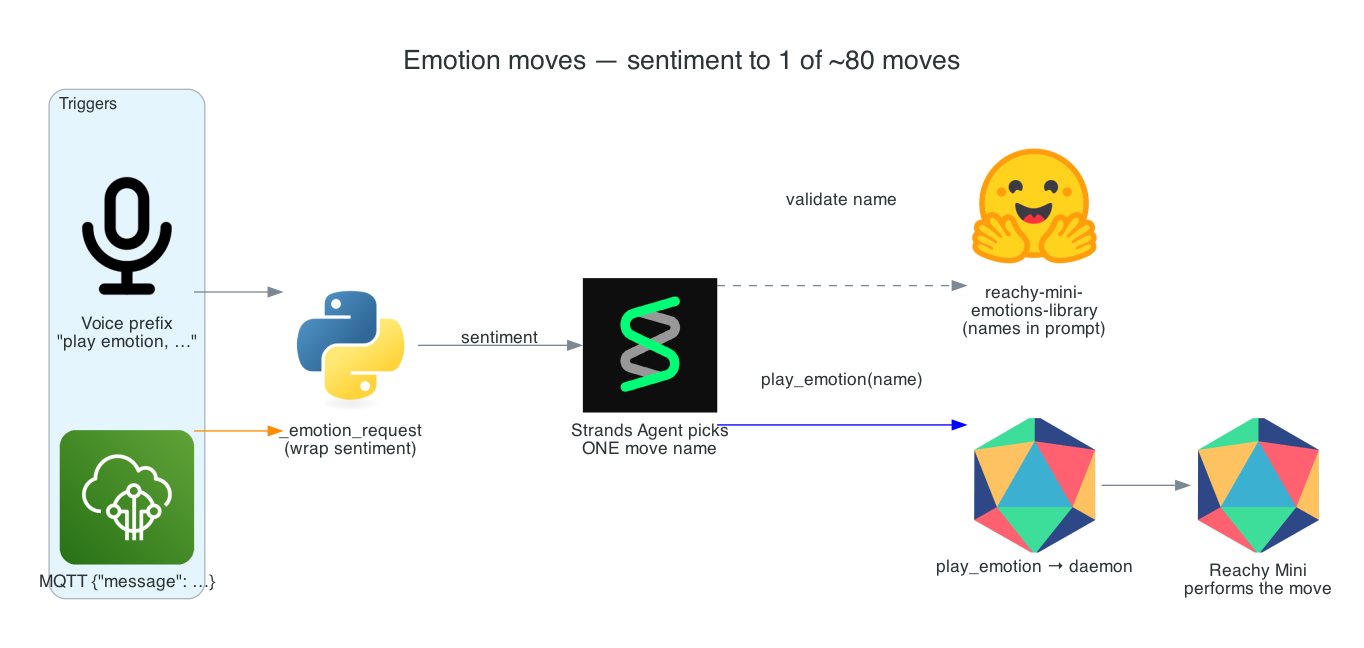
This is Part 8 of the series. The robot can move with primitive gestures, but those are deliberate, literal motions. For expression — reacting to good news, bad news, a greeting, a joke — I want something richer: a library of ~80 pre-choreographed emotion moves that the agent picks from to match the mood.
The moves themselves ship with the Reachy Mini Python SDK as a recorded-move library. The interesting part is how the agent chooses one. Rather than make it run a discovery call first, the valid move names are injected straight into the system prompt for the wake, so the agent picks a real, validated move name in a single shot — and play_emotion still validates the choice as a safety net.
Two triggers funnel into the same place: a spoken "play emotion, ..." prefix and an MQTT message's sentiment. Both wrap the sentence into one instruction — read its sentiment, then play the single best-matching move — so voice and MQTT behave identically.
Goals
- Give the agent ~80 pre-choreographed emotion moves from the Reachy Mini SDK's recorded-move library
- Let it pick one move matched to the sentiment of a request or message (praise →
success1, bad news →sad1, greeting →welcoming1) - Avoid a discovery round-trip by injecting the valid move names into the system prompt
- Validate the chosen name against the real list, returning the valid set to retry on a miss
- Support two triggers — a spoken
"play emotion"prefix and an MQTTmessagefield — through one shared path
The Overall System
The moves load once at startup; their names go into the prompt; a trigger's sentiment is wrapped into an instruction; the agent picks a move; and play_emotion validates and plays it.
System Components:
- Recorded-move library —
pollen-robotics/reachy-mini-emotions-library, loaded once intoEMOTION_NAMES list_emotion_moves/play_emotion— the two Strands Agent tools wrapping the library- Prompt injection —
handle_wakeappends the valid names so the agent picks one in a single shot _emotion_request— wraps a sentiment sentence into a play-one-move instruction- Routers —
_route_voice_request(the"play emotion"prefix) and the MQTTmessagefield
Interactive Sequence Diagram
Step through "great job team, we hit the target!" — wrapped as a sentiment, matched to success1, validated, and played.
Sentiment to Move: Picking One Validated Emotion
Valid move names are injected into the prompt, so the agent picks one in a single shot
Architecture
| Tool | Purpose |
|---|---|
list_emotion_moves() | Returns the comma-separated list of available move names |
play_emotion(name) | Validates name against EMOTION_NAMES, then plays it via mini.play_move(...); an invalid name returns the valid list to retry |
How it works
The recorded-move library
The pre-choreographed moves come from the Reachy Mini Python SDK recorded-move library. _load_emotions() loads it once and caches it, reading the names into EMOTION_NAMES:
from reachy_mini.motion.recorded_move import RecordedMoves
_emotions = RecordedMoves("pollen-robotics/reachy-mini-emotions-library")
EMOTION_NAMES = sorted(_emotions.list_moves())
The library is warmed at startup so the names are ready before the first wake; the log line [emotions] loaded {len(EMOTION_NAMES)} pre-choreographed moves. reports the count (~80). Names include success1, proud1, sad1, welcoming1, laughing1, curious1.
Injecting move names into the system prompt
Rather than make the agent call list_emotion_moves first, handle_wake appends the cached names to the system prompt for that wake, so the agent picks a valid move in a single shot with no discovery round-trip:
sys_prompt = SYSTEM_PROMPT
if EMOTION_NAMES:
    sys_prompt += "\n\nValid play_emotion move names: " + ", ".join(EMOTION_NAMES) + "."
play_emotion still validates the chosen name. If loading the library failed at startup, the injection is skipped and the agent falls back to the list_emotion_moves tool.
Two triggers: voice prefix and MQTT message
Both triggers funnel through _emotion_request(sentiment), which wraps a sentence into an instruction telling the agent to read its sentiment and call play_emotion with the single best-matching move name.
The spoken trigger is EMOTION_PREFIX (default "play emotion", env-overridable). _route_voice_request checks whether the transcription starts with the prefix; if so it strips the prefix and routes the rest as a sentiment, otherwise the request passes through unchanged so the voice path stays generic:
if EMOTION_PREFIX and stripped.lower().startswith(EMOTION_PREFIX):
    sentiment = stripped[len(EMOTION_PREFIX):].lstrip(" ,.:;-").strip()
    return _emotion_request(sentiment or stripped)
return text
The MQTT trigger is an AWS IoT Core payload with a message field. When a payload carries a non-empty "message", the handler routes its text through the same _emotion_request, so voice and MQTT behave identically:
if str(payload.get("message", "")).strip():
    return _emotion_request(str(payload["message"]).strip())
Technical Challenges & Solutions
Challenge 1: Picking a real move without a discovery call
Problem: The agent can only call play_emotion with a name that actually exists. Making it call list_emotion_moves first on every emotional reaction adds a model round-trip and latency.
Solution: Inject the cached EMOTION_NAMES directly into the system prompt for the wake. The agent sees the full valid set up front and picks one in a single shot — no discovery call — while play_emotion still validates as a backstop.
Challenge 2: A hallucinated or misspelled move name
Problem: Even with names in the prompt, an LLM might invent or misspell a move, which would fail to play.
Solution: play_emotion validates the chosen name against EMOTION_NAMES. An invalid name doesn't crash — it returns the valid list, so the agent can immediately retry with a correct one.
Challenge 3: One path for two triggers
Problem: Voice and MQTT arrive in different shapes (a prefixed transcription vs. a JSON message field), but should produce the same expressive behaviour.
Solution: Both normalise to a sentiment sentence and go through the single _emotion_request wrapper, so the agent receives an identical instruction regardless of source — voice and MQTT are guaranteed to behave the same.
Getting Started
GitHub Repository: https://github.com/chiwaichan/chiwaichan-reachy-mini-strands-agent-jetson-thor
Trigger an emotion
# MQTT: the agent reads the sentiment and plays a matching move
./send_mqtt.sh '{"message":"great job team, we hit the target!"}'   # -> success1
./send_mqtt.sh '{"message":"unfortunately the build failed again"}' # -> sad1

# Voice: start the assistant, say the wake word, then the prefix
./reachy_assistant.sh
#   "Hey Reachy ... play emotion, I am so happy"
Praise maps to success1/proud1, bad news to sad1, a greeting to welcoming1, a joke to laughing1 — the agent reads the mood and plays one matching move.
What's Next
In Part 9 - Idle Presence: Humans vs. Cats, the robot starts noticing who's around while it rests — periodically asking Cosmos who it sees and routing the observation through species-specific tools for people and cats, all fully local and $0.
Summary
This post covered the emotion-move layer:
- ~80 pre-choreographed moves from the Reachy Mini SDK recorded-move library (
pollen-robotics/reachy-mini-emotions-library), loaded once intoEMOTION_NAMES - Sentiment matching — the agent picks one move to fit the mood (praise →
success1, bad news →sad1, greeting →welcoming1) - Prompt injection — the valid move names are appended to the system prompt, so the agent picks one in a single shot with no discovery round-trip
- Validation —
play_emotionchecks the name against the real list and returns the valid set on a miss - Two triggers, one path — a spoken
"play emotion"prefix and an MQTTmessagefield both normalise through_emotion_request, so voice and MQTT behave identically