Reachy Mini x Strands Agent on Jetson Thor - Part 2: Bringing the Robot to Life — Hardware Bring-Up & Self-Test

This is Part 2 of the series building a local-first voice & vision robot on an NVIDIA Jetson Thor. In Part 1 I covered the motion foundation — a Strands Agent given motion tools that drive the robot. But all of that assumes one thing: that the host can actually reach the robot, and that the hardware underneath works. This post is about earning that assumption.
Two things have to be true before any AI runs. First, bring-up: the host needs USB permissions, a media plugin, and a running daemon so the Reachy Mini Python SDK can connect. Second, proof: I want to confirm every physical subsystem — the 6-DOF head, body rotation, antennas, camera, the XVF3800 microphone array, and the speaker — actually works, independently of any agent or cloud, so that when something misbehaves later I know it isn't the hardware.
The key idea is that the self-test never trusts a command. Sending goto_target(pitch=20°) and getting no error back doesn't prove the head moved. So for every subsystem the test commands an action and then confirms it from the strongest signal available — an encoder read-back compared against the target, a joint-position delta, a real camera frame with non-trivial content, a microphone RMS level cross-checked against the XVF3800's own per-mic energy register. Each subsystem gets a PASS / FAIL / SKIP verdict, and the run exits non-zero if anything failed. No LLM is involved.
Goals
- Make the host able to reach the robot with a one-time setup: USB udev permissions, the GStreamer
webrtcsinkplugin, and a runningreachy-mini-daemon - Connect to the daemon through the Reachy Mini Python SDK (
ReachyMini,connection_mode="localhost_only") - Provide a read-only sanity check (
verify_robot.py) that proves the SDK ↔ daemon ↔ robot chain without moving a single motor - Provide a full self-test (
hardware_check.py) that exercises every hardware feature and confirms each one from a real read-back, not just a missing error - Give each subsystem a PASS / FAIL / SKIP verdict and exit non-zero on any failure, so the test is usable in a bring-up checklist
- Correctly attribute a dead microphone to hardware (the flex/FPC cable) vs. the SDK capture path, using two independent signals
- Document the silent-mic ribbon-cable gotcha so it isn't mistaken for a software bug
The Overall System
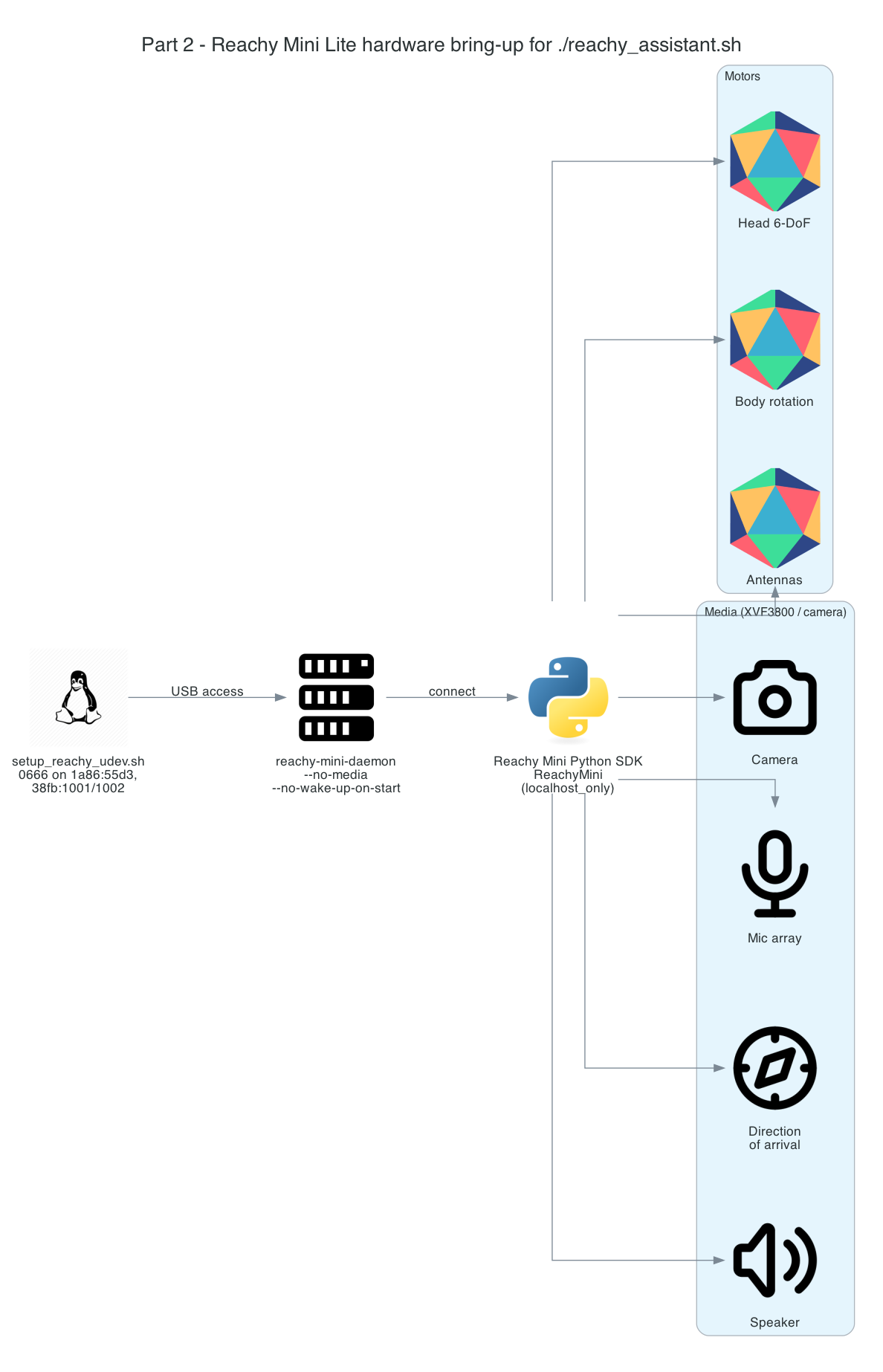
Bring-up is a short chain, and the self-test rides on top of it. One-time udev rules grant USB access; the daemon owns the USB link to the robot and (for the self-test) the camera/mic/speaker over WebRTC; the Reachy Mini Python SDK connects to the daemon over localhost; and on top of that, two pure-SDK harnesses — a read-only verify_robot.py and the full hardware_check.py — exercise the robot and record verdicts.
System Components:
setup_reachy_udev.sh— writes/etc/udev/rules.d/99-reachy-mini.rulesgranting0666on the robot's USB interfaces so the daemon and libusb open them without root- GStreamer
webrtcsinkplugin — the Rust plugin the SDK's media path (camera/mic/speaker) is carried over; not in apt, built once into~/.local/gst-plugins-rs reachy-mini-daemon— owns the USB link to the motors and media hardware; the SDK talks to it over localhost- Reachy Mini Python SDK (
ReachyMini) — thelocalhost_onlyconnection every test and tool rides on verify_robot.py— read-only: proves the SDK round-trips to the motors without moving anythinghardware_check.py— the full self-test: commands every subsystem, confirms it from a read-back, prints a PASS/FAIL/SKIP table
Interactive Sequence Diagram
Step through one self-test run. The pattern repeats per subsystem: command, then read back the result, then record a verdict. The thresholds shown (err ≤ 7°, delta > 0.05 rad, std > 1.0, RMS > 5e-4) are taken verbatim from hardware_check.py; the measured values are representative sample readings.
Hardware Bring-Up & Self-Test: Command then Read-Back
Every subsystem is commanded, then confirmed from a real read-back before a verdict is recorded
Architecture
The bring-up path the assistant actually takes, and the harnesses layered on it:
| Layer | File | Moves motors? | What it proves |
|---|---|---|---|
| USB permissions | setup_reachy_udev.sh | — | The daemon/libusb can open the robot's USB nodes without root |
| Media plugin | gst-plugins-rs (webrtcsink) | — | The SDK media path (camera/mic/speaker) can start |
| Read-only sanity | verify_robot.py (verify_robot.sh) | No | SDK ↔ daemon ↔ robot chain round-trips; live joint feedback reads |
| Full self-test | hardware_check.py (test_hardware.sh) | Yes | Every subsystem works, confirmed from a read-back |
verify_robot.py connects with media_backend="no_media" and only reads state — ideal as the first thing to run, since it can't damage anything. hardware_check.py connects with media_backend="default" (so the camera/mic/speaker are live) and the robot physically moves.
How it works
USB permissions (udev)
The daemon and libusb open the robot's USB devices directly, and they must do so without root. On a fresh host those nodes come up root root, so the daemon's mic-array init fails with Errno 13 (permission denied) and the microphone is silent. The one-time fix is setup_reachy_udev.sh, run once with sudo:
sudo bash setup_reachy_udev.sh
It writes /etc/udev/rules.d/99-reachy-mini.rules granting MODE="0666" and GROUP="dialout" on each of the robot's USB interfaces:
| Vendor:Product | Device |
|---|---|
1a86:55d3 | motor serial control board (usb + tty) |
38fb:1001 | ReSpeaker / XVF3800 audio + mic array |
38fb:1002 | audio device (secondary interface) |
It then runs udevadm control --reload-rules, triggers the matching usb and tty subsystems, settles, and prints the resulting node permissions. The two 38fb audio rules are what fix the mic-array init Errno 13 and the silent microphone; the 1a86 rules cover the motor board. If a node still shows root root afterwards, unplug and replug the robot's USB so the rules re-apply.
GStreamer webrtcsink plugin
The SDK's media path (camera, mic, speaker) is carried over WebRTC, which needs the webrtcsink element from GStreamer's Rust plugins. It is not packaged in apt, so it is built once from gst-plugins-rs following Pollen's GStreamer install guide into ~/.local/gst-plugins-rs. The scripts export GST_PLUGIN_PATH to that directory so the plugin loads at runtime. test_hardware.sh fails fast and explains the fix if the plugin can't be loaded, rather than letting the media tests mysteriously fail later:
if ! gst-inspect-1.0 webrtcsink >/dev/null 2>&1; then
  err "webrtcsink GStreamer plugin not found (GST_PLUGIN_PATH=$GST_PLUGIN_PATH)."
  err "Build it per the README media setup, then re-run."
  exit 1
fi
Daemon and SDK connection
With USB permissions granted and the plugin on GST_PLUGIN_PATH, the harness starts a daemon and connects through the SDK. test_hardware.sh starts reachy-mini-daemon with media enabled, polls http://localhost:8000/docs until it answers, then waits for the camera IPC socket (/tmp/reachymini_camera_socket) to appear — that socket is the signal that the SDK will pick the local media backend rather than falling back. Only then does it run the self-test.
The SDK connects with connection_mode="localhost_only": it talks to the daemon over localhost, and the daemon owns the USB link to the robot's motors and media hardware. That connection is what every motion and sensor check rides on.
Read-only sanity check first
Before moving anything, verify_robot.py proves the chain end to end without touching a motor. It connects with media disabled and only reads: daemon/backend status, then live joint feedback round-tripped from the hardware.
mini = ReachyMini(media_backend="no_media", connection_mode="localhost_only")
with mini:
    status = mini.client.get_status()          # daemon bound to the robot?
    head_joints, antennas = mini.get_current_joint_positions()
    present_antennas = mini.get_present_antenna_joint_positions()
    head_pose = mini.get_current_head_pose()    # live feedback from the motors
If status reads but joint feedback fails, the script reports the likely cause — the control board is reachable but the motors are unpowered (connect wall power) or the backend isn't ready yet — and returns a distinct exit code. Nothing moves, so it's safe to run first on a fresh build.
The full self-test: command, then confirm
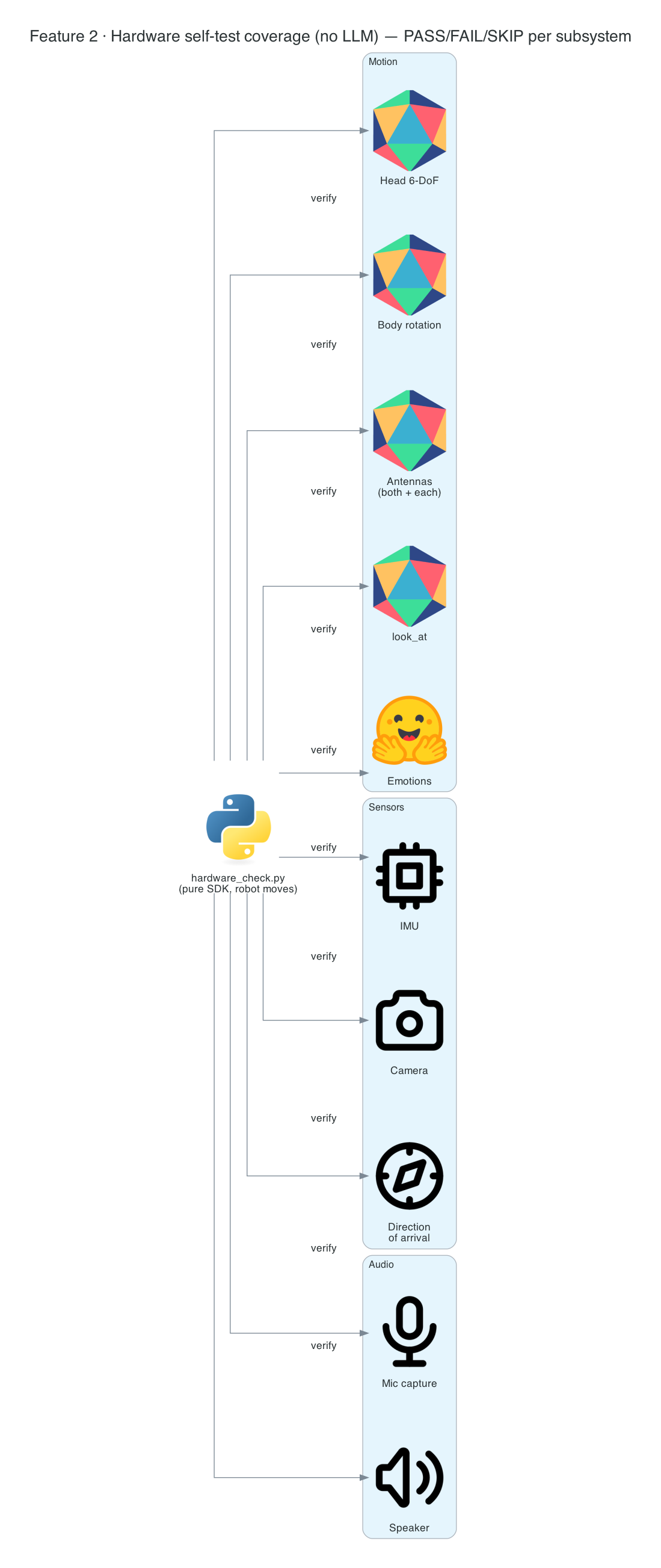
hardware_check.py is the centerpiece. It walks every subsystem and, critically, never trusts the command — it reads the strongest signal available and compares it against a threshold before recording a verdict. A small record(feature, status, detail) helper accumulates (feature, status, detail) tuples and prints a colored [PASS]/[FAIL]/[SKIP] line as it goes.
| Subsystem | How it's confirmed | PASS threshold |
|---|---|---|
| Head orientation (pitch/roll/yaw) | get_current_head_pose() read-back vs. target | error ≤ 7° |
| Head translation (x/y/z) | pose-matrix translation vs. target | within 6 mm |
| Body rotation | max joint-position delta after body_yaw=30° | delta > 0.05 rad |
| Antennas (both, then each) | get_present_antenna_joint_positions() vs. target | error ≤ 0.15 rad |
look_at_world | head yaw moved | |yaw| > 5° |
| Recorded emotion | plays a move from the HF library | plays without error (else SKIP) |
| IMU | wireless-only — absent on the Lite | reported as SKIP |
| Camera | a real frame with non-trivial content | std > 1.0 over pixels |
| Microphone | SDK capture RMS and XVF3800 chip energy | RMS > 5e-4 |
| Speaker | playback path runs (AEC blocks loopback) | no error (confirm by ear) |
The head check is representative of the whole pattern: command the pose (the call blocks until the motion is acknowledged), read the encoders back, and compare:
mini.goto_target(create_head_pose(degrees=True, pitch=20.0), duration=1.0)  # ack on return
meas = dict(zip(("roll", "pitch", "yaw"), rpy_deg(mini.get_current_head_pose())))
err = abs(meas["pitch"] - 20.0)
record("head pitch", "PASS" if err <= 7.0 else "FAIL",
       f"target=20° measured={meas['pitch']:.1f}° err={err:.1f}°")
At the end it prints a summary table, counts failures, returns the robot to neutral, and exits non-zero if anything failed — so the test slots straight into a bring-up checklist.
Telling a dead mic from a routing bug
The microphone check is the most carefully designed, because a silent mic has two very different causes — and the fix depends on which. So it reads two independent signals: the SDK capture RMS (what the software pipeline delivers) and the XVF3800's own AEC_SPENERGY_VALUES register read directly over USB (what the mics deliver to the DSP chip, independent of the SDK). The combination disambiguates the failure:
if mic_rms > 5e-4:
    record("microphone", "PASS", f"capture RMS={mic_rms:.5f}")
elif chip_energy > 1e-3:
    record("microphone", "FAIL", "chip hears mics but SDK capture silent (routing)")
else:
    record("microphone", "FAIL", "NO signal at the mics -> hardware: reseat the mic flex/FPC cable")
If the chip reports energy but the SDK capture is flat, it's a software/routing problem. If both are flat while you're making noise, the signal isn't even reaching the chip — it's hardware, the flex cable. That single distinction saves hours of debugging the wrong layer.
Why the speaker can't auto-verify
You might expect the speaker to be checked acoustically — play a tone, hear it on the mic. It can't be: the XVF3800 does acoustic echo cancellation and deliberately removes the speaker's own sound from the mic signal. So the test confirms the playback path runs without error (play_sound("dance1.wav")) and leaves the audible confirmation to your ear — and the table says so explicitly rather than pretending to a verdict it can't earn.
Technical Challenges & Solutions
Challenge 1: A command returning isn't proof of motion
Problem: goto_target(...) returning without an exception only means the command was accepted — not that the head actually reached the pose. A stuck servo, an unpowered motor, or a backend that silently dropped the command would all still "succeed."
Solution: Every motion check reads the result back from the hardware and compares it against the target within a tolerance — encoder read-back for head orientation (err ≤ 7°), a translation read for x/y/z (within 6 mm), a joint-position delta for body rotation (> 0.05 rad), and present-position read-back for antennas (≤ 0.15 rad). The verdict is grounded in measured state, not in the absence of an error.
Challenge 2: A silent mic — hardware or software?
Problem: When the microphone returns digital silence, the obvious SDK-level check (capture RMS) can't tell you why. Reseating a cable and re-flashing firmware are very different fixes from debugging the capture pipeline.
Solution: Read two independent signals — the SDK capture RMS and the XVF3800's per-mic AEC_SPENERGY_VALUES register over USB. Chip energy present but SDK silent ⇒ routing/software; both flat ⇒ no signal reaching the chip ⇒ hardware (the flex/FPC cable). The verdict points at the right layer.
Challenge 3: You can't acoustically verify the speaker
Problem: The natural speaker test — play a sound and detect it on the mic — is defeated by the XVF3800's echo cancellation, which strips the speaker's own output from the mic feed by design.
Solution: Confirm the playback path runs without error and mark the check as needing audible confirmation, stated plainly in the result line. The test never claims a PASS it can't actually measure.
Challenge 4: USB permissions and the Errno 13 silent mic
Problem: On a fresh host the robot's USB nodes come up root root, so the daemon's mic-array init fails with Errno 13 and the mic is silent — which looks identical to a hardware fault.
Solution: setup_reachy_udev.sh installs udev rules granting 0666 on all of the robot's USB interfaces (including both 38fb audio interfaces), reloads and triggers them. If a node still shows root root, a replug re-applies the rule. This is a permissions fix, distinct from the hardware ribbon-cable gotcha below.
The silent-microphone ribbon-cable gotcha
There is one hardware gotcha worth knowing before blaming software. If the mic returns digital silence — all-zero capture, frozen direction-of-arrival — while the XVF3800 control plane is otherwise healthy, the udev rules are not the cause. This is pollen-robotics/reachy_mini#845: most often the mic ribbon (flex/FPC) cable is installed upside-down. Reseat it with the blue side / "Main Board" text facing up. A secondary fix is flashing firmware v2.1.3, bundled in the SDK at reachy_mini/assets/firmware/. The standalone mic_listen.sh — a live mic level meter that needs no venv — is the quickest way to confirm the mic hears you after the fix.
Getting Started
GitHub Repository: https://github.com/chiwaichan/chiwaichan-reachy-mini-strands-agent-jetson-thor
Prerequisites
- Reachy Mini Lite assembled and connected over USB, with the motor power supply on
- A Linux/Jetson host with
sudo(for the one-time udev rules) and the GStreamerwebrtcsinkplugin built into~/.local/gst-plugins-rs
One-time setup, then the tests
# one time, on a fresh host — USB permissions
sudo bash setup_reachy_udev.sh

# read-only sanity check — nothing moves
./verify_robot.sh

# full self-test — the robot WILL move; prints a PASS/FAIL/SKIP table
./test_hardware.sh

# confirm the mic hears you (handy after the ribbon-cable fix)
./mic_listen.sh
verify_robot.sh and test_hardware.sh each bootstrap the venv, install the Reachy Mini SDK, ensure a daemon is running, and run their Python harness. Start with verify_robot.sh (safe, read-only); run test_hardware.sh once you want the full moving self-test.
What's Next
In Part 3 - Offline "Hey Reachy" Wake-Up with Vosk, I cover the lowest layer of the voice stack: the fully offline, zero-LLM wake-word trigger built on Vosk that listens for "Hey Reachy" before any agent spins up. With the hardware proven here, the robot is ready to start listening.
Summary
This post covered hardware bring-up and the pure-SDK self-test — the layer that earns the trust everything else depends on:
- One-time bring-up —
setup_reachy_udev.shgrants0666USB access (fixing theErrno 13silent mic), the GStreamerwebrtcsinkplugin carries the SDK media path, and the daemon +localhost_onlySDK connection is what every tool rides on - Read-only first —
verify_robot.pyround-trips the SDK ↔ daemon ↔ robot chain and reads live joint feedback without moving a motor, returning distinct codes for "unpowered" vs. "not ready" - Command, then confirm —
hardware_check.pynever trusts a command: it reads the strongest signal per subsystem (encoder read-back, joint delta, real camera frame, mic RMS) against thresholds taken from the code, and records a PASS / FAIL / SKIP verdict, exiting non-zero on any failure - Right-layer diagnosis — the mic check cross-checks SDK capture RMS against the XVF3800's own chip-energy register to separate a routing bug from a dead cable, and the speaker check is honest about what echo cancellation makes it impossible to auto-verify
- The ribbon-cable gotcha — a silent mic with a healthy control plane is usually the flex/FPC cable installed upside-down (issue #845), not a software bug