Strands Agents 00: Overview
· 13 min read

Draft placeholder. This post will accompany part 00 of my Strands Agents training series: what Strands is, the model-driven approach, and a map of the Strands harness, Strands Harness SDK, Strands Shell and Evals SDK, with a short tour of every topic the later decks cover.
Series: All decks
Tip: click into the slides and use the arrow keys to navigate, or hit the fullscreen button for the best experience.
Download the slides: PDF · PowerPoint
Agenda
- What Strands Agents is, and where it came from
- The model-driven approach and the agent loop
- The toolkit: Strands harness, Strands Harness SDK, Strands Shell, Evals SDK
- A tour of what you build with: models, tools, memory, context, control
- Running it: observability, security, deployment
- The series ahead, deck by deck
What Strands Agents is
What is Strands Agents?
- An open-source SDK for building and running AI agents in Python and TypeScript
- Takes a model-driven approach: the model plans, picks tools and reflects
- You define a prompt and a list of tools in code, then test locally and deploy
- Amazon Bedrock is the default; Anthropic, OpenAI, Google and Ollama also work
- Licensed under Apache 2.0, and built in the open on GitHub
"Like the two strands of DNA, Strands connects two core pieces of the agent together: the model and the tools."
A library, not a platform
- Strands runs inside your own process
- Creating an agent is constructing an object in Python or Node.js
- There is no hosted control plane, scheduler or database to stand up first
- The only service the agent reaches is the model provider
- An AWS account is only required if you keep the default provider
- Adding an agent to a FastAPI, Express or Next.js app is a dependency and a few lines
The smallest agent
from strands import Agent

agent = Agent()
agent("Explain the agent loop in one sentence.")
import { Agent } from '@strands-agents/sdk'

const agent = new Agent()
const result = await agent.invoke('Explain the agent loop in one sentence.')
console.log(result.lastMessage)
- The smallest agent is a model with the loop around it
The Strands toolkit at a glance
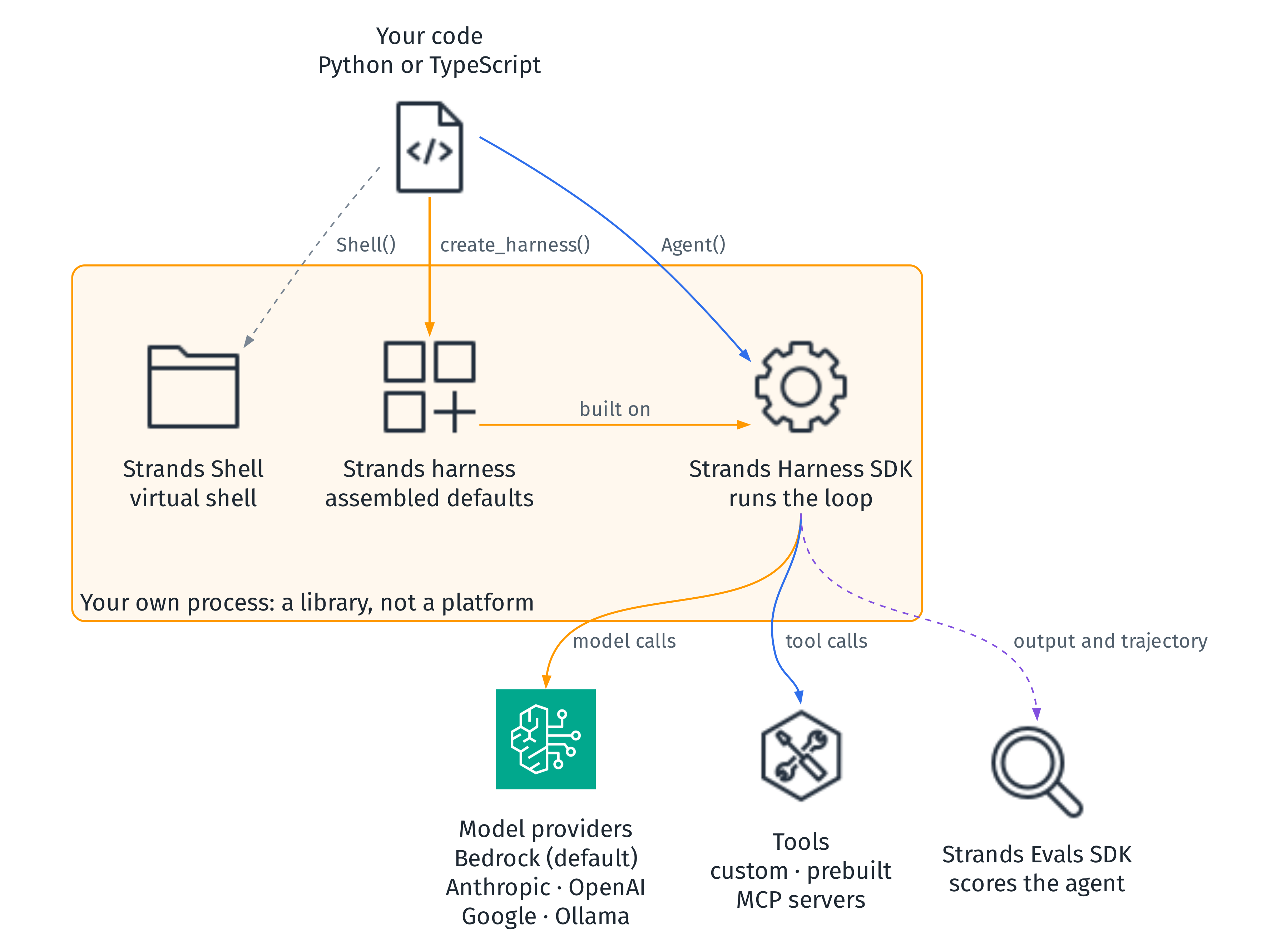
How Strands got here

The model-driven approach
Why model-driven?
- Earlier frameworks: orchestration logic, state machines, predefined workflows
- Those agents often broke on scenarios nobody anticipated during development
- Modern models reason, plan and select tools natively
- So Strands lets the model drive its own behaviour and adapt as it goes
- When an API call fails, the model reasons about alternatives instead of crashing
- Q Developer teams went from months to days and weeks to ship a new agent
An agent is three things
| Component | What you provide |
|---|---|
| Model | Any model with reasoning and tool use, from a supported provider |
| Tools | Python functions with @tool, prebuilt tools, or MCP servers |
| Prompt | The task, plus an optional system prompt for general behaviour |
- The agent uses the model to direct its own steps and to use tools
- It interacts with its model and tools in a loop until the task is complete
The agent loop
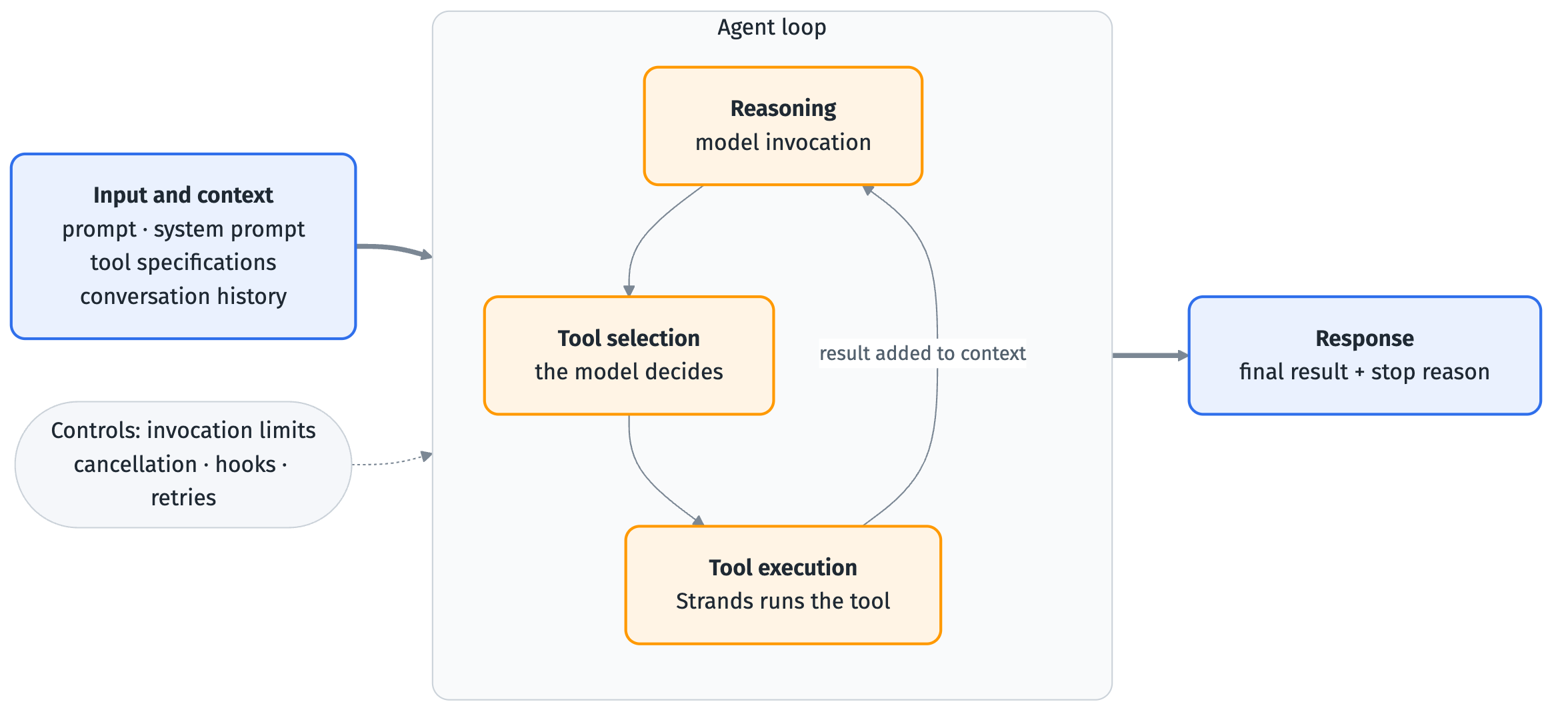
Guiding the model through context
- The model drives, but its behaviour is shaped by the context it receives
- System prompts set the role and goals, and describe what success looks like
- Tool specifications define capability boundaries and usage guidance
- Conversation history keeps continuity, and needs managing as it grows
- A shift from procedural programming to contextual programming
Instead of writing "if this, then that" logic, you craft the context that helps the model figure out the best approach.
Framework, or your own loop?
| Job a production agent needs | Strands | Your own loop |
|---|---|---|
| Limits, cancellation, stop reasons | Built-in | DIY |
| Tools, structured output, streaming | Built-in | DIY |
| MCP | Built-in client | DIY |
| Multi-agent | Graph, swarm, agents as tools | DIY |
| Memory, sessions, guardrails, interventions | Built-in | DIY |
| Model provider portability | Built-in (many) | Per provider |
| Tracing and observability | OpenTelemetry-native | DIY |
| Evaluation | Companion Evals SDK | DIY |
The toolkit: harness, SDK, Shell, Evals
Strands harness
# pip install strands-harness
from strands_harness import create_harness

agent = create_harness()
agent("Research the top three vector databases, compare pricing and limits, and write it up in comparison.md")
- A fully assembled, state-of-the-art agent harness in one import
- Benchmarked defaults for tools, context management, sessions, memory and hooks
- Opinionated but not restrictive: every default is overridable
- Returns a standard Strands
Agent, with no wrapper or hidden abstraction - TypeScript:
createHarnessfrom@strands-agents/harness
What the default harness does
- Runs on the model of your choice, with reasoning turned on
- Follows a tuned system prompt: explore first, then act, verify before finishing
- Has a shell, file tools (
read,write,edit) and web access - Manages its own context window and caches the reused parts of each request
- Keeps long-term memory across runs, and resumes a conversation from a session id
- Delegates subtasks to a built-in helper agent, and loads Agent Skills when present
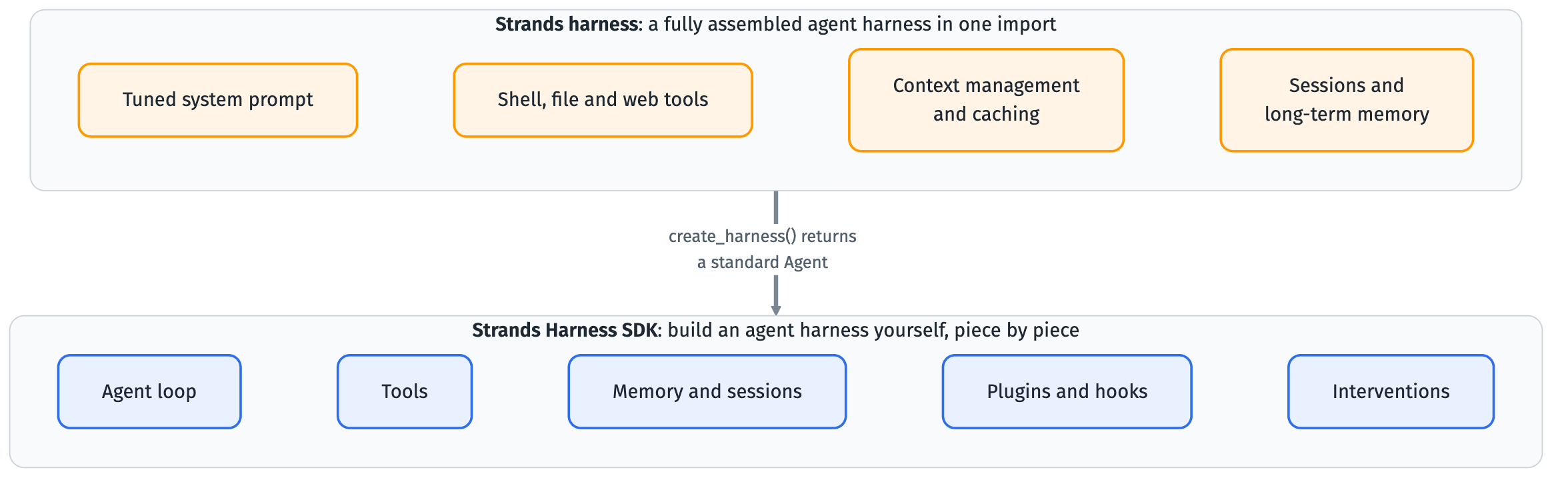
Strands harness or the Strands Harness SDK?
| If you want to… | Start with |
|---|---|
| Get a complete agent harness with tested defaults | Strands harness |
| Build the agent harness yourself, piece by piece | Strands Harness SDK |
| Start on Strands harness and drop down for more control later | Compose with the Strands Harness SDK |
Two starting points, and you can move between them without a rewrite.
One stack, two starting points
Strands Shell
- A Bourne-compatible shell that runs inside your own process
- Ships
grep,sed,jq,curl,findand more without callingforkorexec - It can reach only the host files, URLs and credentials you declare
- Runs from Python, Node.js or a built-in MCP server
| Docker | Cloud sandbox | Strands Shell | |
|---|---|---|---|
| Cold start | ~200ms | ~1s (network) | under 1ms |
| Isolation | Container namespace | MicroVM | In-process VFS |
| Network | iptables or sidecar | Platform policy | URL allowlist plus SSRF guard |
Strands Evals SDK
pip install strands-agents-evals

# One-off check: does the agent's answer contain "Paris"?
strands-evals run \
  --input "What is the capital of France?" \
  --expected-output "Paris" \
  --agent my_agent:build_agent
- Measure an agent before you ship it, and watch it after
- Evaluators score output and trajectory; detectors find failures and their root cause
- Red teaming probes for unsafe behaviour; simulators stand in for users and tools
- Evaluator groups: quality, safety, multimodal, agentic, skill, deterministic, custom
A tour of what you build with
Getting started and the agent loop
- Quickstarts for Python and TypeScript: install, pick a provider, run, add a tool
- The loop: invoke the model, run the tool it asks for, repeat until a final response
- Invocation limits cap the turns and tokens one call may use
- Cancellation stops a running agent mid-loop with
agent.cancel() - Stop reasons report why the loop ended, such as
cancelledorlimit_turns - Limit stop reasons leave history valid, so you can reinvoke with a higher budget
Model providers
from strands import Agent
from strands.models.anthropic import AnthropicModel

agent = Agent(model=AnthropicModel(
    client_args={"api_key": "<KEY>"}, model_id="claude-sonnet-5"))
print(agent("What can you help me build?"))
- The model is one object you hand to the agent; the rest of the code does not change
- First-party providers include Amazon Bedrock, Anthropic, OpenAI and Google
- Community packages add more, and a custom provider interface covers anything else
- Streaming, tool calling and structured output work on every first-party provider
- Prompt caching is the capability that varies most between providers
Tools
from strands import Agent, tool

@tool
def get_weather(city: str) -> str:
    """Get the current weather for a city."""
    return f"It's sunny in {city}."

agent = Agent(tools=[get_weather])
agent("What's the weather in Seattle?")
- You pass tools to an agent, and the agent decides when to call them
- Works with tools you write, prebuilt tools, and any MCP server
- Tools run with the permissions of the host process, so audit what each one does
Streaming and structured output
from pydantic import BaseModel, Field
from strands import Agent

class PersonInfo(BaseModel):
    name: str = Field(description="Name of the person")
    age: int = Field(description="Age of the person")

result = Agent()("John Smith is a 30 year-old software engineer", structured_output_model=PersonInfo)
person_info: PersonInfo = result.structured_output
- Streaming: text tokens, tool calls and lifecycle events as they occur
- Structured output: define a schema, pass it in, read a validated object back
Sessions and memory
- A session persists conversation history and agent state across restarts and requests
- Built-in persistence captures and restores it automatically through a session manager
- By default an agent starts every conversation from zero
MemoryManageradds long-term memory that persists across sessions- It does three jobs across memory stores: recall, injection and extraction
- Stores: a zero-setup test store, Amazon Bedrock Knowledge Bases, or your own
Context management
from strands import Agent

agent = Agent(context_manager="auto")
| Value | Behaviour |
|---|---|
"auto" | Background compression with tuned defaults. No model involvement. |
"agentic" | Model-driven: the model manages its own context. |
| Custom config | Full control over the strategy pipeline, targets and conditions. |
false | No context management. Overflow errors propagate directly. |
Hooks and plugins
- Hooks add logging, validation or custom logic at any point in the agent loop
- A hook event marks a point in the lifecycle; a callback runs when it fires
- Register one with
agent.add_hook(), for events such asBeforeToolCallEvent - Plugins change the typical behaviour of an agent by composing on its primitives
- Built-in plugins: Skills, Context Offloader, Context Injector and GoalLoop
- Or write your own plugin that registers hooks and tools and manages state
Interventions
- A composable control layer: authorization, guardrails, steering, content transformation
- Handlers return typed decisions:
proceed,deny,guide,confirm,transform - The framework applies them with ordered evaluation and short-circuiting
- Human in the loop: a person approves, edits or rejects a tool call
- Steering: context-aware guidance that appears when relevant
- Cedar authorization: Cedar policies evaluated before each tool call
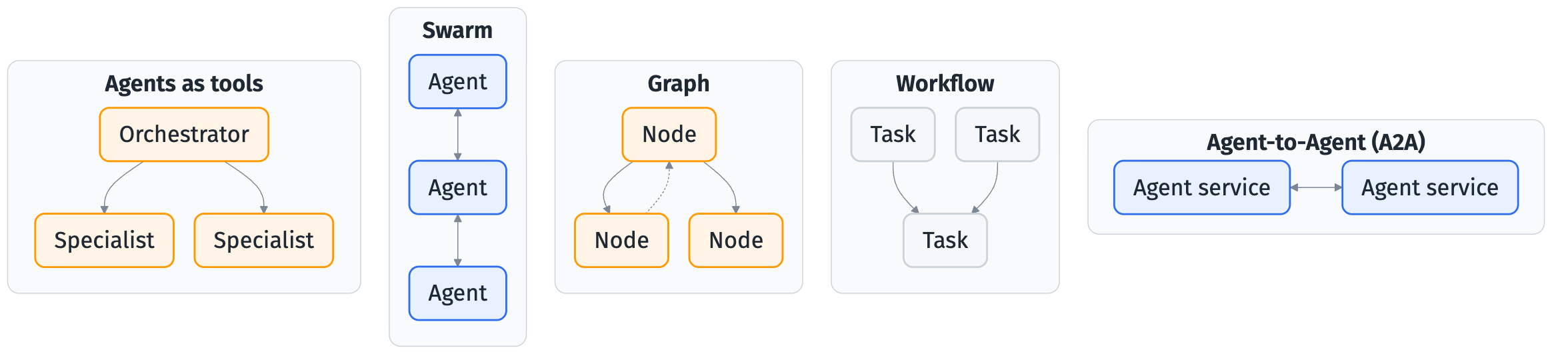
Multi-agent
from strands import Agent

weather_agent = Agent(
    name="weather_agent",
    description="Answers questions about the weather.",
    system_prompt="You are a weather specialist.",
)
orchestrator = Agent(
    system_prompt="Route weather questions to weather_agent; answer the rest yourself.",
    tools=[weather_agent],
)
orchestrator("What should I pack for Seattle this weekend?")
Five ways to compose agents
Voice
agent = BidiAgent(
    model=model,
    system_prompt="You are a helpful voice assistant. Keep responses concise and natural."
)
audio_io = AudioIO()

async def main():
    await agent.run(inputs=[audio_io.input()], outputs=[audio_io.output()])
BidiAgentlistens and talks in real time over a persistent connection- Three providers: Amazon Nova Sonic, OpenAI and Gemini Live
- Handles barge-ins and tool calls mid-conversation; Python SDK only
Running it in production
Observability
- All observability APIs are embedded directly in the SDK
- Three telemetry primitives: traces, metrics and logs
- A trace is one end-to-end request; its spans are model and tool invocations
- Model spans can carry the system prompt, parameters, messages and token usage
- Metrics include tool invocations, latency, agent loop count and token usage
- Strands uses OpenTelemetry to emit to any OTEL-compatible backend
Security and guardrails
bedrock_model = BedrockModel(
    guardrail_id="your-guardrail-id",         # Your Bedrock guardrail ID
    guardrail_version="1",                    # Guardrail version
    guardrail_trace="enabled",                # Enable trace info for debugging
)
agent = Agent(system_prompt="You are a helpful assistant.", model=bedrock_model)
- Guardrails screen what reaches the model and what it returns
- Content filtering, PII detection and redaction, and topic boundaries
- Configured per model provider; Amazon Bedrock guardrails integrate directly
- When a Bedrock guardrail triggers, the stop reason is
guardrail_intervened
Deployment targets
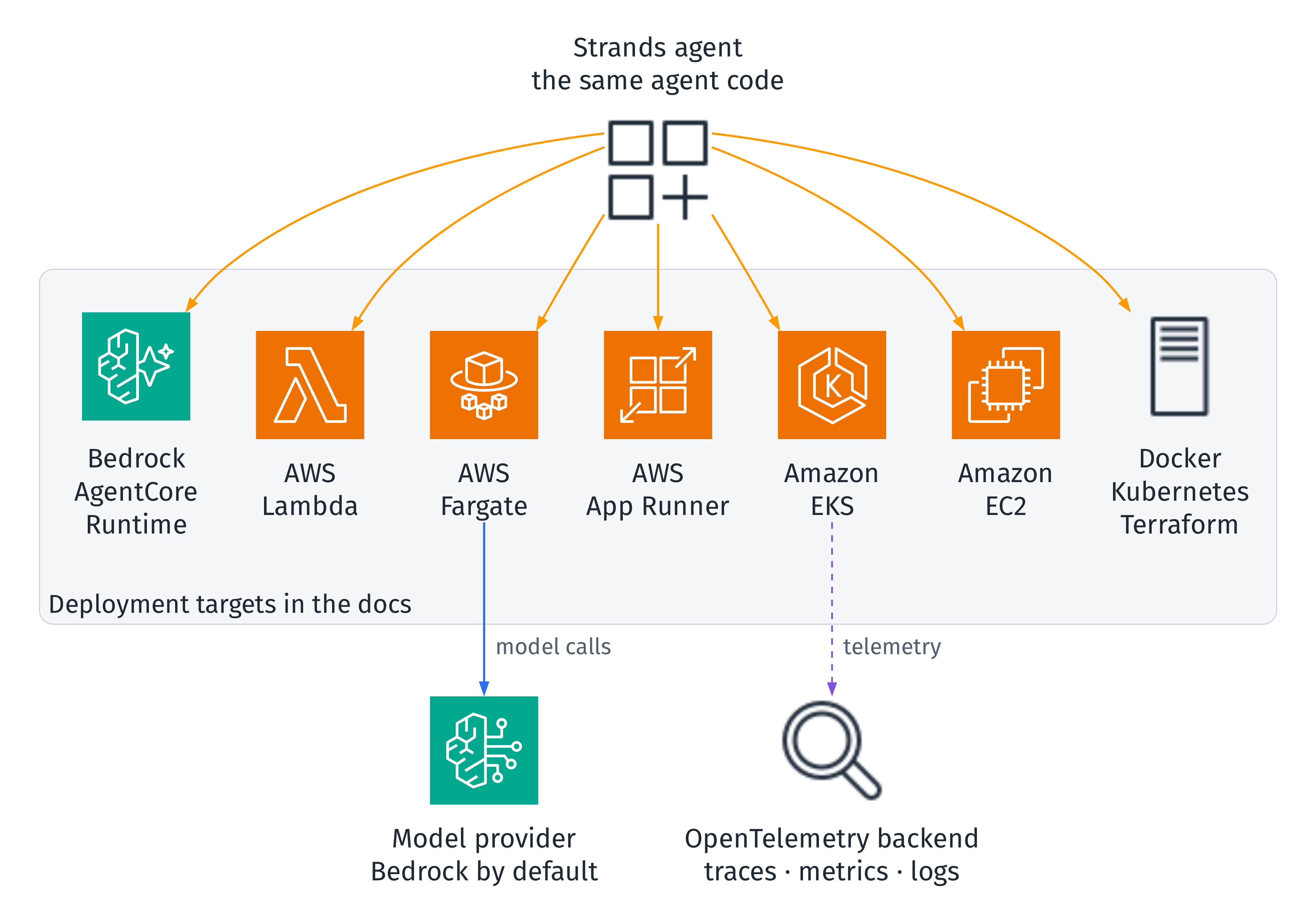
Python and TypeScript
| Feature | Python | TypeScript |
|---|---|---|
| Agents, streaming, structured output | ✅ | ✅ |
| Bedrock, OpenAI, Anthropic, Google, custom providers | ✅ | ✅ |
| Custom function tools, MCP | ✅ | ✅ |
| Vended tools (files, HTTP, notebooks, shell) | ✅ | ✅ |
| Hooks, sessions, steering, OpenTelemetry | ✅ | ✅ |
| Swarm, graph, workflow, agents as tools, A2A | ✅ | ✅ |
| Voice (bidirectional streaming) | ✅ | ❌ |
Versioning and Strands Labs
- The SDK follows semantic versioning:
MAJOR.MINOR.PATCH - Minor and patch upgrades should not need code changes
- Features in
strands.experimentalcan change between minor versions - MCP, A2A and OpenTelemetry GenAI conventions still evolve: pin a minor version
- Deprecated features warn first and are removed in the next major version
- Strands Labs is the experimental arm: robots, benchmark harnesses, AI Functions
The series
- 00 Overview · this deck
- 01 Getting Started · Python and TypeScript
- 02 Agent Loop · controls, state, retries
- 03 Model Providers · Bedrock, Ollama, caching
- 04 Tools · custom, MCP, vended, executors
- 05 Streaming and Structured Output
- 06 Sessions and Memory
- 07 Context Management
- 08 Hooks and Plugins · skills, goal loop
- 09 Interventions · human in the loop, Cedar
- 10 Multi-Agent · swarm, graph, workflow, A2A
- 11 Voice · bidirectional agents, barge-in
- 12 Harness and Shell · tools, sandboxes
- 13 Observability · metrics, traces, logs
- 14 Evals · evaluators, simulators, red teaming
- 15 Security and Guardrails
- 16 Deployment · AgentCore, Lambda, EKS
Key takeaways
- Strands is a library, not a platform: the agent is an object in your own process
- Model-driven: the model plans and picks tools, and you shape it through context
- An agent is a model, tools and a prompt, running in the agent loop
- Strands harness is the assembled start; the Harness SDK is the build-it-yourself one
- Strands Shell contains commands in-process; the Evals SDK measures the agent
- The same agent code runs across providers and deployment targets