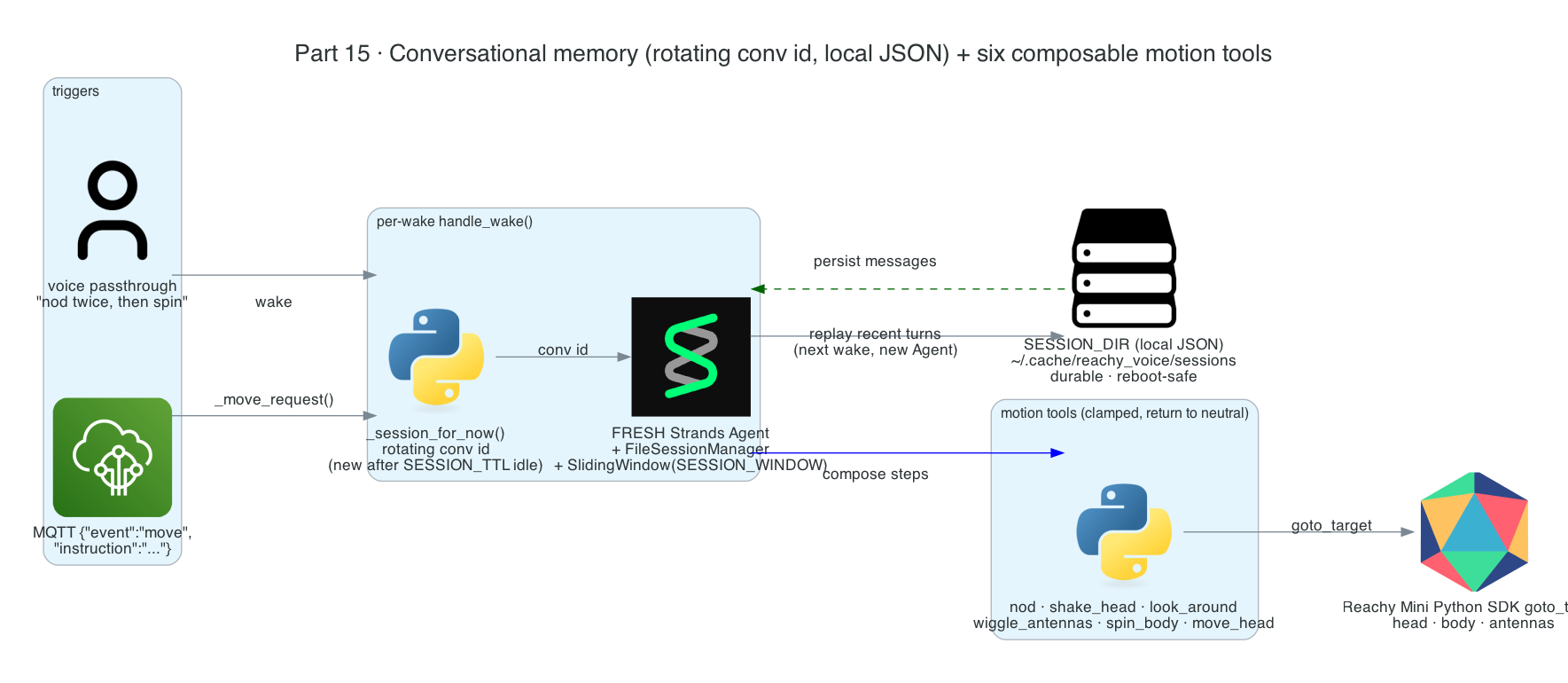
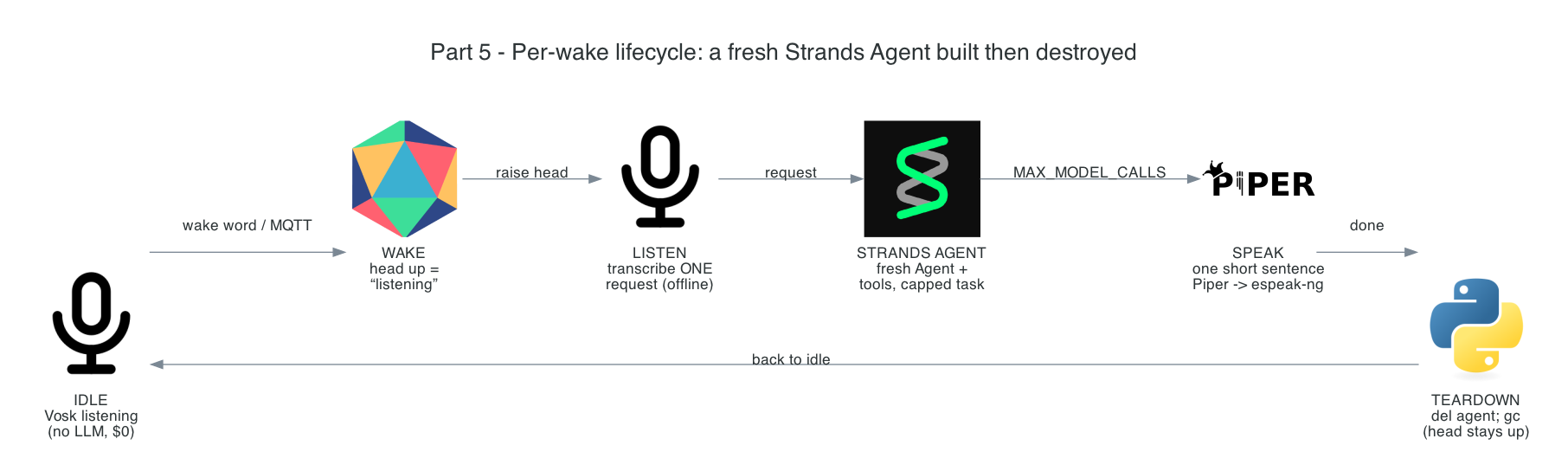
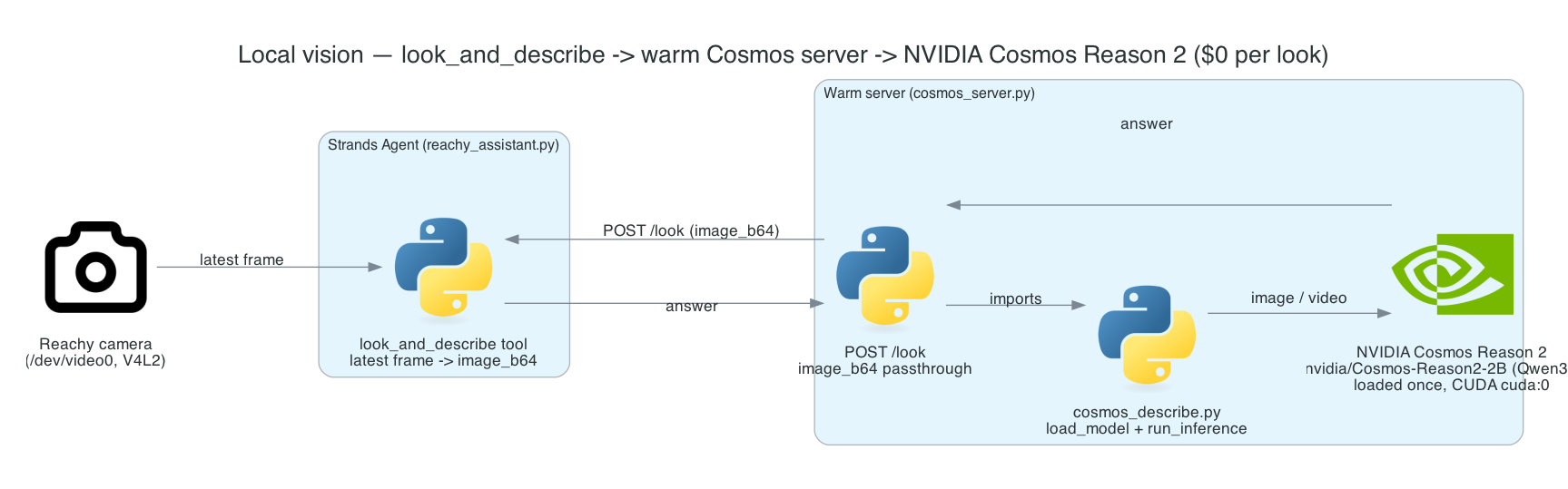
This is Part 15, the final post in the series. Throughout the build, every wake has created a brand-new agent and destroyed it — which keeps idle at $0 but means the robot forgets everything the instant it replies. This post fixes that without giving up the cost-minimal lifecycle: the robot gains conversational memory across wakes, so you can ask a follow-up — "…and what was the first thing I said?" — and the fresh per-wake agent recalls it. It also rounds out the agent's body with six composable motion tools it can chain into novel gestures.
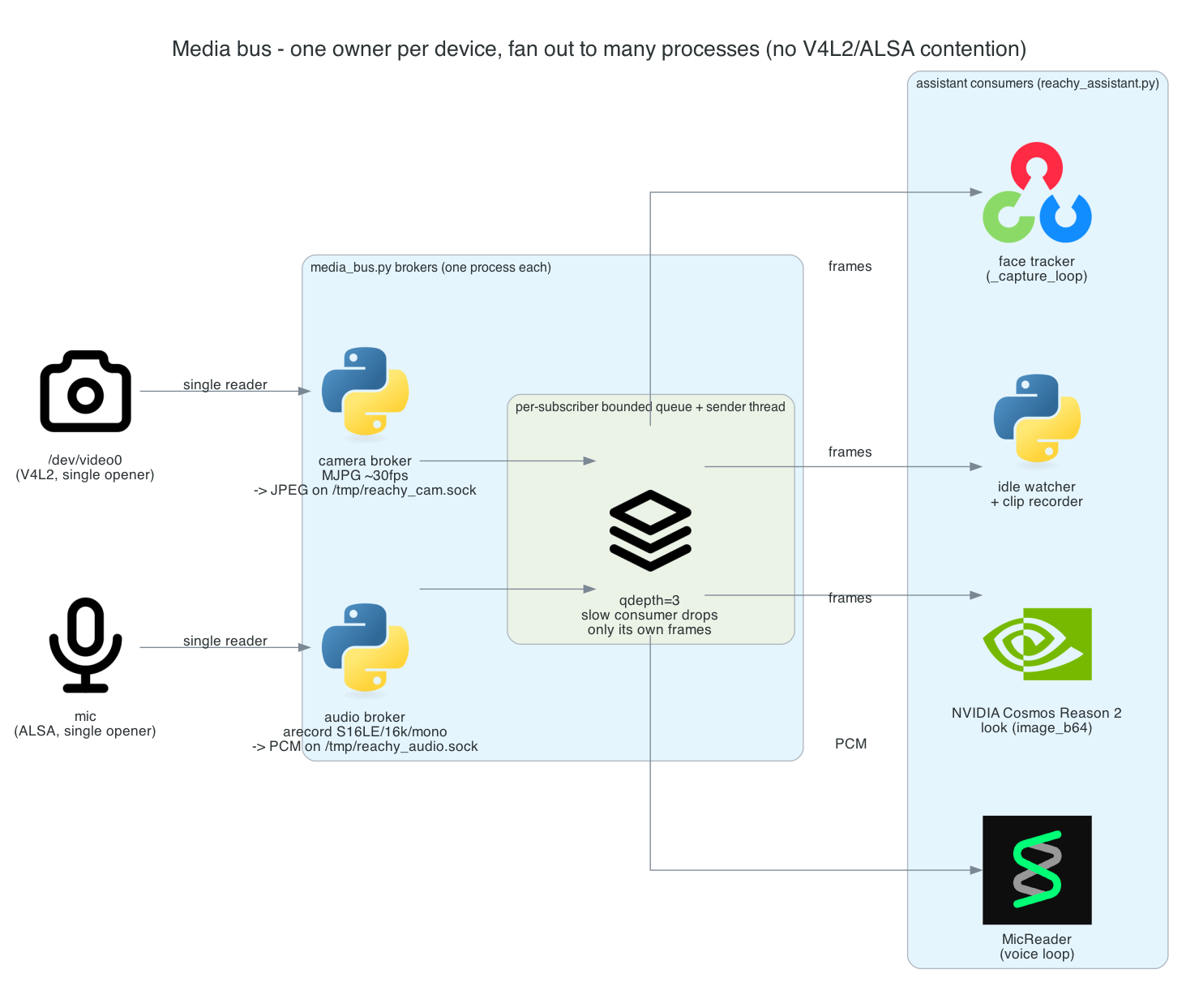
This is Part 14 of the series. Several features now want the camera — face tracking, the idle watcher, Cosmos vision, clip recording — and the voice loop wants the mic. But /dev/video0 and the ALSA mic are single-opener devices: once one process holds either, no one else can. Until now everything that needed a device had to live as a thread inside the one process that opened it.
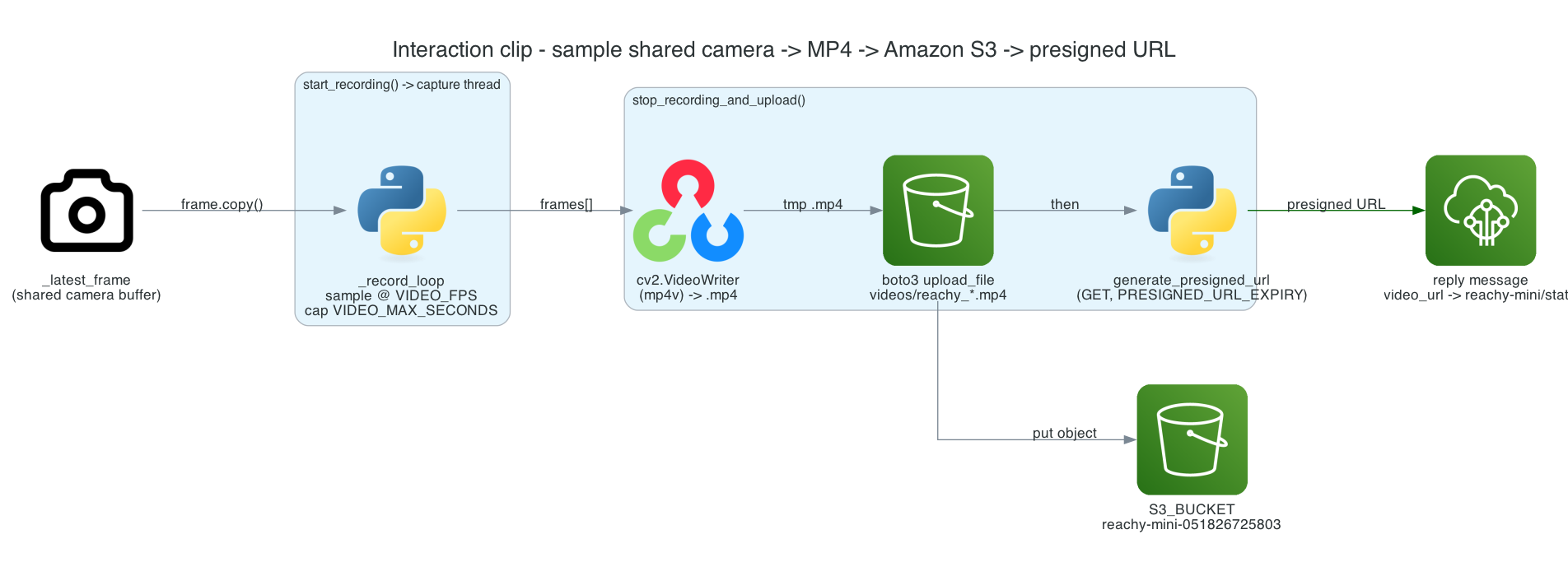
This is Part 13 of the series. The telemetry from Part 12 tells a subscriber what the robot did — but not what it saw. This post adds that: each interaction (and each presence detection) is recorded to a short MP4, uploaded to Amazon S3, and a presigned download URL is attached to the outgoing message, so whoever receives the event can watch the exact clip.
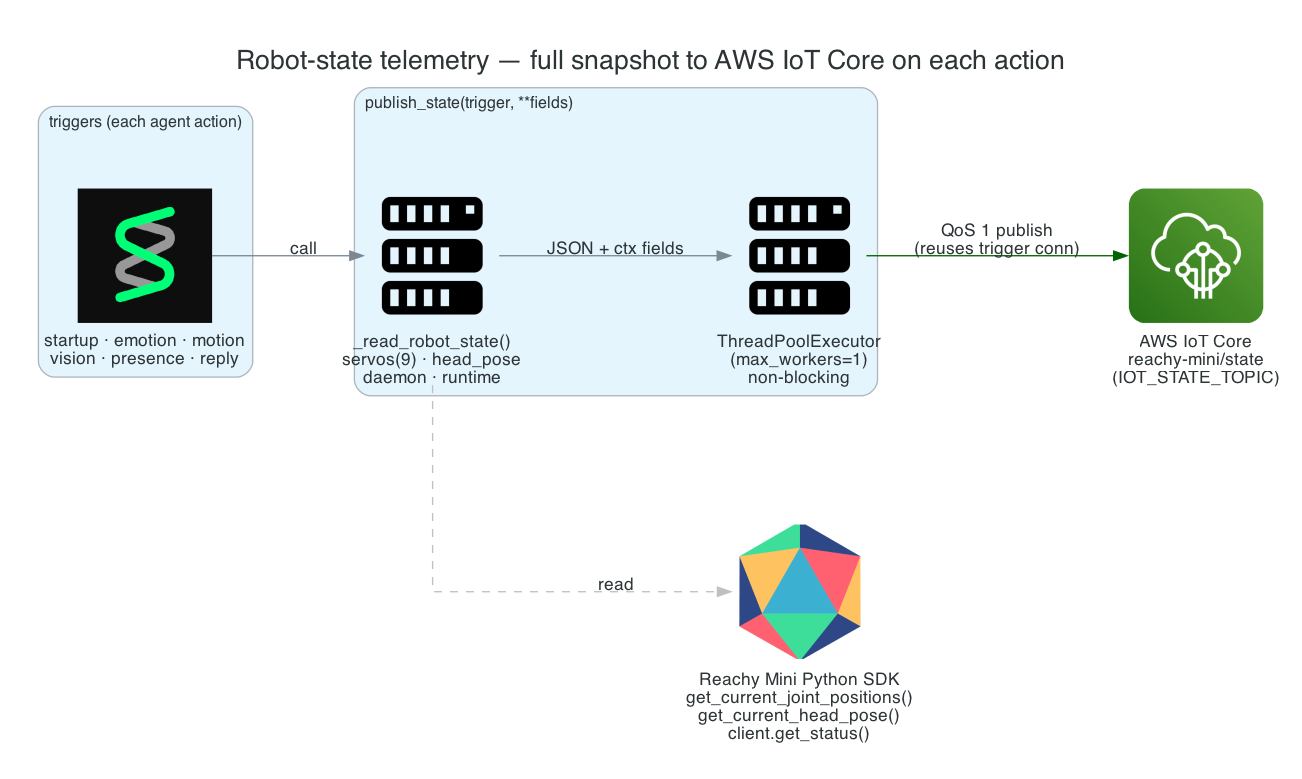
This is Part 12 of the series. The robot now does a lot — moves, looks, emotes, answers, notices presence. I want an external system (a dashboard, a data lake, another robot) to be able to follow exactly what Reachy is doing in near-real-time. So every agent action uploads a full snapshot of the robot's state — servos, head pose, daemon status, runtime flags — to AWS IoT Core.
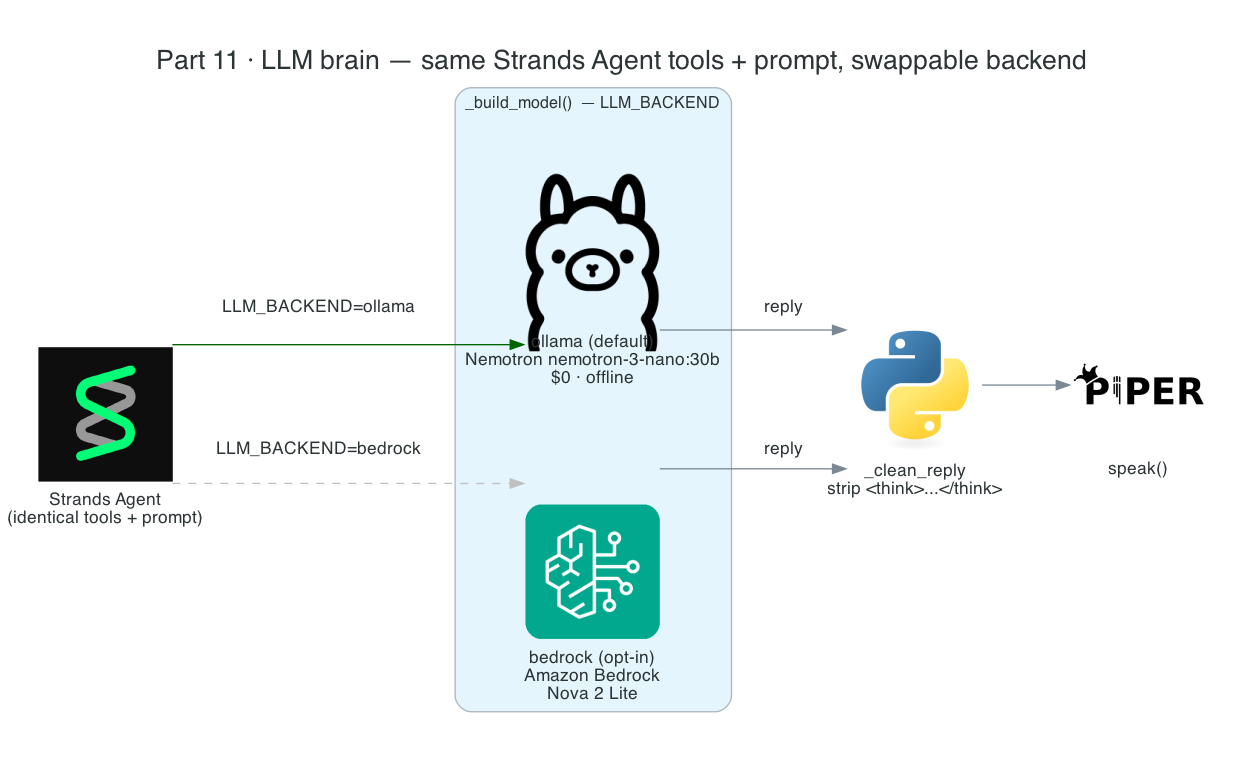
This is Part 11 of the series. The robot's vision has been local since Part 4, but its brain — the reasoning model the Strands Agent runs on — has been Amazon Bedrock. This post moves the brain on-device too: local Nemotron served by Ollama becomes the default, and Amazon Bedrock is demoted to a single opt-in env var.
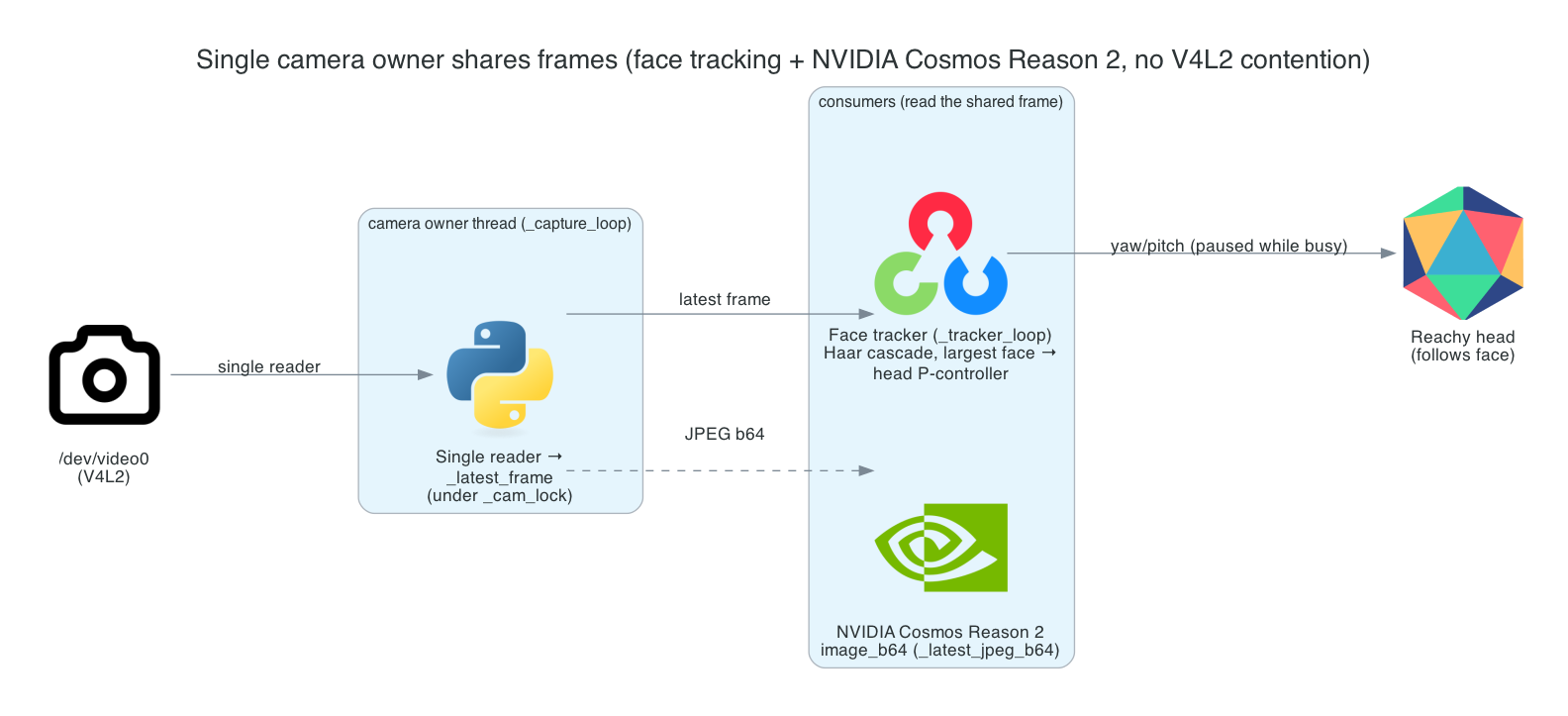
This is Part 10 of the series. The robot can already look on demand with Cosmos vision and notice who's around while idle. Now I want it to feel present: its head should follow your face in real time — and it has to do that while Cosmos vision and the idle watcher are also using the camera.
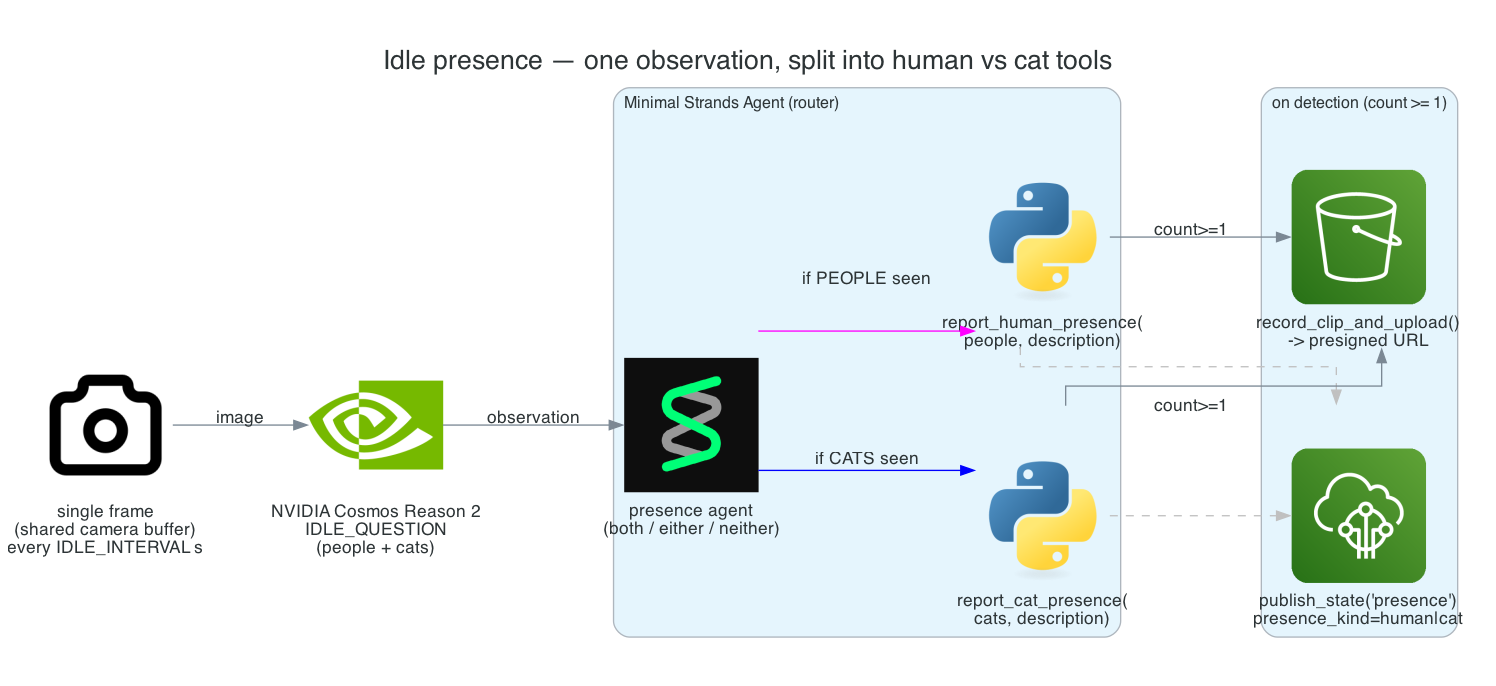
This is Part 9 of the series. So far the robot only acts when triggered — a wake word or an MQTT message. Now I want it to show a little life between interactions: while resting, it should quietly notice who's in the room and have a place to hang future reactions — greet a person, perk up at a cat.
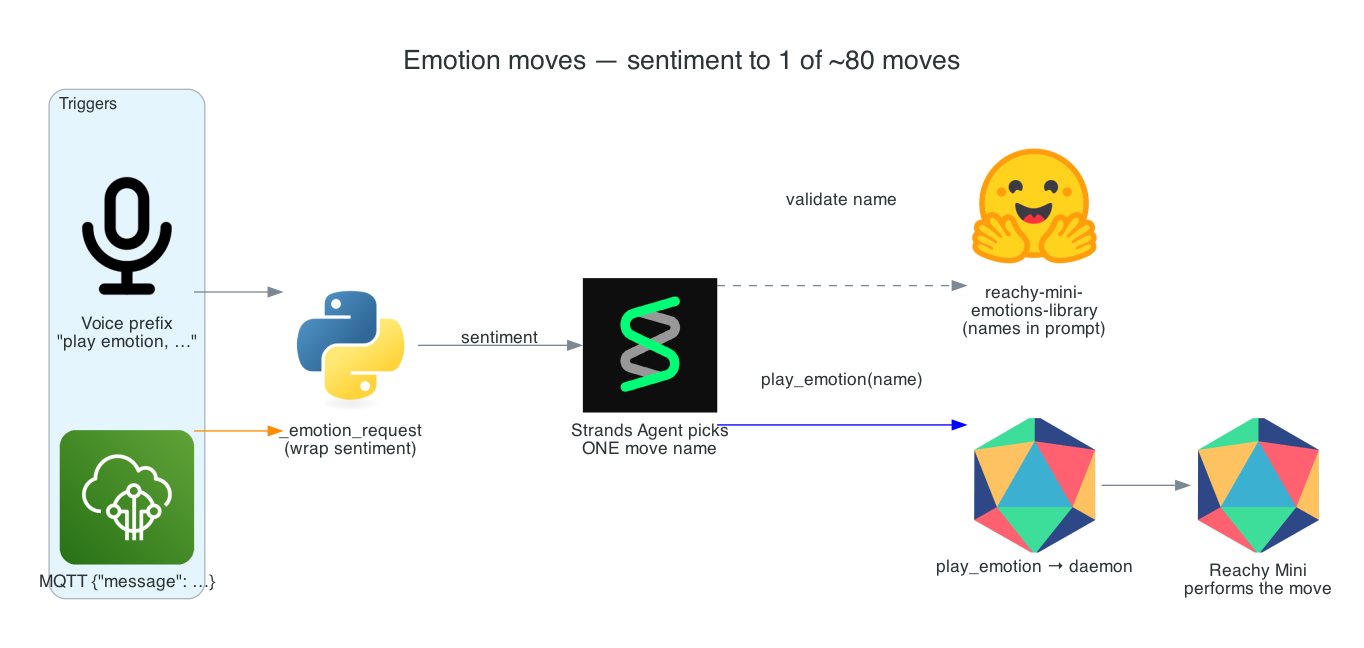
This is Part 8 of the series. The robot can move with primitive gestures, but those are deliberate, literal motions. For expression — reacting to good news, bad news, a greeting, a joke — I want something richer: a library of ~80 pre-choreographed emotion moves that the agent picks from to match the mood.
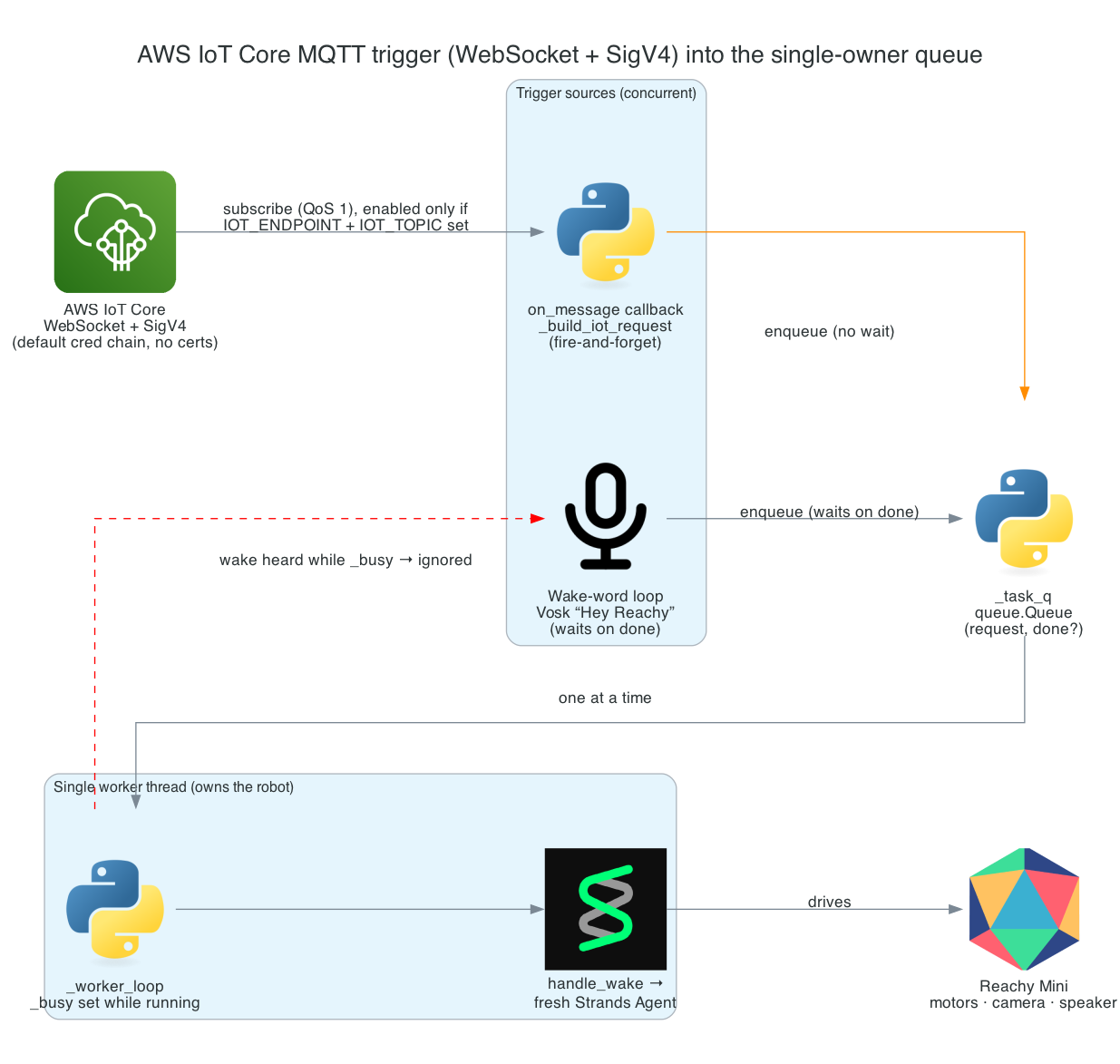
This is Part 7 of the series. The robot already wakes to "Hey Reachy" and runs the full per-wake loop. Now I want a second way to trigger it — a message published to AWS IoT Core — so another system (a home-automation rule, a sensor, a script) can ask Reachy to look, move, or react without anyone speaking.
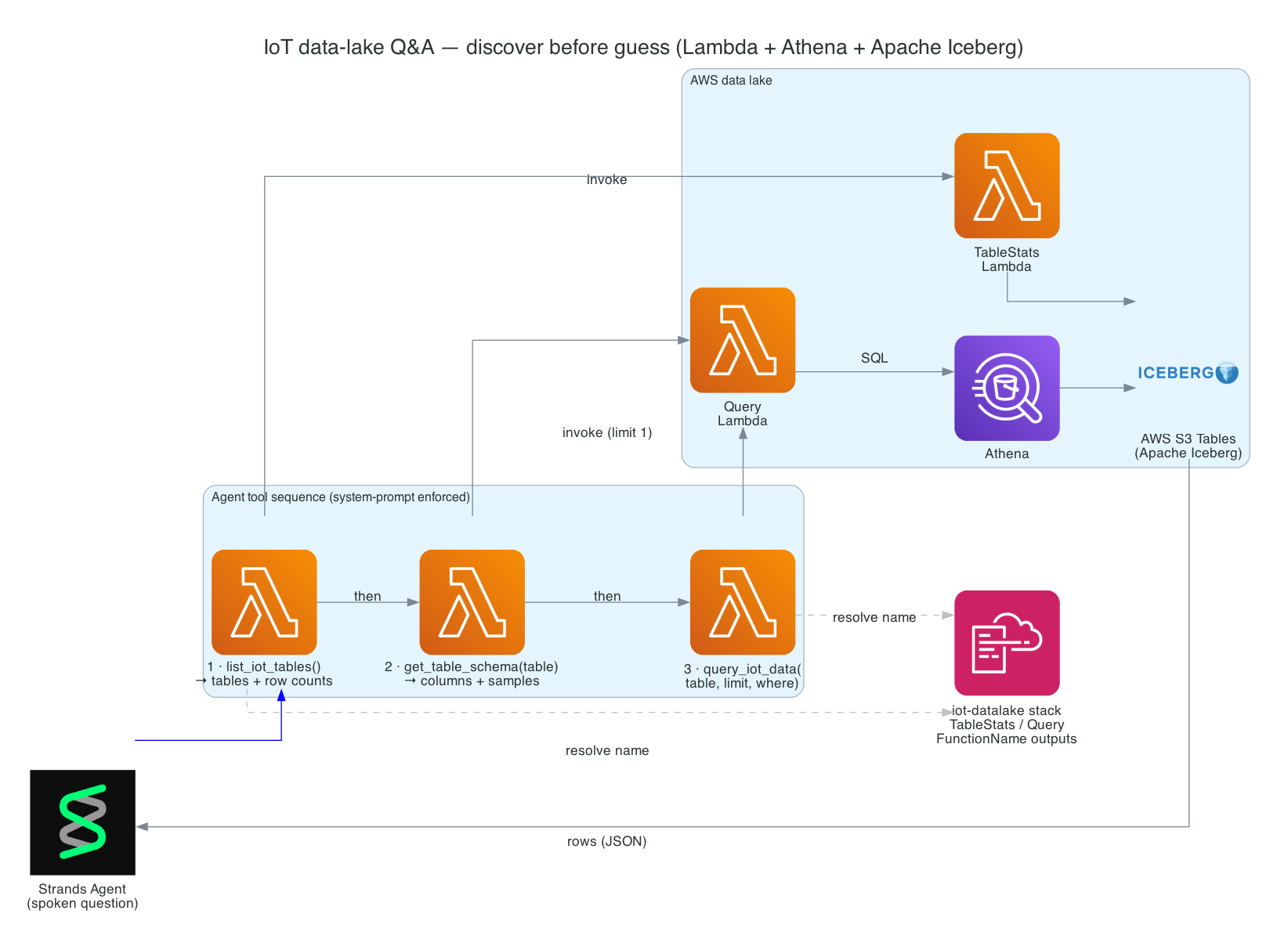
This is Part 6 of the series. So far the robot can move, see, and run the full per-wake loop. Now I want it to answer questions about real data — "Hey Reachy, has the kitchen water sensor tripped today?" — by querying an AWS data lake of IoT sensor readings, and speaking the answer back in one sentence.
This is Part 5 of the series — and the centerpiece. Part 3 gave the robot ears and Part 4 gave it eyes. This post is the loop that ties them — and everything still to come — together: "Hey Reachy" → transcribe → a fresh per-wake Strands Agent that picks a tool → speak one short sentence → tear down.
This is Part 4 of the series. In Part 3 the robot learned to listen. Now I want to give it eyes: the ability to look through its camera and answer a question about the room — identify an object, read visible text, count things, or describe what a person is doing — entirely on-device.
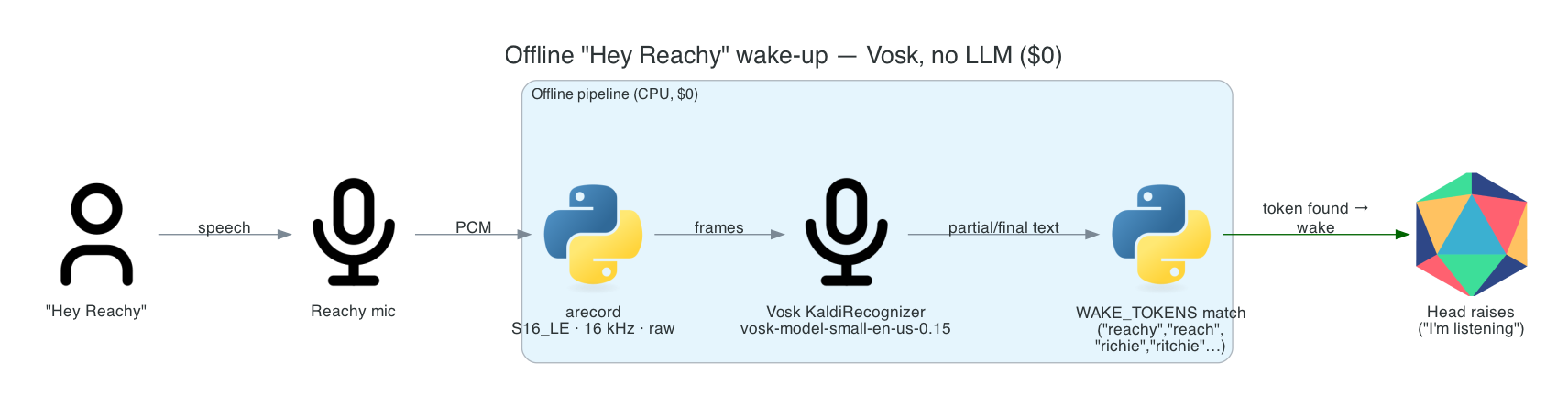
This is Part 3 of the series. In Part 2 I proved the hardware works — the head moves, the mic hears, the camera sees. Now the robot can start listening. This post covers the lowest layer of the voice stack: the "Hey Reachy" wake word, running fully offline with no LLM and no network.
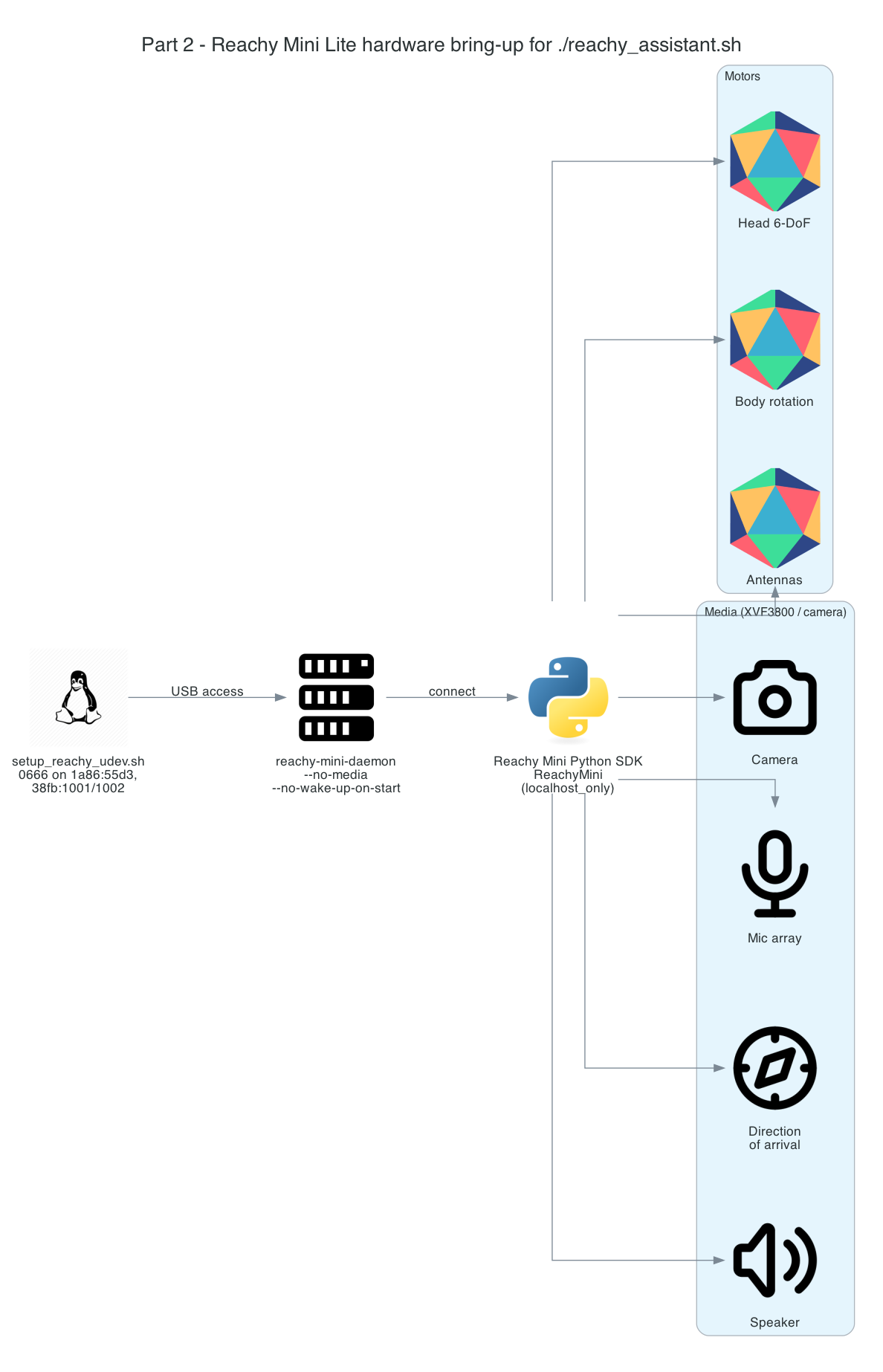
This is Part 2 of the series building a local-first voice & vision robot on an NVIDIA Jetson Thor. In Part 1 I covered the motion foundation — a Strands Agent given motion tools that drive the robot. But all of that assumes one thing: that the host can actually reach the robot, and that the hardware underneath works. This post is about earning that assumption.
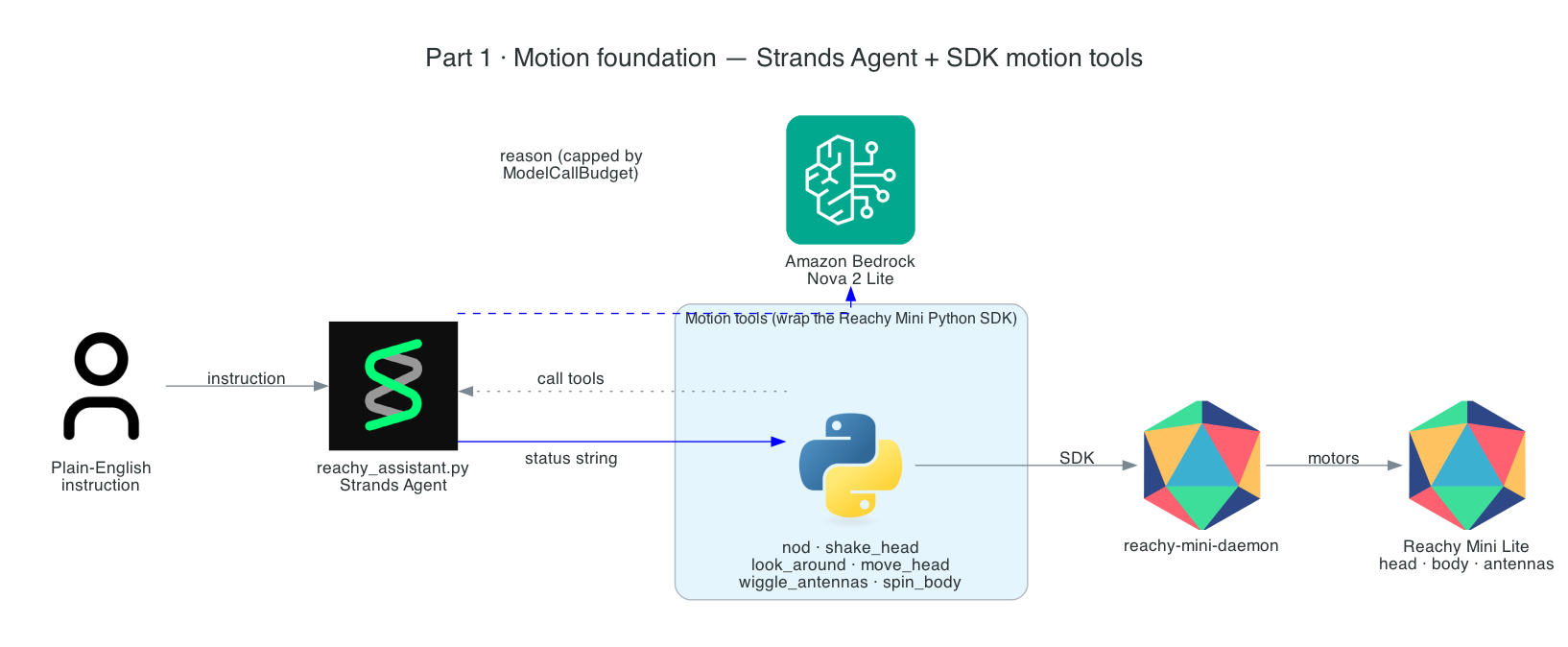
This is Part 1 of a series that builds a Reachy Mini Lite desk robot driven by a Strands agent running entirely on-device on an NVIDIA Jetson Thor. Say "Hey Reachy" (or publish an MQTT message) and a fresh agent wakes up, decides which tool it needs — move its head and body, see the room with a local vision model, express an emotion, or answer questions about IoT sensor data in an AWS data lake — speaks one short sentence, and tears itself down. Idle is pure-local and $0: no cloud, no LLM tokens, just an offline wake-word listener.
These are the slides from my talk at the AWS User Group Wellington meet-up on 29 April 2026, walking through how I built a real-time pipeline that listens to speech in the browser and drives a robotic hand to fingerspell the words in American Sign Language (ASL).
Tip: click into the slides and use the arrow keys to navigate, or hit the fullscreen button for the best experience.
This is Part 3 of a 3-part series covering a real-time voice-to-sign-language translation system. In Part 1, I covered the React frontend that captures speech, processes it with Amazon Nova 2 Sonic, and publishes cleaned sentence text via MQTT. In Part 2, I covered the AWS CDK stack that routes IoT Core messages through Lambda to AppSync for real-time GraphQL subscriptions.
This post covers the final piece — the edge AI agent that actually makes the physical hand move. It is a Strands Agent running on an NVIDIA Jetson that subscribes to MQTT commands from the frontend, uses Amazon Nova 2 Lite to invoke the fingerspell tool, drives the Pollen Robotics Amazing Hand's Feetech SCS0009 servos for ASL fingerspelling letter by letter, records video of the hand in action, uploads it to S3, and publishes hand state back to IoT Core — which Part 2's infrastructure routes through to the frontend via AppSync.
This post (Part 3) - Edge AI Agent (strands-agents-amazing-hands) — Strands Agent powered by Amazon Nova 2 Lite on NVIDIA Jetson that translates sentence text to ASL servo commands, drives the Amazing Hand, and publishes state back
Goals
Receive MQTT commands from the React frontend (plain text or JSON with sentence field) and drive the Amazing Hand servos for ASL fingerspelling
Use the Strands Agents framework with Amazon Nova 2 Lite (us.amazon.nova-2-lite-v1:0) to invoke the fingerspell tool — the LLM passes the incoming text verbatim to the tool for letter-by-letter ASL spelling
Fingerspell text using the 26-letter ASL alphabet (A-Z), with each letter held for 0.8 seconds and spaces adding a 0.4-second pause
Control 8 Feetech SCS0009 servos (4 fingers x 2 joints) on the Pollen Robotics Amazing Hand via serial bus at 1M baud using the rustypot library
Record video of the hand via OpenCV during each fingerspelling sequence, encode to H.264 MP4 via imageio-ffmpeg, upload to S3, and include a presigned URL in the state message
Publish real-time hand state (servo angles, letter, video URL) to IoT Core over MQTT — which Part 2's CDK stack routes to AppSync for the frontend to consume
Authenticate to AWS IoT Core using mTLS with X.509 device certificates
Create a fresh agent instance per MQTT message to prevent conversation history accumulation and unbounded token growth
Handle graceful shutdown with servo torque disable on SIGINT/SIGTERM
The Overall System
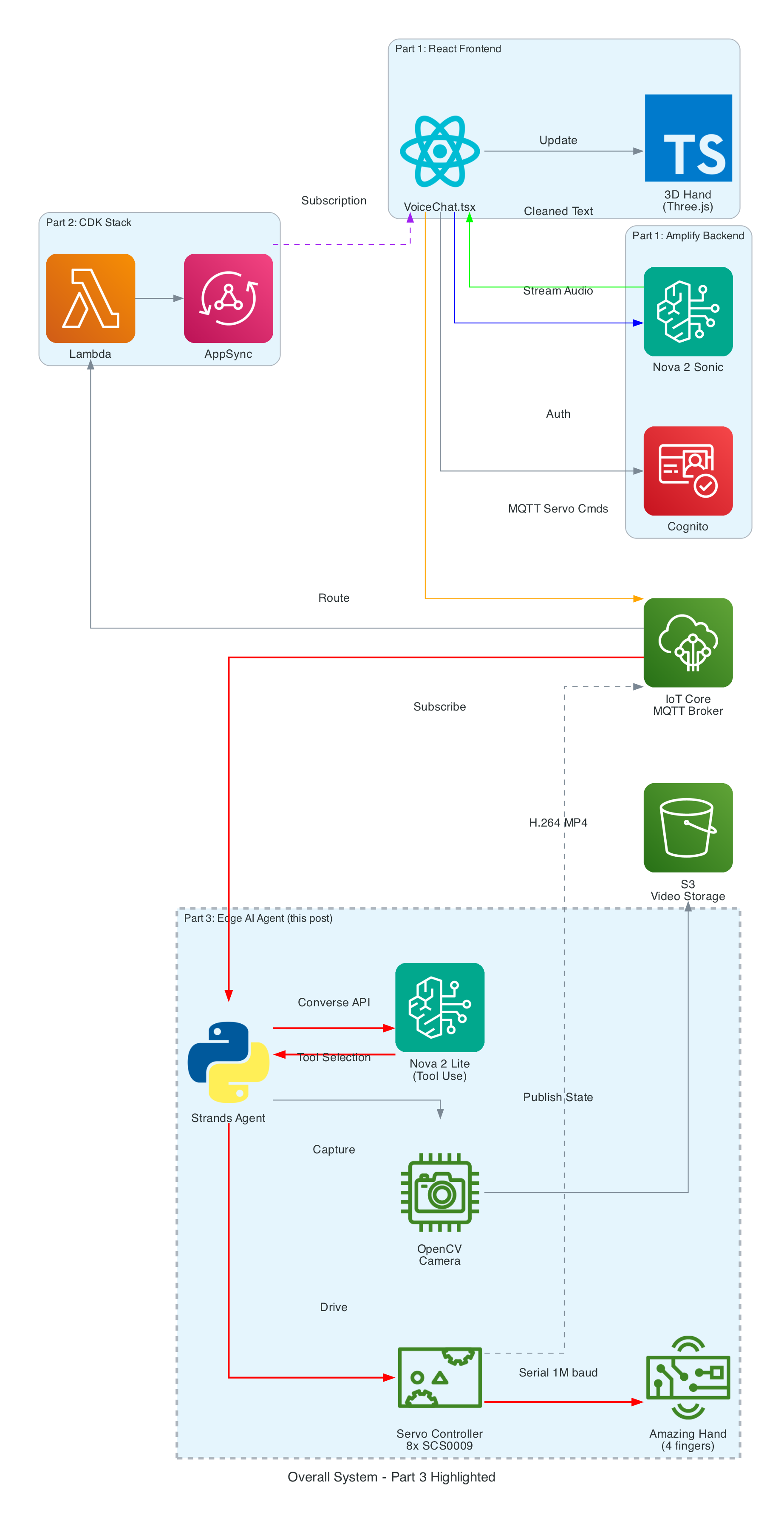
This diagram shows the complete end-to-end system. Part 3 is the edge device highlighted on the right — the NVIDIA Jetson running the Strands Agent that controls the Amazing Hand.
How Part 3 fits in:
Part 1 (Frontend) publishes cleaned sentence text to the-project/robotic-hand/{deviceName}/action via MQTT
Part 3 (This agent) subscribes to the /action topic, processes the command through the Strands Agent, drives the servos, records video, and publishes state back to /state
Part 2 (Infrastructure) picks up the /state messages and routes them through Lambda to AppSync, where the frontend receives them via GraphQL subscriptions
Architecture
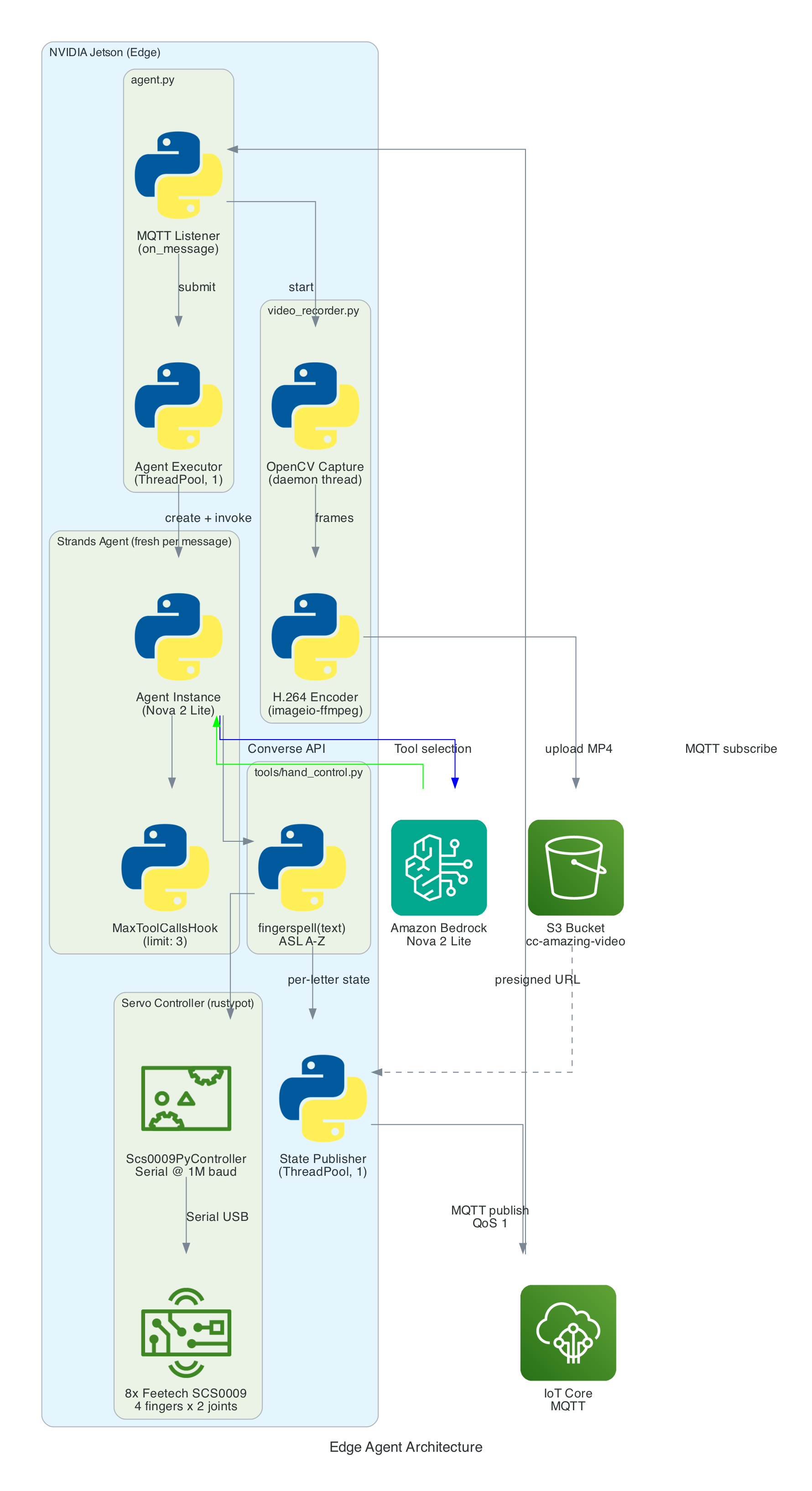
The agent is a Python application built on the Strands Agents framework. It runs as a long-lived MQTT listener on the NVIDIA Jetson, creating a fresh agent instance for each incoming message to keep memory bounded.
MQTT Listener (agent.py) — Subscribes to the action topic, parses incoming messages (plain text or JSON), and submits each action to a single-threaded agent executor to keep the AWS CRT MQTT event loop free
Strands Agent — A fresh Agent instance created per message with Amazon Nova 2 Lite as the model, the fingerspell tool as the available action, and a MaxToolCallsHook (limit 3) to prevent runaway tool-call loops
Fingerspell Tool (hand_control.py) — A @tool decorated function that the LLM invokes to spell text letter-by-letter using the 26-letter ASL alphabet
Servo Controller — Uses rustypot.Scs0009PyController to communicate with 8 Feetech SCS0009 servos over serial at 1M baud. Each finger has two servos controlled by dedicated move functions (Move_Index, Move_Middle, Move_Ring, Move_Thumb)
Video Recorder (video_recorder.py) — Background daemon thread captures frames via OpenCV, encodes to H.264 MP4 via imageio-ffmpeg, uploads to S3, and returns a presigned URL (1-hour expiry)
State Publisher — Non-blocking MQTT publisher on a separate thread that sends hand state (finger angles, letter, video URL) to the /state topic with QoS 1
The agent subscribes to an MQTT action topic (e.g. the-project/robotic-hand/XIAOAmazingHandRight/action) using mTLS authentication with X.509 device certificates. The first connection uses clean_session=True to flush any stale session state, then reconnects with clean_session=False for normal operation.
When a message arrives, the handler tries to parse it as JSON and extract the sentence field. If JSON parsing fails, it treats the entire payload as plain text. The action is then submitted to a single-threaded executor (agent_executor) to keep the AWS CRT MQTT event loop free:
The Strands Agents framework provides the core AI reasoning loop. A fresh agent instance is created for every MQTT message — this is deliberate to prevent conversation history from accumulating across messages, which would cause unbounded token growth over time.
The agent uses Amazon Nova 2 Lite (us.amazon.nova-2-lite-v1:0) via the Bedrock Converse API. Nova 2 Lite was chosen for its low-latency tool-use responses, which is critical for real-time servo control. The agent is configured with a MaxToolCallsHook that cancels tool calls beyond 3 to prevent infinite LLM tool-call loops.
The agent runs in fingerspell-only mode — only the fingerspell tool is available. The system prompt instructs the LLM to pass the entire message verbatim to the fingerspell tool without shortening or modifying it. State messages include a letter field identifying the current ASL letter being signed.
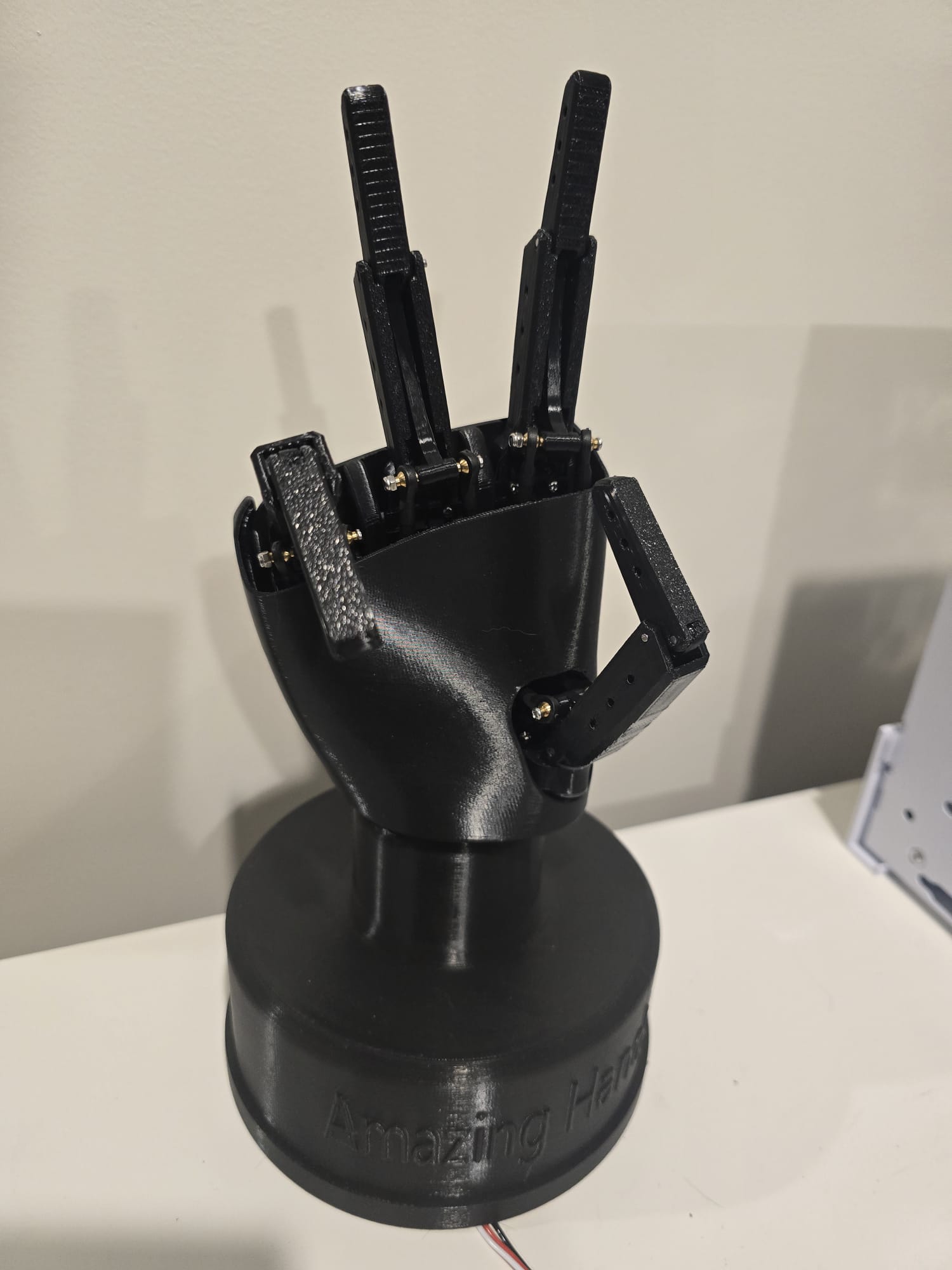
The Amazing Hand — an open-source robotic hand designed by Pollen Robotics and manufactured by Seeed Studio — has 4 fingers (index, middle, ring, thumb — no pinky) with 2 Feetech SCS0009 servos per finger (8 servos total) connected via a Waveshare driver board over serial USB at 1,000,000 baud.
Each servo has an angle range of -90 to +90 degrees. Per-servo calibration offsets (MiddlePos) are applied during move operations to account for physical alignment:
MiddlePos =[-17,8,-16,-4,-12,10,-9,9]
The control sequence for each finger:
Set goal speed for both servos (write_goal_speed) with a 0.2ms sleep between each speed write for serial bus timing
Convert angle to radians with calibration offset: np.deg2rad(MiddlePos[i] + angle)
Set goal position for both servos (write_goal_position)
5ms sleep after positions are set before the next finger's commands
The fingerspell(text) tool is decorated with @tool from the Strands framework, making it callable by the LLM during inference. It spells text letter-by-letter using the ASL alphabet. Each of the 26 letters (A-Z) is mapped to servo angle tuples for all 4 fingers. Each letter is held for 0.8 seconds, spaces add a 0.4-second pause, and non-letter characters are skipped. A state message with the current letter field is published after each letter.
Since the Amazing Hand has no pinky finger, ASL letters that require a pinky use the ring finger instead.
Video is recorded concurrently with each fingerspelling sequence:
Start recording — Before the agent is invoked, start_recording() launches a background daemon thread (video-capture) that captures frames from OpenCV VideoCapture(0) at the camera's native FPS (typically 30)
Stop and encode — After the agent completes, stop_recording_and_upload() stops the capture thread, converts frames from BGR (OpenCV) to RGB, and encodes to H.264 MP4 using imageio.v3 with the libx264 codec. The temp file is named hand_YYYYMMDD_HHMMSS_
Upload to S3 — The MP4 is uploaded to the configured S3 bucket (default: cc-amazing-video) with key videos/hand_YYYYMMDD_HHMMSS.mp4
Presigned URL — A presigned URL is generated with 1-hour expiry and appended to the last state message, which is re-published to the /state topic
After each servo movement, the tool publishes a state message to the MQTT /state topic (e.g. the-project/robotic-hand/XIAOAmazingHandRight/state) with QoS 1. Publishing is non-blocking — it submits to a dedicated _publish_executor thread to avoid blocking the servo tool.
The last published state is cached so that publish_state_with_video_url() can re-publish it with the presigned URL appended after video upload completes — without needing to re-read servo angles.
This state payload is what Part 2's CDK stack picks up via the IoT Rule, flattens in Lambda, and pushes into AppSync for the frontend to consume.
Problem: Strands Agents maintain conversation history by default. Over time, as hundreds of MQTT messages are processed, the token count grows unboundedly, increasing latency and cost.
Solution: A fresh Agent instance is created for every MQTT message. This discards all prior conversation history, keeping each invocation lightweight. Token usage (input, output, total) is logged after each invocation for monitoring.
Problem: The LLM might enter a loop of calling tools repeatedly — for example, calling fingerspell then deciding to call it again with modified text, then again.
Solution: A custom MaxToolCallsHook implementing the Strands HookProvider interface. It counts tool calls per agent invocation and cancels any tool call beyond the limit of 3. This is injected into the agent via hooks=[MaxToolCallsHook()].
Problem: The Pollen Robotics Amazing Hand has only 4 fingers (index, middle, ring, thumb) — no pinky. Several ASL letters require specific pinky positions (e.g. I, J, Y).
Solution: ASL letters that require a pinky use the ring finger instead. The 26-letter ASL alphabet is manually mapped to 4-finger servo angle tuples, approximating the correct hand shape with the available fingers.
Problem: Sending servo commands too quickly over the serial bus causes missed commands or erratic movement. The Feetech SCS0009 protocol requires time between operations.
Solution: A 0.2ms sleep is inserted between speed writes, and a 5ms sleep is added after both goal positions are set, giving the serial bus time to process each command before the next finger's sequence begins.
The agent will connect to IoT Core, subscribe to the action topic, and wait for commands. When a message arrives, it will process it through the Strands Agent, drive the servos, record video, and publish state back.
Summary
This post covered the edge AI agent — the final piece of the voice-to-sign-language translation system:
Strands Agents framework with Amazon Nova 2 Lite for tool-use — a fresh agent per MQTT message prevents history bloat, with MaxToolCallsHook limiting calls to 3
ASL fingerspelling with the 26-letter alphabet (A-Z), each letter held for 0.8 seconds — the fingerspell tool is decorated with @tool for LLM invocation
8 Feetech SCS0009 servos on 4 fingers controlled via rustypot over serial at 1M baud, with per-servo calibration offsets
Video pipeline captures via OpenCV in a background daemon thread, encodes to H.264 MP4 via imageio-ffmpeg, uploads to S3, and includes a 1-hour presigned URL in the final state message
Non-blocking threading with 2 thread pools (agent executor off MQTT event loop, state publisher) and a daemon thread for video capture
Real-time state publishing to IoT Core after every servo movement — which Part 2's CDK stack routes through Lambda to AppSync, completing the feedback loop to the React frontend in Part 1
Graceful shutdown disables servo torque on SIGINT/SIGTERM to release the servos and prevent power draw
I want to have the ability to be able to manage the firmware of all IoT devices using a prompt - it could be to upgrade a device to the latest version, or even to perform a rollback, whether across the entire IoT device fleet level - every device in all 20+ solution types, all the devices within a type of solution, or even at an individual device level.
Goals
To be able to over-the-air flash a new firmware version using a prompt
To have an Agentic Agent do all the work, give it a prompt and it takes cares of the rest
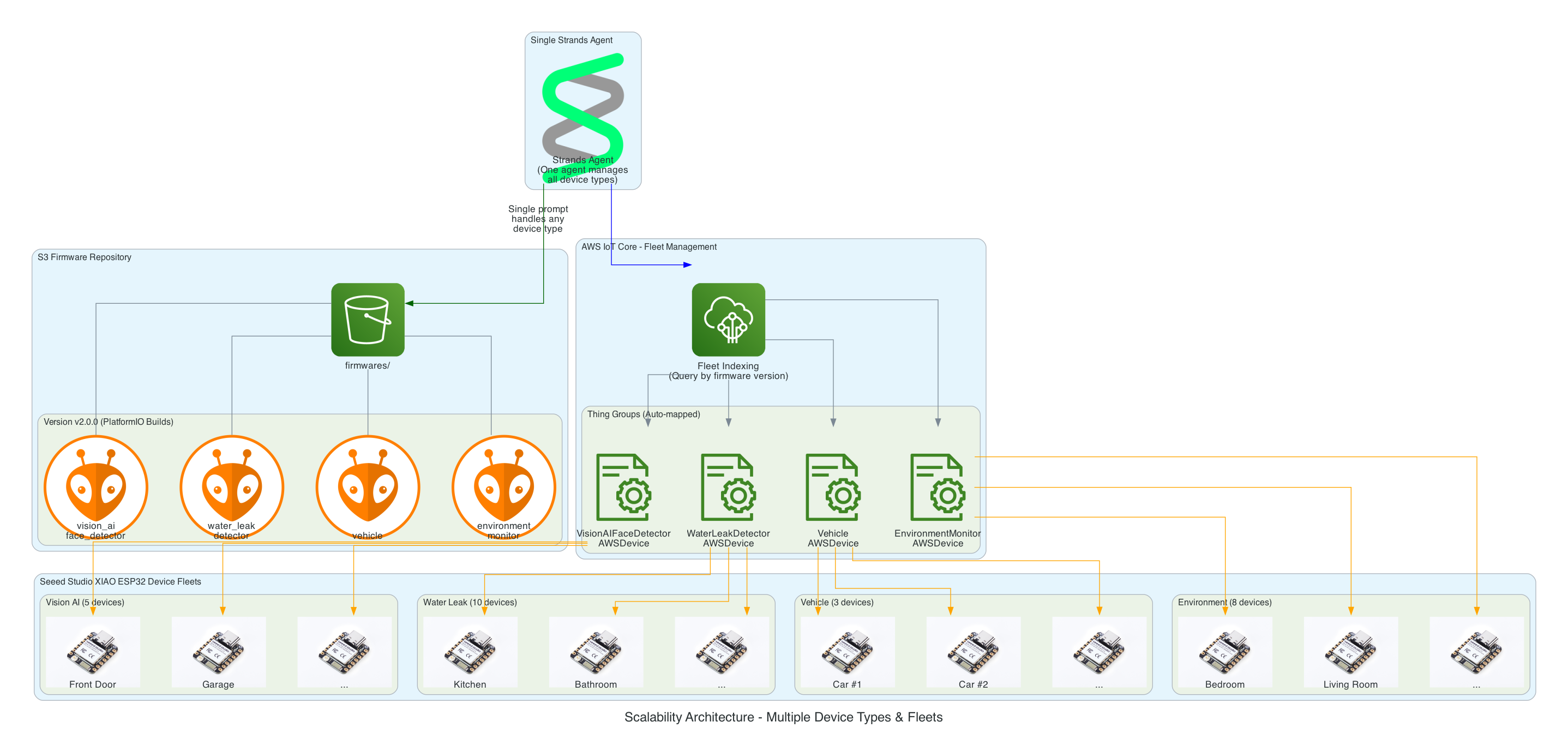
Scalable in the number of IoT devices, as well as, being able to scale as the number of new IoT solution Types increases; with no effort required - implement once and forget
Have the ability to rollback to any firmware version specified in the prompt
This same solution can be interfaced with using the Model Context Protocol (MCP): whether via Kiro CLI or Claude Code
This same solution can be interfaced with using a chatbot
Must be authenticated to interface with this solution
Must be a completely serverless-solution
Firmware integrity verification using SHA256 checksums before flashing to ensure firmware hasn't been corrupted during download
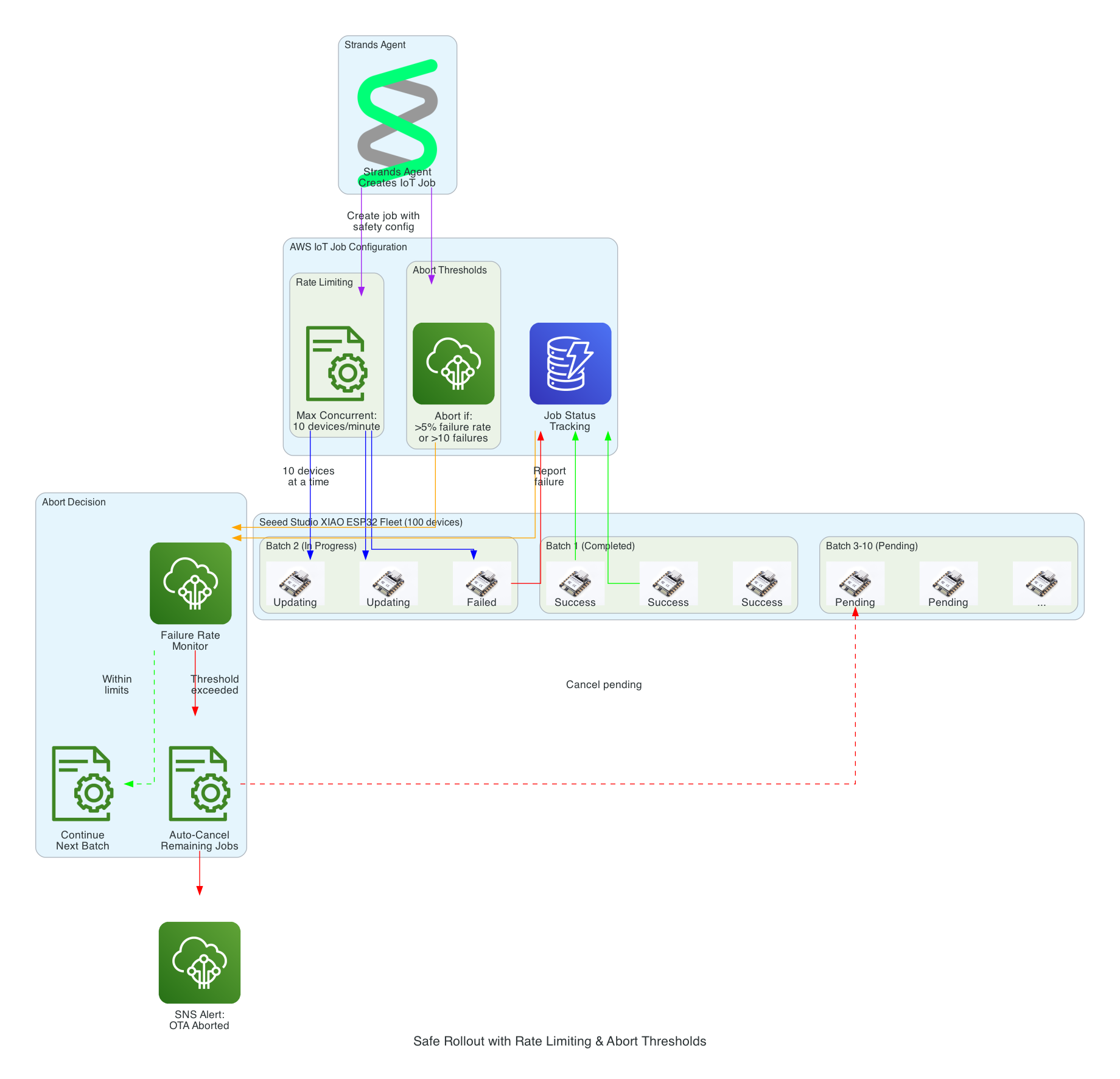
Safe rollout with rate limiting and automatic abort thresholds to prevent fleet-wide failures
Device firmware version tracking via device shadows to enable version-based targeting for updates
Configuration-gated deployments to enable or disable OTA updates per device type for controlled rollouts
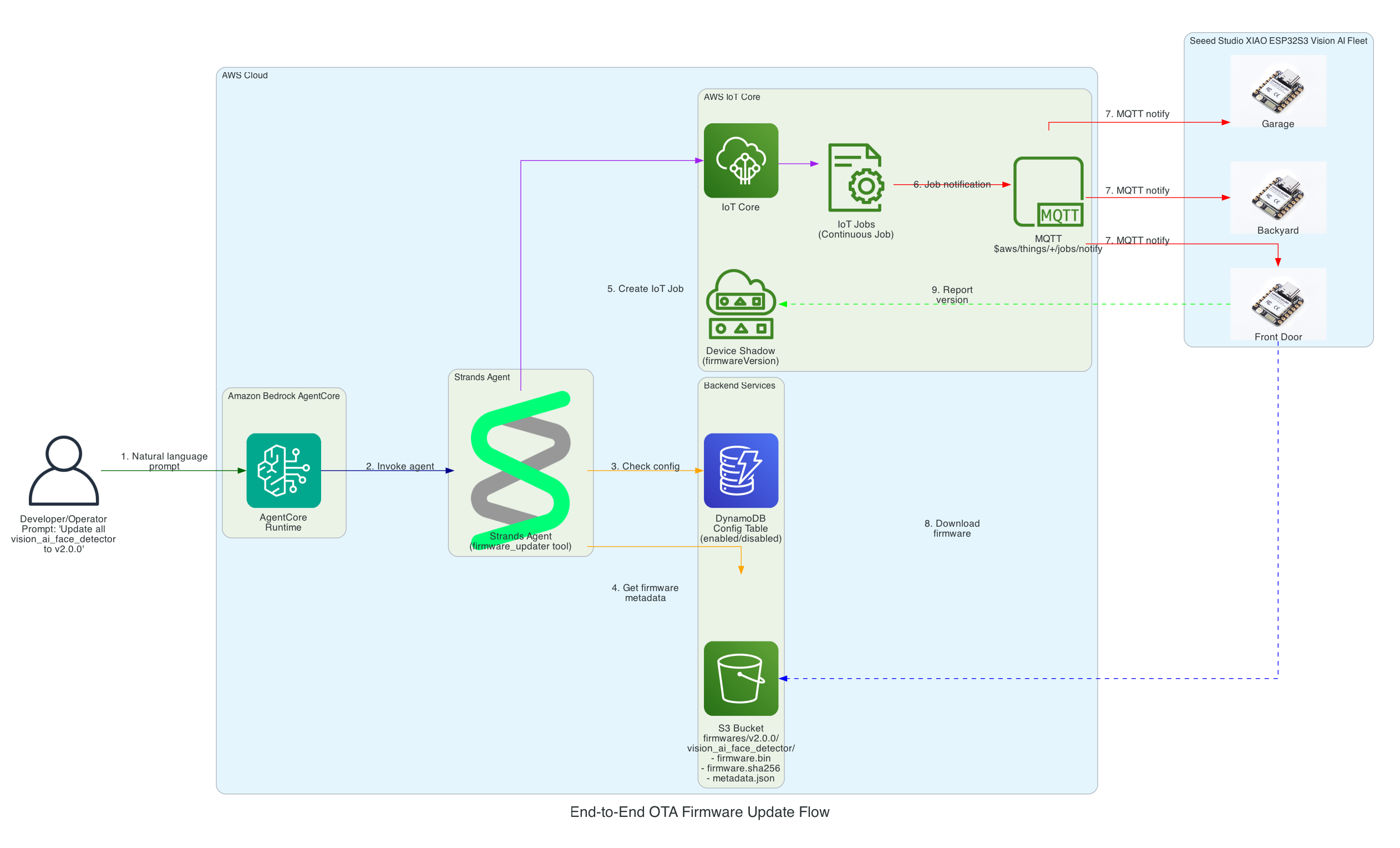
From natural language prompt to firmware flashed on Seeed Studio XIAO ESP32
0/15
User
AgentCore
Strands
DynamoDB
S3
IoT Core
XIAO
Milestone
Complete
Total: 15 message exchanges across 7 participants
~12 seconds end-to-end (prompt to firmware flashed)
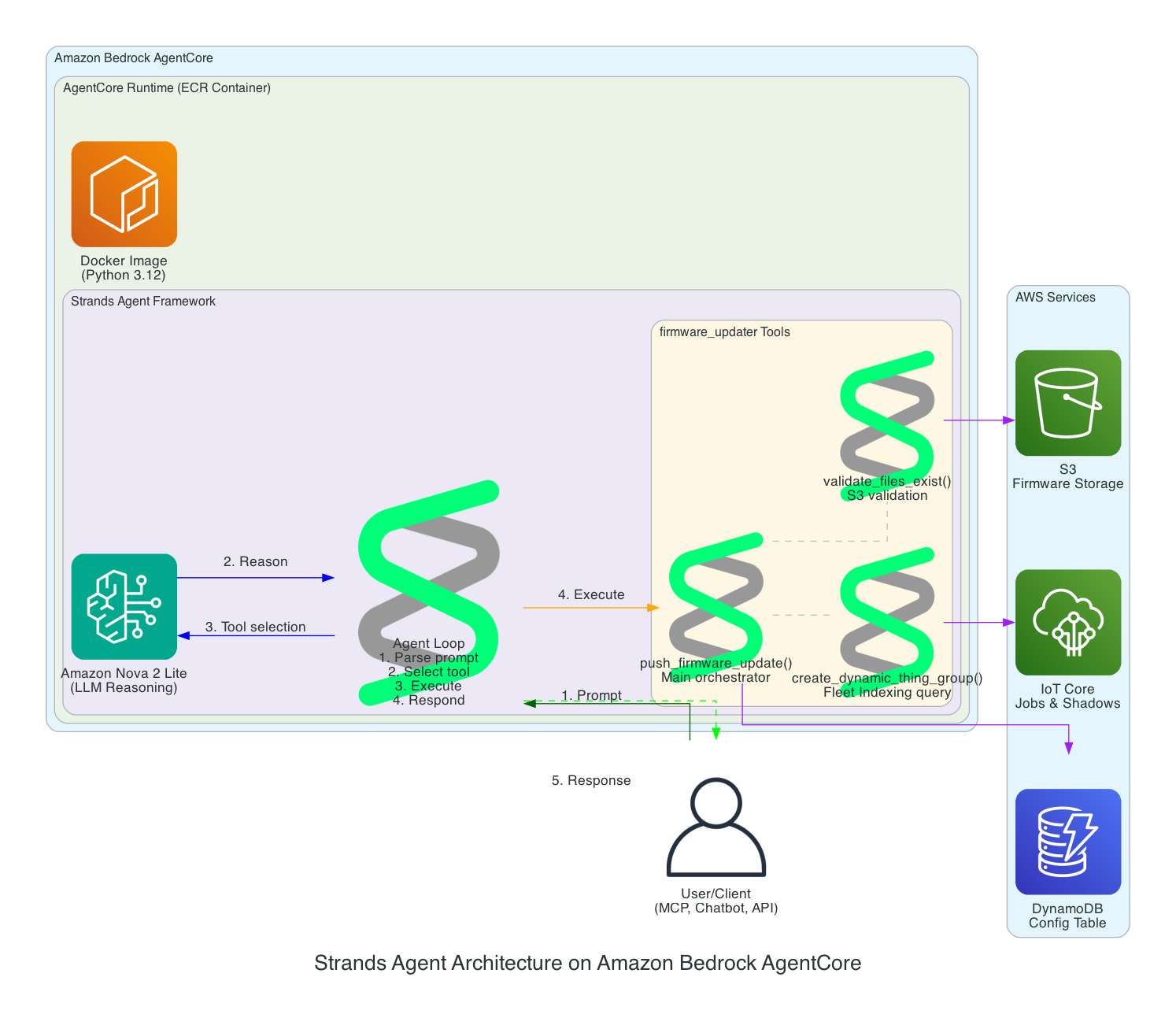
Strands Agent Architecture on Amazon Bedrock AgentCore
This diagram details the internal architecture of the Strands Agent running on Amazon Bedrock AgentCore, showing how the LLM reasons about prompts and orchestrates tool execution.
Components:
Amazon Bedrock AgentCore - Managed runtime that hosts and scales the agent
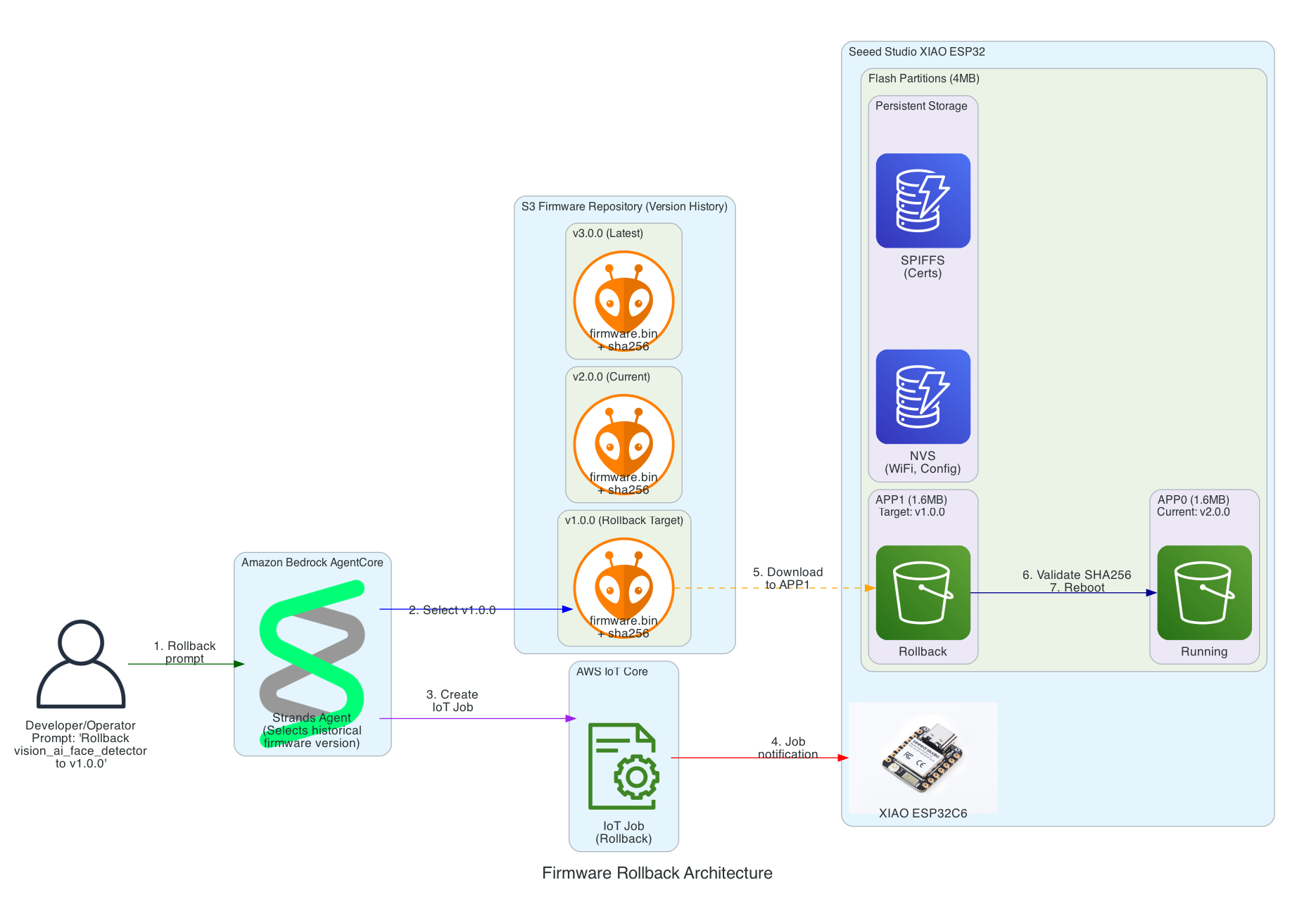
This diagram shows how the solution enables rollback to any previous firmware version using a simple prompt, leveraging the dual-partition architecture of the Seeed Studio XIAO ESP32.
Key Rollback Features:
Version History in S3 - All firmware versions are retained (v1.0.0, v2.0.0, v3.0.0, etc.) enabling rollback to any point
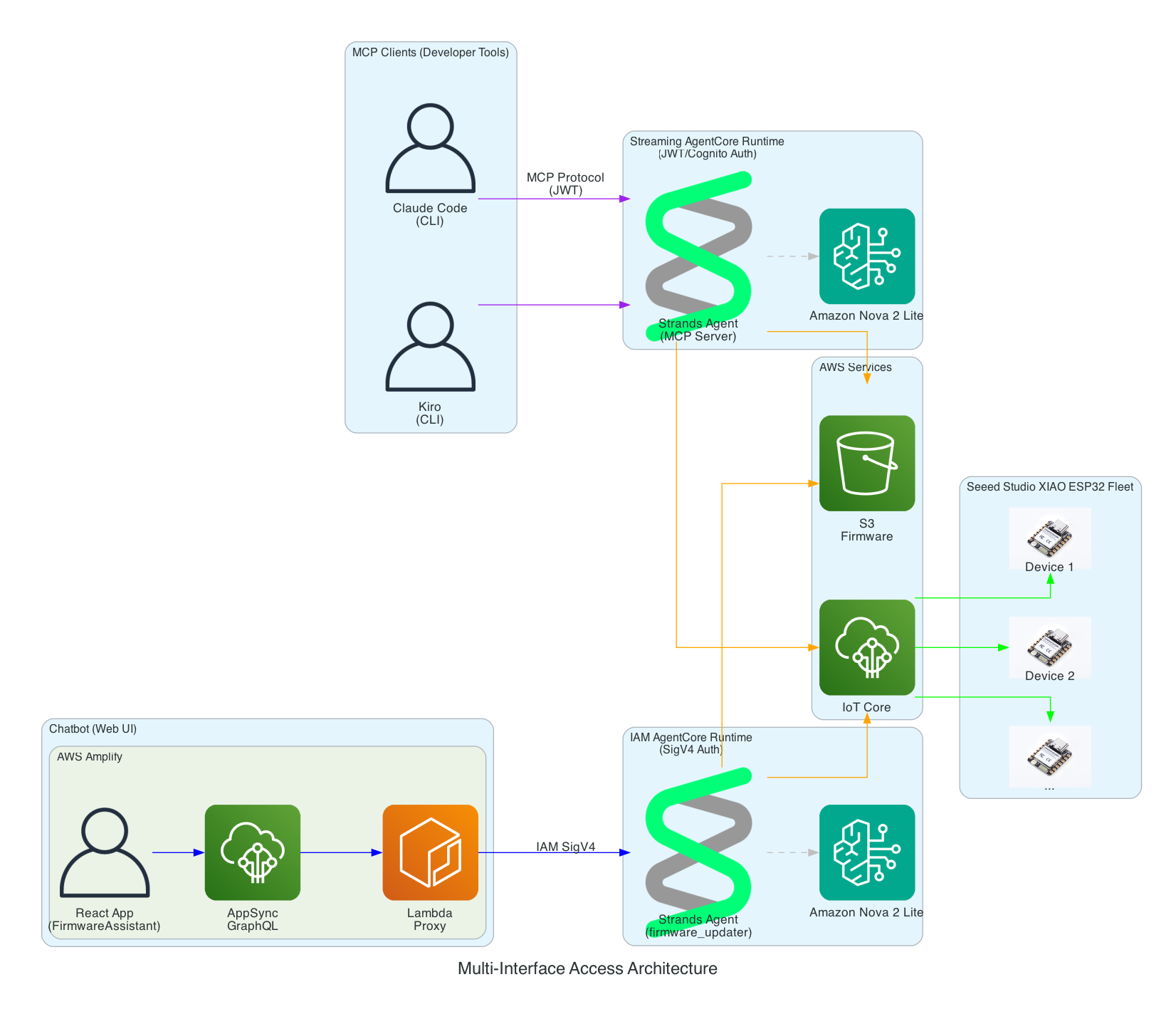
This diagram demonstrates how the Strands Agent can be accessed through multiple interfaces with different authentication methods - enabling developers to use their preferred tools while operators can use a web-based chatbot.
Interface Options:
MCP Clients (Developer Tools) - Claude Code and Kiro CLI connect via Model Context Protocol to a Streaming AgentCore Runtime using JWT/Cognito authentication
Chatbot (Web UI) - AWS Amplify React app with FirmwareAssistant component connects via Lambda proxy to an IAM AgentCore Runtime using SigV4 authentication for service-to-service communication
Two Runtimes, Same Agent Logic - Both runtimes run the same Strands Agent code but are deployed separately with different authentication methods suited to their use cases
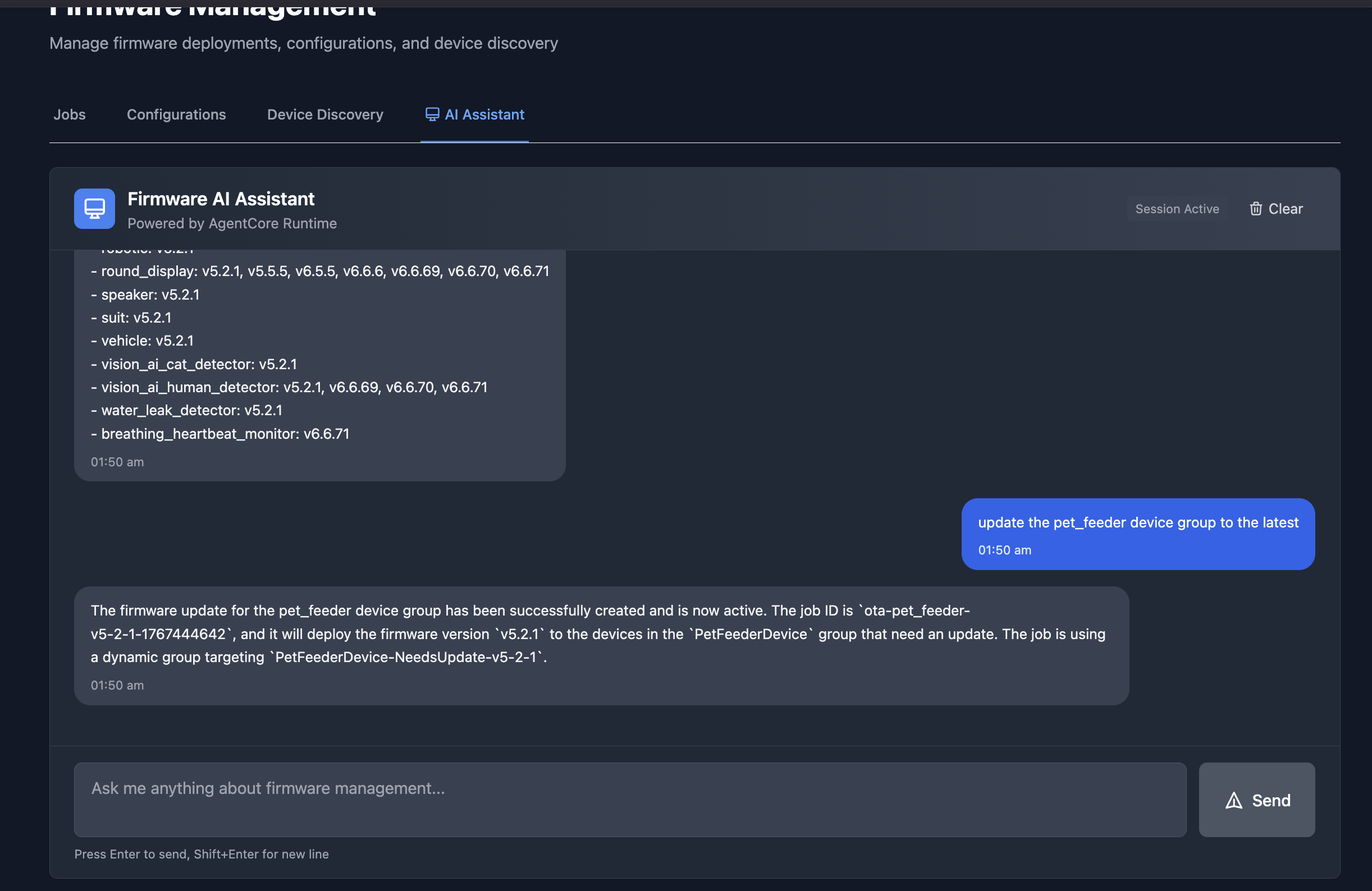
The chatbot interface in an Amplify React App provides a conversational way to manage firmware updates. In this example, the assistant lists all available firmware versions across device groups, and then creates an OTA job to update the pet_feeder device group to the latest firmware version.
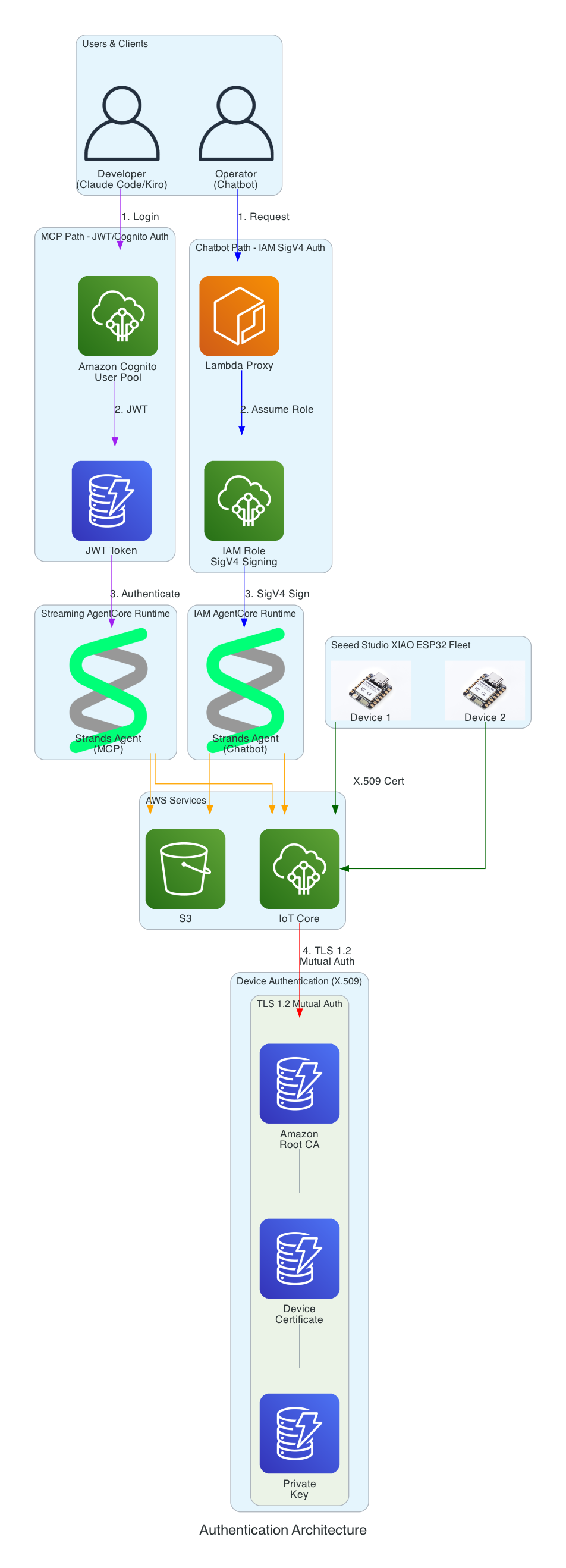
This diagram illustrates the multi-layer security model ensuring that all access to the firmware management system is properly authenticated. Each interface uses a different authentication method suited to its use case.
Authentication Layers:
Cognito JWT (MCP Path) - Developers using Claude Code and Kiro CLI authenticate via Amazon Cognito User Pool and receive JWT tokens, connecting to the Streaming AgentCore Runtime
IAM SigV4 (Chatbot Path) - The Lambda proxy authenticates using AWS IAM roles with SigV4 request signing for service-to-service communication with the IAM AgentCore Runtime
X.509 Certificates (Device Path) - XIAO ESP32 devices authenticate to AWS IoT Core using TLS 1.2 mutual authentication with per-device certificates
Certificate Chain - Amazon Root CA validates device certificates stored in SPIFFS (survives firmware updates)
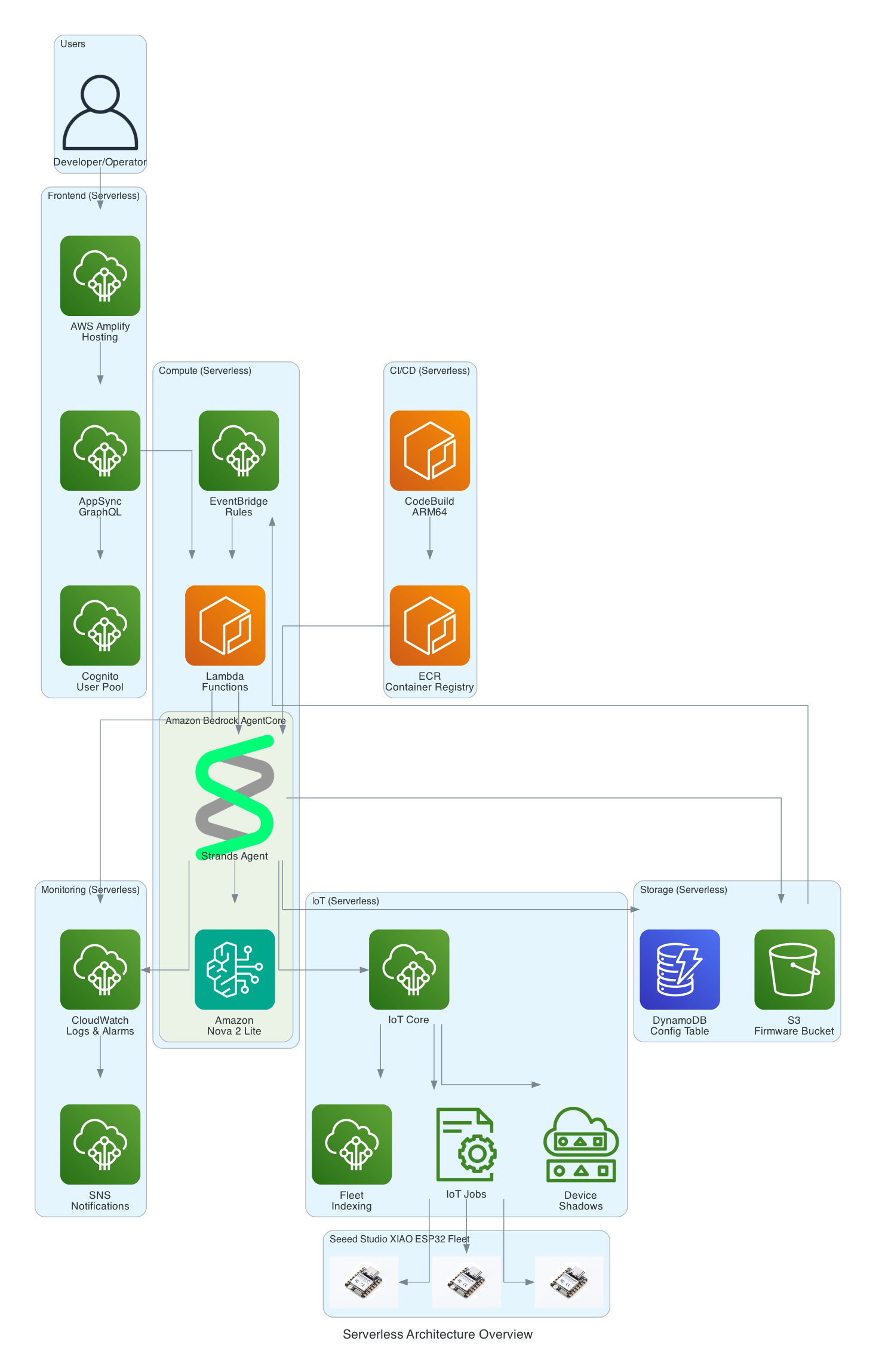
This diagram provides a comprehensive view of all AWS services used in the solution - every component is fully serverless with no EC2 instances to manage.
Serverless Components:
Frontend - AWS Amplify Hosting, AppSync GraphQL, Cognito User Pool
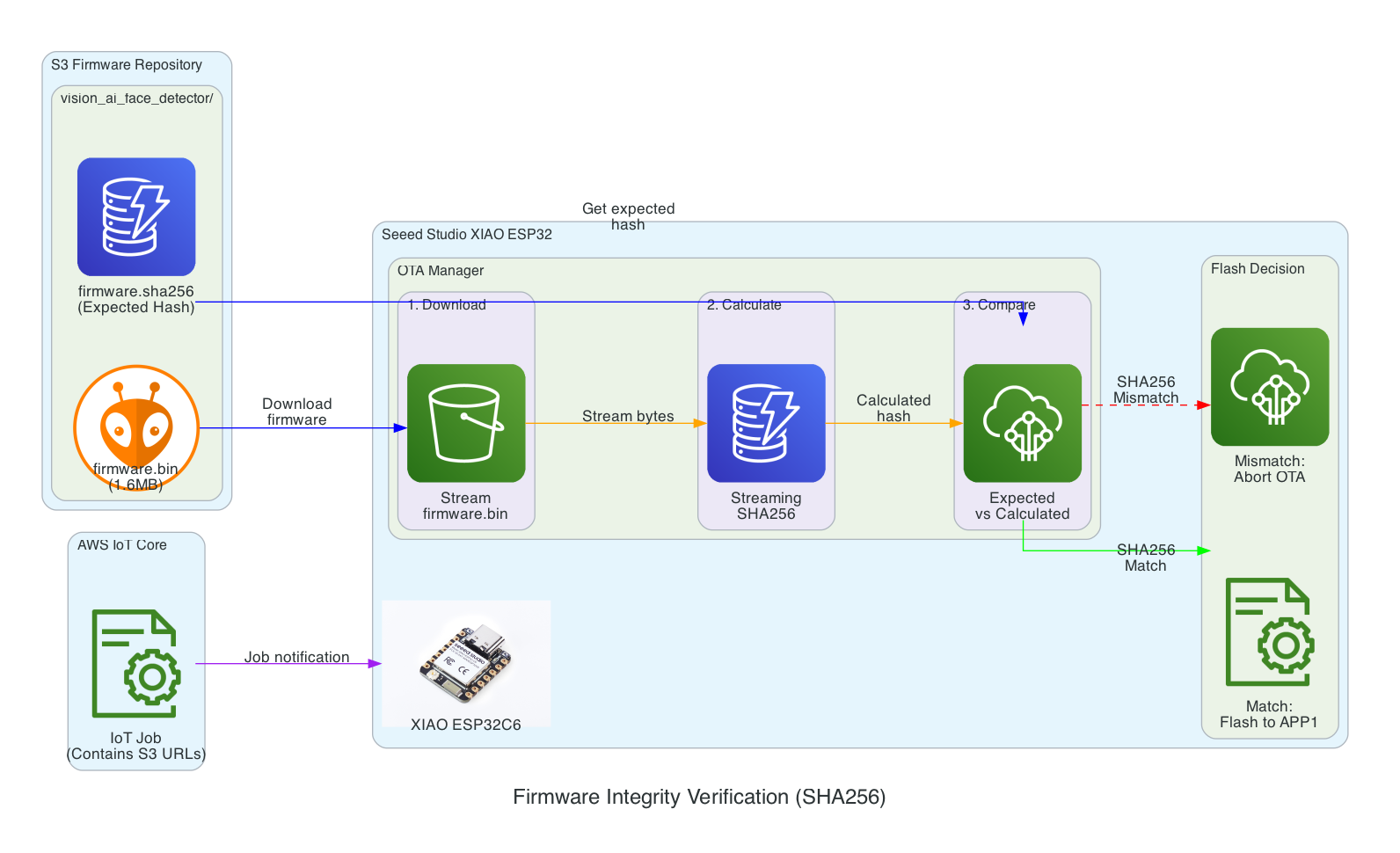
This diagram shows the firmware integrity verification process that ensures firmware hasn't been corrupted during download before flashing to the device.
Verification Flow:
Download - XIAO ESP32 streams firmware.bin from S3 in chunks
Calculate - SHA256 hash is calculated progressively during download (streaming hash)
Compare - Calculated hash is compared against expected hash from firmware.sha256 file
Flash Decision - Match: proceed to flash APP1 partition | Mismatch: abort OTA and report failure
Benefits:
Detects corruption during download (network issues, incomplete transfers)
Prevents flashing of tampered firmware
Memory-efficient streaming verification (no need to store entire firmware before hashing)
Streaming hash verification during firmware download
0/15
IoT Job
XIAO
S3
OTA Mgr
Flash
Memory-efficient: Hash calculated during download, not after
~5.6 seconds (download + verify + commit)
Safe Rollout with Rate Limiting & Abort Thresholds
This diagram illustrates the safety mechanisms that prevent fleet-wide failures during OTA updates by controlling rollout speed and automatically aborting when issues are detected.
Safety Mechanisms:
Rate Limiting - Updates are deployed to a maximum of 10 devices concurrently, preventing network congestion and allowing monitoring
Abort Thresholds - Job automatically cancels if failure rate exceeds 5% or more than 10 absolute failures occur
Batch Processing - Fleet of 100 devices is updated in batches, with completed, in-progress, and pending states tracked
Failure Monitoring - Real-time tracking of success/failure status feeds into abort decision logic
Auto-Cancel - When threshold is exceeded, all pending device updates are automatically cancelled
SNS Alerts - Operators are immediately notified when an OTA rollout is aborted