Agentic based Over-The-Air Firmware Management of Seeed Studio XIAO ESP32S3 IoT Device Firmware using Amazon AgentCore and Strands Agents

I want to have the ability to be able to manage the firmware of all IoT devices using a prompt - it could be to upgrade a device to the latest version, or even to perform a rollback, whether across the entire IoT device fleet level - every device in all 20+ solution types, all the devices within a type of solution, or even at an individual device level.
Goals
- To be able to over-the-air flash a new firmware version using a prompt
- To have an Agentic Agent do all the work, give it a prompt and it takes cares of the rest
- Scalable in the number of IoT devices, as well as, being able to scale as the number of new IoT solution Types increases; with no effort required - implement once and forget
- Have the ability to rollback to any firmware version specified in the prompt
- This same solution can be interfaced with using the Model Context Protocol (MCP): whether via Kiro CLI or Claude Code
- This same solution can be interfaced with using a chatbot
- Must be authenticated to interface with this solution
- Must be a completely serverless-solution
- Firmware integrity verification using SHA256 checksums before flashing to ensure firmware hasn't been corrupted during download
- Safe rollout with rate limiting and automatic abort thresholds to prevent fleet-wide failures
- Device firmware version tracking via device shadows to enable version-based targeting for updates
- Configuration-gated deployments to enable or disable OTA updates per device type for controlled rollouts
Architecture
End-to-End OTA Firmware Update Flow
This diagram illustrates the complete flow from a user's natural language prompt to firmware being flashed on Seeed Studio XIAO ESP32S3 devices.
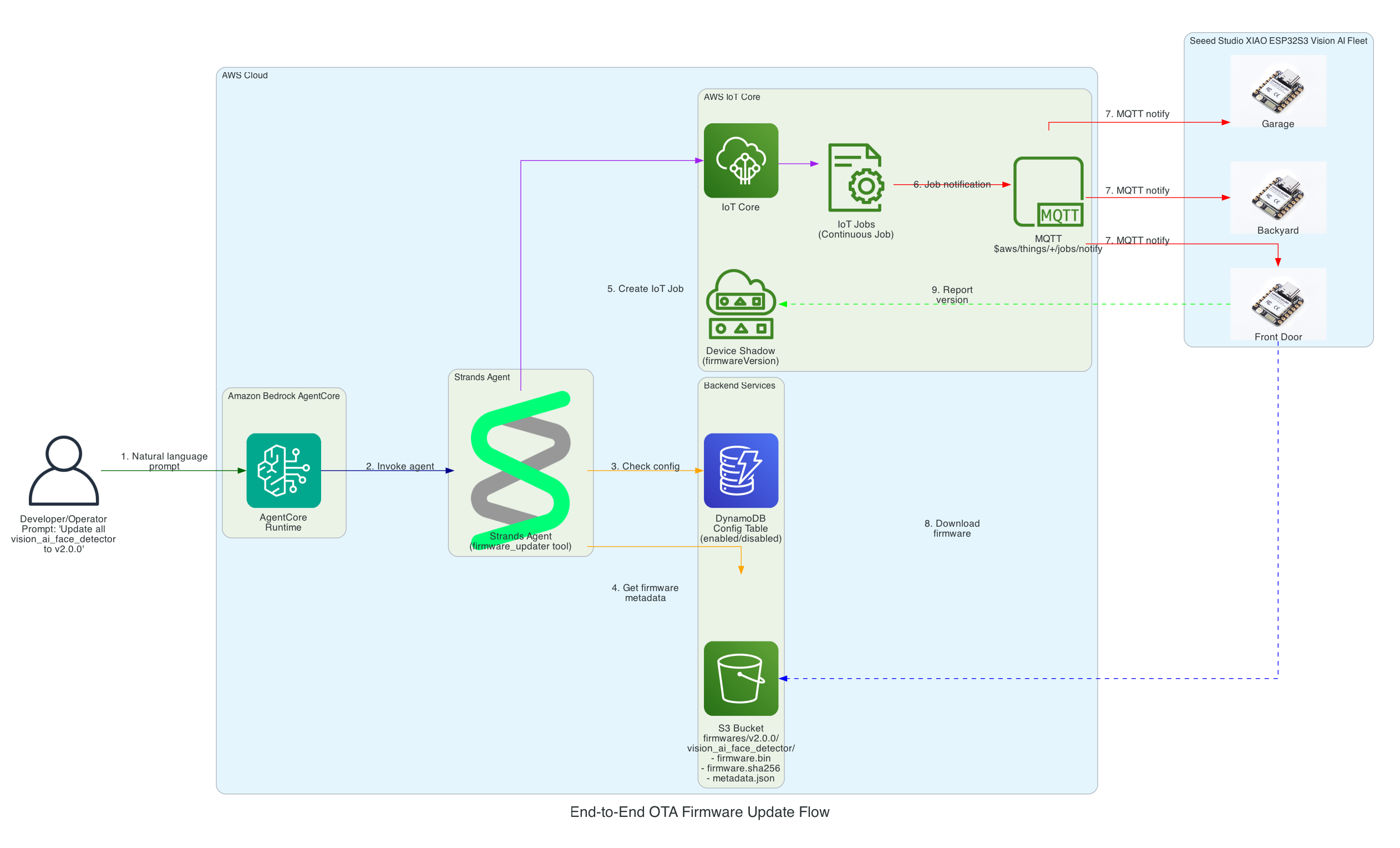
Flow Steps:
- User Prompt - Developer/Operator provides a natural language command (e.g., "Update all vision_ai_face_detector devices to v2.0.0")
- AgentCore Runtime - Amazon Bedrock AgentCore receives and processes the request
- Strands Agent - The agent with
firmware_updatertool reasons about the task - Config Check - Agent queries DynamoDB to verify the device type is enabled for OTA updates
- Firmware Metadata - Agent retrieves firmware binary, SHA256 checksum, and metadata from S3
- Create IoT Job - Agent creates a continuous IoT Job targeting the specified device group
- MQTT Notification - AWS IoT Core notifies devices via MQTT topic
$aws/things/+/jobs/notify - Firmware Download - Each XIAO ESP32S3 Vision AI Face Detector downloads the firmware directly from S3
- Version Reporting - Devices report their new firmware version to their Device Shadow
Interactive Sequence Diagram
End-to-End OTA Firmware Update Flow
From natural language prompt to firmware flashed on Seeed Studio XIAO ESP32
Strands Agent Architecture on Amazon Bedrock AgentCore
This diagram details the internal architecture of the Strands Agent running on Amazon Bedrock AgentCore, showing how the LLM reasons about prompts and orchestrates tool execution.
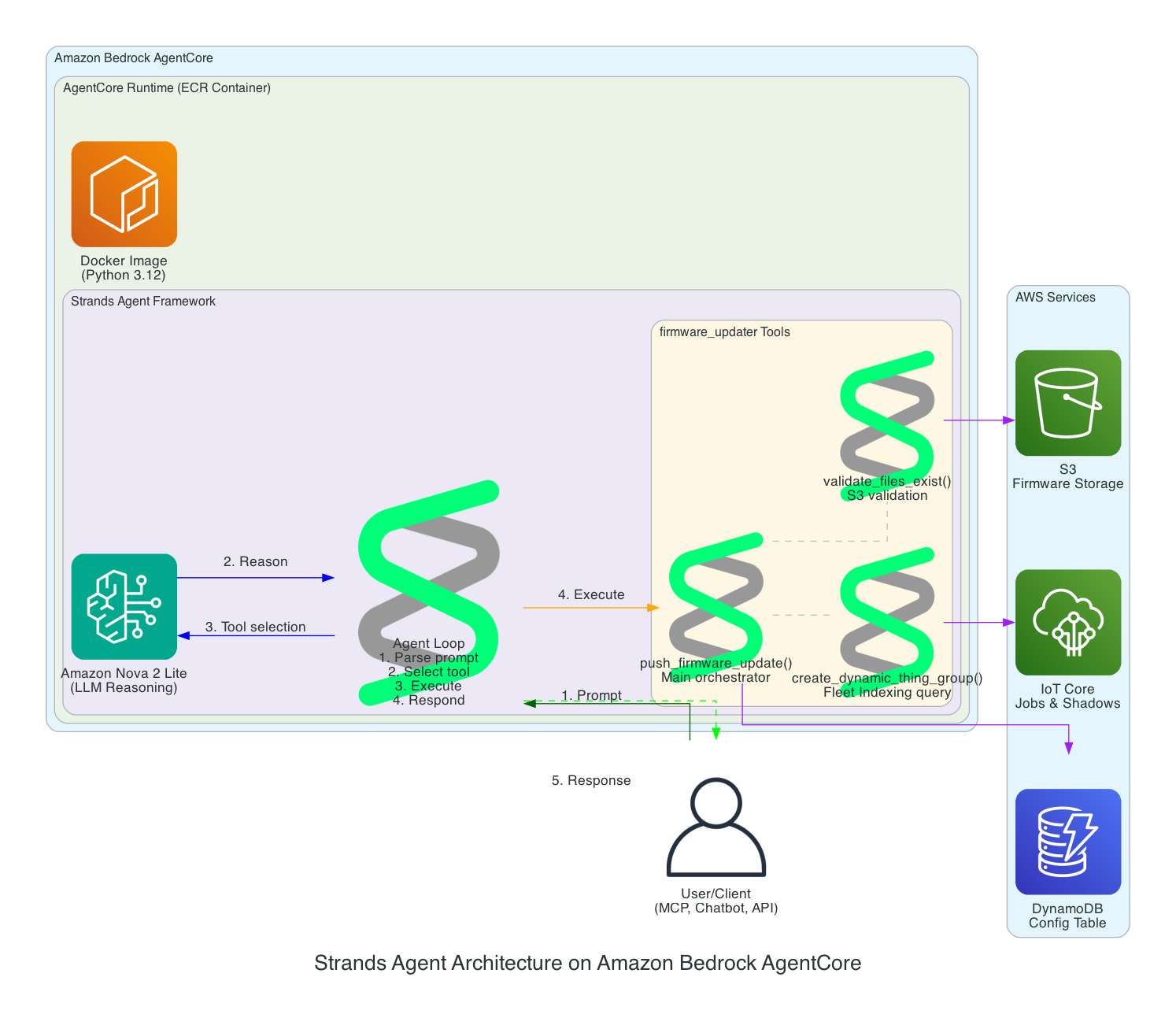
Components:
- Amazon Bedrock AgentCore - Managed runtime that hosts and scales the agent
- ECR Container - Docker image (Python 3.12) containing the Strands Agent code
- Amazon Nova 2 Lite - The LLM that provides reasoning capabilities
- Agent Loop - The core execution cycle: parse prompt → select tool → execute → respond
- firmware_updater Tools:
push_firmware_update()- Main orchestrator that coordinates the entire OTA processvalidate_files_exist()- Validates firmware.bin, firmware.sha256, and metadata.json exist in S3create_dynamic_thing_group()- Creates Fleet Indexing queries to target devices by firmware version
Scalability Architecture
This diagram demonstrates how the solution scales effortlessly across multiple device types and large device fleets - implement once and forget.
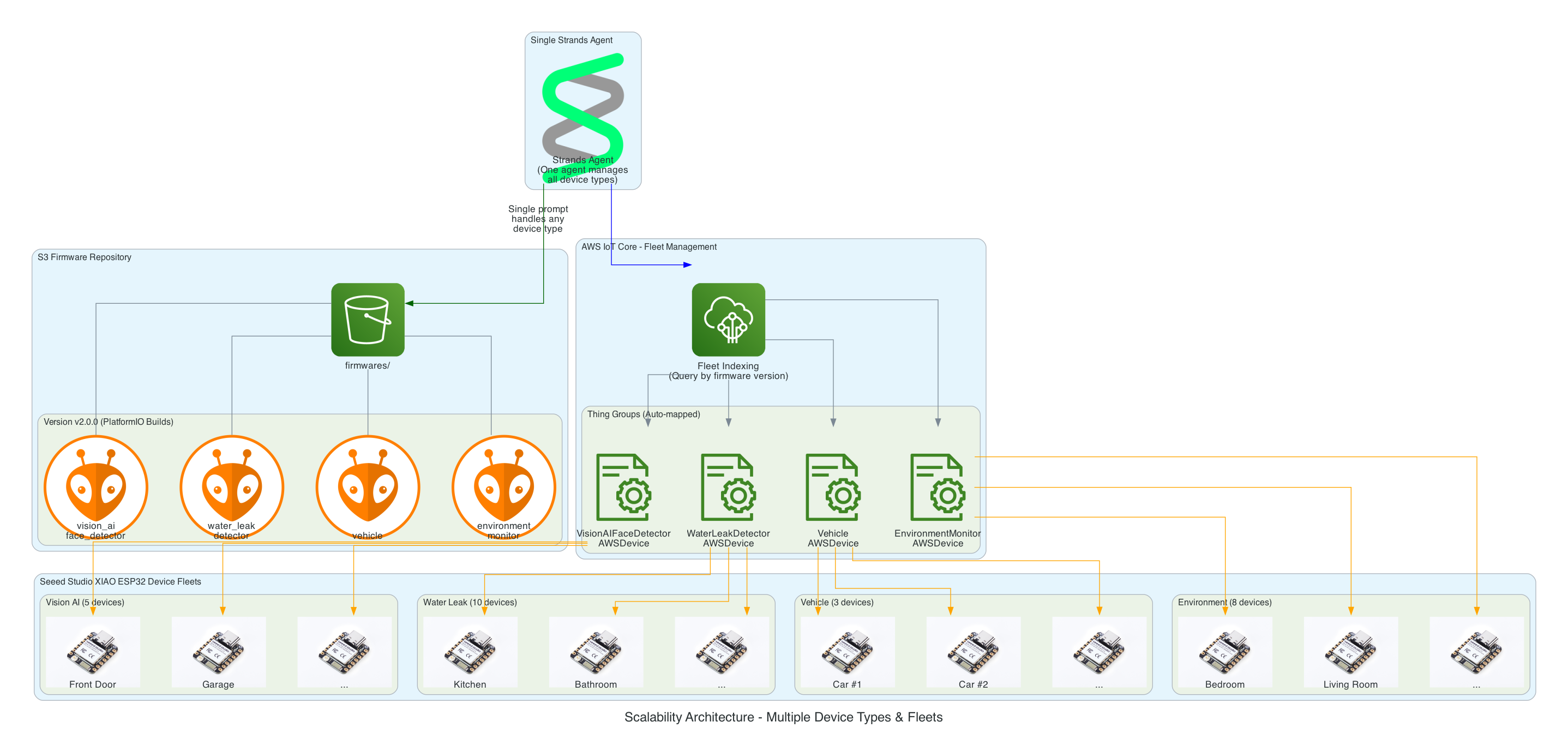
Key Scalability Features:
- Single Agent, Multiple Device Types - One Strands Agent manages all 26+ device groups without code changes
- S3 Folder Convention - Adding a new device type is as simple as creating a new folder (e.g.,
firmwares/v1.0.0/new_device_type/) - Auto-Discovery Mapping - Folder names automatically map to Thing Groups (e.g.,
vision_ai_face_detector→VisionAIFaceDetectorAWSDevice) - Fleet Indexing Queries - Dynamically target devices based on current firmware version, no hardcoded device lists
- Horizontal Scaling - Add unlimited devices to any group; IoT Jobs handles distribution automatically
Firmware Rollback Architecture
This diagram shows how the solution enables rollback to any previous firmware version using a simple prompt, leveraging the dual-partition architecture of the Seeed Studio XIAO ESP32.
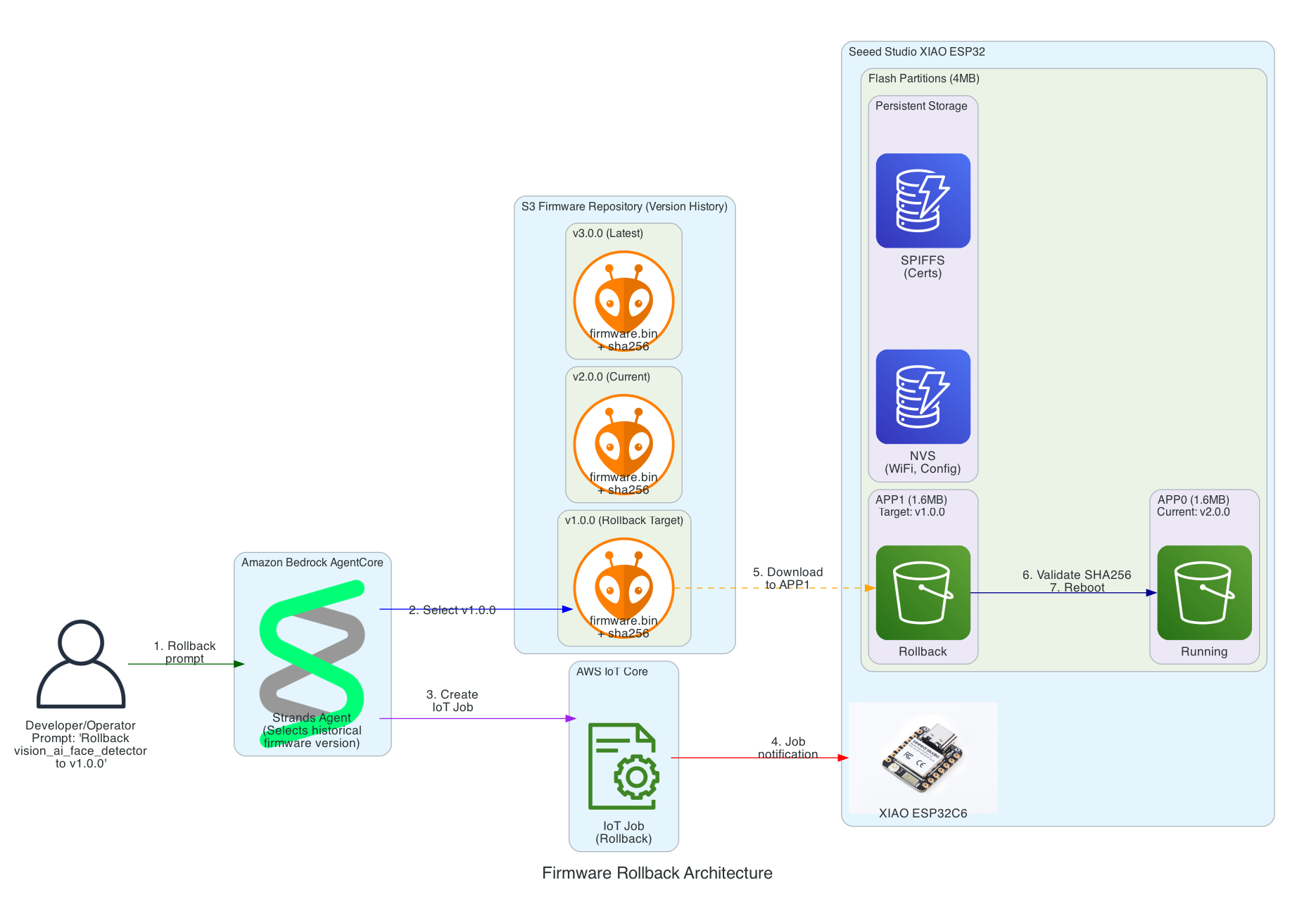
Key Rollback Features:
- Version History in S3 - All firmware versions are retained (v1.0.0, v2.0.0, v3.0.0, etc.) enabling rollback to any point
- Dual-Partition Flash Layout - XIAO ESP32 uses APP0/APP1 partitions for safe ping-pong updates
- Persistent Storage - NVS (WiFi, config) and SPIFFS (certificates) survive firmware updates
- SHA256 Validation - Firmware integrity verified before committing to new partition
- Automatic Rollback - If new firmware fails to boot and connect to MQTT, device automatically reverts to previous partition
Interactive Sequence Diagram
Firmware Rollback Sequence
Rollback to any previous firmware version with dual-partition safety
Multi-Interface Access Architecture
This diagram demonstrates how the Strands Agent can be accessed through multiple interfaces with different authentication methods - enabling developers to use their preferred tools while operators can use a web-based chatbot.
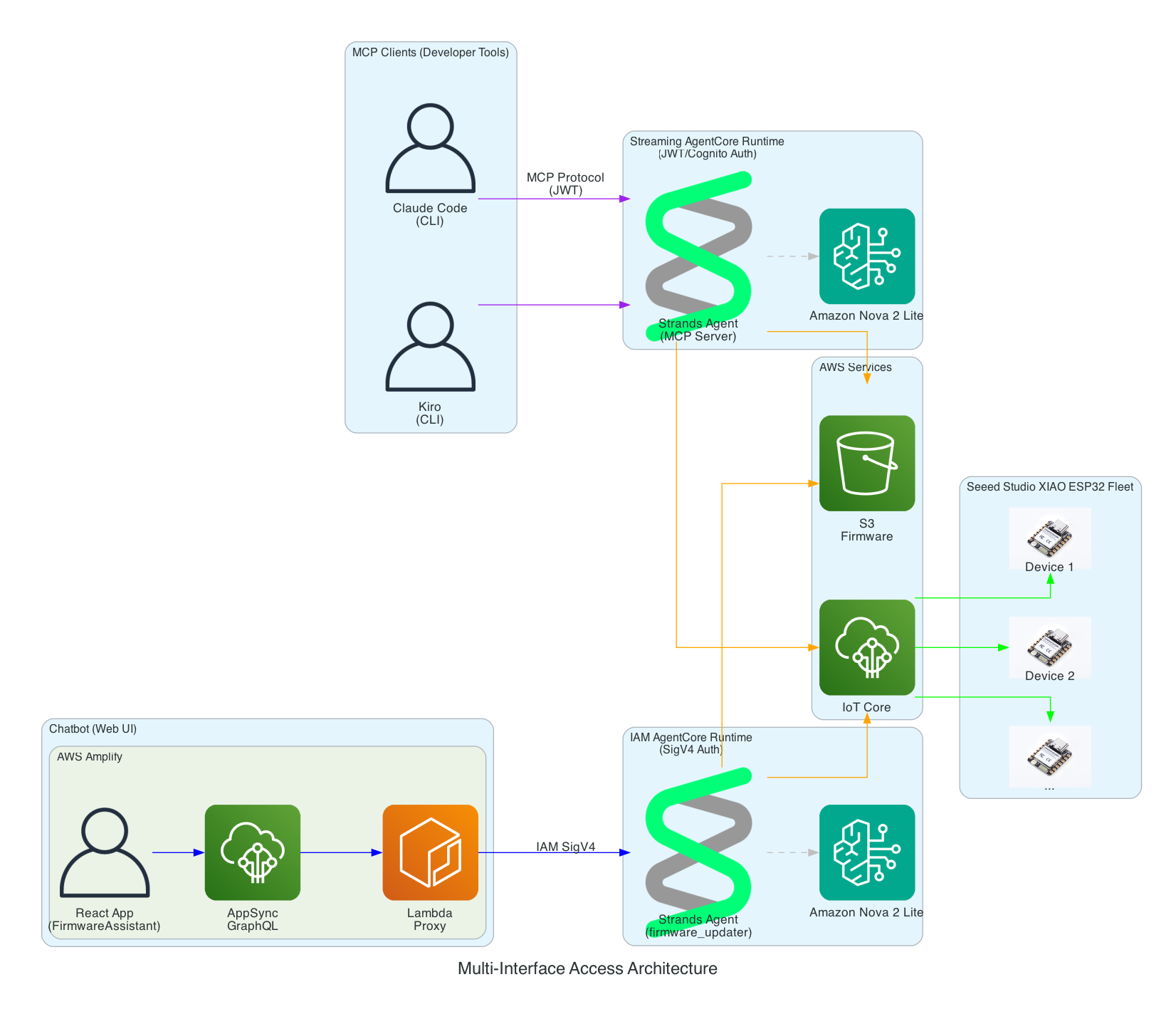
Interface Options:
- MCP Clients (Developer Tools) - Claude Code and Kiro CLI connect via Model Context Protocol to a Streaming AgentCore Runtime using JWT/Cognito authentication
- Chatbot (Web UI) - AWS Amplify React app with FirmwareAssistant component connects via Lambda proxy to an IAM AgentCore Runtime using SigV4 authentication for service-to-service communication
- Two Runtimes, Same Agent Logic - Both runtimes run the same Strands Agent code but are deployed separately with different authentication methods suited to their use cases
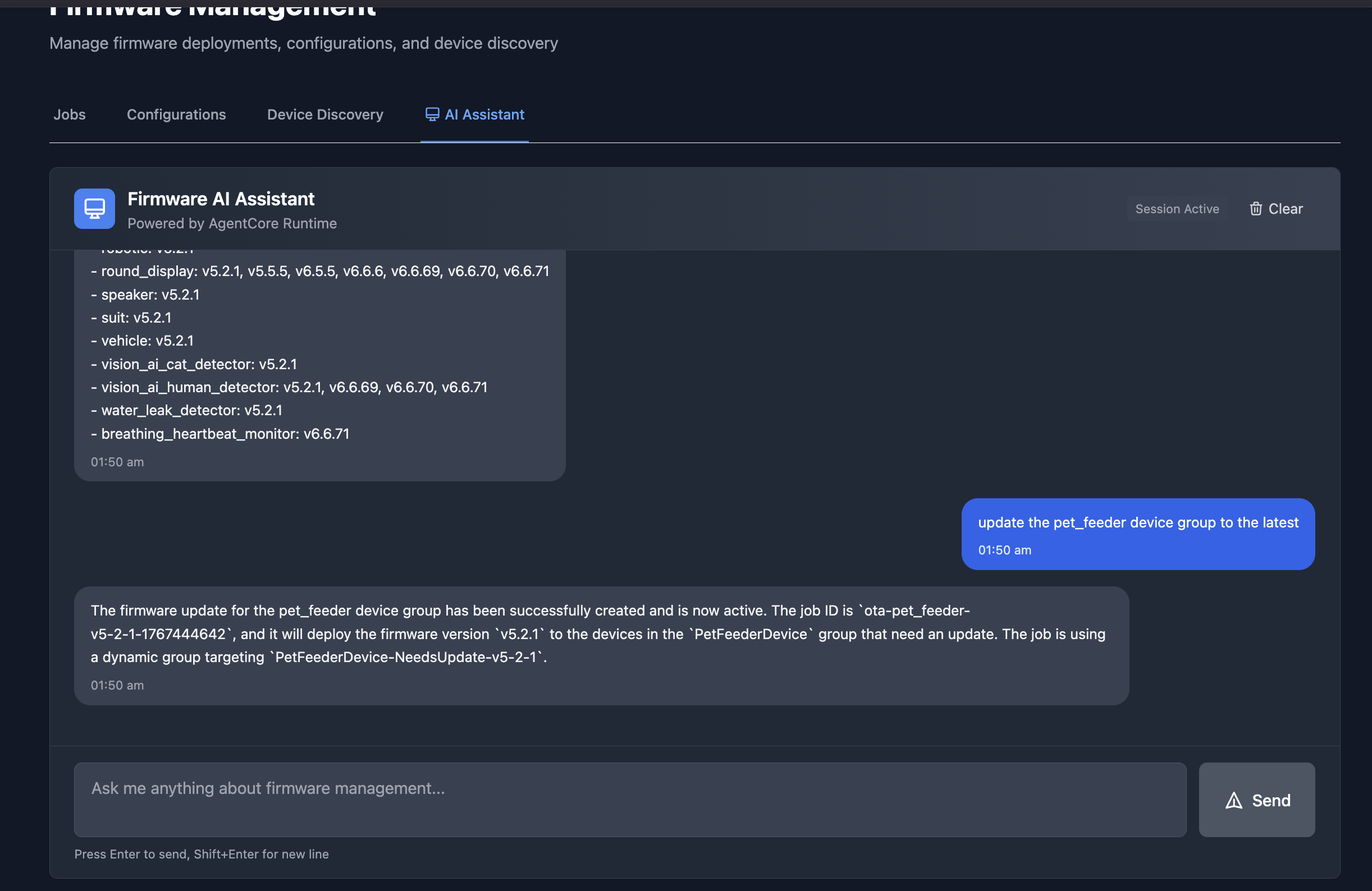
Firmware AI Assistant Chatbot
The chatbot interface in an Amplify React App provides a conversational way to manage firmware updates. In this example, the assistant lists all available firmware versions across device groups, and then creates an OTA job to update the pet_feeder device group to the latest firmware version.
Authentication Architecture
This diagram illustrates the multi-layer security model ensuring that all access to the firmware management system is properly authenticated. Each interface uses a different authentication method suited to its use case.
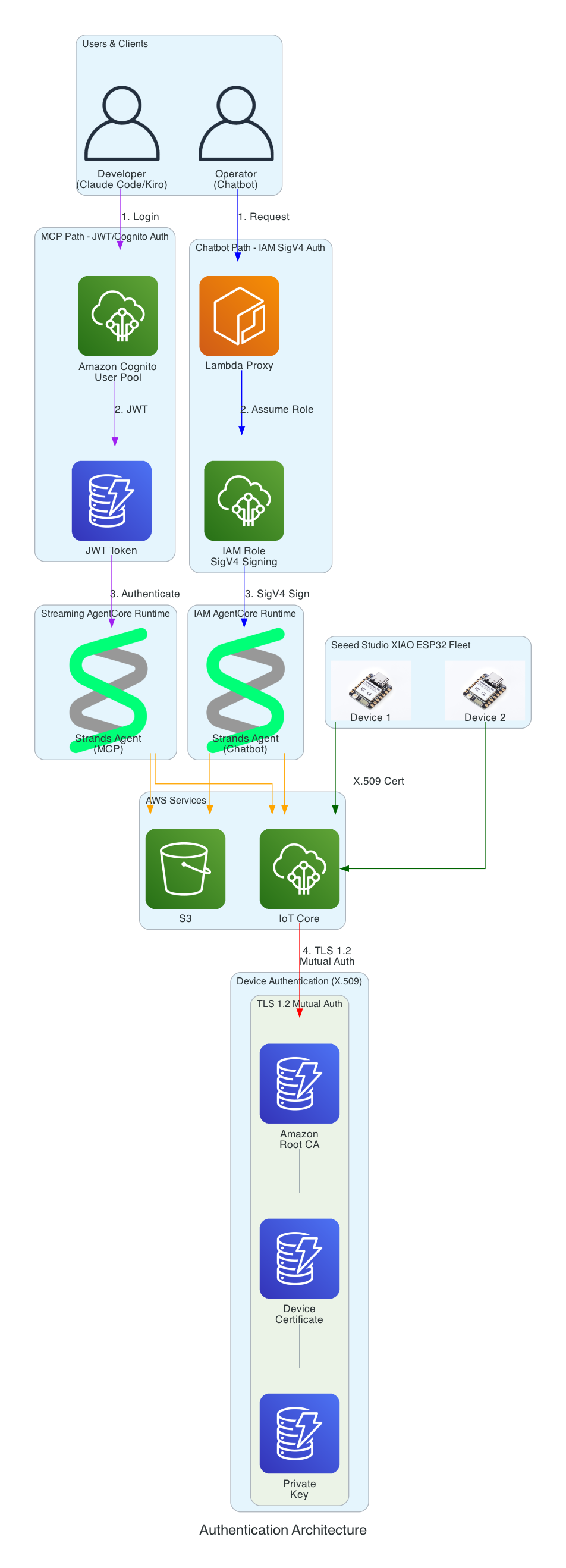
Authentication Layers:
- Cognito JWT (MCP Path) - Developers using Claude Code and Kiro CLI authenticate via Amazon Cognito User Pool and receive JWT tokens, connecting to the Streaming AgentCore Runtime
- IAM SigV4 (Chatbot Path) - The Lambda proxy authenticates using AWS IAM roles with SigV4 request signing for service-to-service communication with the IAM AgentCore Runtime
- X.509 Certificates (Device Path) - XIAO ESP32 devices authenticate to AWS IoT Core using TLS 1.2 mutual authentication with per-device certificates
- Certificate Chain - Amazon Root CA validates device certificates stored in SPIFFS (survives firmware updates)
Serverless Architecture Overview
This diagram provides a comprehensive view of all AWS services used in the solution - every component is fully serverless with no EC2 instances to manage.
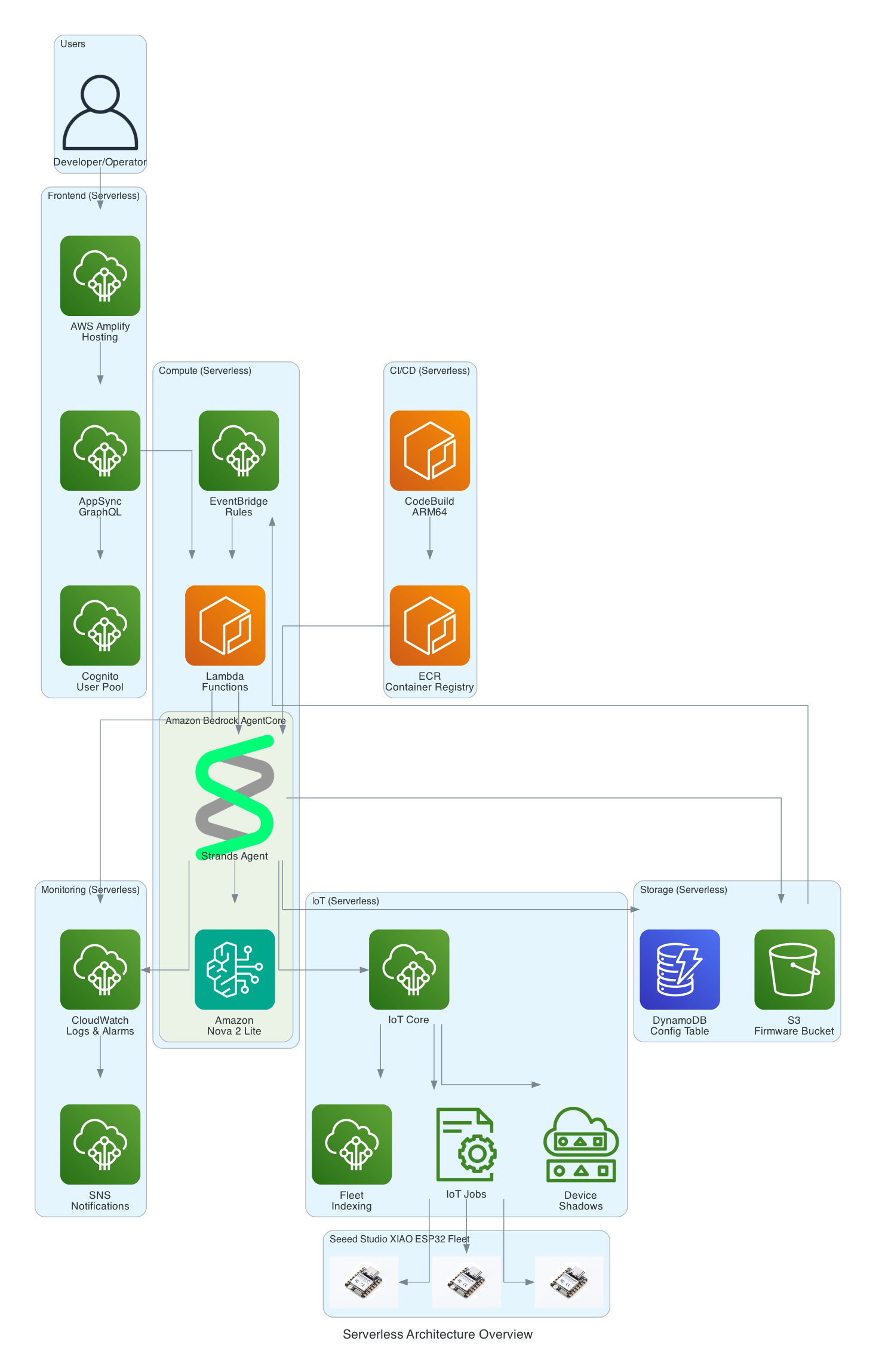
Serverless Components:
- Frontend - AWS Amplify Hosting, AppSync GraphQL, Cognito User Pool
- Compute - Amazon Bedrock AgentCore, Lambda Functions, EventBridge Rules
- Storage - S3 Firmware Bucket, DynamoDB Config Table
- IoT - IoT Core, IoT Jobs, Device Shadows, Fleet Indexing
- Monitoring - CloudWatch Logs & Alarms, SNS Notifications
- CI/CD - CodeBuild (ARM64), ECR Container Registry
Firmware Integrity Verification (SHA256)
This diagram shows the firmware integrity verification process that ensures firmware hasn't been corrupted during download before flashing to the device.
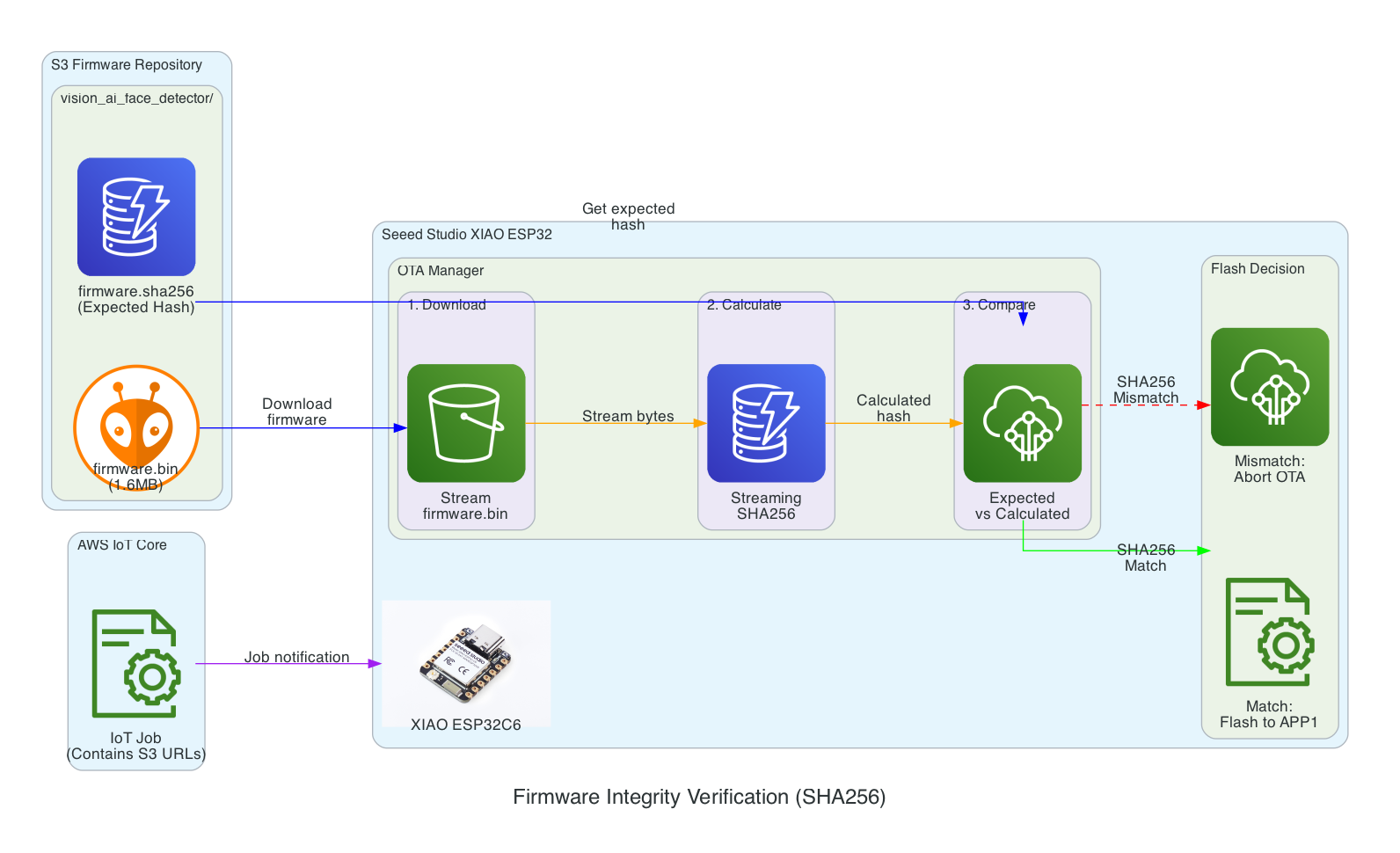
Verification Flow:
- Download - XIAO ESP32 streams firmware.bin from S3 in chunks
- Calculate - SHA256 hash is calculated progressively during download (streaming hash)
- Compare - Calculated hash is compared against expected hash from firmware.sha256 file
- Flash Decision - Match: proceed to flash APP1 partition | Mismatch: abort OTA and report failure
Benefits:
- Detects corruption during download (network issues, incomplete transfers)
- Prevents flashing of tampered firmware
- Memory-efficient streaming verification (no need to store entire firmware before hashing)
Interactive Sequence Diagram
SHA256 Integrity Verification Sequence
Streaming hash verification during firmware download
Safe Rollout with Rate Limiting & Abort Thresholds
This diagram illustrates the safety mechanisms that prevent fleet-wide failures during OTA updates by controlling rollout speed and automatically aborting when issues are detected.
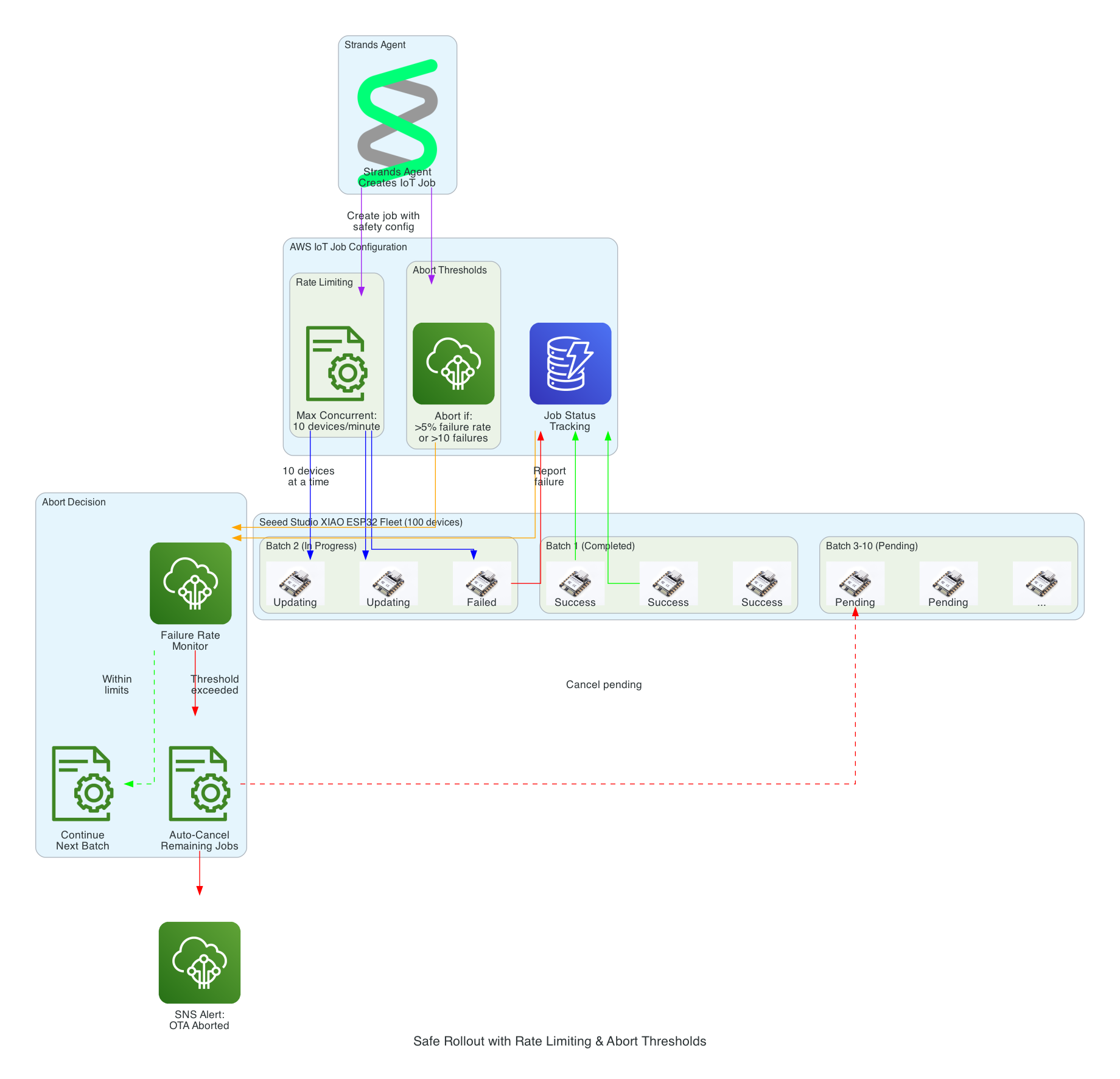
Safety Mechanisms:
- Rate Limiting - Updates are deployed to a maximum of 10 devices concurrently, preventing network congestion and allowing monitoring
- Abort Thresholds - Job automatically cancels if failure rate exceeds 5% or more than 10 absolute failures occur
- Batch Processing - Fleet of 100 devices is updated in batches, with completed, in-progress, and pending states tracked
- Failure Monitoring - Real-time tracking of success/failure status feeds into abort decision logic
- Auto-Cancel - When threshold is exceeded, all pending device updates are automatically cancelled
- SNS Alerts - Operators are immediately notified when an OTA rollout is aborted
Interactive Sequence Diagram
Safe Rollout with Abort Threshold
Rate-limited deployment with automatic abort on failure threshold
Source Code
The source code for this project is available on GitHub:
- cdk-iot-firmware-manager - AWS CDK infrastructure, Strands Agent code, and Lambda functions for firmware management
This repository is not yet open sourced. It will be made public in a future update.