These are the slides from my talk at the AWS User Group Wellington meet-up on 26 May 2026, walking through how I built a real-time pipeline that listens to spoken commands in the browser and drives a Sphero RVR — exact distances, exact angles — with live telemetry streaming back into the UI.
Tip: click into the slides and use the arrow keys to navigate, or hit the fullscreen button for the best experience.
arduino-aws-iot — ESP32-S3 firmware. The talk focuses on the sphero_rvr device group, including the new maneuver executor (forward, reverse, turn, cancel) layered on top of the existing drive D-pad.
cdk-iot-sphero-rvr-streaming — AWS CDK stack that filters the RVR telemetry MQTT topic, flattens the nested payload in Lambda, and forwards it as a GraphQL mutation to an Amplify-managed AppSync API.
amplify-react-nova-sonic-voice-chat-sphero-rvr — React + AWS Amplify Gen 2 frontend. The same Cognito identity is used for Bedrock streaming, IoT publish, and the AppSync subscription that surfaces live telemetry.
Big thanks to the AWS User Group Wellington organisers and everyone who came along — happy to chat about any of the code, the maneuver framework, or where the project goes next.
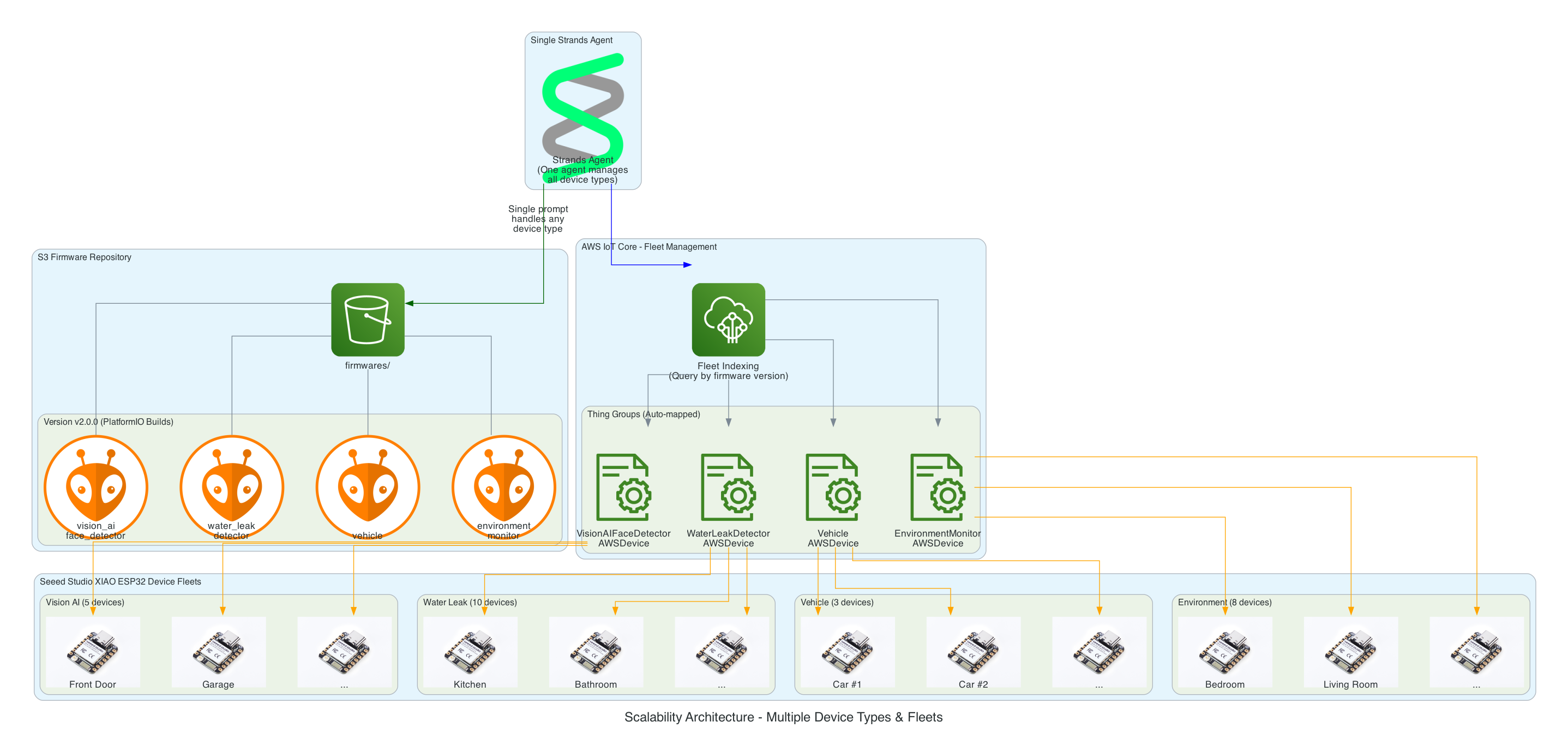
I want to have the ability to be able to manage the firmware of all IoT devices using a prompt - it could be to upgrade a device to the latest version, or even to perform a rollback, whether across the entire IoT device fleet level - every device in all 20+ solution types, all the devices within a type of solution, or even at an individual device level.
Goals
To be able to over-the-air flash a new firmware version using a prompt
To have an Agentic Agent do all the work, give it a prompt and it takes cares of the rest
Scalable in the number of IoT devices, as well as, being able to scale as the number of new IoT solution Types increases; with no effort required - implement once and forget
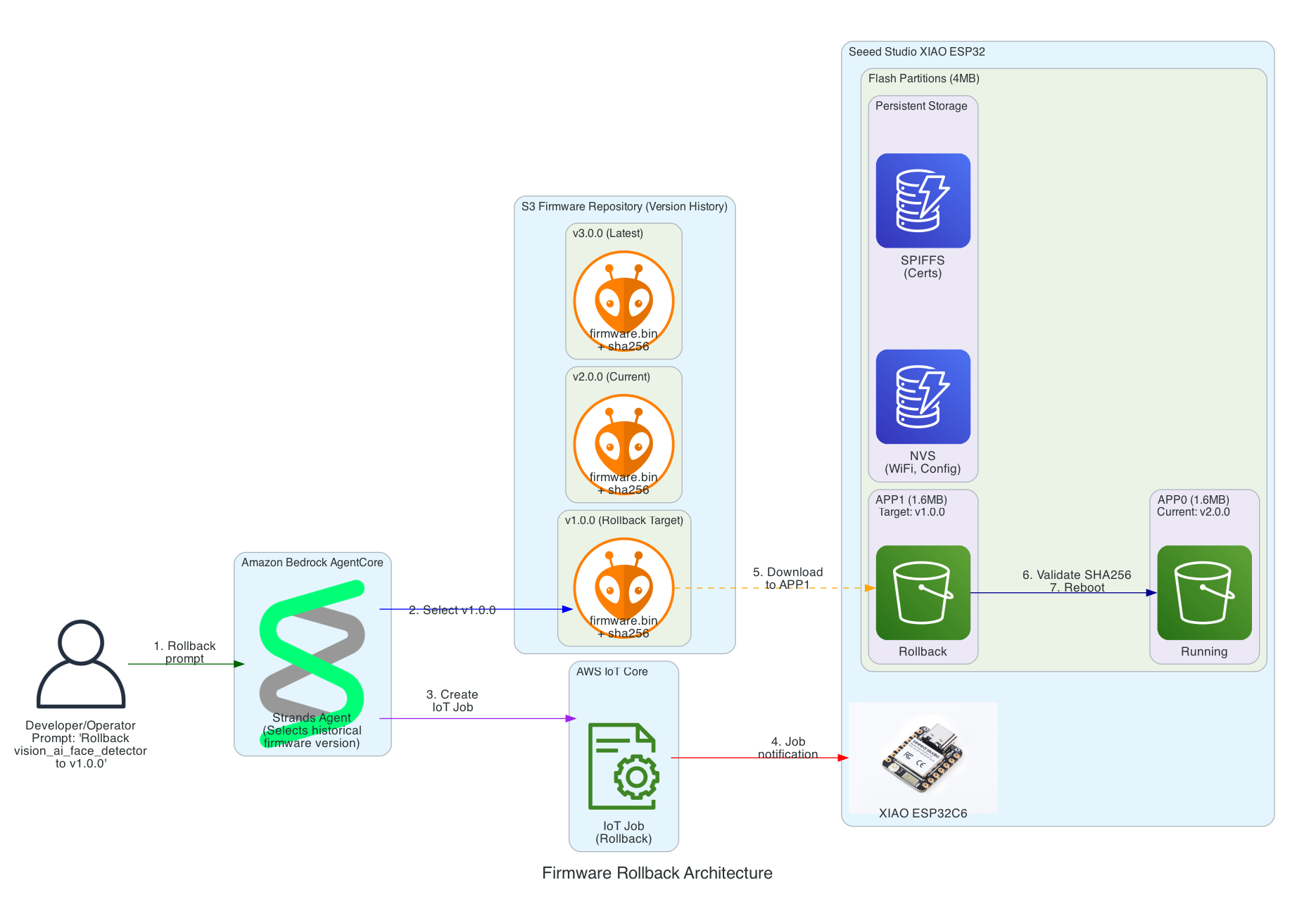
Have the ability to rollback to any firmware version specified in the prompt
This same solution can be interfaced with using the Model Context Protocol (MCP): whether via Kiro CLI or Claude Code
This same solution can be interfaced with using a chatbot
Must be authenticated to interface with this solution
Must be a completely serverless-solution
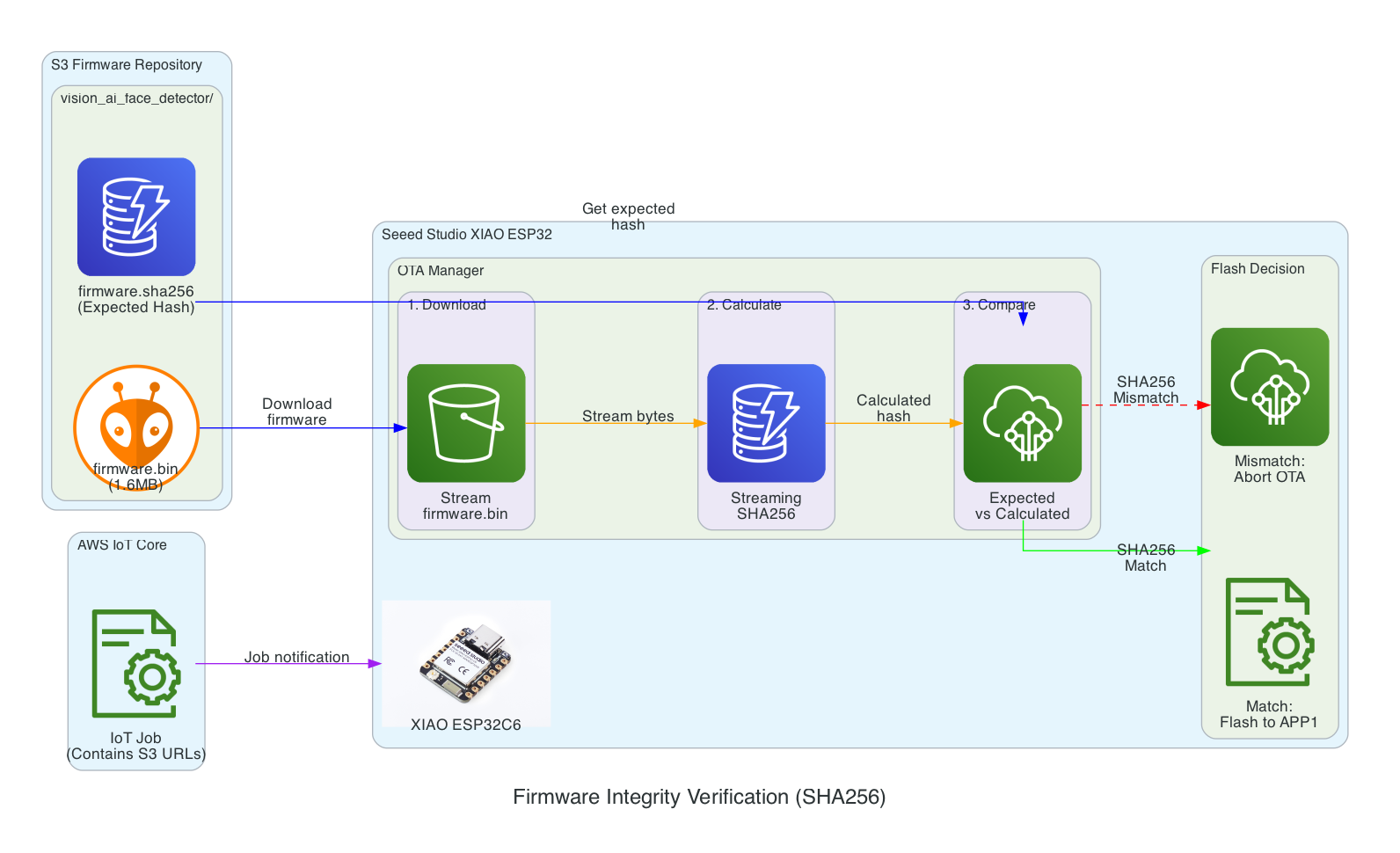
Firmware integrity verification using SHA256 checksums before flashing to ensure firmware hasn't been corrupted during download
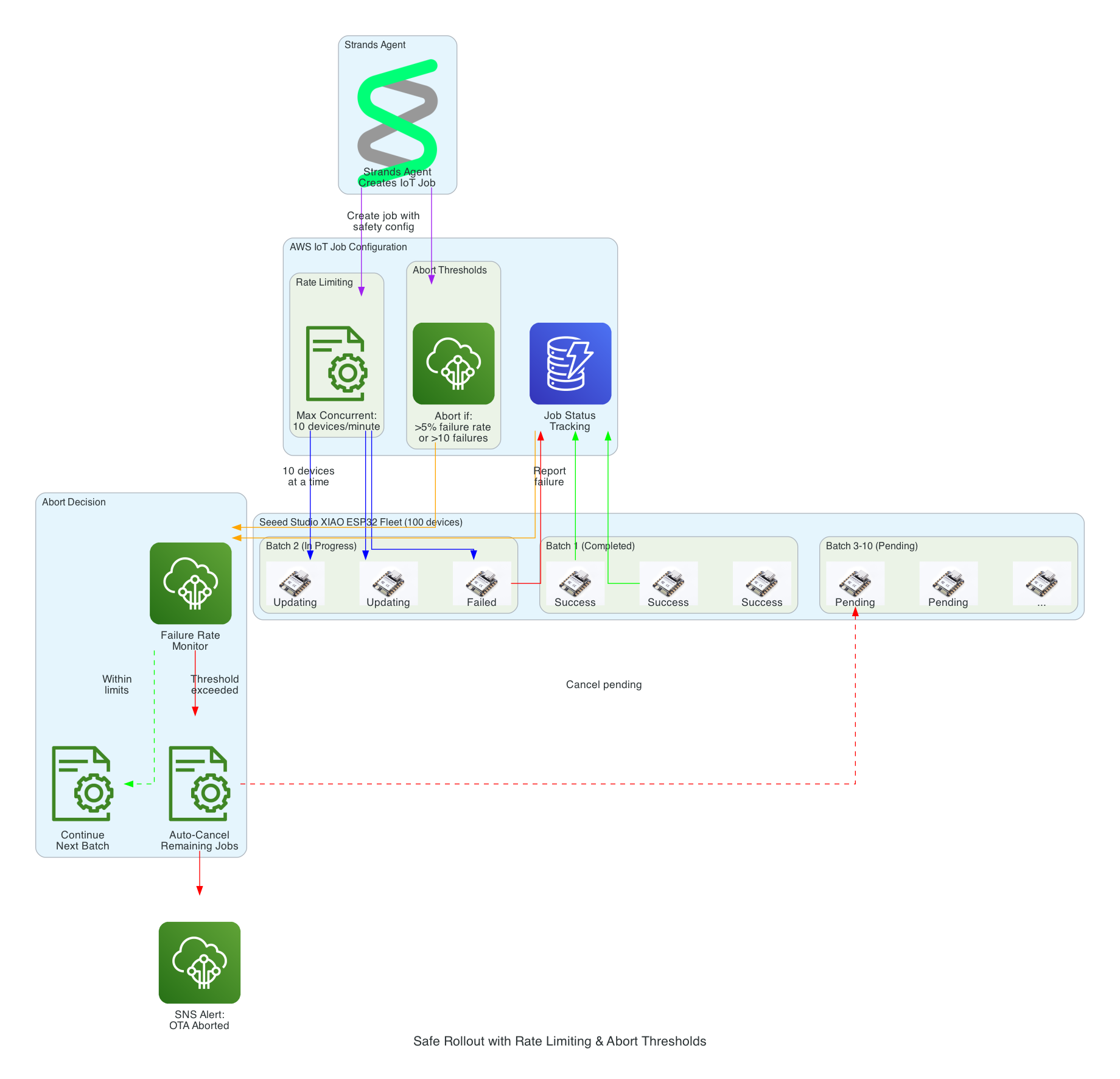
Safe rollout with rate limiting and automatic abort thresholds to prevent fleet-wide failures
Device firmware version tracking via device shadows to enable version-based targeting for updates
Configuration-gated deployments to enable or disable OTA updates per device type for controlled rollouts
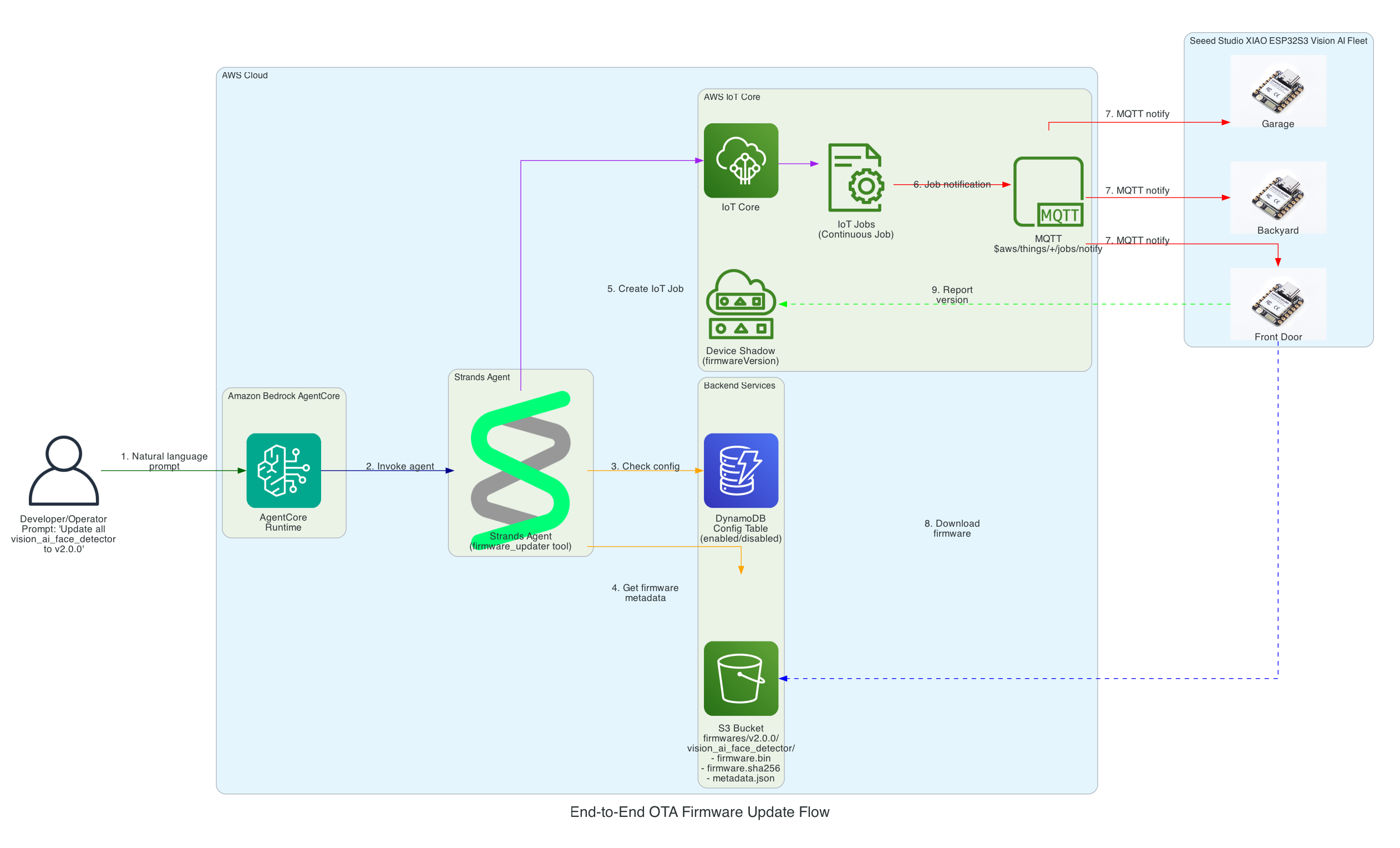
From natural language prompt to firmware flashed on Seeed Studio XIAO ESP32
0/15
User
AgentCore
Strands
DynamoDB
S3
IoT Core
XIAO
Milestone
Complete
Total: 15 message exchanges across 7 participants
~12 seconds end-to-end (prompt to firmware flashed)
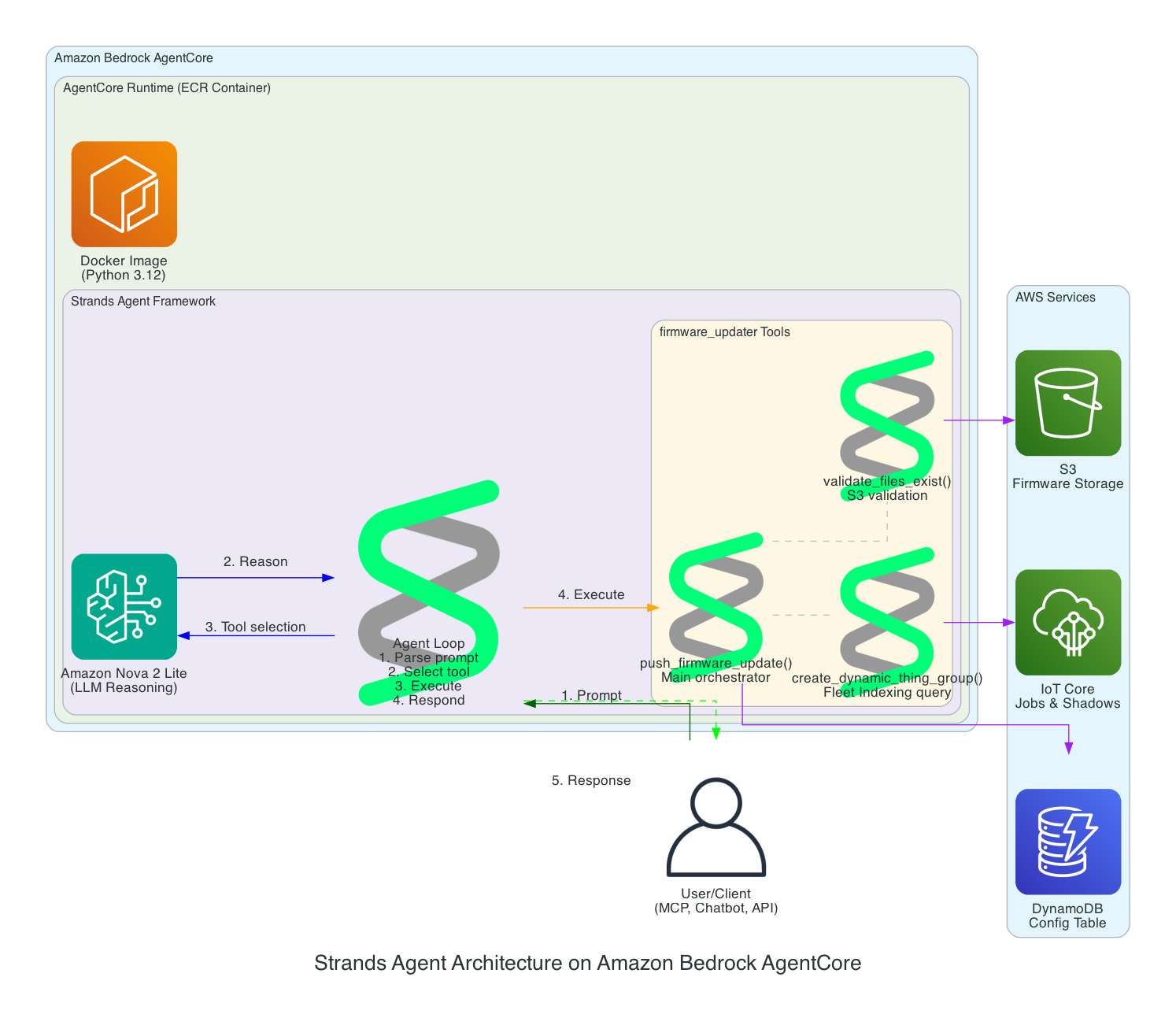
Strands Agent Architecture on Amazon Bedrock AgentCore
This diagram details the internal architecture of the Strands Agent running on Amazon Bedrock AgentCore, showing how the LLM reasons about prompts and orchestrates tool execution.
Components:
Amazon Bedrock AgentCore - Managed runtime that hosts and scales the agent
This diagram shows how the solution enables rollback to any previous firmware version using a simple prompt, leveraging the dual-partition architecture of the Seeed Studio XIAO ESP32.
Key Rollback Features:
Version History in S3 - All firmware versions are retained (v1.0.0, v2.0.0, v3.0.0, etc.) enabling rollback to any point
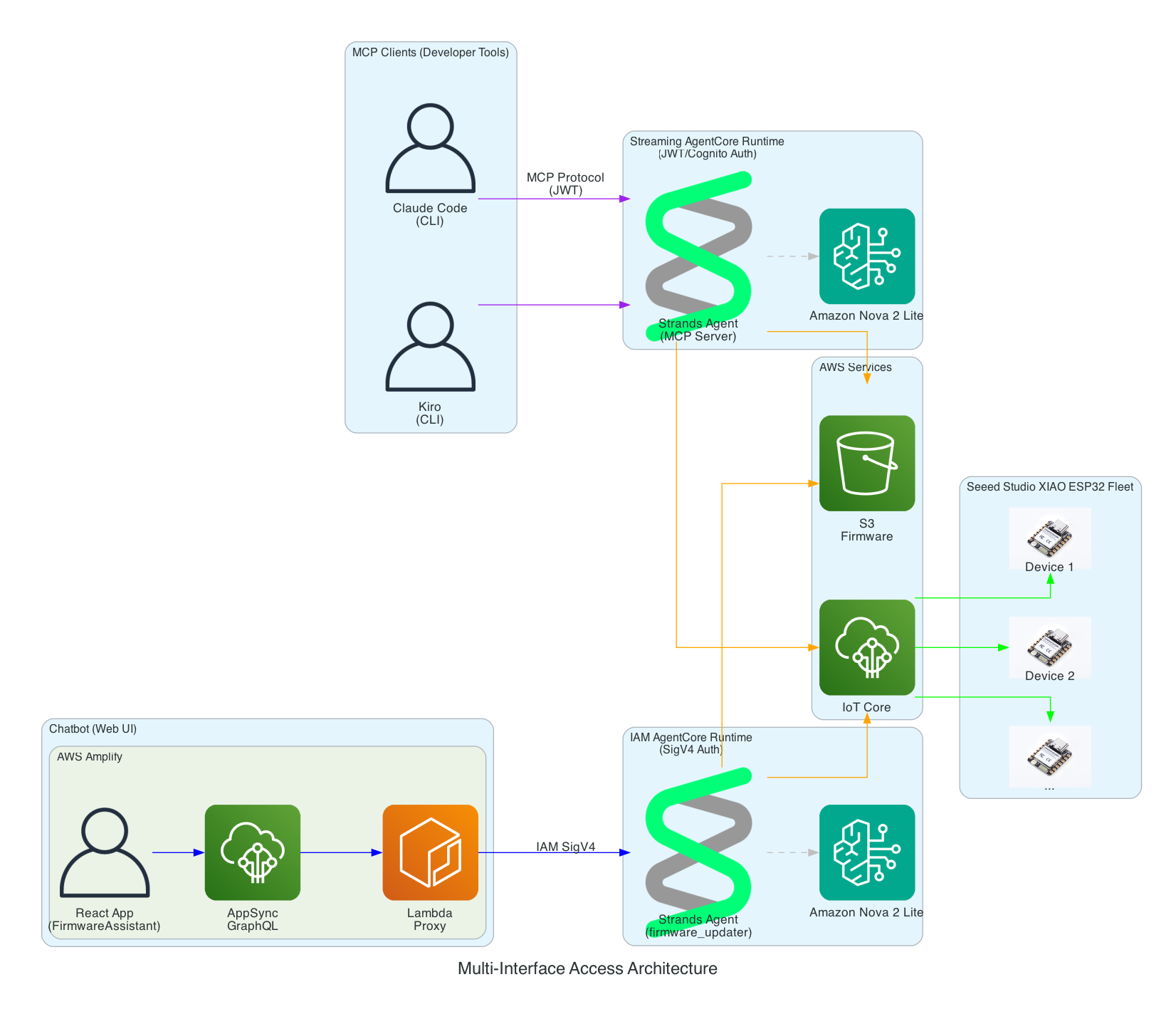
This diagram demonstrates how the Strands Agent can be accessed through multiple interfaces with different authentication methods - enabling developers to use their preferred tools while operators can use a web-based chatbot.
Interface Options:
MCP Clients (Developer Tools) - Claude Code and Kiro CLI connect via Model Context Protocol to a Streaming AgentCore Runtime using JWT/Cognito authentication
Chatbot (Web UI) - AWS Amplify React app with FirmwareAssistant component connects via Lambda proxy to an IAM AgentCore Runtime using SigV4 authentication for service-to-service communication
Two Runtimes, Same Agent Logic - Both runtimes run the same Strands Agent code but are deployed separately with different authentication methods suited to their use cases
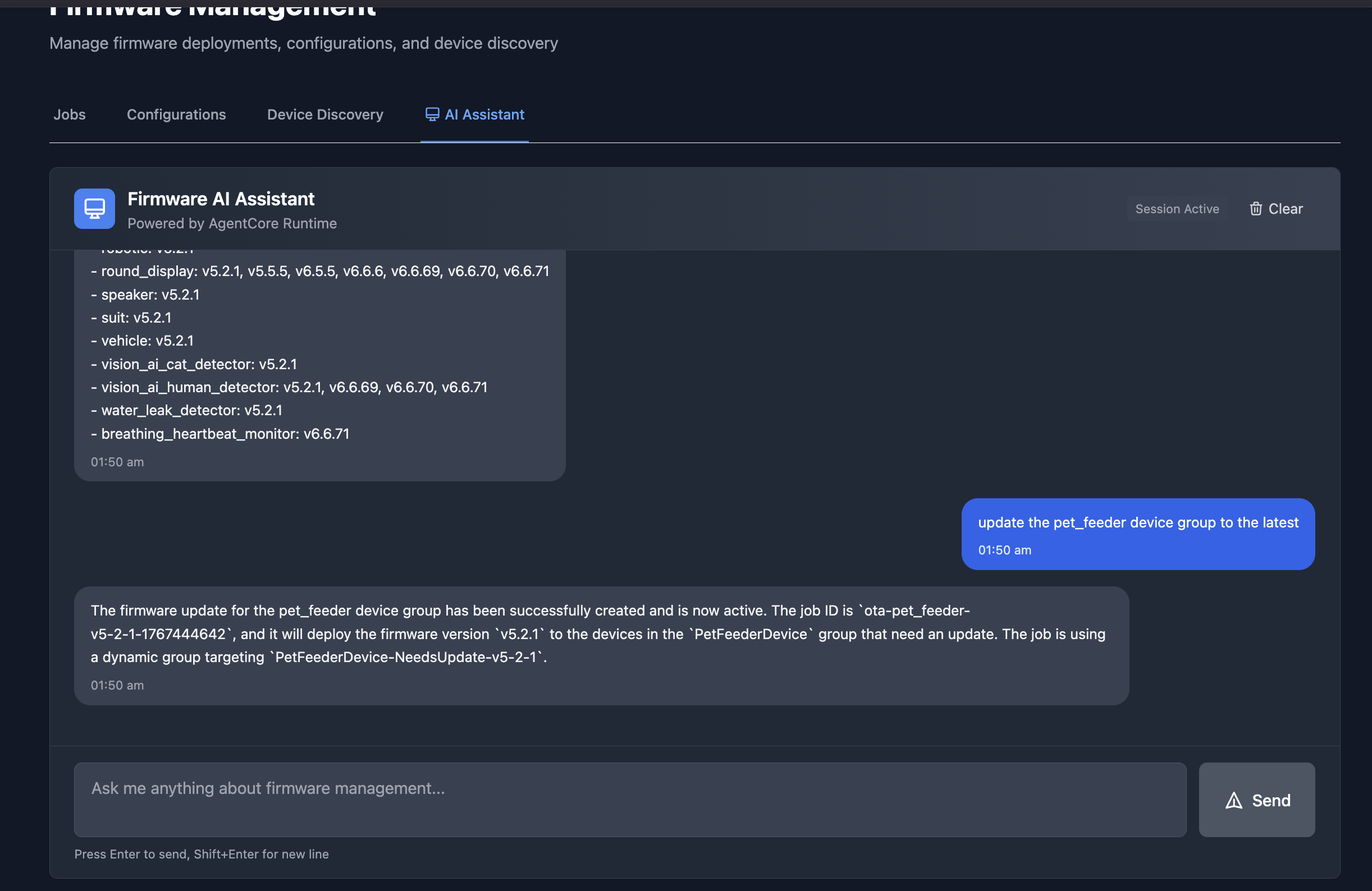
The chatbot interface in an Amplify React App provides a conversational way to manage firmware updates. In this example, the assistant lists all available firmware versions across device groups, and then creates an OTA job to update the pet_feeder device group to the latest firmware version.
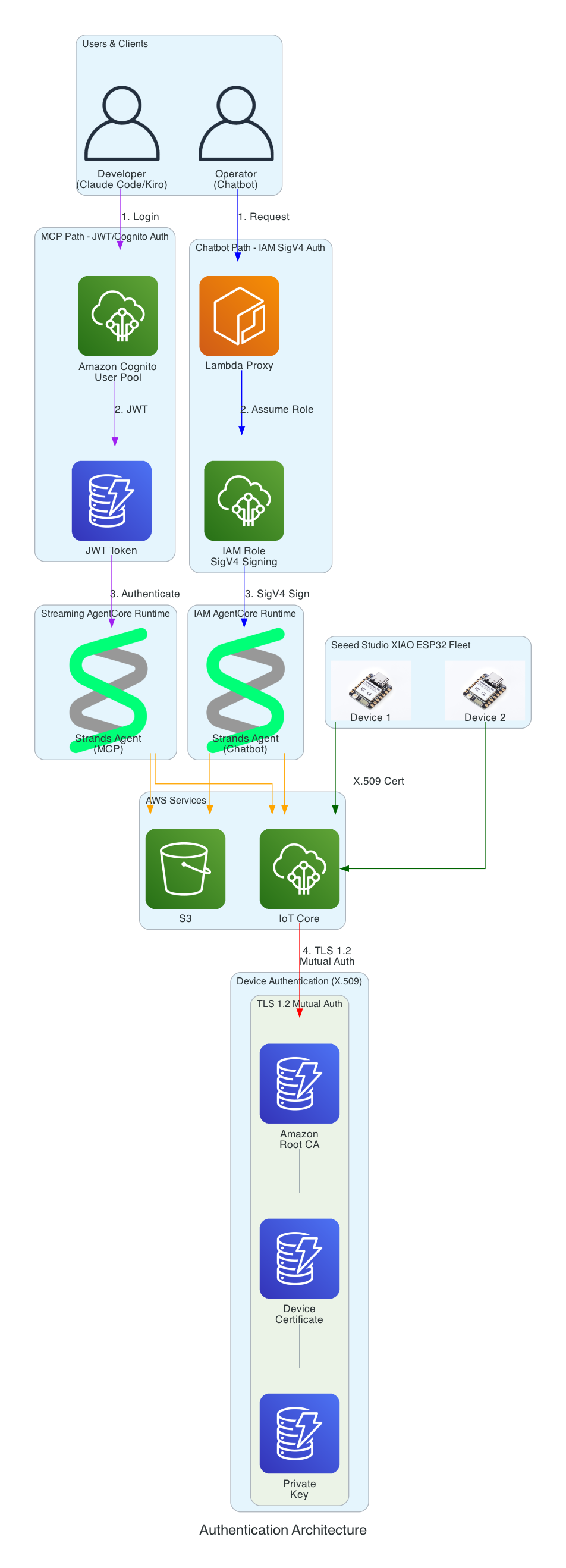
This diagram illustrates the multi-layer security model ensuring that all access to the firmware management system is properly authenticated. Each interface uses a different authentication method suited to its use case.
Authentication Layers:
Cognito JWT (MCP Path) - Developers using Claude Code and Kiro CLI authenticate via Amazon Cognito User Pool and receive JWT tokens, connecting to the Streaming AgentCore Runtime
IAM SigV4 (Chatbot Path) - The Lambda proxy authenticates using AWS IAM roles with SigV4 request signing for service-to-service communication with the IAM AgentCore Runtime
X.509 Certificates (Device Path) - XIAO ESP32 devices authenticate to AWS IoT Core using TLS 1.2 mutual authentication with per-device certificates
Certificate Chain - Amazon Root CA validates device certificates stored in SPIFFS (survives firmware updates)
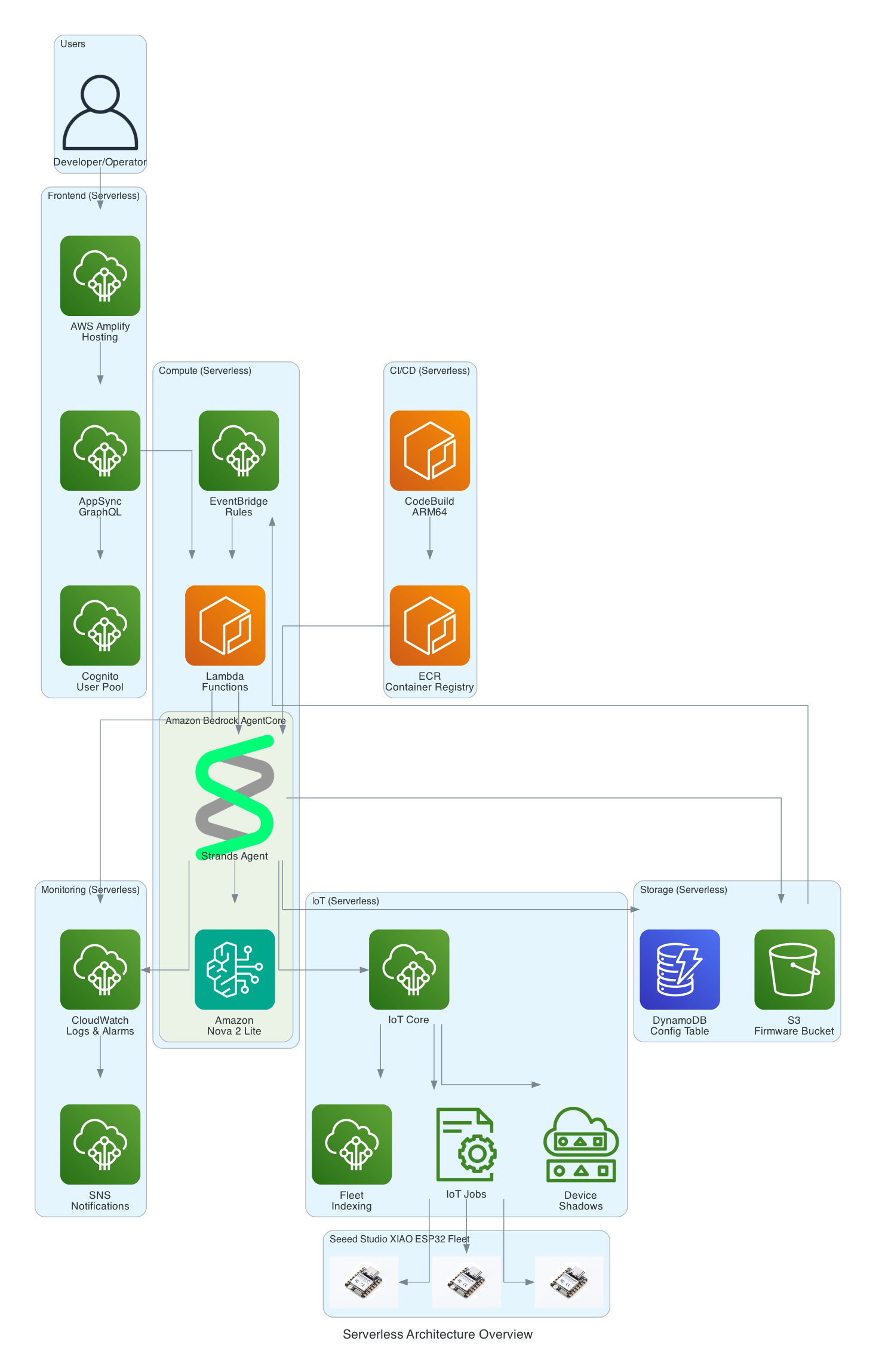
This diagram provides a comprehensive view of all AWS services used in the solution - every component is fully serverless with no EC2 instances to manage.
Serverless Components:
Frontend - AWS Amplify Hosting, AppSync GraphQL, Cognito User Pool
This diagram shows the firmware integrity verification process that ensures firmware hasn't been corrupted during download before flashing to the device.
Verification Flow:
Download - XIAO ESP32 streams firmware.bin from S3 in chunks
Calculate - SHA256 hash is calculated progressively during download (streaming hash)
Compare - Calculated hash is compared against expected hash from firmware.sha256 file
Flash Decision - Match: proceed to flash APP1 partition | Mismatch: abort OTA and report failure
Benefits:
Detects corruption during download (network issues, incomplete transfers)
Prevents flashing of tampered firmware
Memory-efficient streaming verification (no need to store entire firmware before hashing)
Streaming hash verification during firmware download
0/15
IoT Job
XIAO
S3
OTA Mgr
Flash
Memory-efficient: Hash calculated during download, not after
~5.6 seconds (download + verify + commit)
Safe Rollout with Rate Limiting & Abort Thresholds
This diagram illustrates the safety mechanisms that prevent fleet-wide failures during OTA updates by controlling rollout speed and automatically aborting when issues are detected.
Safety Mechanisms:
Rate Limiting - Updates are deployed to a maximum of 10 devices concurrently, preventing network congestion and allowing monitoring
Abort Thresholds - Job automatically cancels if failure rate exceeds 5% or more than 10 absolute failures occur
Batch Processing - Fleet of 100 devices is updated in batches, with completed, in-progress, and pending states tracked
Failure Monitoring - Real-time tracking of success/failure status feeds into abort decision logic
Auto-Cancel - When threshold is exceeded, all pending device updates are automatically cancelled
SNS Alerts - Operators are immediately notified when an OTA rollout is aborted
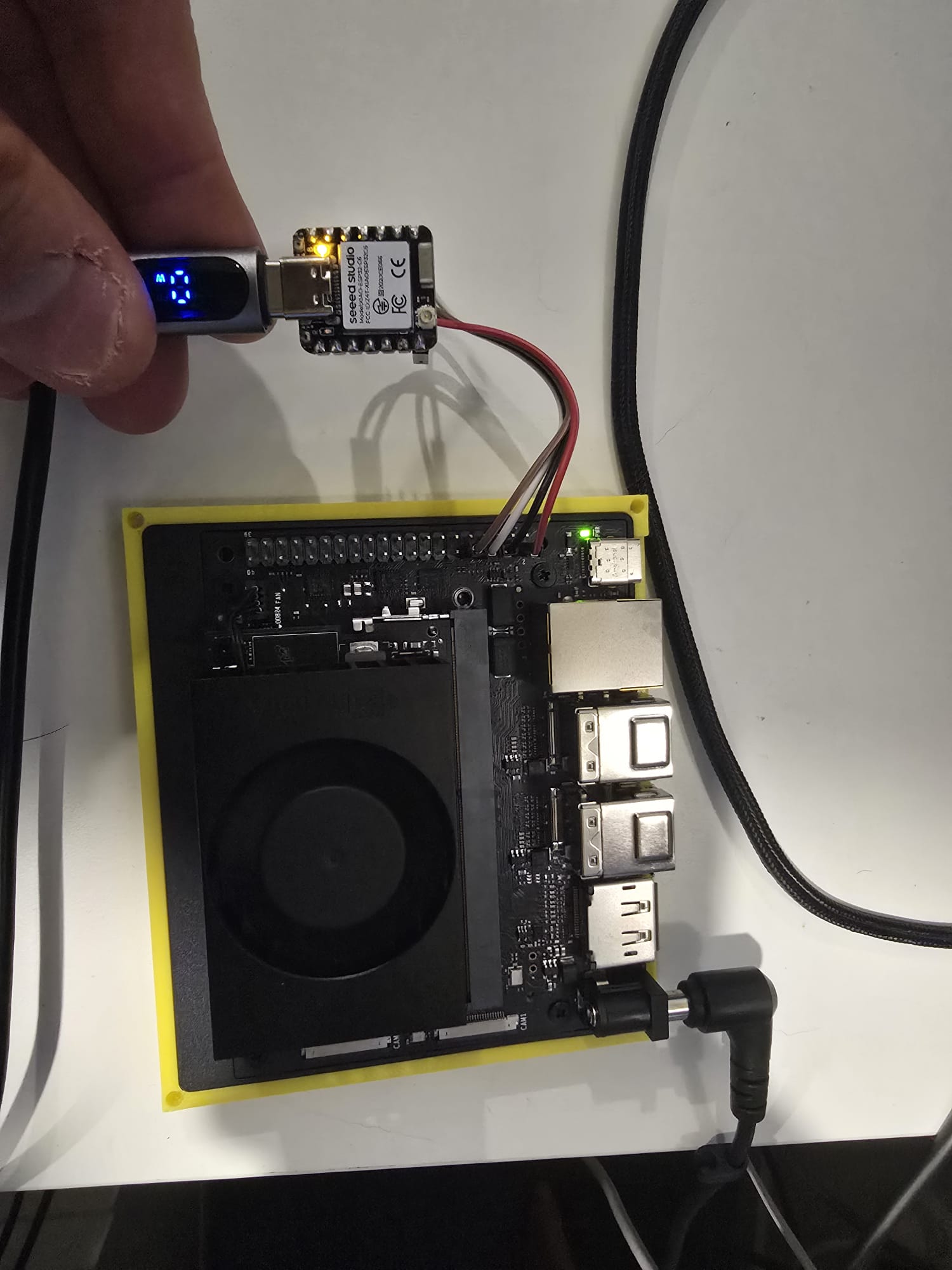
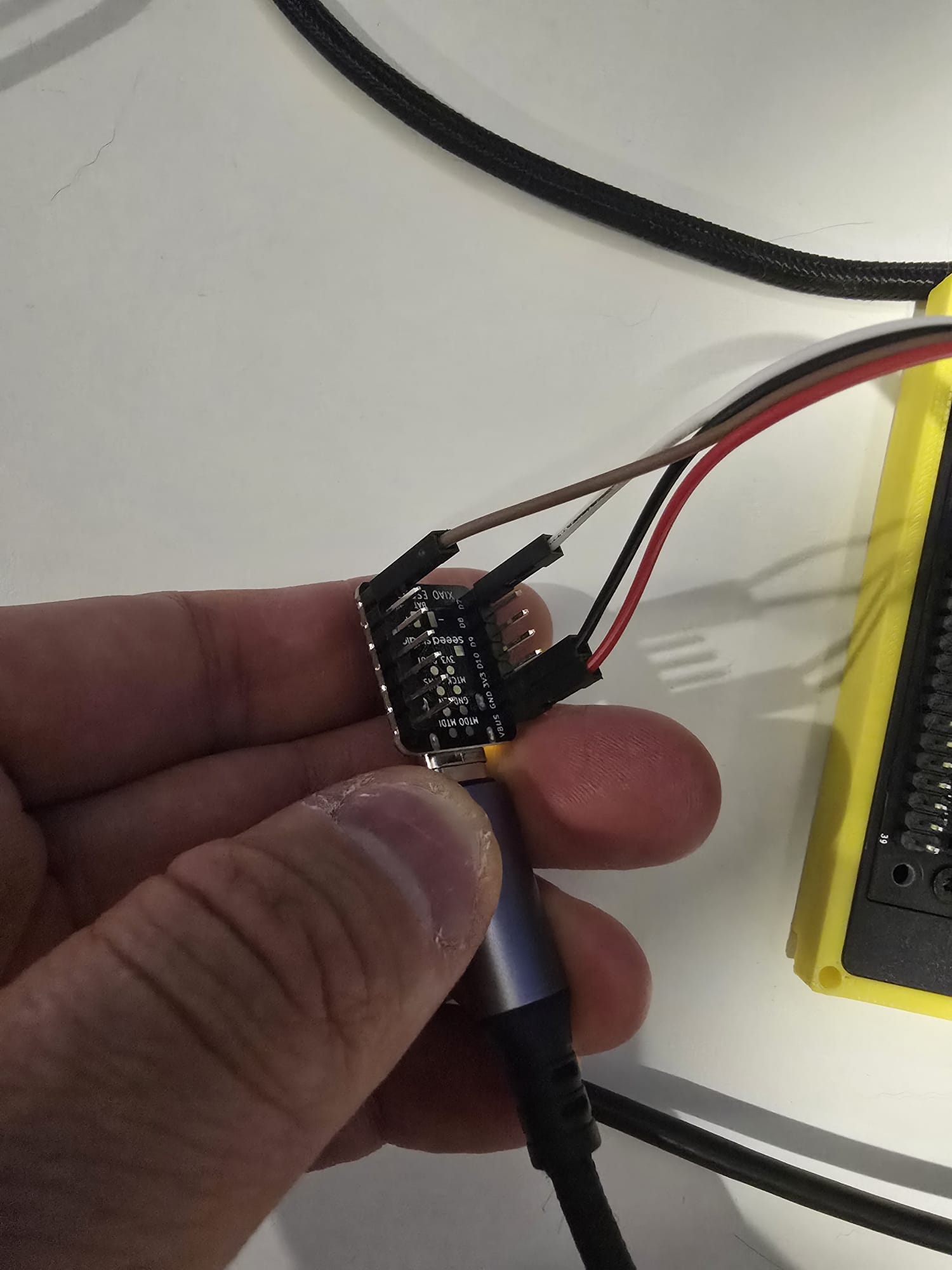
I want to use the Jetson Nano to leverage any sensor readings captured by the ESP32C6 and use it for inferences downstream. In the past I would have tried to send the messages between the devices via AWS IoT Core, but over the wires using UART it is definitely much faster - single digit milliseconds over UART.
Here is the source code to use as a building block to enable a Seeed Studio XIAO ESP32C6 to send messages to a NVIDIA Jetson Nano Super over the UART protocol; uni-direction. The XIAO code is a PlatformIO project and the Jetson Nano Super is a Python script.
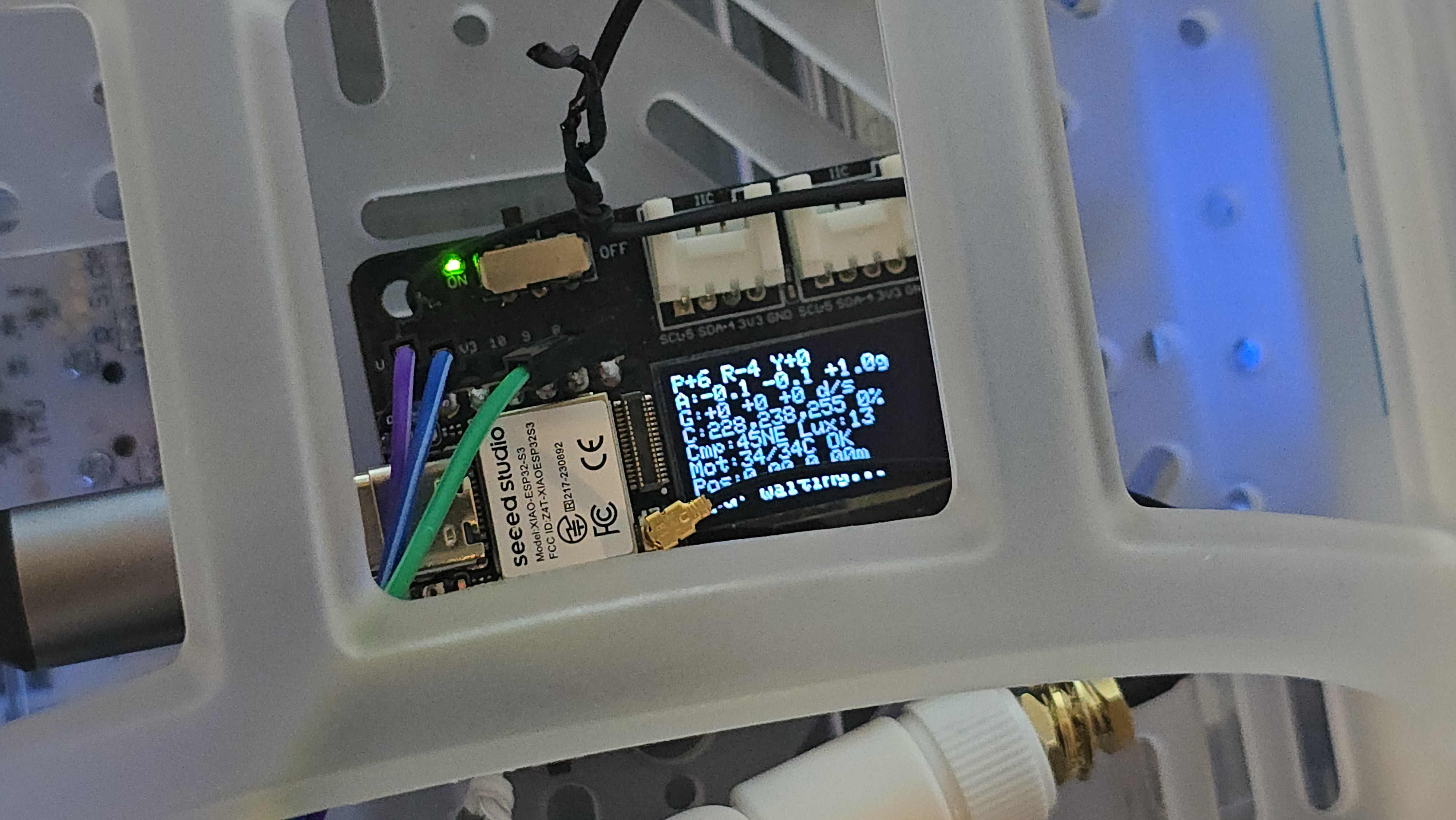
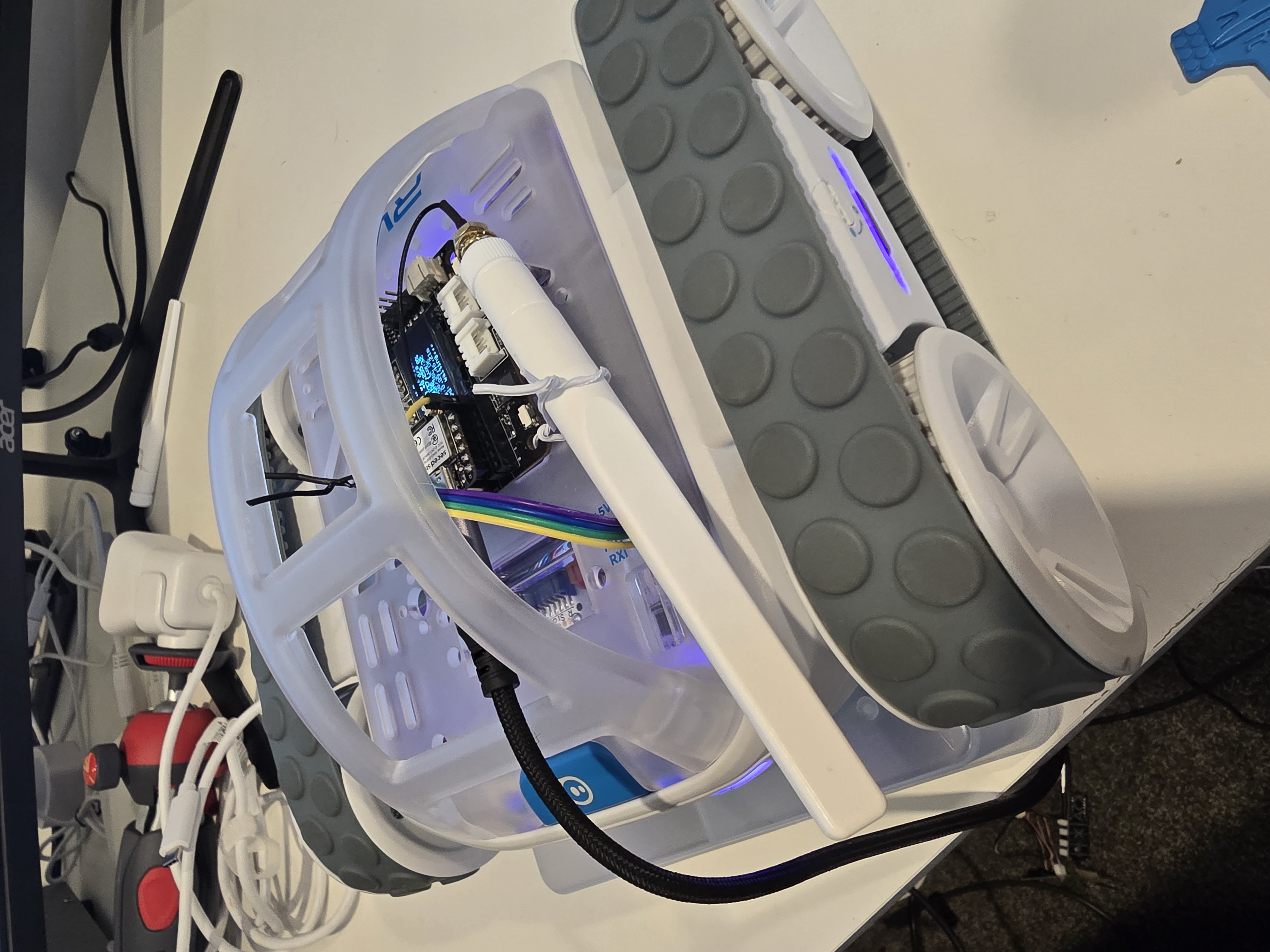
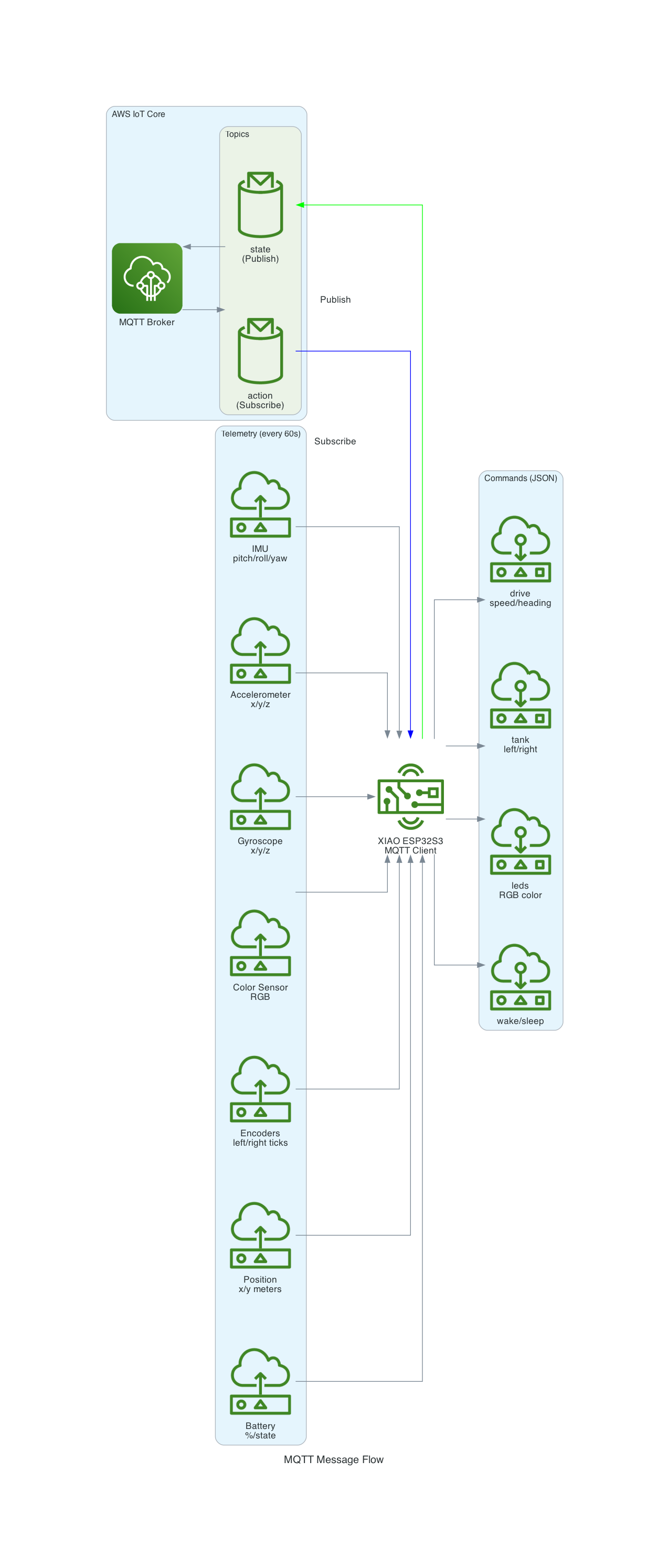
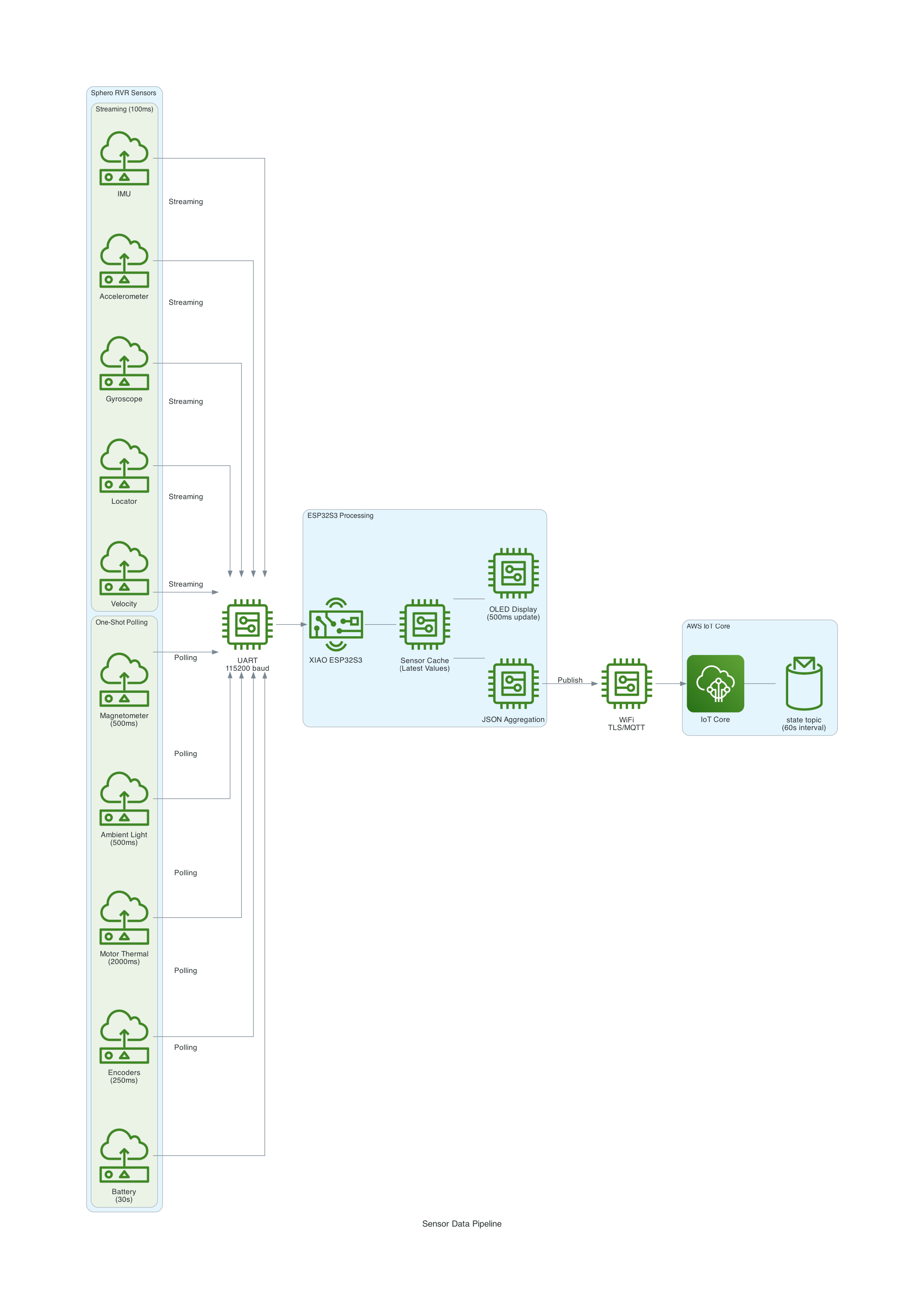
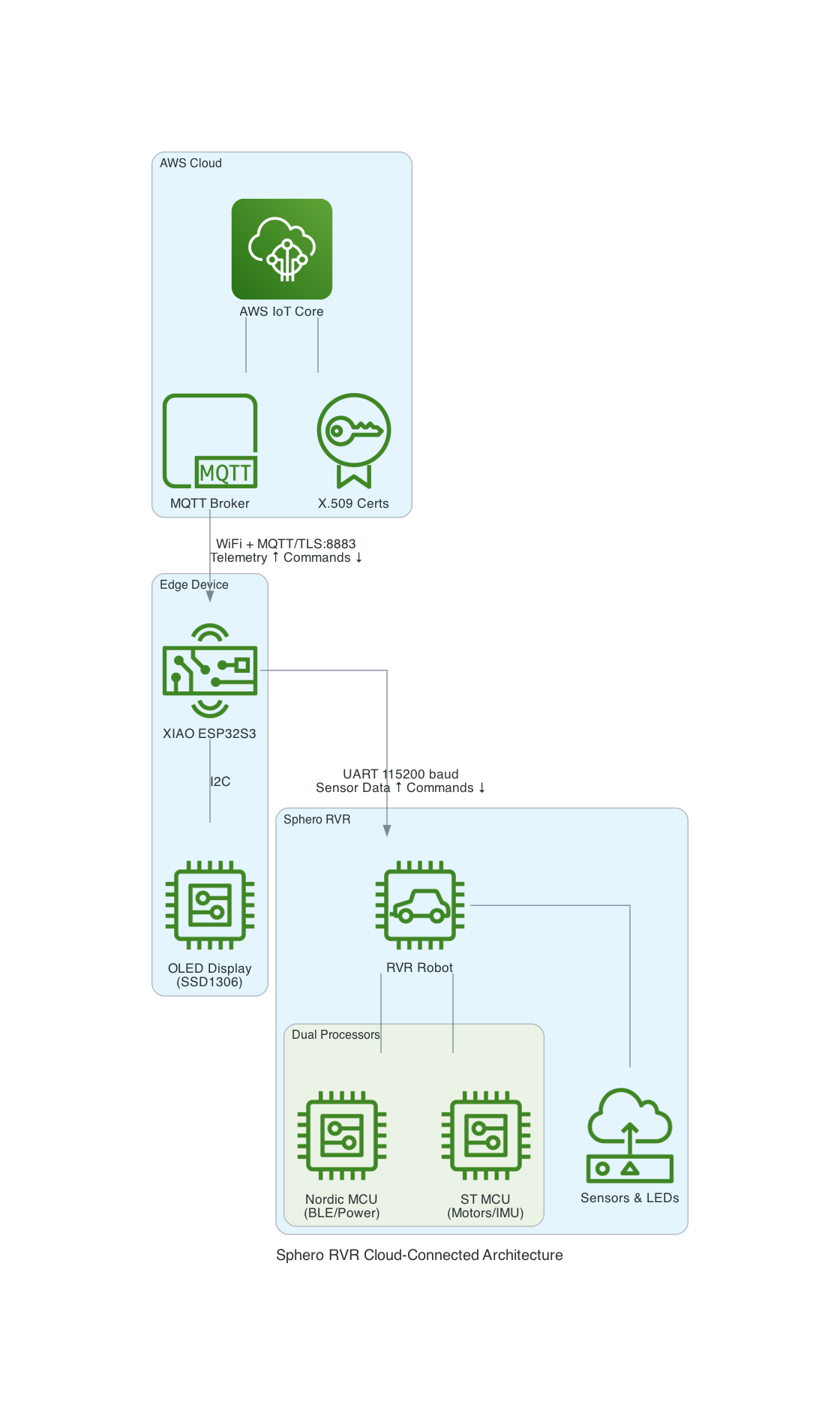
A Sphero RVR integrated with a Seeed Studio XIAO ESP32S3 with telemetry uploaded into, and also, basic drive remote control commands received from any where leveraging AWS IoT Core.
Lately I have been aiming to go deep on AI Robotics, and last year I have been slowly experimenting more and more with anything that is AI, IoT and Robotics related; with the intention of learning and going as wide and as deep as possible in any pillars I can think of. You can check out my blogs under the Robotics Project to see what I have been up to. This year I want to focus on enabling mobility for my experiments - as in providing wheels for solutions to move around the house, ideally autonomously; starting off with wheel based solutions bought off-shelve, followed by solutions that I build myself from open-sourced projects people have kindly contirbuted online, and then ambitiously designed, 3D Printed and built all from the ground up - perhaps in a couple of years time.
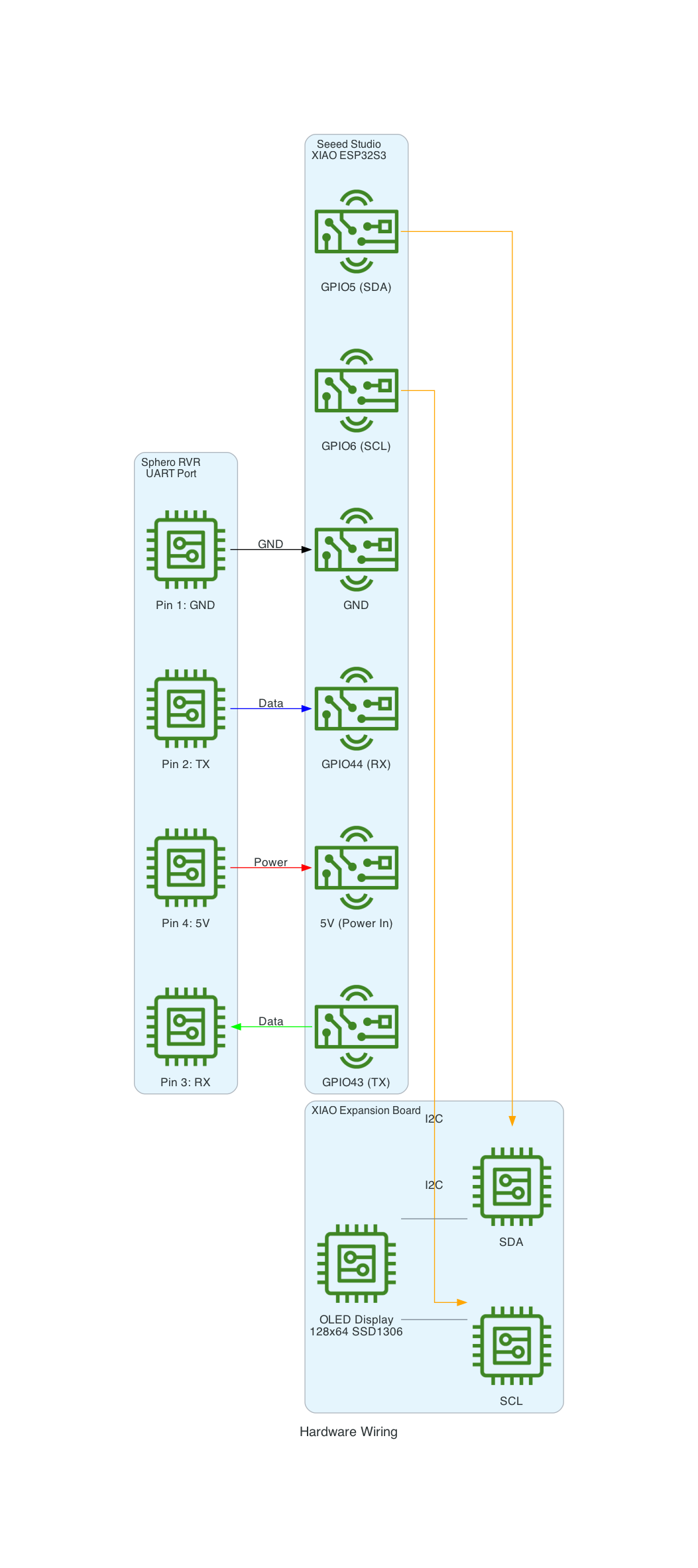
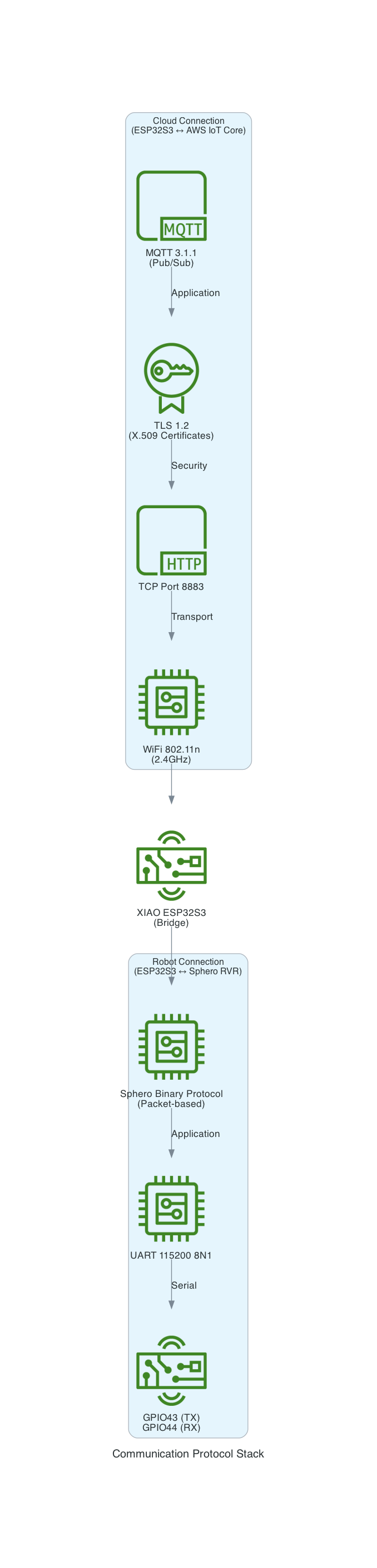
This project uses a Seeed Studio XIAO ESP32S3 microcontroller to communicate with a Sphero RVR robot via UART, while simultaneously connecting to AWS IoT Core over WiFi. The system publishes real-time sensor telemetry and accepts remote drive commands through MQTT.
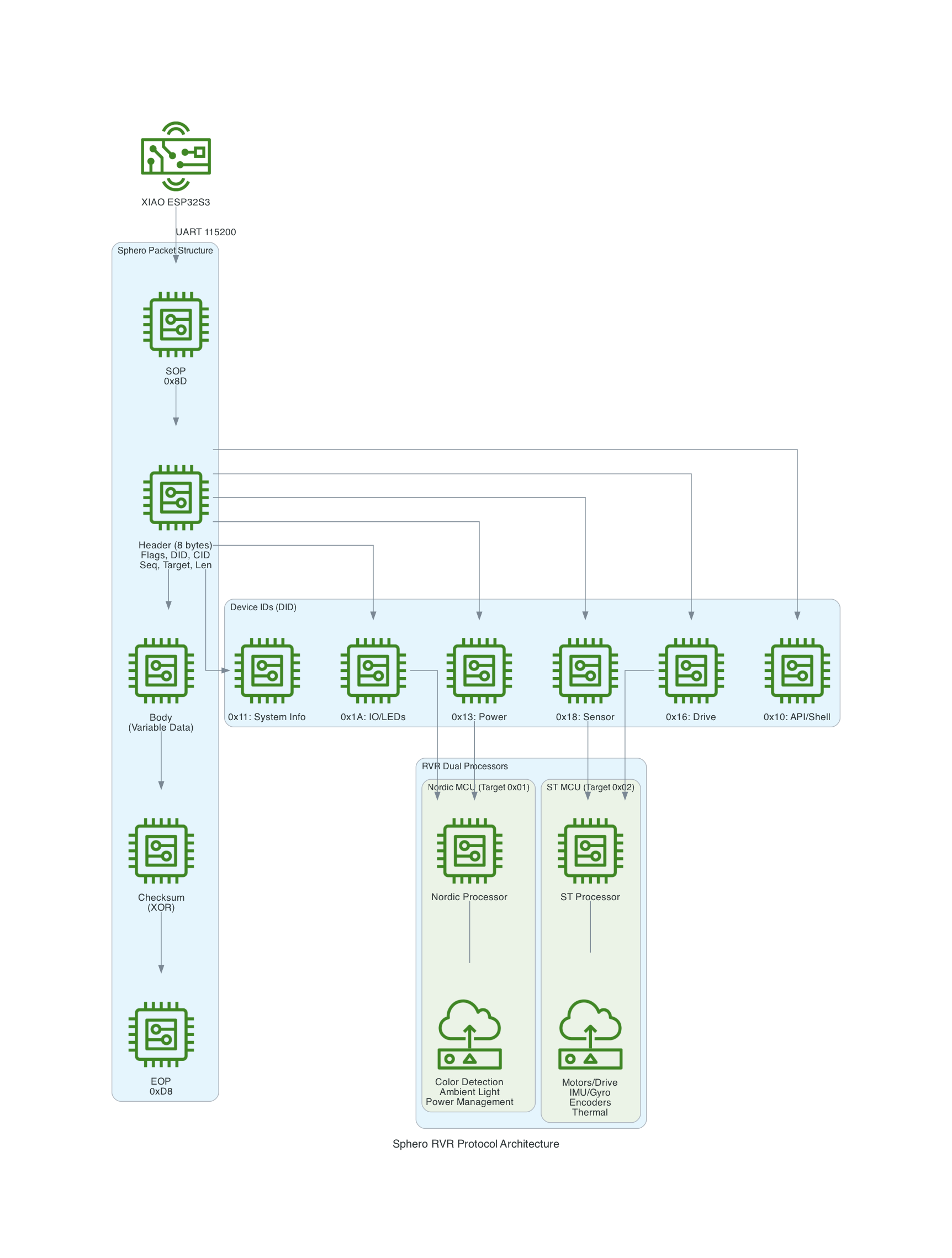
The Sphero RVR uses a binary packet-based protocol over UART. Each packet contains a start-of-packet byte (0x8D), an 8-byte header with device ID and command ID, variable-length data body, checksum, and end-of-packet byte (0xD8). The RVR has two internal processors: Nordic (handles BLE, power, color detection) and ST (handles motors, IMU, encoders).
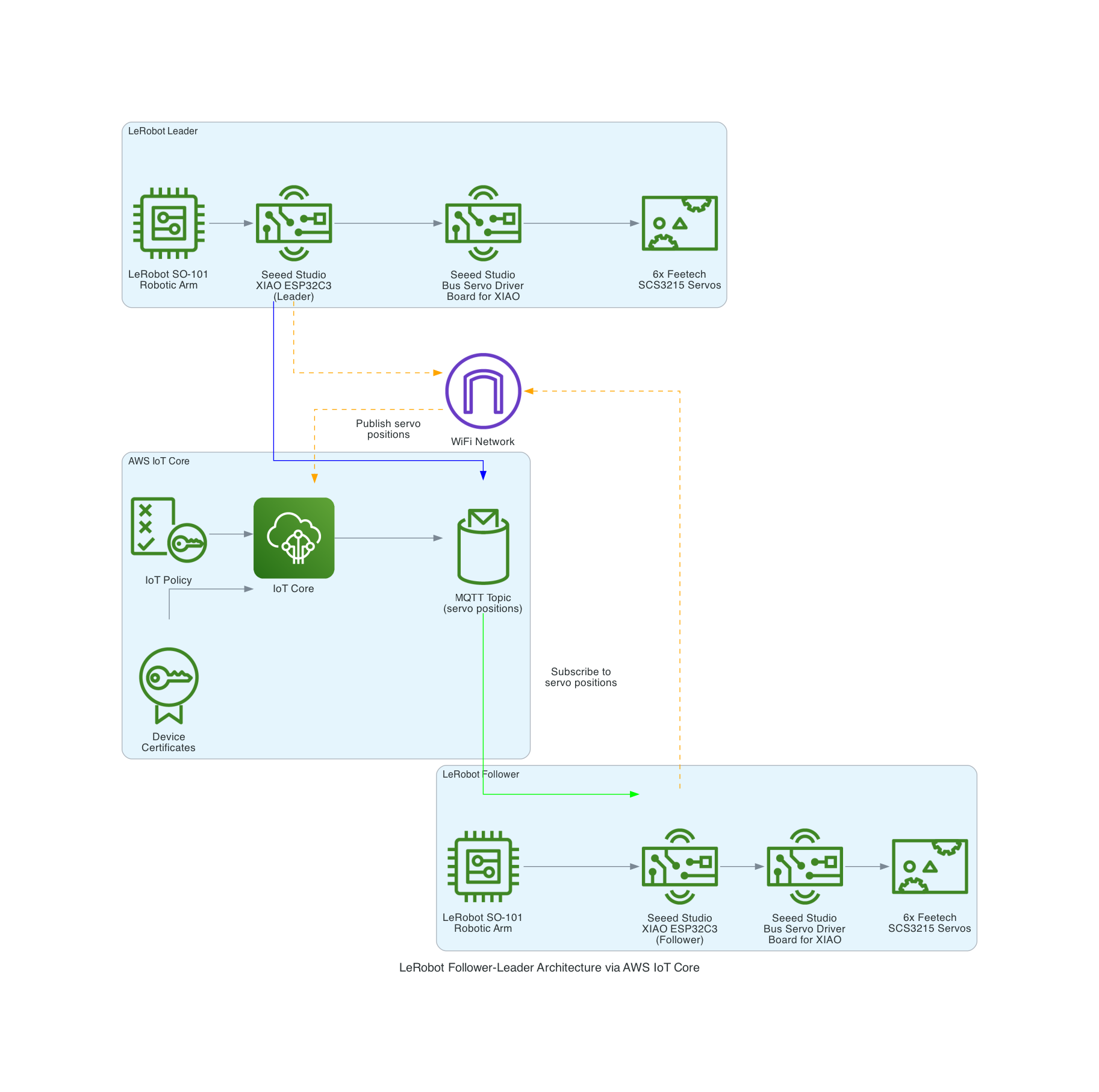
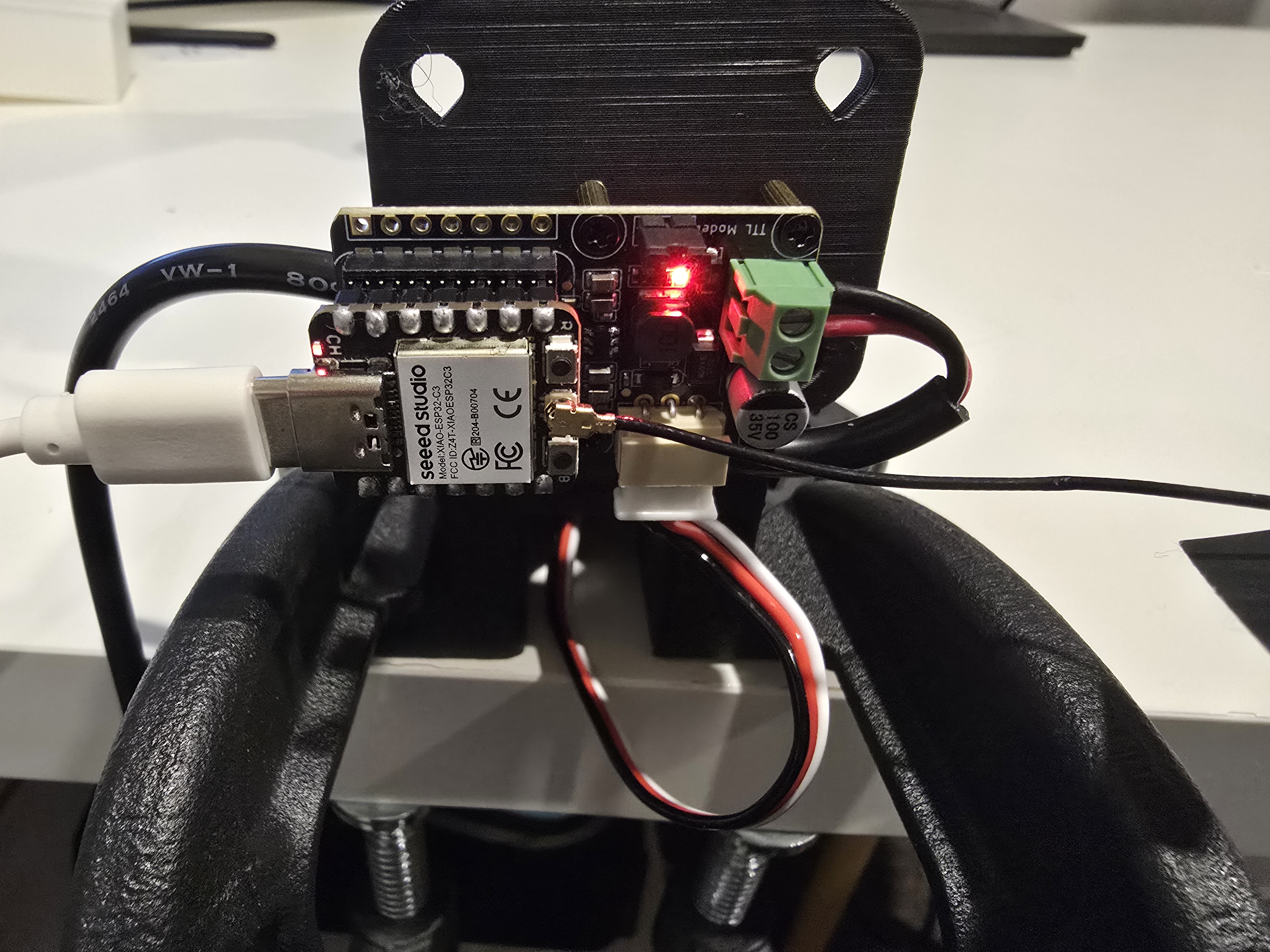
The LeRobot Follower arm is subscribed to an IoT Topic that is being published in real-time by the LeRobot Leader arm over AWS IoT Core, using a Seeed Studio XIAO ESP32C3 integrated with a Seeed Studio Bus Servo Driver Board, the driver board is controlling the 6 Feetech 3215 Servos over the UART protocol.
In this video I demonstrate how to control a set of Hugging Face SO-101 arms over AWS IoT Core, without the use of the LeRobot framework, nor using a device such as a Mac nor a device like Nvidia Jetson Orin Nano Super Developer Kit. Only using Seeed Studio XIAO ESP32C3 and AWS IoT.