SYS.ONLINE

3 posts tagged with "esp32s3"

View All Tags

Voice to Robotics: Driving a Sphero RVR — AWS User Group Wellington

· 3 min read
Chiwai Chan
Tinkerer

These are the slides from my talk at the AWS User Group Wellington meet-up on 26 May 2026, walking through how I built a real-time pipeline that listens to spoken commands in the browser and drives a Sphero RVR — exact distances, exact angles — with live telemetry streaming back into the UI.

Tip: click into the slides and use the arrow keys to navigate, or hit the fullscreen button for the best experience.

What the talk covers​

  • The problem — turning a spoken sentence into a precise, exact-distance robot motion in real time
  • Voice in — Amazon Nova 2 Sonic bidirectional streaming with forced tool use as a "robot controller"
  • Commands down — browser → AWS IoT Core MQTT publish via temporary Cognito credentials, no backend
  • The edge — a Seeed Studio XIAO ESP32-S3 bridging WiFi/MQTT to the Sphero RVR's UART SDK
  • Maneuver framework — locator-based distance and IMU-based turn, both running on the device, so "1 metre" actually means 1 metre
  • Telemetry up — an AWS CDK stack tying IoT Rule → Lambda → AppSync → DynamoDB → live GraphQL subscription back into the React UI

The three repos behind the demo​

  • arduino-aws-iot — ESP32-S3 firmware. The talk focuses on the sphero_rvr device group, including the new maneuver executor (forward, reverse, turn, cancel) layered on top of the existing drive D-pad.
  • cdk-iot-sphero-rvr-streaming — AWS CDK stack that filters the RVR telemetry MQTT topic, flattens the nested payload in Lambda, and forwards it as a GraphQL mutation to an Amplify-managed AppSync API.
  • amplify-react-nova-sonic-voice-chat-sphero-rvr — React + AWS Amplify Gen 2 frontend. The same Cognito identity is used for Bedrock streaming, IoT publish, and the AppSync subscription that surfaces live telemetry.

If you want background on the building blocks before the talk:

  1. Sphero RVR with AWS IoT Core on a Seeed Studio XIAO ESP32-S3
  2. Real-Time Voice Chat with Amazon Nova Sonic, React and AWS Amplify Gen 2

Thanks​

Big thanks to the AWS User Group Wellington organisers and everyone who came along — happy to chat about any of the code, the maneuver framework, or where the project goes next.

Agentic based Over-The-Air Firmware Management of Seeed Studio XIAO ESP32S3 IoT Device Firmware using Amazon AgentCore and Strands Agents

· 8 min read
Chiwai Chan
Tinkerer

I want to have the ability to be able to manage the firmware of all IoT devices using a prompt - it could be to upgrade a device to the latest version, or even to perform a rollback, whether across the entire IoT device fleet level - every device in all 20+ solution types, all the devices within a type of solution, or even at an individual device level.

Goals

  • To be able to over-the-air flash a new firmware version using a prompt
  • To have an Agentic Agent do all the work, give it a prompt and it takes cares of the rest
  • Scalable in the number of IoT devices, as well as, being able to scale as the number of new IoT solution Types increases; with no effort required - implement once and forget
  • Have the ability to rollback to any firmware version specified in the prompt
  • This same solution can be interfaced with using the Model Context Protocol (MCP): whether via Kiro CLI or Claude Code
  • This same solution can be interfaced with using a chatbot
  • Must be authenticated to interface with this solution
  • Must be a completely serverless-solution
  • Firmware integrity verification using SHA256 checksums before flashing to ensure firmware hasn't been corrupted during download
  • Safe rollout with rate limiting and automatic abort thresholds to prevent fleet-wide failures
  • Device firmware version tracking via device shadows to enable version-based targeting for updates
  • Configuration-gated deployments to enable or disable OTA updates per device type for controlled rollouts

Architecture

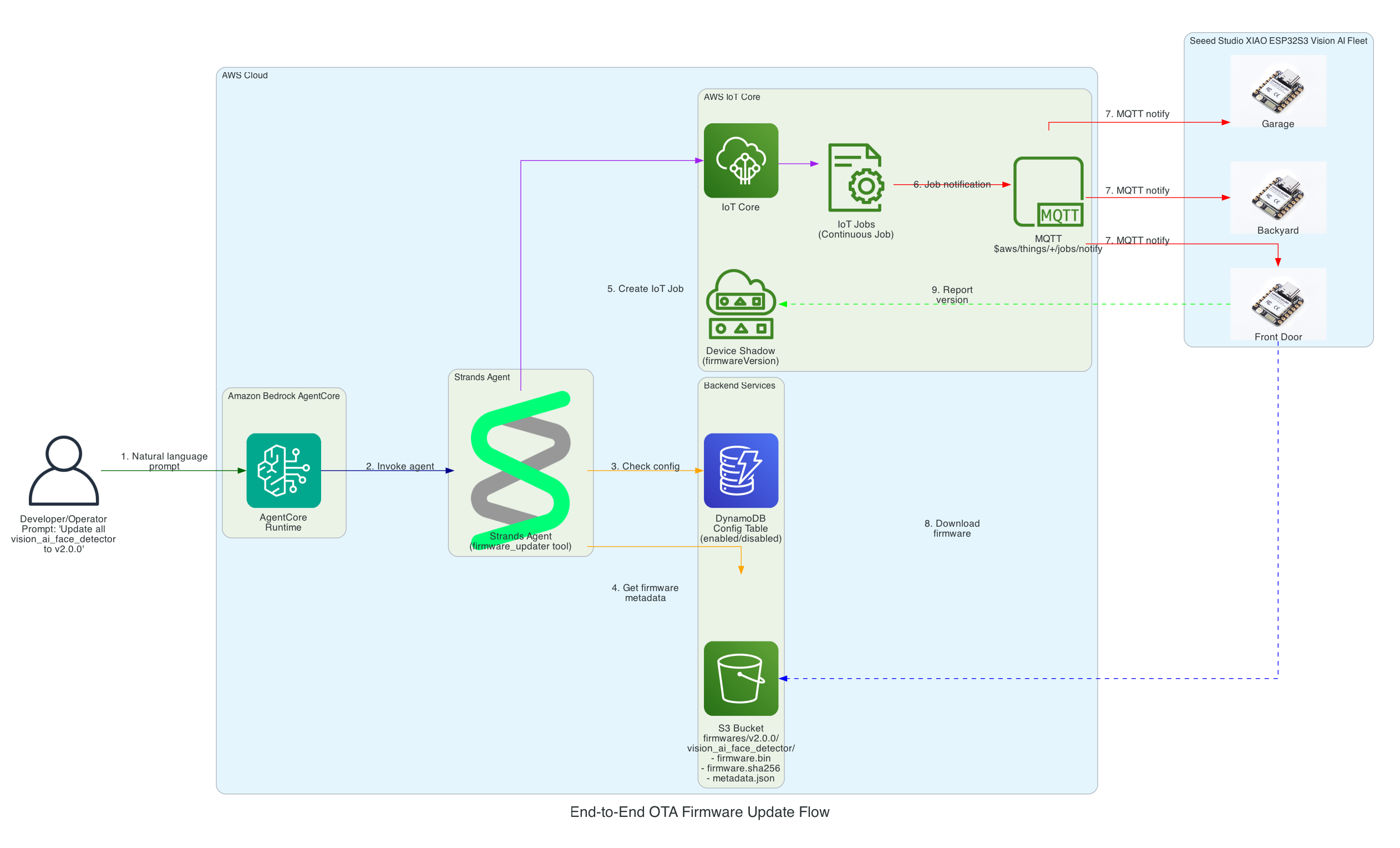
End-to-End OTA Firmware Update Flow​

This diagram illustrates the complete flow from a user's natural language prompt to firmware being flashed on Seeed Studio XIAO ESP32S3 devices.

End-to-End OTA Firmware Update Flow

Flow Steps:

  1. User Prompt - Developer/Operator provides a natural language command (e.g., "Update all vision_ai_face_detector devices to v2.0.0")
  2. AgentCore Runtime - Amazon Bedrock AgentCore receives and processes the request
  3. Strands Agent - The agent with firmware_updater tool reasons about the task
  4. Config Check - Agent queries DynamoDB to verify the device type is enabled for OTA updates
  5. Firmware Metadata - Agent retrieves firmware binary, SHA256 checksum, and metadata from S3
  6. Create IoT Job - Agent creates a continuous IoT Job targeting the specified device group
  7. MQTT Notification - AWS IoT Core notifies devices via MQTT topic $aws/things/+/jobs/notify
  8. Firmware Download - Each XIAO ESP32S3 Vision AI Face Detector downloads the firmware directly from S3
  9. Version Reporting - Devices report their new firmware version to their Device Shadow

Interactive Sequence Diagram​

End-to-End OTA Firmware Update Flow

From natural language prompt to firmware flashed on Seeed Studio XIAO ESP32

0/15
UserDeveloper/OperatorAgentCoreBedrock AgentCoreStrandsStrands AgentDynamoDBS3S3 BucketIoT CoreAWS IoT CoreXIAOXIAO ESP320.0s"Update all vision_ai_face_detector to v2.0.0"Natural language0.1sInvoke agent with prompt0.2sGetItem: Check if device type enabled0.3senabled: true0.4svalidate_files_exist()0.5sfirmware.bin, firmware.sha256, metadata.json ✓0.6sCreateJob (continuous, targeting device group)0.7sJob created: job-vision-ai-v2.0.00.8sSuccess: OTA job created for 5 devices0.9s"Created OTA job for vision_ai_face_detector..."1.0sMQTT: $aws/things/+/jobs/notifyAll devices in group2.0sGET firmware.bin (pre-signed URL)5.0sStreaming download (1.6MB)8.0sVerify SHA256 → Flash to APP1 → Reboot12.0sShadow update: firmwareVersion = "2.0.0"
User
AgentCore
Strands
DynamoDB
S3
IoT Core
XIAO
Milestone
Complete
Total: 15 message exchanges across 7 participants
~12 seconds end-to-end (prompt to firmware flashed)

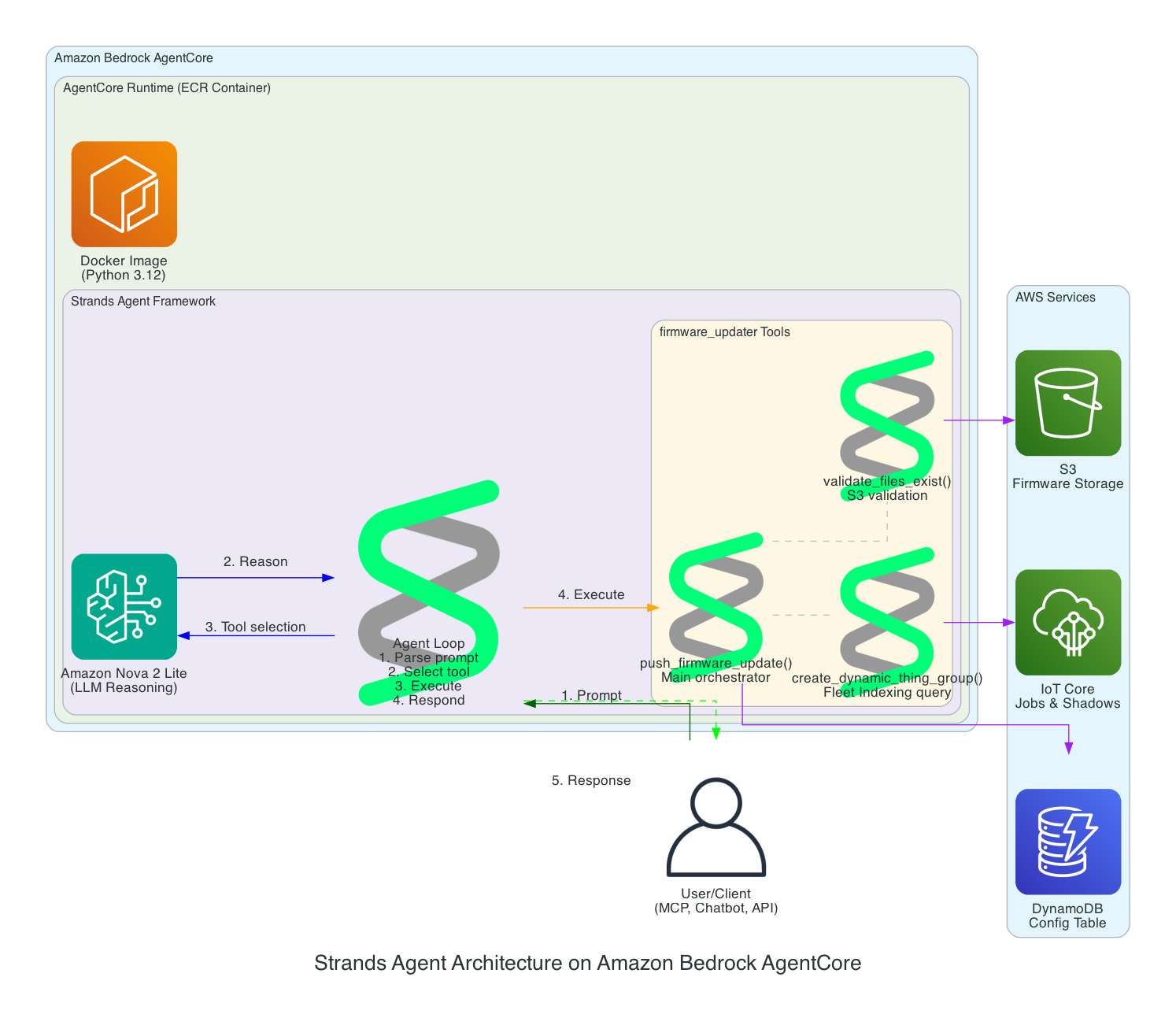
Strands Agent Architecture on Amazon Bedrock AgentCore​

This diagram details the internal architecture of the Strands Agent running on Amazon Bedrock AgentCore, showing how the LLM reasons about prompts and orchestrates tool execution.

Strands Agent Architecture

Components:

  • Amazon Bedrock AgentCore - Managed runtime that hosts and scales the agent
  • ECR Container - Docker image (Python 3.12) containing the Strands Agent code
  • Amazon Nova 2 Lite - The LLM that provides reasoning capabilities
  • Agent Loop - The core execution cycle: parse prompt → select tool → execute → respond
  • firmware_updater Tools:
    • push_firmware_update() - Main orchestrator that coordinates the entire OTA process
    • validate_files_exist() - Validates firmware.bin, firmware.sha256, and metadata.json exist in S3
    • create_dynamic_thing_group() - Creates Fleet Indexing queries to target devices by firmware version

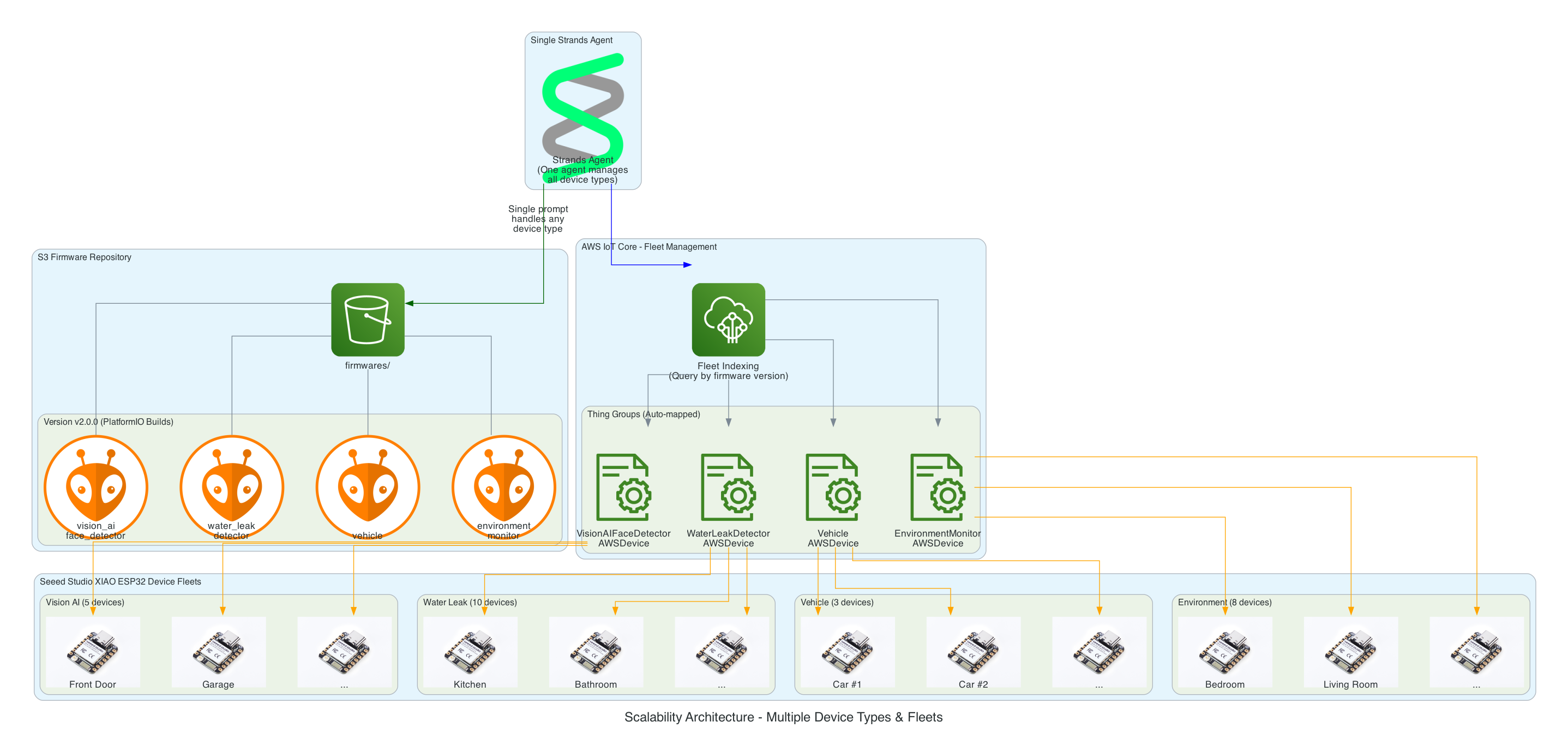
Scalability Architecture​

This diagram demonstrates how the solution scales effortlessly across multiple device types and large device fleets - implement once and forget.

Scalability Architecture

Key Scalability Features:

  • Single Agent, Multiple Device Types - One Strands Agent manages all 26+ device groups without code changes
  • S3 Folder Convention - Adding a new device type is as simple as creating a new folder (e.g., firmwares/v1.0.0/new_device_type/)
  • Auto-Discovery Mapping - Folder names automatically map to Thing Groups (e.g., vision_ai_face_detector → VisionAIFaceDetectorAWSDevice)
  • Fleet Indexing Queries - Dynamically target devices based on current firmware version, no hardcoded device lists
  • Horizontal Scaling - Add unlimited devices to any group; IoT Jobs handles distribution automatically

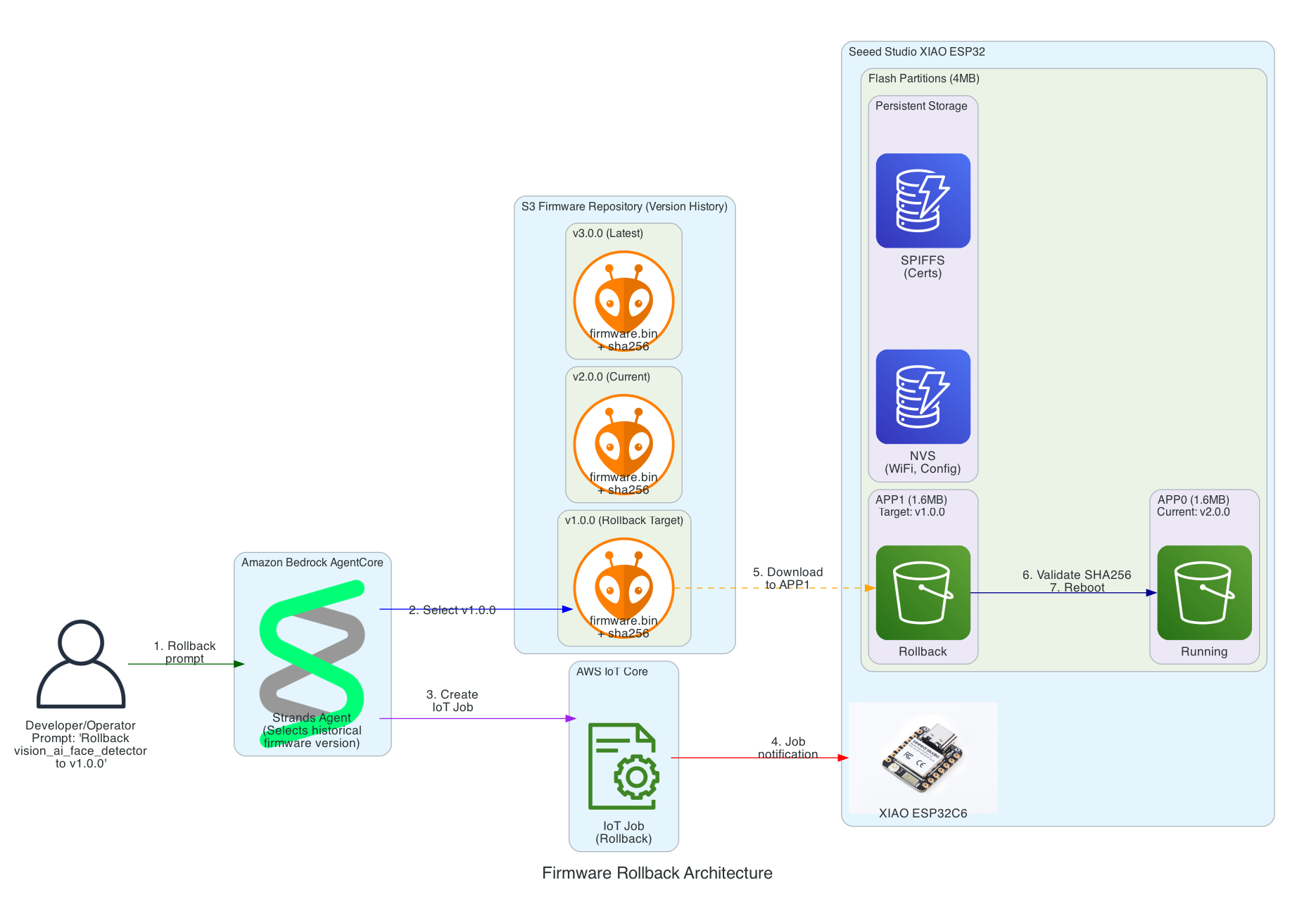
Firmware Rollback Architecture​

This diagram shows how the solution enables rollback to any previous firmware version using a simple prompt, leveraging the dual-partition architecture of the Seeed Studio XIAO ESP32.

Firmware Rollback Architecture

Key Rollback Features:

  • Version History in S3 - All firmware versions are retained (v1.0.0, v2.0.0, v3.0.0, etc.) enabling rollback to any point
  • Dual-Partition Flash Layout - XIAO ESP32 uses APP0/APP1 partitions for safe ping-pong updates
  • Persistent Storage - NVS (WiFi, config) and SPIFFS (certificates) survive firmware updates
  • SHA256 Validation - Firmware integrity verified before committing to new partition
  • Automatic Rollback - If new firmware fails to boot and connect to MQTT, device automatically reverts to previous partition

Interactive Sequence Diagram​

Firmware Rollback Sequence

Rollback to any previous firmware version with dual-partition safety

0/17
UserDeveloper/OperatorStrandsStrands AgentS3S3 (Version History)IoT CoreAWS IoT CoreXIAOXIAO ESP32FlashFlash Partitions0.0s"Rollback vision_ai_face_detector to v1.0.0"Natural language0.2sList versions: v1.0.0, v2.0.0, v3.0.00.3sv1.0.0 exists with firmware.bin + sha2560.5sCreateJob: target v1.0.0 firmware0.6sJob created: rollback-v1.0.00.7s"Rollback job created, targeting 5 devices"1.0sMQTT: Job notification with v1.0.0 URL2.0sGET v1.0.0/firmware.bin5.0sStream v1.0.0 firmware (1.6MB)6.0sWrite to APP1 partition (inactive)7.0sAPP1 written, SHA256 verified7.5sSet boot partition: APP18.0sESP.restart() → Reboot10.0sBoot from APP1 (v1.0.0)12.0sMQTT Connect successful12.5sMark APP1 as valid (ota_mark_valid)13.0sShadow: firmwareVersion = "1.0.0"
User
Strands
S3
IoT Core
XIAO
Flash
Dual-partition safety: APP0 preserved during rollback to APP1
~13 seconds to rollback (with auto-recovery on failure)

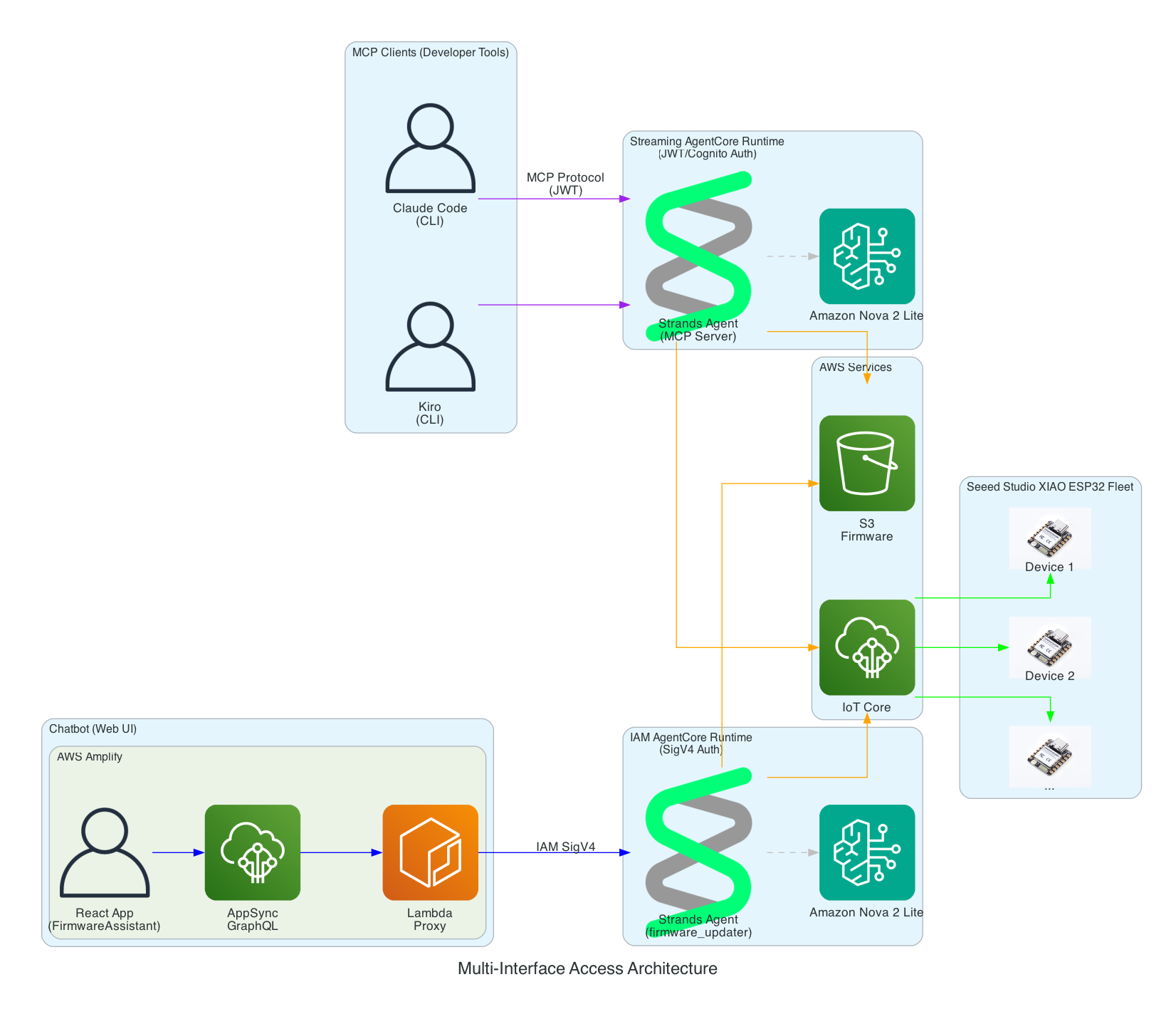
Multi-Interface Access Architecture​

This diagram demonstrates how the Strands Agent can be accessed through multiple interfaces with different authentication methods - enabling developers to use their preferred tools while operators can use a web-based chatbot.

Multi-Interface Access Architecture

Interface Options:

  • MCP Clients (Developer Tools) - Claude Code and Kiro CLI connect via Model Context Protocol to a Streaming AgentCore Runtime using JWT/Cognito authentication
  • Chatbot (Web UI) - AWS Amplify React app with FirmwareAssistant component connects via Lambda proxy to an IAM AgentCore Runtime using SigV4 authentication for service-to-service communication
  • Two Runtimes, Same Agent Logic - Both runtimes run the same Strands Agent code but are deployed separately with different authentication methods suited to their use cases

Firmware AI Assistant Chatbot​

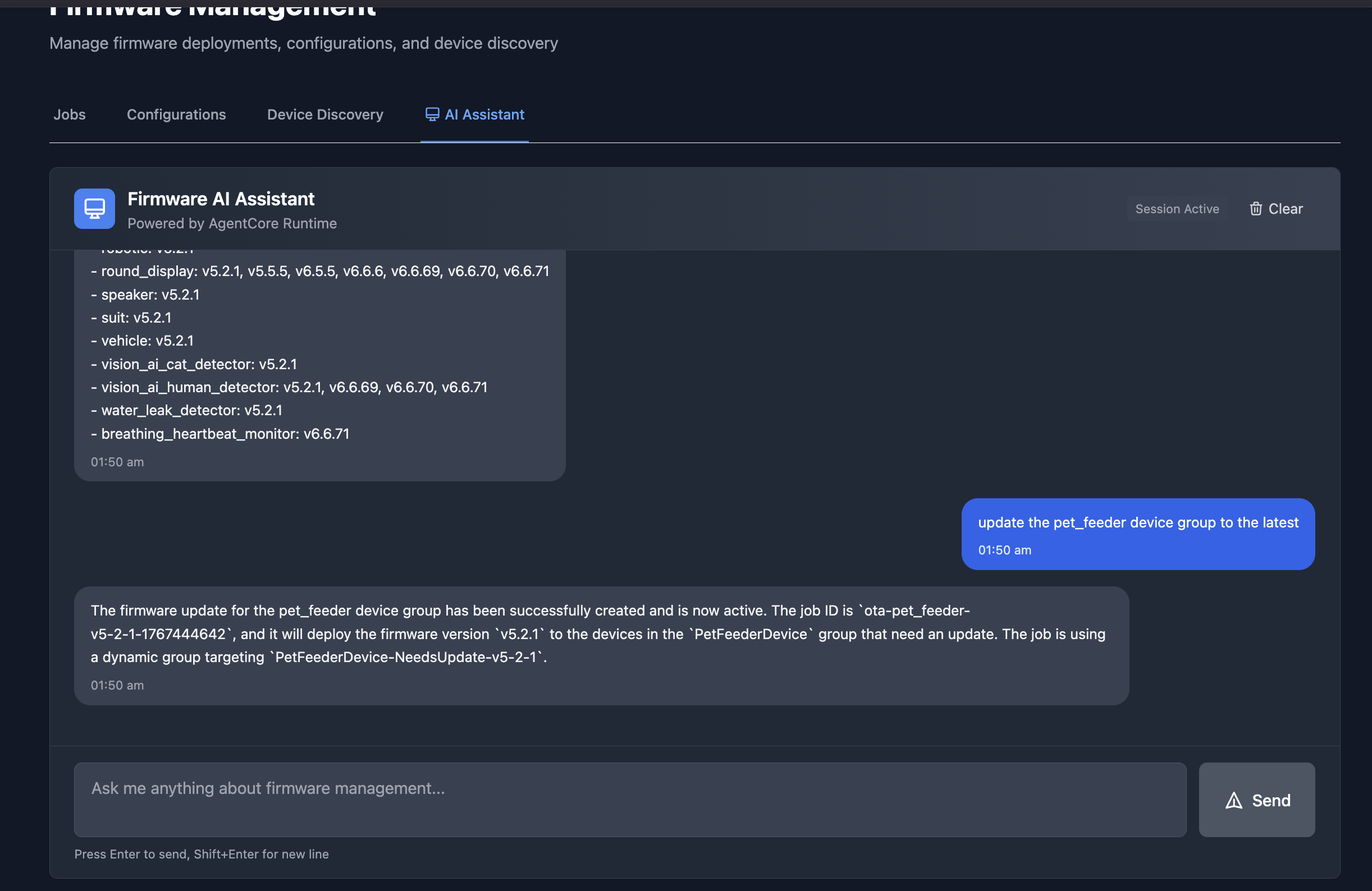
The chatbot interface in an Amplify React App provides a conversational way to manage firmware updates. In this example, the assistant lists all available firmware versions across device groups, and then creates an OTA job to update the pet_feeder device group to the latest firmware version.

Firmware AI Assistant Chatbot

Authentication Architecture​

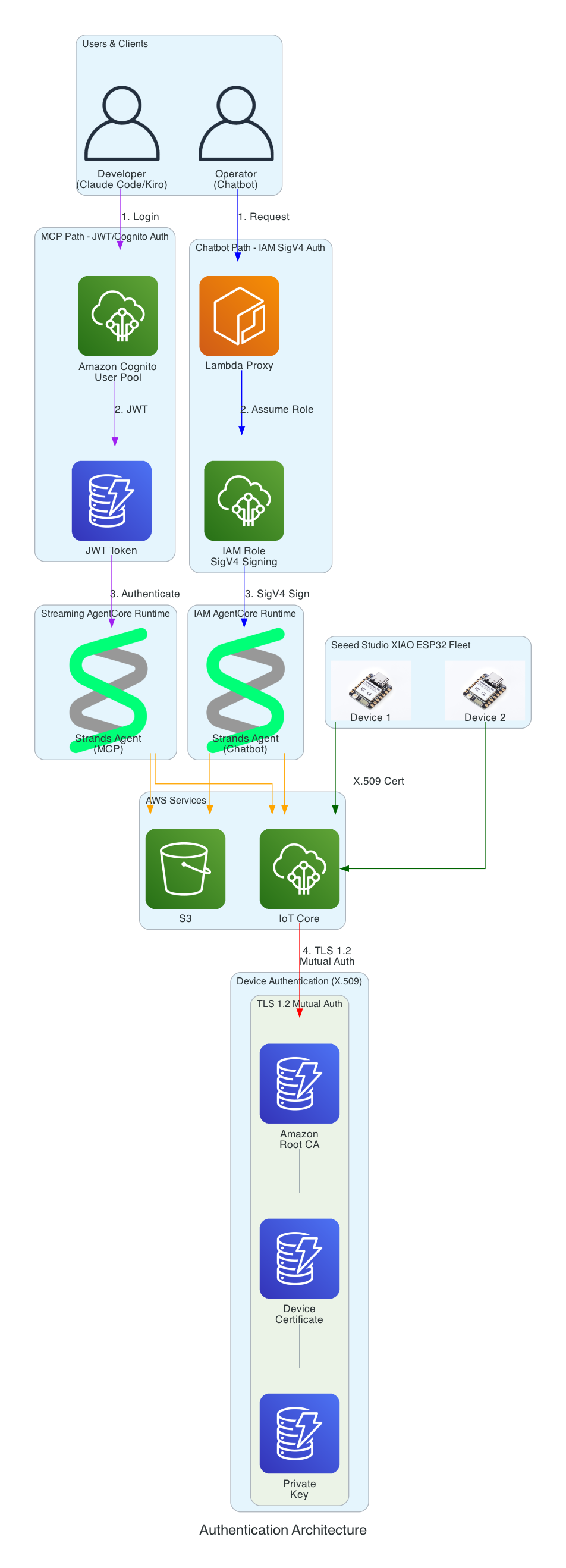
This diagram illustrates the multi-layer security model ensuring that all access to the firmware management system is properly authenticated. Each interface uses a different authentication method suited to its use case.

Authentication Architecture

Authentication Layers:

  • Cognito JWT (MCP Path) - Developers using Claude Code and Kiro CLI authenticate via Amazon Cognito User Pool and receive JWT tokens, connecting to the Streaming AgentCore Runtime
  • IAM SigV4 (Chatbot Path) - The Lambda proxy authenticates using AWS IAM roles with SigV4 request signing for service-to-service communication with the IAM AgentCore Runtime
  • X.509 Certificates (Device Path) - XIAO ESP32 devices authenticate to AWS IoT Core using TLS 1.2 mutual authentication with per-device certificates
  • Certificate Chain - Amazon Root CA validates device certificates stored in SPIFFS (survives firmware updates)

Serverless Architecture Overview​

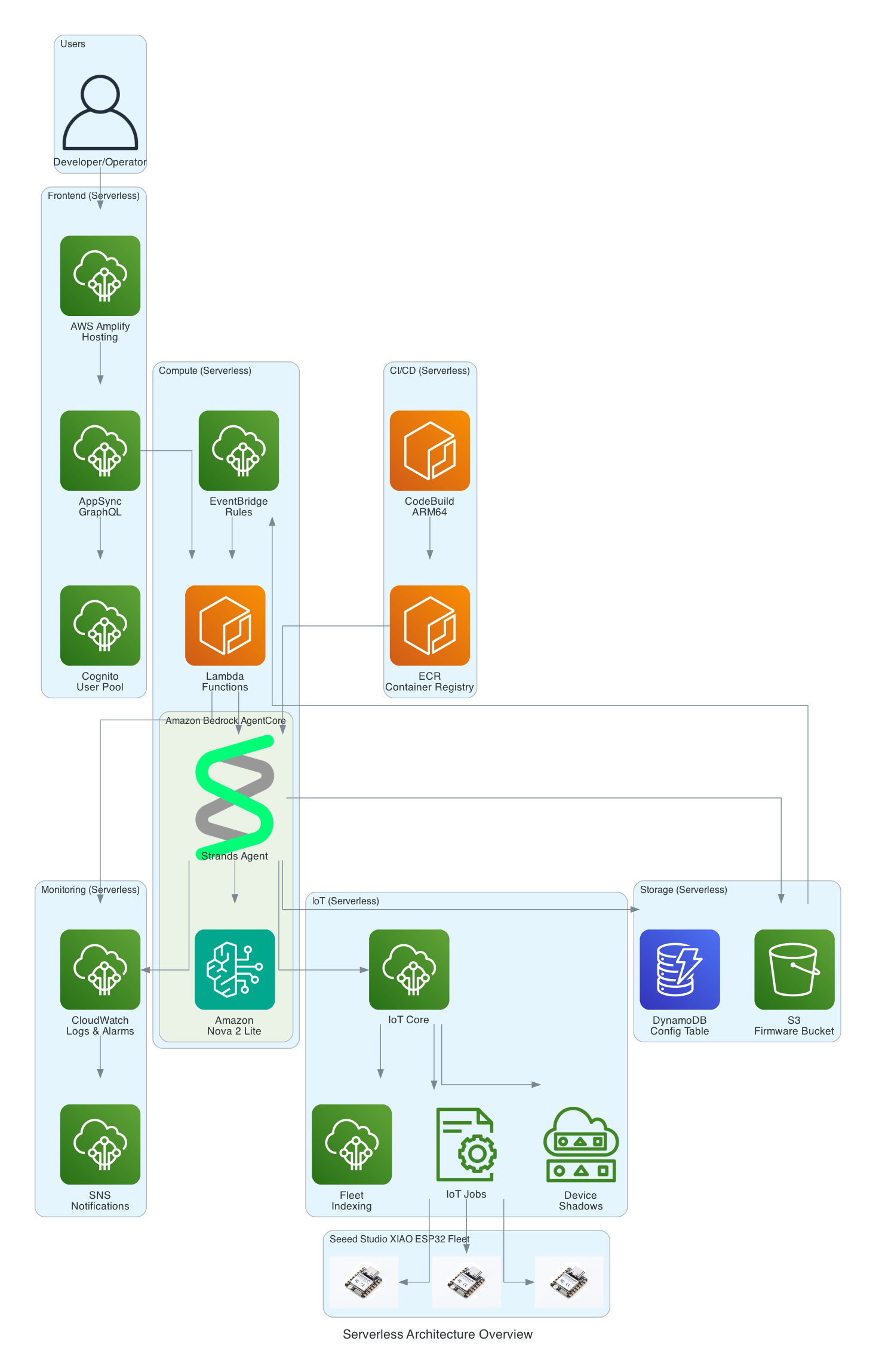
This diagram provides a comprehensive view of all AWS services used in the solution - every component is fully serverless with no EC2 instances to manage.

Serverless Architecture Overview

Serverless Components:

  • Frontend - AWS Amplify Hosting, AppSync GraphQL, Cognito User Pool
  • Compute - Amazon Bedrock AgentCore, Lambda Functions, EventBridge Rules
  • Storage - S3 Firmware Bucket, DynamoDB Config Table
  • IoT - IoT Core, IoT Jobs, Device Shadows, Fleet Indexing
  • Monitoring - CloudWatch Logs & Alarms, SNS Notifications
  • CI/CD - CodeBuild (ARM64), ECR Container Registry

Firmware Integrity Verification (SHA256)​

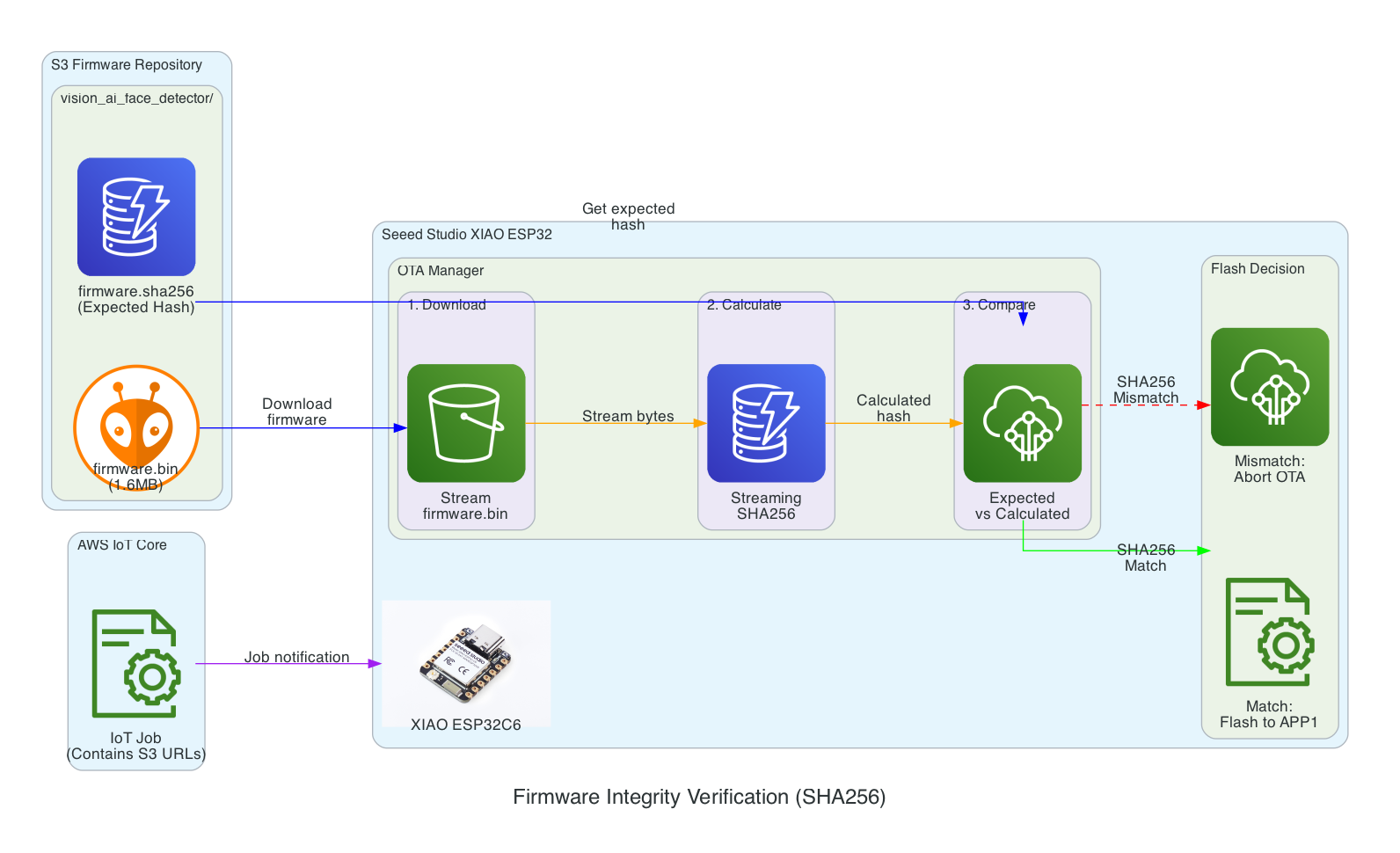
This diagram shows the firmware integrity verification process that ensures firmware hasn't been corrupted during download before flashing to the device.

Firmware Integrity Verification

Verification Flow:

  1. Download - XIAO ESP32 streams firmware.bin from S3 in chunks
  2. Calculate - SHA256 hash is calculated progressively during download (streaming hash)
  3. Compare - Calculated hash is compared against expected hash from firmware.sha256 file
  4. Flash Decision - Match: proceed to flash APP1 partition | Mismatch: abort OTA and report failure

Benefits:

  • Detects corruption during download (network issues, incomplete transfers)
  • Prevents flashing of tampered firmware
  • Memory-efficient streaming verification (no need to store entire firmware before hashing)

Interactive Sequence Diagram​

SHA256 Integrity Verification Sequence

Streaming hash verification during firmware download

0/15
IoT JobAWS IoT JobXIAOXIAO ESP32S3S3 BucketOTA MgrOTA ManagerFlashFlash Memory0.0sJob document with firmware URL + expected SHA2560.1sStart OTA: updateFromURLWithChecksum(url, sha256)0.2sHTTP GET firmware.bin (Content-Length: 1.6MB)0.5sStream chunk 1 (1KB)0.6sSHA256.update(chunk1) → Running hash0.7sWrite chunk 1 to APP1 partition3.0sStream chunks 2...1600 (1KB each)~1600 iterations3.5sSHA256.update(chunks) → Accumulating hash4.0sWrite remaining chunks to APP15.0sDownload complete (EOF)5.1sSHA256.finalize() → Calculated hash5.2sCompare: calculated == expected ?5.3s✓ MATCH: Commit APP1, set boot partitionSafe to flash!5.5sAPP1 committed successfully5.6sOTA_SUCCESS: Ready to reboot
IoT Job
XIAO
S3
OTA Mgr
Flash
Memory-efficient: Hash calculated during download, not after
~5.6 seconds (download + verify + commit)

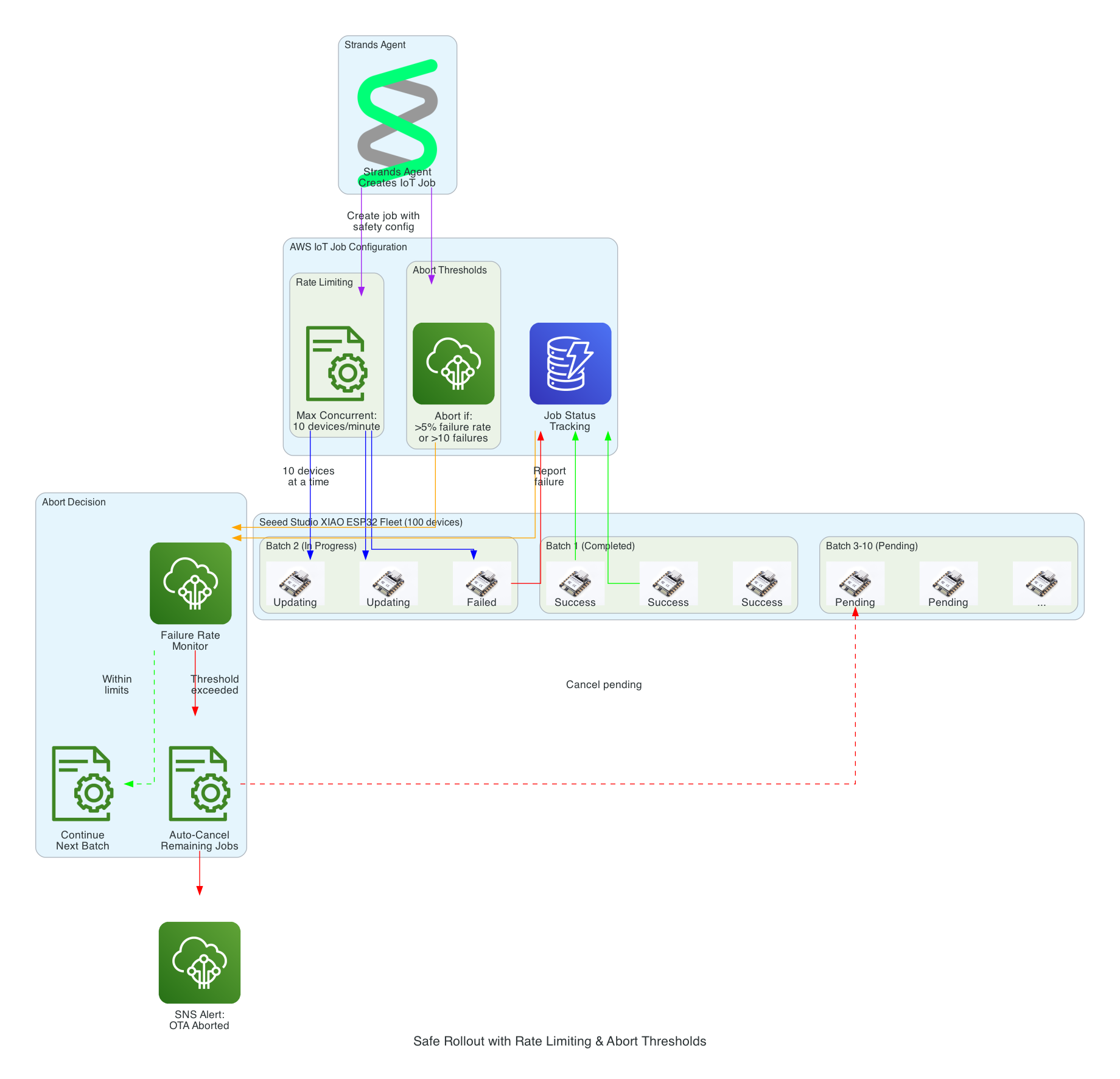
Safe Rollout with Rate Limiting & Abort Thresholds​

This diagram illustrates the safety mechanisms that prevent fleet-wide failures during OTA updates by controlling rollout speed and automatically aborting when issues are detected.

Safe Rollout with Rate Limiting

Safety Mechanisms:

  • Rate Limiting - Updates are deployed to a maximum of 10 devices concurrently, preventing network congestion and allowing monitoring
  • Abort Thresholds - Job automatically cancels if failure rate exceeds 5% or more than 10 absolute failures occur
  • Batch Processing - Fleet of 100 devices is updated in batches, with completed, in-progress, and pending states tracked
  • Failure Monitoring - Real-time tracking of success/failure status feeds into abort decision logic
  • Auto-Cancel - When threshold is exceeded, all pending device updates are automatically cancelled
  • SNS Alerts - Operators are immediately notified when an OTA rollout is aborted

Interactive Sequence Diagram​

Safe Rollout with Abort Threshold

Rate-limited deployment with automatic abort on failure threshold

0/16
StrandsStrands AgentIoT JobsAWS IoT JobsBatch 1Batch 1 (10 devices)Batch 2Batch 2 (10 devices)MonitorFailure MonitorSNSSNS Alerts0.0sCreateJob: maxConcurrent=10, abortThreshol...Rate limiting config0.1sJob created: 100 devices in queue0.5sDeploy to Batch 1 (devices 1-10)First 10 devices15.0sDevice 1-8: SUCCESS18.0sDevice 9-10: SUCCESS18.5sBatch 1 complete: 10/10 success (0% failure)18.6s✓ Below threshold, continue rollout19.0sDeploy to Batch 2 (devices 11-20)32.0sDevice 11-14: SUCCESS45.0sDevice 15-17: FAILED (network timeout)3 failures!45.5sRunning total: 13 success, 3 failed (18.75%)45.6sCheck: 18.75% > 5% threshold45.7s⚠️ ABORT: Failure threshold exceeded!Stop rollout46.0sCancel pending jobs (devices 18-100)46.5sPublish abort notification47.0sEmail/SMS: "OTA aborted: 3 failures i...
Strands
IoT Jobs
Batch 1
Batch 2
Monitor
SNS
Prevented 84 additional devices from receiving bad firmware
Fleet-wide failure avoided by abort threshold

Source Code​

The source code for this project is available on GitHub:

note

This repository is not yet open sourced. It will be made public in a future update.

Cloud-Connected Sphero RVR Robot with AWS IoT Core and Seeed Studio XIAO ESP32S3

· 4 min read
Chiwai Chan
Tinkerer

Seeed Studio XIAO ESP32S3

Sphero RVR

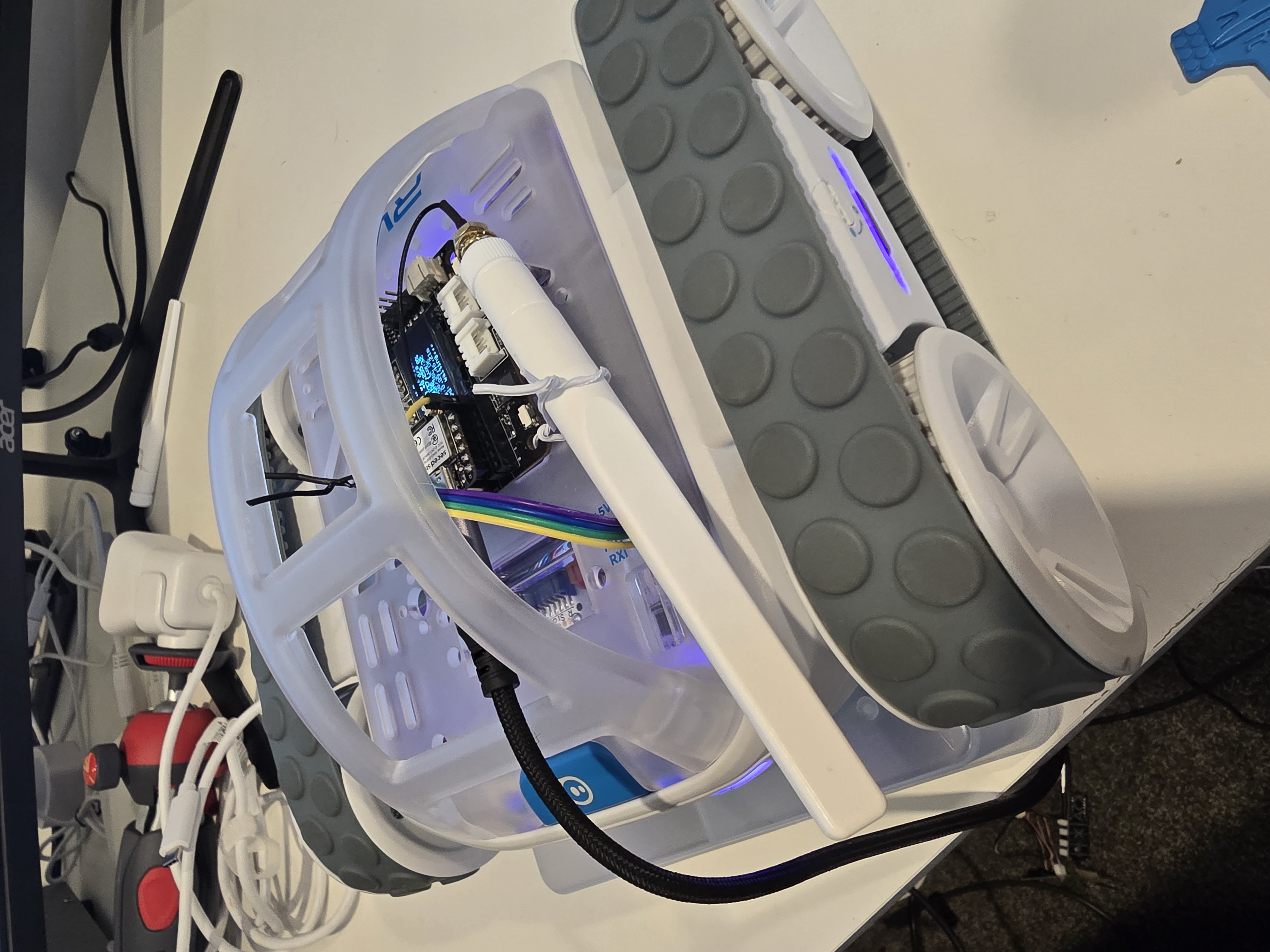
A Sphero RVR integrated with a Seeed Studio XIAO ESP32S3 with telemetry uploaded into, and also, basic drive remote control commands received from any where leveraging AWS IoT Core.

Overview​

Lately I have been aiming to go deep on AI Robotics, and last year I have been slowly experimenting more and more with anything that is AI, IoT and Robotics related; with the intention of learning and going as wide and as deep as possible in any pillars I can think of. You can check out my blogs under the Robotics Project to see what I have been up to. This year I want to focus on enabling mobility for my experiments - as in providing wheels for solutions to move around the house, ideally autonomously; starting off with wheel based solutions bought off-shelve, followed by solutions that I build myself from open-sourced projects people have kindly contirbuted online, and then ambitiously designed, 3D Printed and built all from the ground up - perhaps in a couple of years time.

This project uses a Seeed Studio XIAO ESP32S3 microcontroller to communicate with a Sphero RVR robot via UART, while simultaneously connecting to AWS IoT Core over WiFi. The system publishes real-time sensor telemetry and accepts remote drive commands through MQTT.

Hardware Components​

ComponentDescription
Seeed Studio XIAO ESP32S3Compact ESP32-S3 microcontroller with WiFi, 8MB flash
Sphero RVRProgrammable robot with motors, IMU, color sensor, encoders
XIAO Expansion BoardProvides OLED display (128x64 SSD1306) for status info

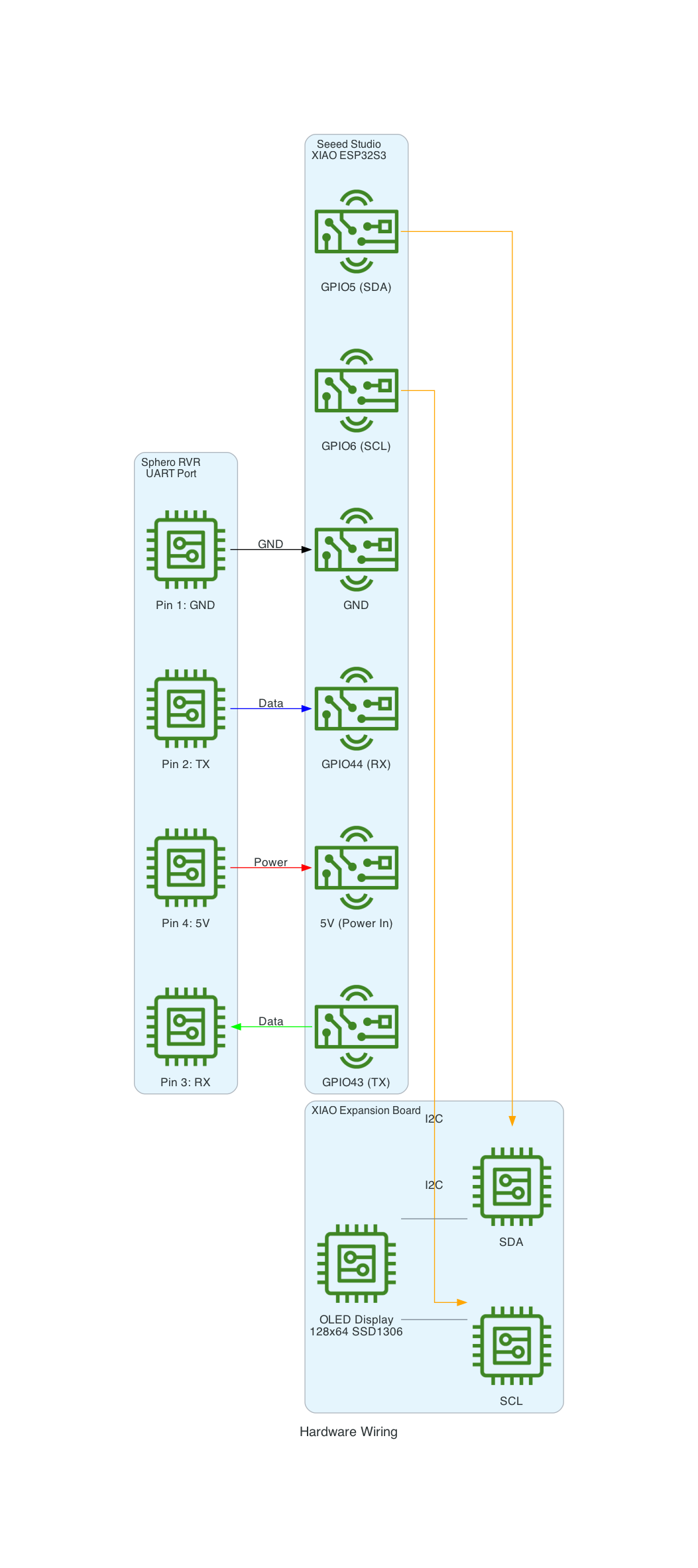
Hardware Wiring​

Hardware Wiring

Features​

Real-time Telemetry​

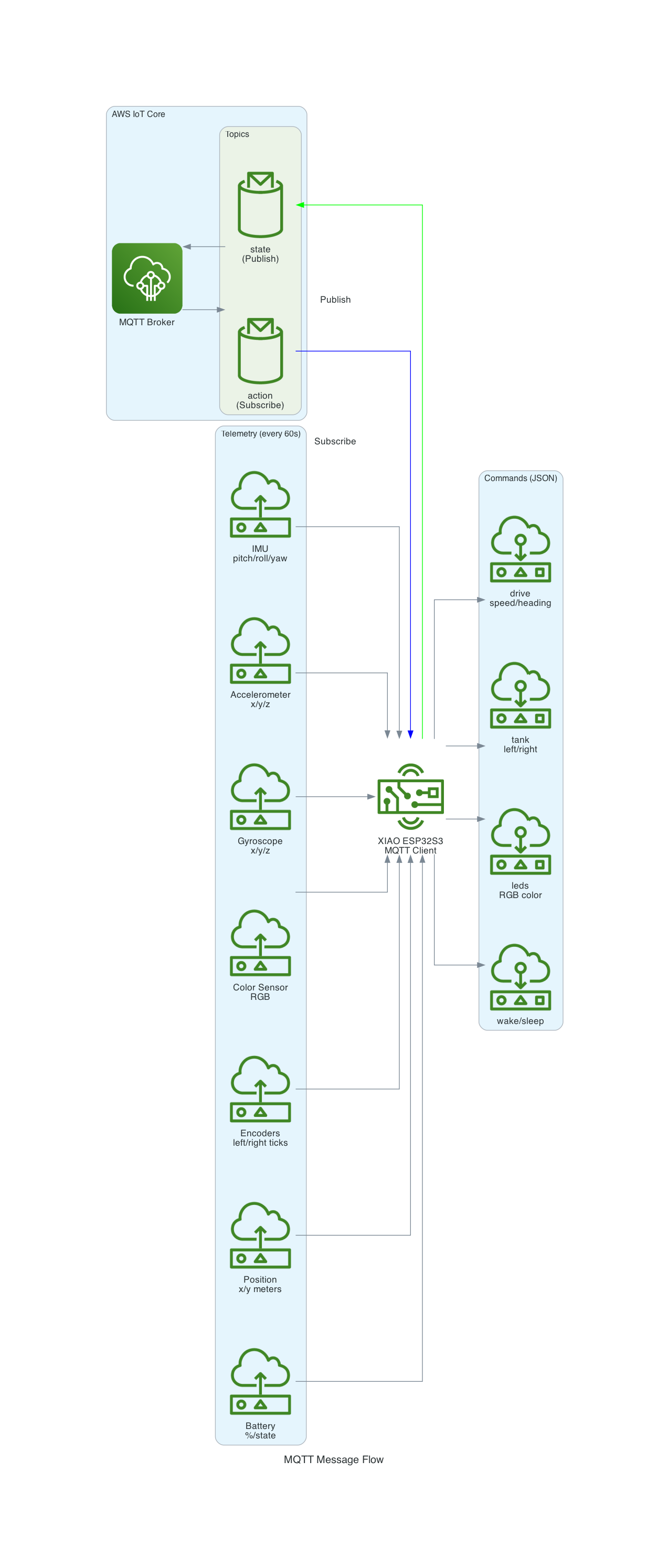
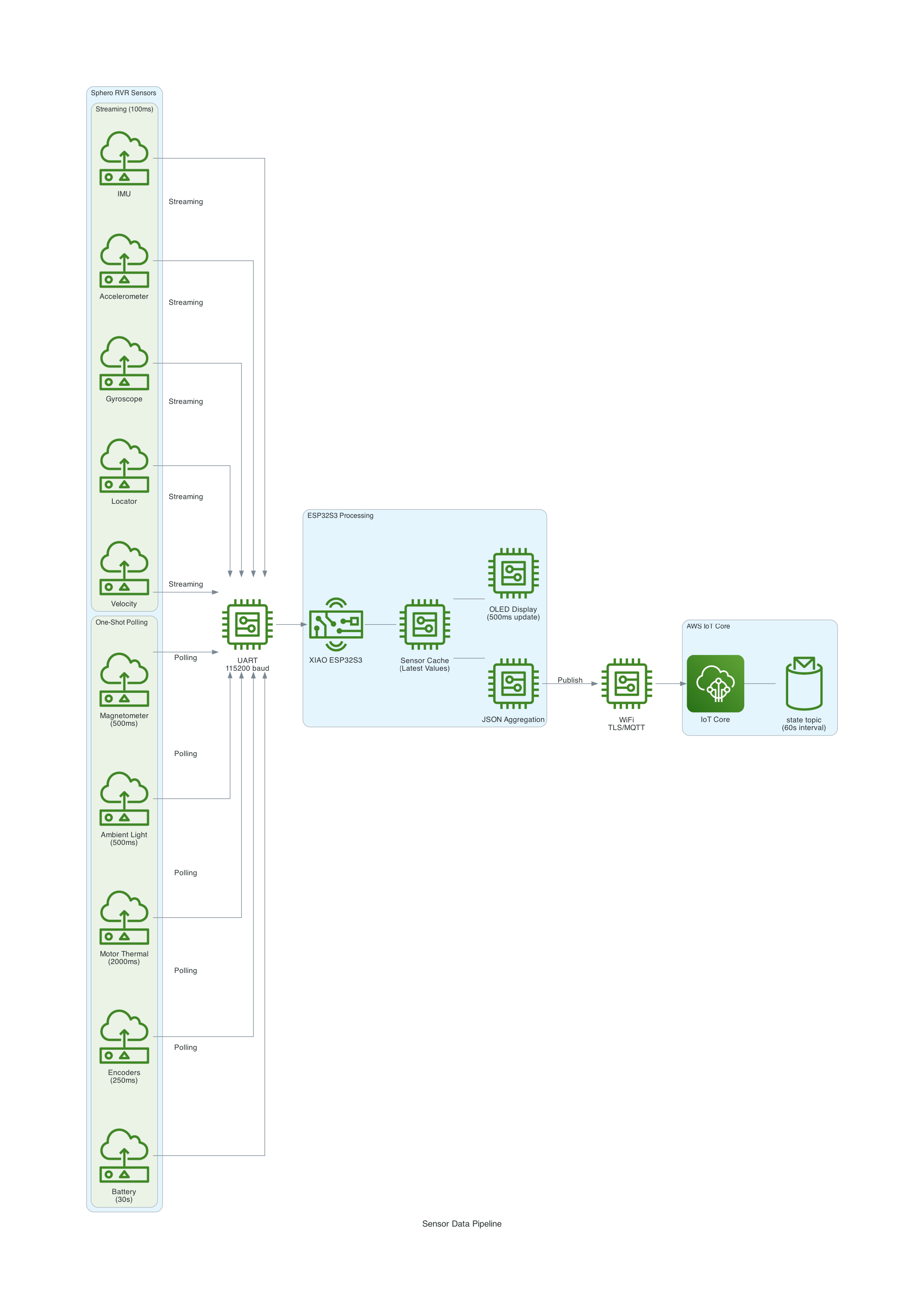
The system publishes comprehensive sensor data every 60 seconds:

  • IMU Data: Pitch, roll, yaw orientation
  • Accelerometer & Gyroscope: Motion and rotation data
  • Color Sensor: RGB values with confidence
  • Compass: Heading in degrees
  • Ambient Light: Lux measurements
  • Motor Thermal: Temperature and protection status
  • Encoders: Wheel tick counts
  • Position & Velocity: Locator data in meters

Remote Commands via MQTT​

Control the RVR from anywhere using JSON commands:

  • Drive: Speed and heading control
  • Tank: Independent left/right motor control
  • Raw Motors: Direct motor speed control
  • LED Control: Headlights, brakelights, status LEDs
  • Navigation: Reset yaw, reset locator
  • Power: Wake and sleep commands

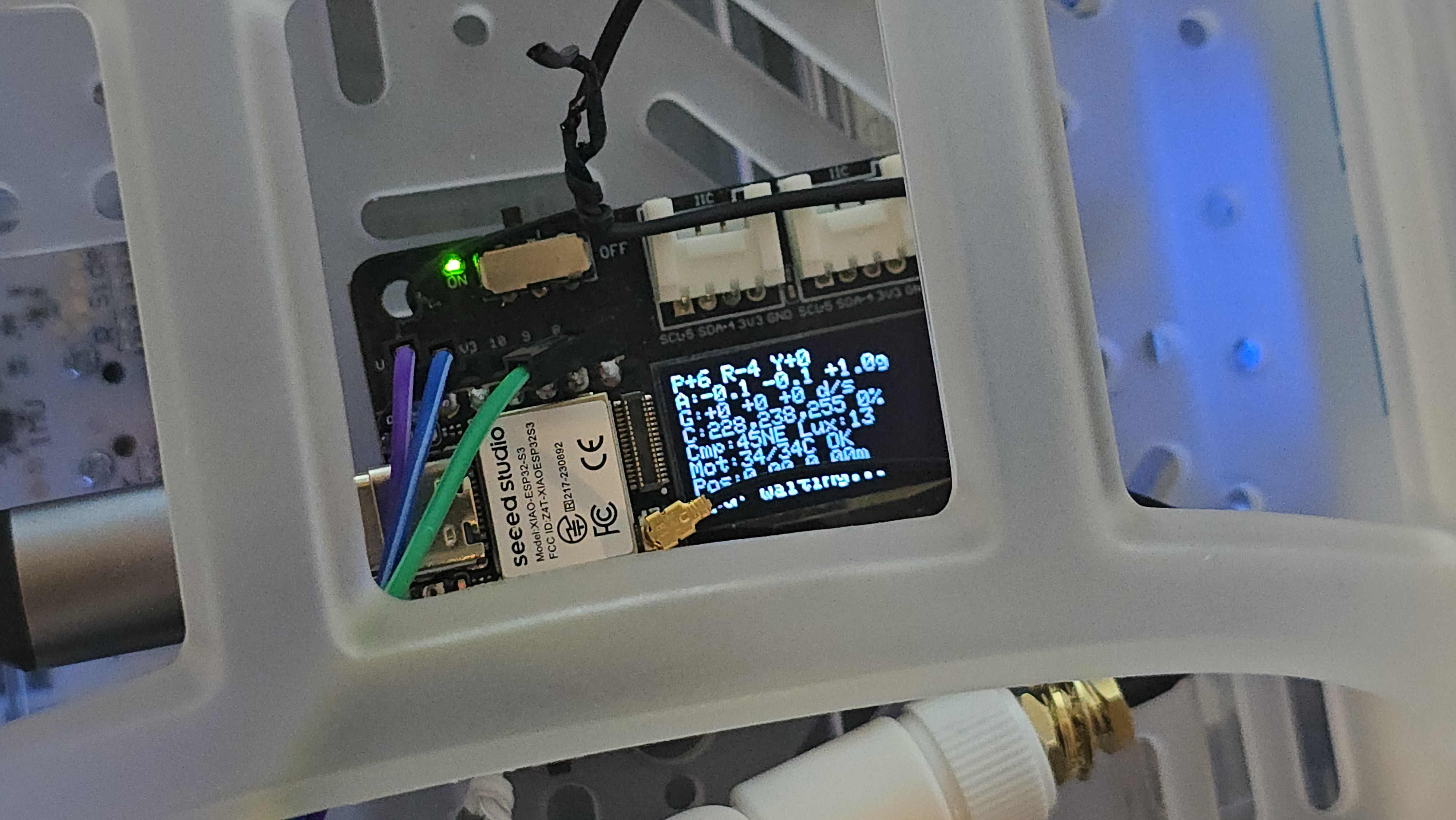
Local OLED Display​

The XIAO Expansion Board's OLED display shows real-time sensor readings for local monitoring.

MQTT Message Flow​

MQTT Message Flow

Sensor Data Pipeline​

Sensor Data Pipeline

Architecture​

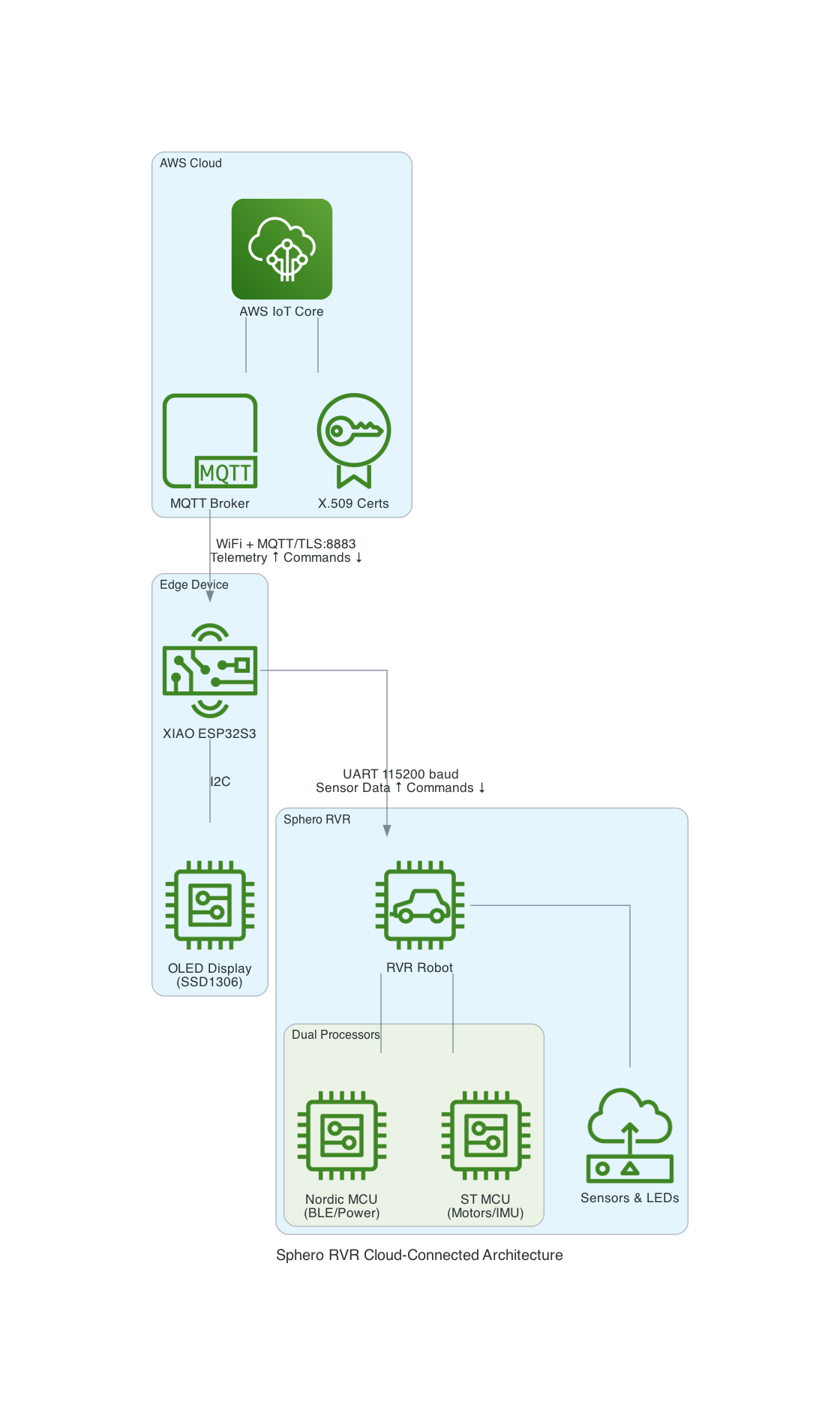
The XIAO ESP32S3 acts as a bridge between the Sphero RVR and AWS IoT Core:

  1. UART Communication: The ESP32S3 communicates with the RVR via UART (GPIO43/44)
  2. WiFi Connection: Connects to local WiFi network
  3. MQTT over TLS: Secure connection to AWS IoT Core with X.509 certificates
  4. Bidirectional: Publishes telemetry and subscribes to command topics

High-Level System Architecture

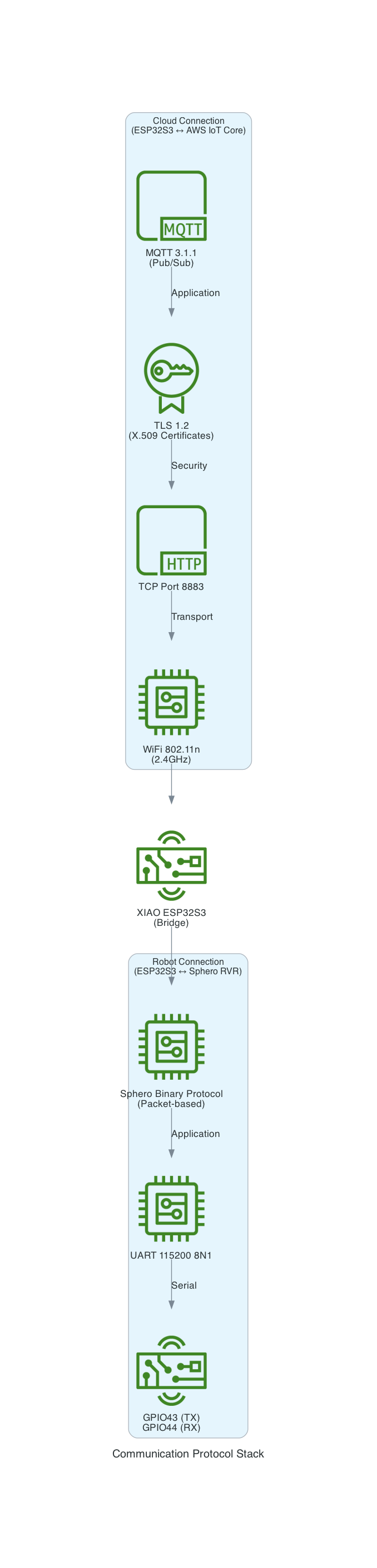
Communication Protocol Stack

Sphero RVR Protocol​

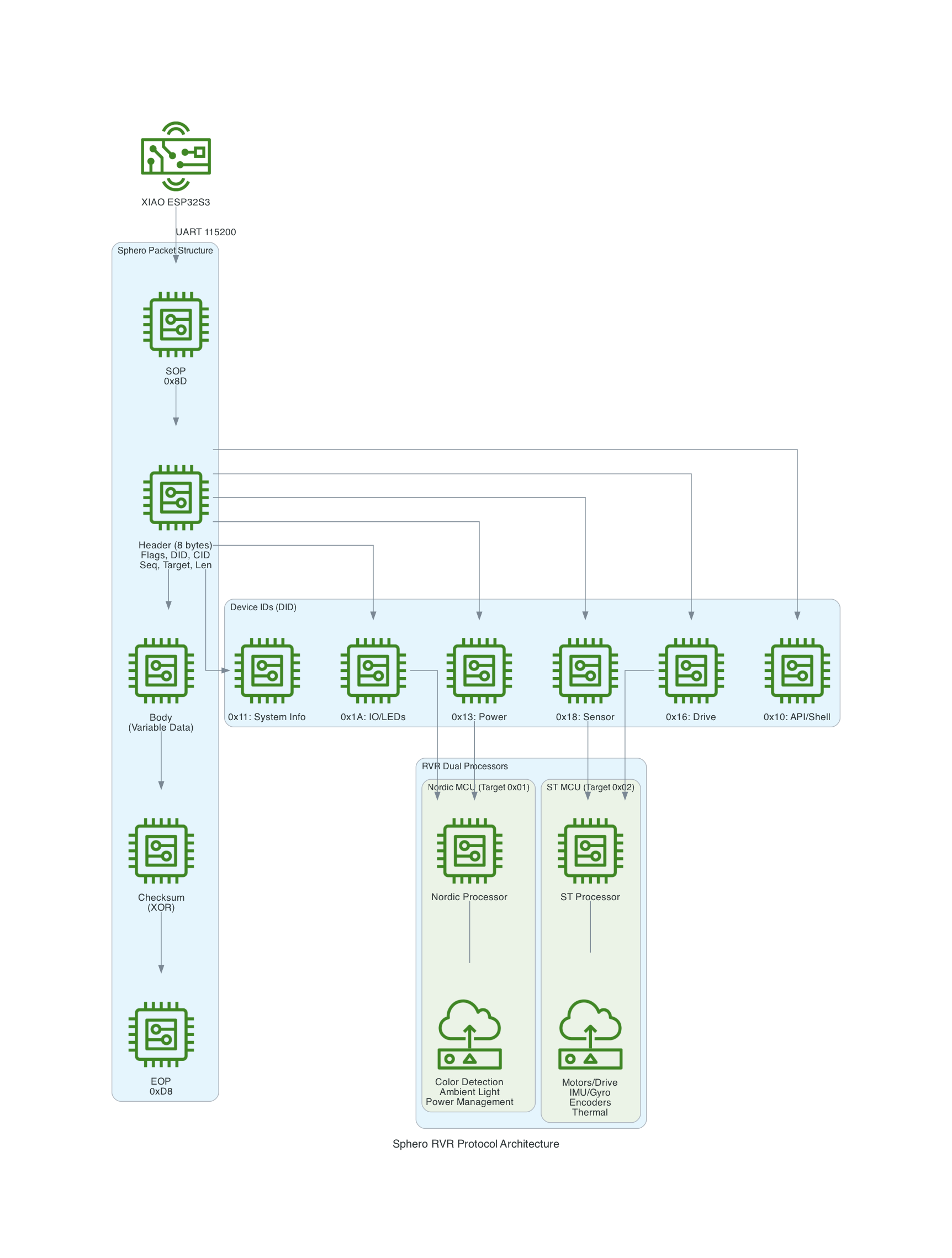
The Sphero RVR uses a binary packet-based protocol over UART. Each packet contains a start-of-packet byte (0x8D), an 8-byte header with device ID and command ID, variable-length data body, checksum, and end-of-packet byte (0xD8). The RVR has two internal processors: Nordic (handles BLE, power, color detection) and ST (handles motors, IMU, encoders).

Sphero RVR Protocol Architecture

Source Code​

I ported the code into this project to control the RVR using the UART protocol based on the Sphero SDK.

You can find the source code for this project here: https://github.com/chiwaichan/platformio-aws-iot-seeed-studio-esp32s3-sphero-rvr