7 posts tagged with "Seeed Studio"

Seeed Studio

View All Tags

Agentic based Over-The-Air Firmware Management of Seeed Studio XIAO ESP32S3 IoT Device Firmware using Amazon AgentCore and Strands Agents

· 8 min read
Chiwai Chan
Tinkerer

I want to have the ability to be able to manage the firmware of all IoT devices using a prompt - it could be to upgrade a device to the latest version, or even to perform a rollback, whether across the entire IoT device fleet level - every device in all 20+ solution types, all the devices within a type of solution, or even at an individual device level.

Goals

  • To be able to over-the-air flash a new firmware version using a prompt
  • To have an Agentic Agent do all the work, give it a prompt and it takes cares of the rest
  • Scalable in the number of IoT devices, as well as, being able to scale as the number of new IoT solution Types increases; with no effort required - implement once and forget
  • Have the ability to rollback to any firmware version specified in the prompt
  • This same solution can be interfaced with using the Model Context Protocol (MCP): whether via Kiro CLI or Claude Code
  • This same solution can be interfaced with using a chatbot
  • Must be authenticated to interface with this solution
  • Must be a completely serverless-solution
  • Firmware integrity verification using SHA256 checksums before flashing to ensure firmware hasn't been corrupted during download
  • Safe rollout with rate limiting and automatic abort thresholds to prevent fleet-wide failures
  • Device firmware version tracking via device shadows to enable version-based targeting for updates
  • Configuration-gated deployments to enable or disable OTA updates per device type for controlled rollouts

Architecture

End-to-End OTA Firmware Update Flow

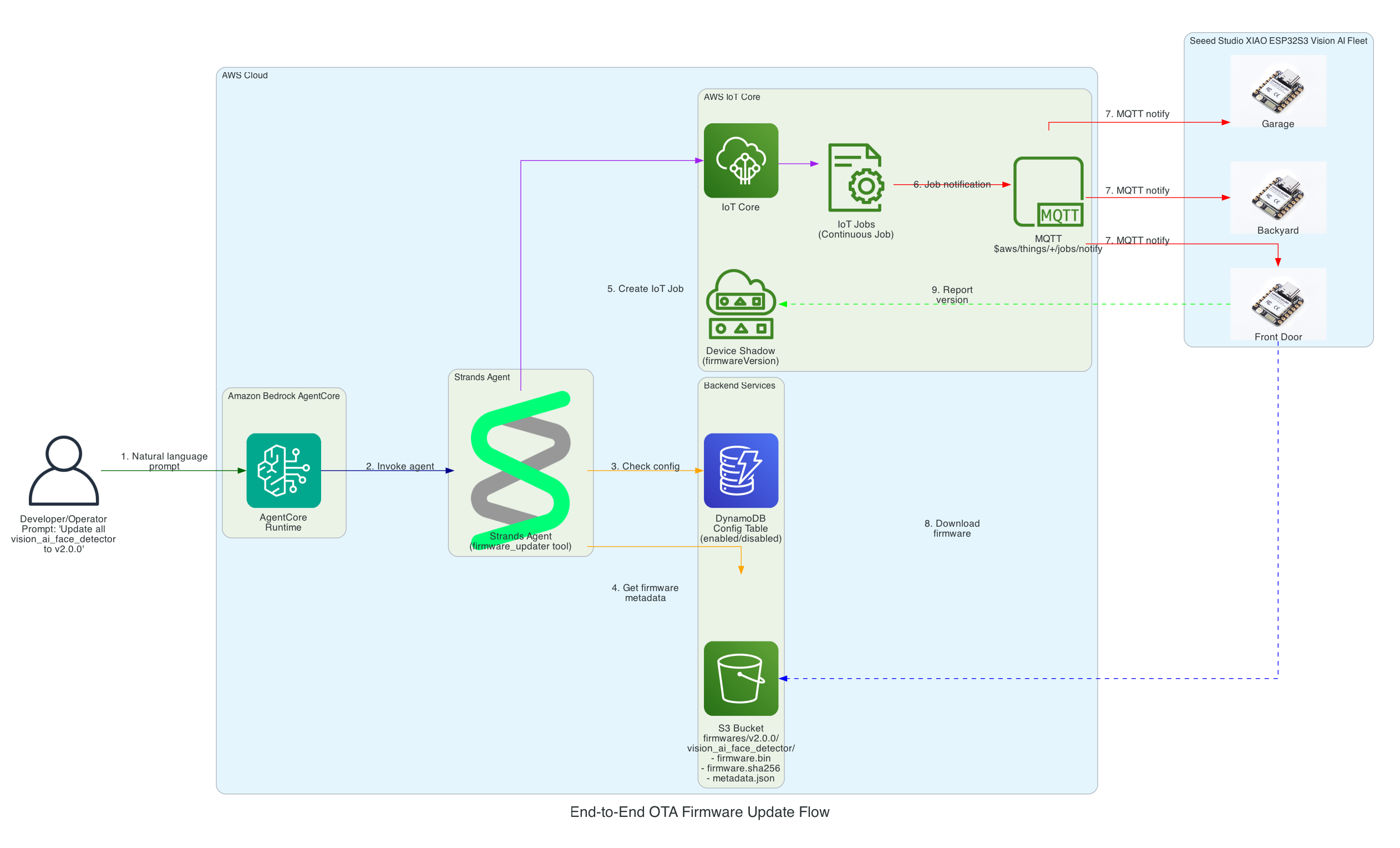
This diagram illustrates the complete flow from a user's natural language prompt to firmware being flashed on Seeed Studio XIAO ESP32S3 devices.

End-to-End OTA Firmware Update Flow

Flow Steps:

  1. User Prompt - Developer/Operator provides a natural language command (e.g., "Update all vision_ai_face_detector devices to v2.0.0")
  2. AgentCore Runtime - Amazon Bedrock AgentCore receives and processes the request
  3. Strands Agent - The agent with firmware_updater tool reasons about the task
  4. Config Check - Agent queries DynamoDB to verify the device type is enabled for OTA updates
  5. Firmware Metadata - Agent retrieves firmware binary, SHA256 checksum, and metadata from S3
  6. Create IoT Job - Agent creates a continuous IoT Job targeting the specified device group
  7. MQTT Notification - AWS IoT Core notifies devices via MQTT topic $aws/things/+/jobs/notify
  8. Firmware Download - Each XIAO ESP32S3 Vision AI Face Detector downloads the firmware directly from S3
  9. Version Reporting - Devices report their new firmware version to their Device Shadow

Interactive Sequence Diagram

End-to-End OTA Firmware Update Flow

From natural language prompt to firmware flashed on Seeed Studio XIAO ESP32

0/15
UserDeveloper/OperatorAgentCoreBedrock AgentCoreStrandsStrands AgentDynamoDBS3S3 BucketIoT CoreAWS IoT CoreXIAOXIAO ESP320.0s"Update all vision_ai_face_detector to v2.0.0"Natural language0.1sInvoke agent with prompt0.2sGetItem: Check if device type enabled0.3senabled: true0.4svalidate_files_exist()0.5sfirmware.bin, firmware.sha256, metadata.json ✓0.6sCreateJob (continuous, targeting device group)0.7sJob created: job-vision-ai-v2.0.00.8sSuccess: OTA job created for 5 devices0.9s"Created OTA job for vision_ai_face_detector..."1.0sMQTT: $aws/things/+/jobs/notifyAll devices in group2.0sGET firmware.bin (pre-signed URL)5.0sStreaming download (1.6MB)8.0sVerify SHA256 → Flash to APP1 → Reboot12.0sShadow update: firmwareVersion = "2.0.0"
User
AgentCore
Strands
DynamoDB
S3
IoT Core
XIAO
Milestone
Complete
Total: 15 message exchanges across 7 participants
~12 seconds end-to-end (prompt to firmware flashed)

Strands Agent Architecture on Amazon Bedrock AgentCore

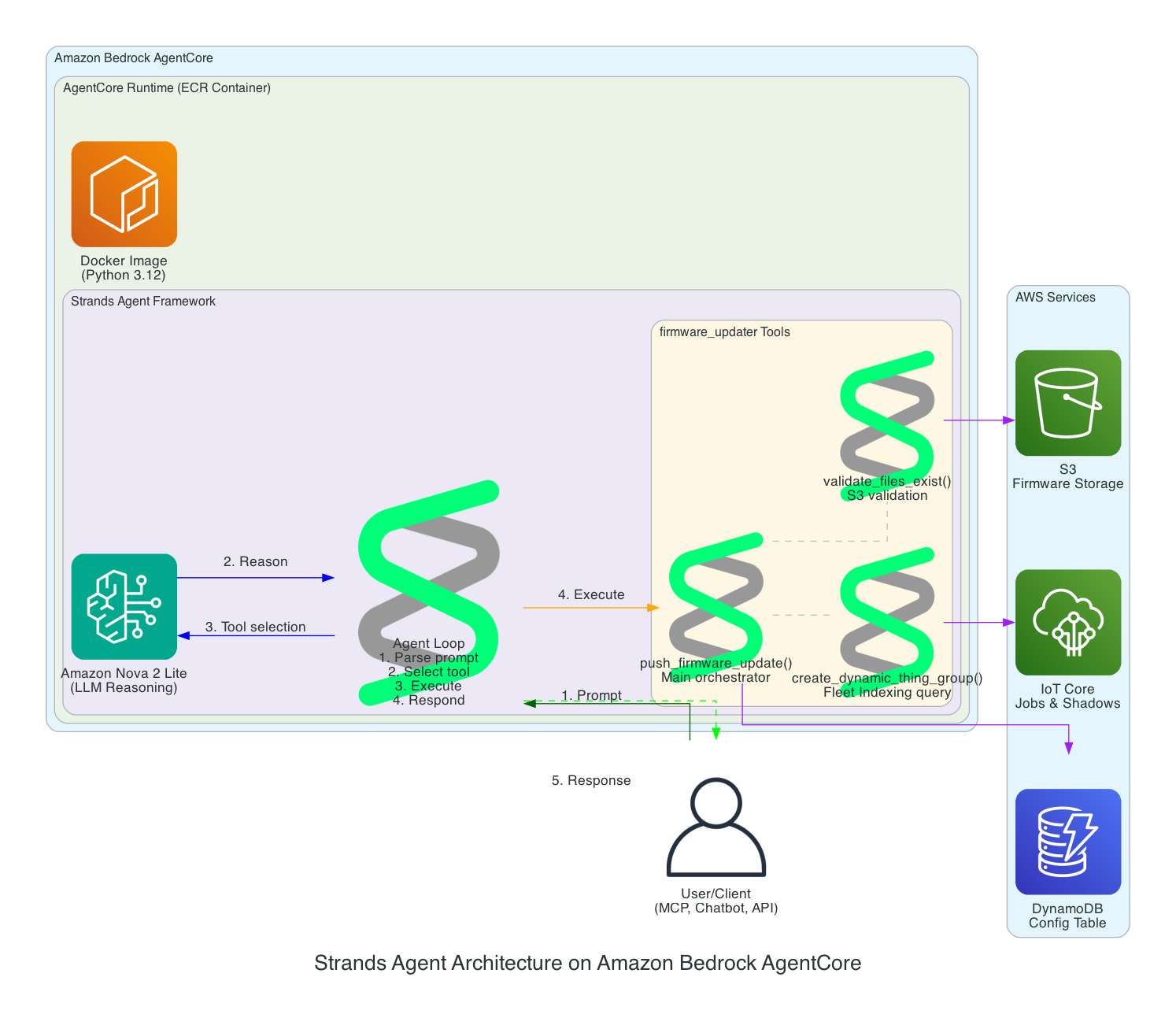
This diagram details the internal architecture of the Strands Agent running on Amazon Bedrock AgentCore, showing how the LLM reasons about prompts and orchestrates tool execution.

Strands Agent Architecture

Components:

  • Amazon Bedrock AgentCore - Managed runtime that hosts and scales the agent
  • ECR Container - Docker image (Python 3.12) containing the Strands Agent code
  • Amazon Nova 2 Lite - The LLM that provides reasoning capabilities
  • Agent Loop - The core execution cycle: parse prompt → select tool → execute → respond
  • firmware_updater Tools:
    • push_firmware_update() - Main orchestrator that coordinates the entire OTA process
    • validate_files_exist() - Validates firmware.bin, firmware.sha256, and metadata.json exist in S3
    • create_dynamic_thing_group() - Creates Fleet Indexing queries to target devices by firmware version

Scalability Architecture

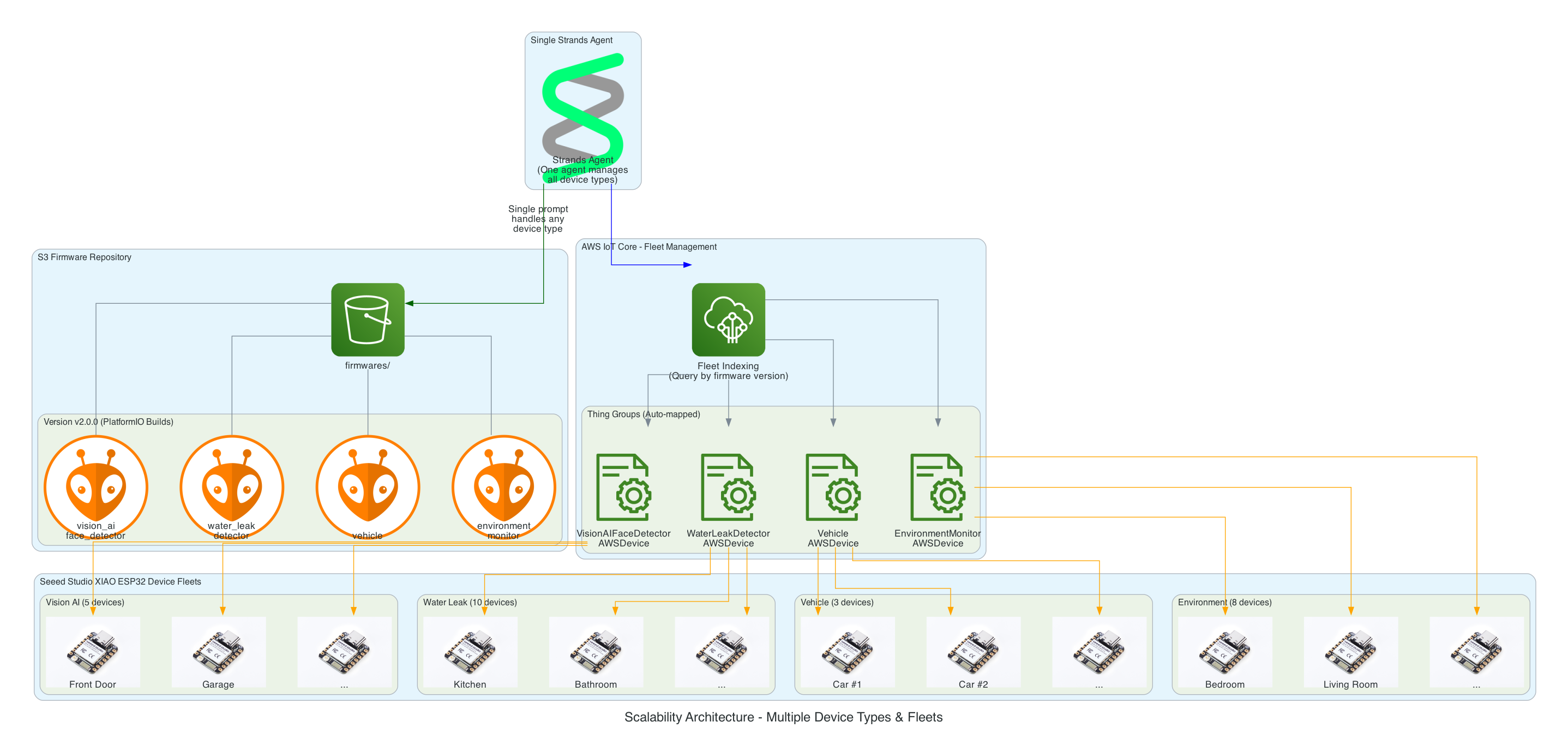
This diagram demonstrates how the solution scales effortlessly across multiple device types and large device fleets - implement once and forget.

Scalability Architecture

Key Scalability Features:

  • Single Agent, Multiple Device Types - One Strands Agent manages all 26+ device groups without code changes
  • S3 Folder Convention - Adding a new device type is as simple as creating a new folder (e.g., firmwares/v1.0.0/new_device_type/)
  • Auto-Discovery Mapping - Folder names automatically map to Thing Groups (e.g., vision_ai_face_detectorVisionAIFaceDetectorAWSDevice)
  • Fleet Indexing Queries - Dynamically target devices based on current firmware version, no hardcoded device lists
  • Horizontal Scaling - Add unlimited devices to any group; IoT Jobs handles distribution automatically

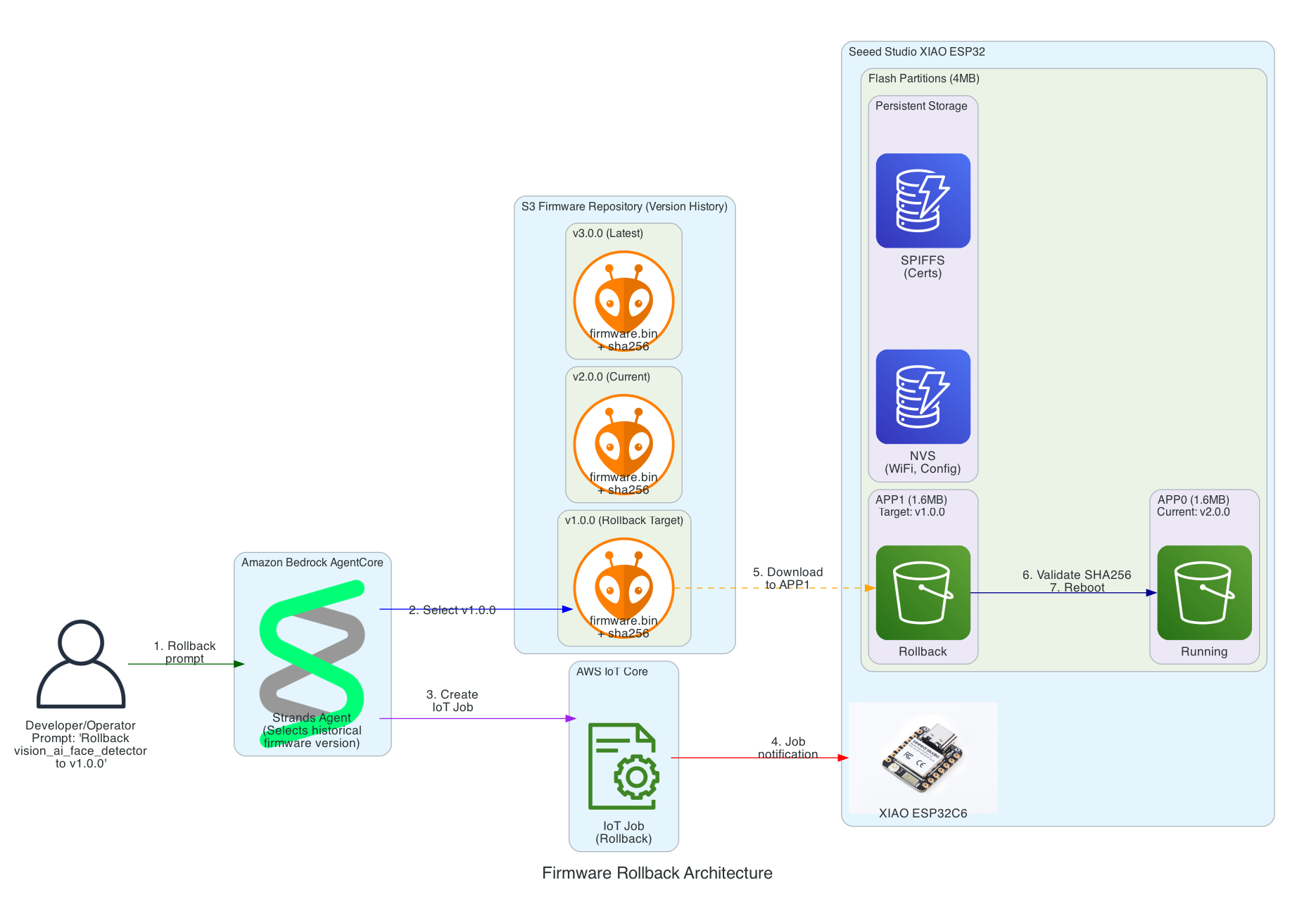
Firmware Rollback Architecture

This diagram shows how the solution enables rollback to any previous firmware version using a simple prompt, leveraging the dual-partition architecture of the Seeed Studio XIAO ESP32.

Firmware Rollback Architecture

Key Rollback Features:

  • Version History in S3 - All firmware versions are retained (v1.0.0, v2.0.0, v3.0.0, etc.) enabling rollback to any point
  • Dual-Partition Flash Layout - XIAO ESP32 uses APP0/APP1 partitions for safe ping-pong updates
  • Persistent Storage - NVS (WiFi, config) and SPIFFS (certificates) survive firmware updates
  • SHA256 Validation - Firmware integrity verified before committing to new partition
  • Automatic Rollback - If new firmware fails to boot and connect to MQTT, device automatically reverts to previous partition

Interactive Sequence Diagram

Firmware Rollback Sequence

Rollback to any previous firmware version with dual-partition safety

0/17
UserDeveloper/OperatorStrandsStrands AgentS3S3 (Version History)IoT CoreAWS IoT CoreXIAOXIAO ESP32FlashFlash Partitions0.0s"Rollback vision_ai_face_detector to v1.0.0"Natural language0.2sList versions: v1.0.0, v2.0.0, v3.0.00.3sv1.0.0 exists with firmware.bin + sha2560.5sCreateJob: target v1.0.0 firmware0.6sJob created: rollback-v1.0.00.7s"Rollback job created, targeting 5 devices"1.0sMQTT: Job notification with v1.0.0 URL2.0sGET v1.0.0/firmware.bin5.0sStream v1.0.0 firmware (1.6MB)6.0sWrite to APP1 partition (inactive)7.0sAPP1 written, SHA256 verified7.5sSet boot partition: APP18.0sESP.restart() → Reboot10.0sBoot from APP1 (v1.0.0)12.0sMQTT Connect successful12.5sMark APP1 as valid (ota_mark_valid)13.0sShadow: firmwareVersion = "1.0.0"
User
Strands
S3
IoT Core
XIAO
Flash
Dual-partition safety: APP0 preserved during rollback to APP1
~13 seconds to rollback (with auto-recovery on failure)

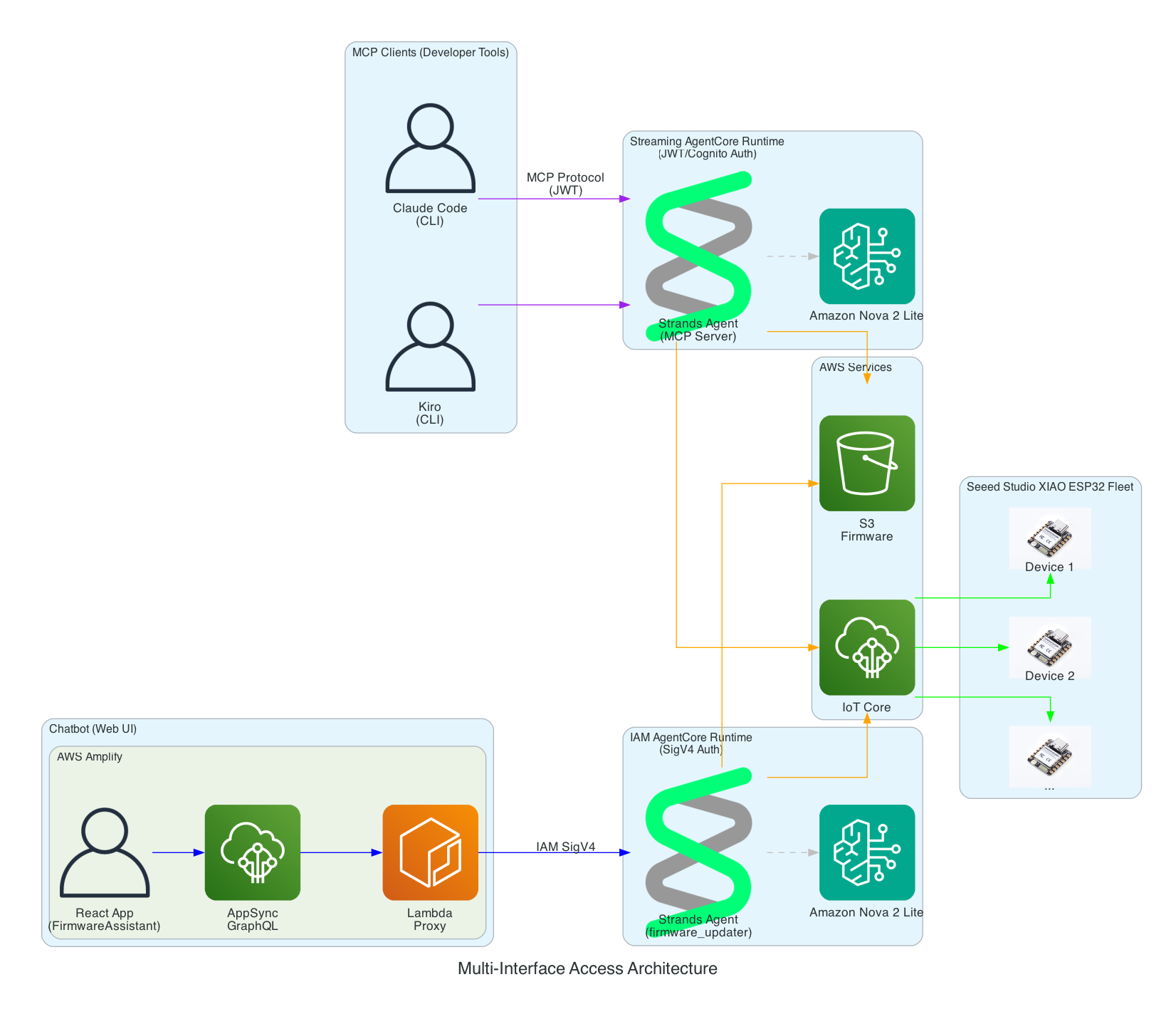
Multi-Interface Access Architecture

This diagram demonstrates how the Strands Agent can be accessed through multiple interfaces with different authentication methods - enabling developers to use their preferred tools while operators can use a web-based chatbot.

Multi-Interface Access Architecture

Interface Options:

  • MCP Clients (Developer Tools) - Claude Code and Kiro CLI connect via Model Context Protocol to a Streaming AgentCore Runtime using JWT/Cognito authentication
  • Chatbot (Web UI) - AWS Amplify React app with FirmwareAssistant component connects via Lambda proxy to an IAM AgentCore Runtime using SigV4 authentication for service-to-service communication
  • Two Runtimes, Same Agent Logic - Both runtimes run the same Strands Agent code but are deployed separately with different authentication methods suited to their use cases

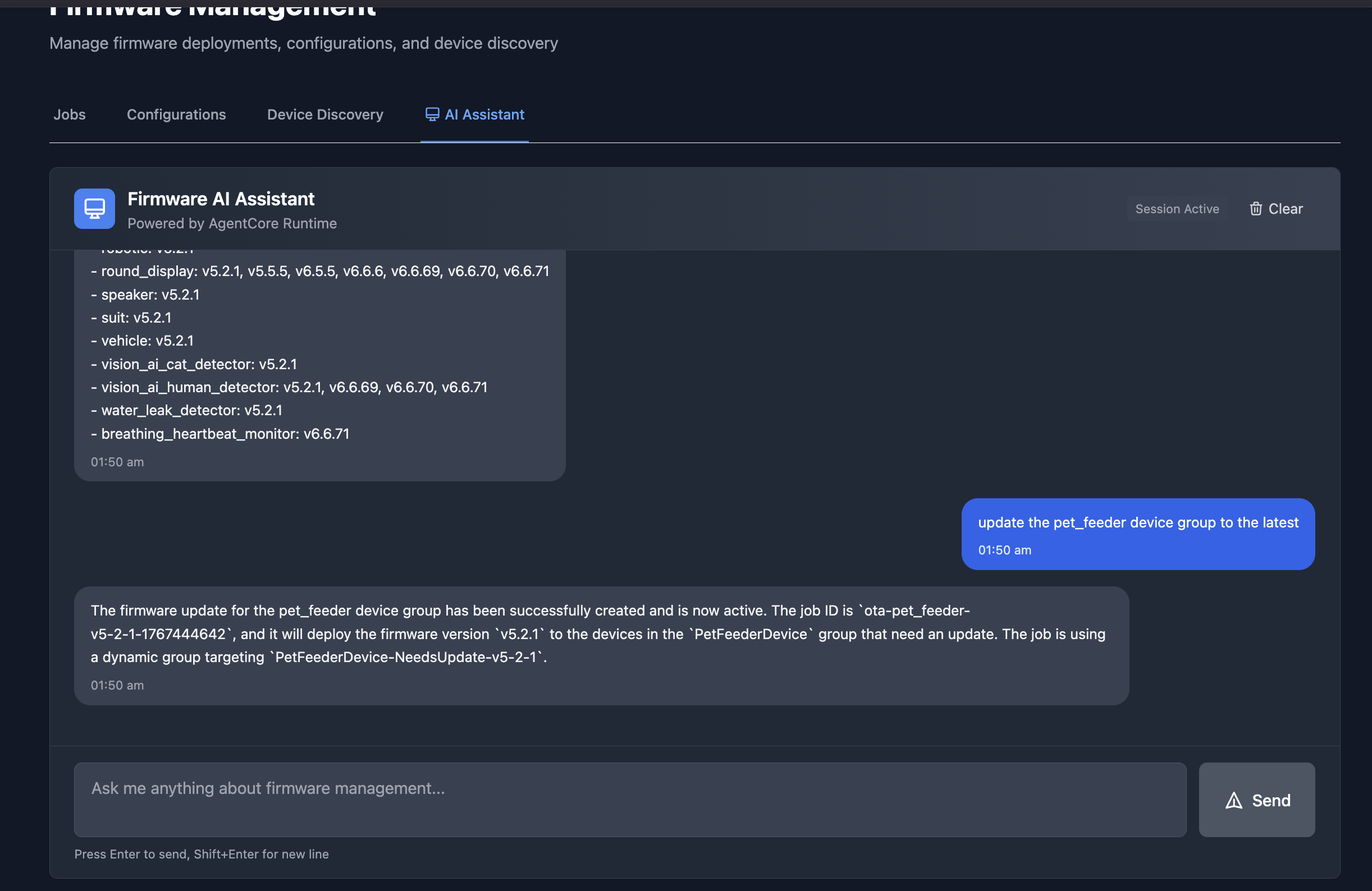
Firmware AI Assistant Chatbot

The chatbot interface in an Amplify React App provides a conversational way to manage firmware updates. In this example, the assistant lists all available firmware versions across device groups, and then creates an OTA job to update the pet_feeder device group to the latest firmware version.

Firmware AI Assistant Chatbot

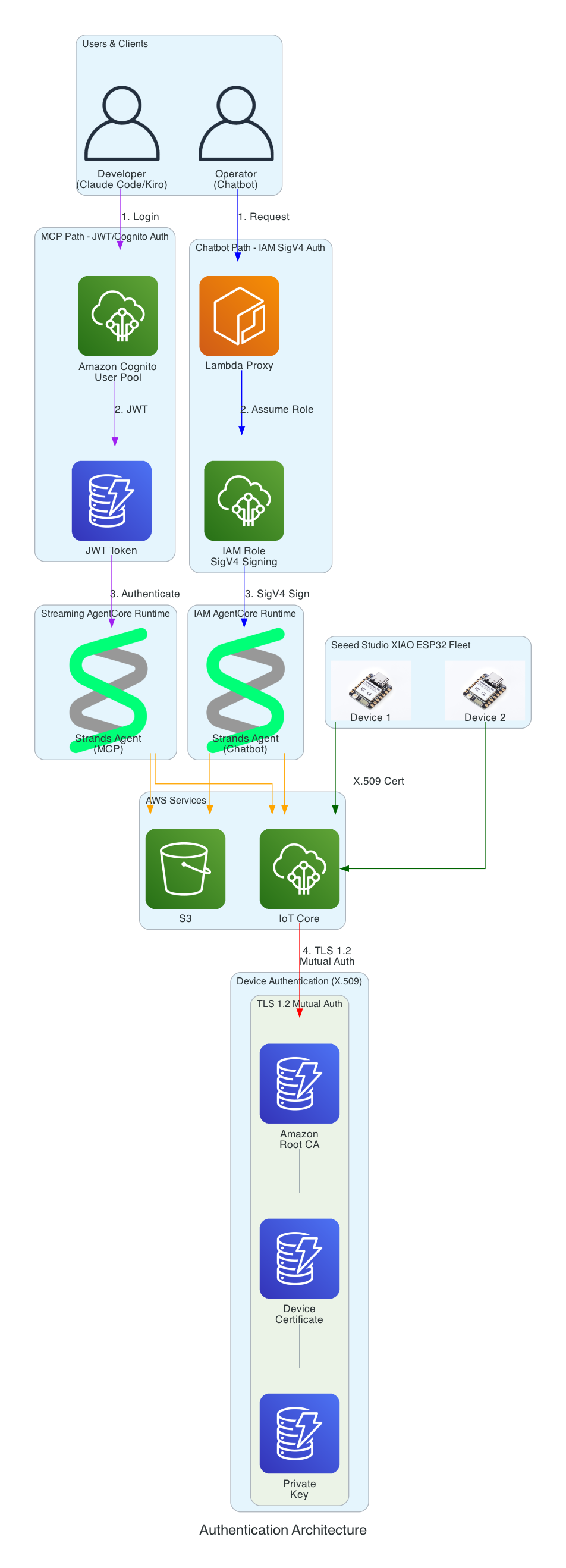
Authentication Architecture

This diagram illustrates the multi-layer security model ensuring that all access to the firmware management system is properly authenticated. Each interface uses a different authentication method suited to its use case.

Authentication Architecture

Authentication Layers:

  • Cognito JWT (MCP Path) - Developers using Claude Code and Kiro CLI authenticate via Amazon Cognito User Pool and receive JWT tokens, connecting to the Streaming AgentCore Runtime
  • IAM SigV4 (Chatbot Path) - The Lambda proxy authenticates using AWS IAM roles with SigV4 request signing for service-to-service communication with the IAM AgentCore Runtime
  • X.509 Certificates (Device Path) - XIAO ESP32 devices authenticate to AWS IoT Core using TLS 1.2 mutual authentication with per-device certificates
  • Certificate Chain - Amazon Root CA validates device certificates stored in SPIFFS (survives firmware updates)

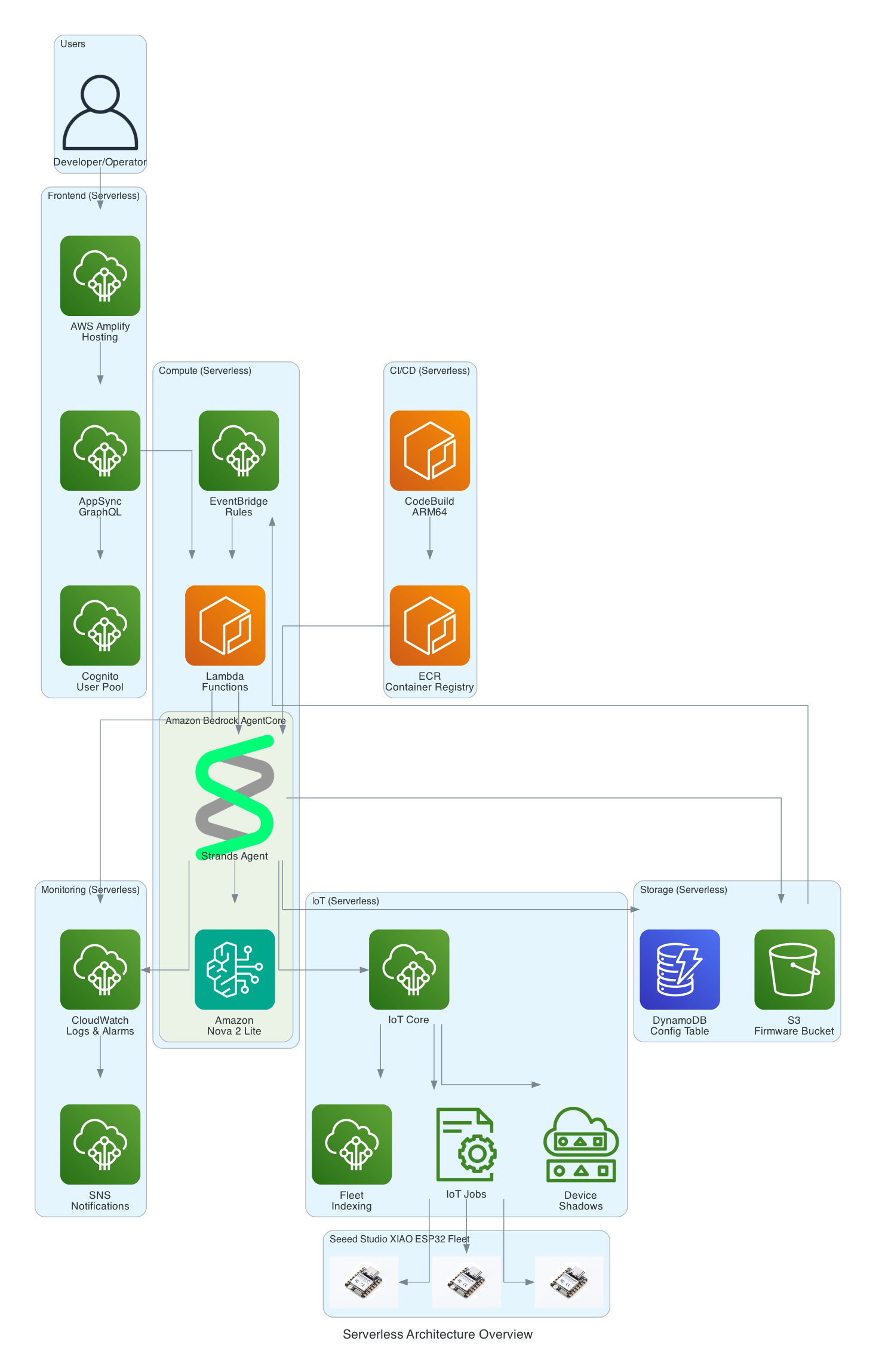
Serverless Architecture Overview

This diagram provides a comprehensive view of all AWS services used in the solution - every component is fully serverless with no EC2 instances to manage.

Serverless Architecture Overview

Serverless Components:

  • Frontend - AWS Amplify Hosting, AppSync GraphQL, Cognito User Pool
  • Compute - Amazon Bedrock AgentCore, Lambda Functions, EventBridge Rules
  • Storage - S3 Firmware Bucket, DynamoDB Config Table
  • IoT - IoT Core, IoT Jobs, Device Shadows, Fleet Indexing
  • Monitoring - CloudWatch Logs & Alarms, SNS Notifications
  • CI/CD - CodeBuild (ARM64), ECR Container Registry

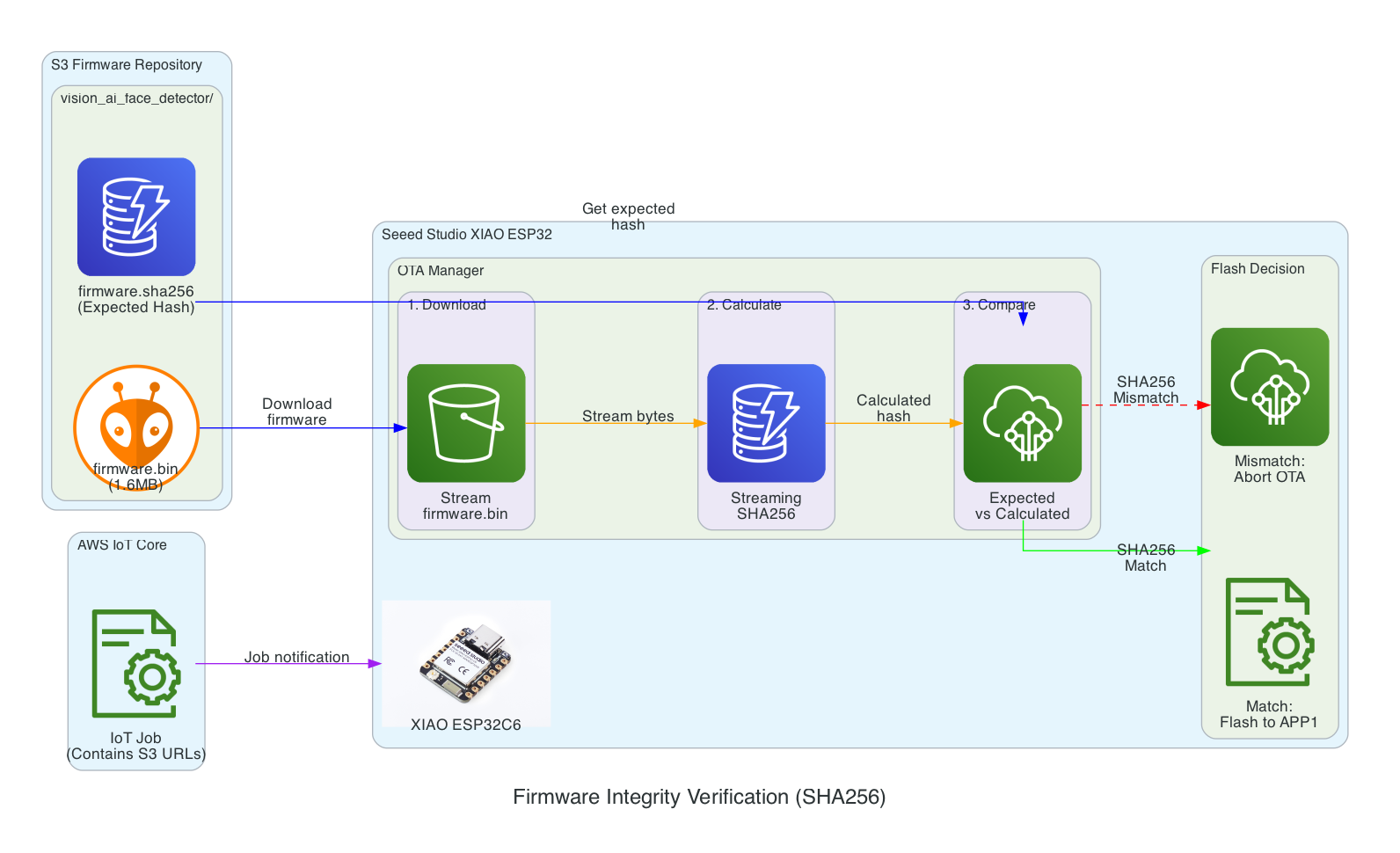
Firmware Integrity Verification (SHA256)

This diagram shows the firmware integrity verification process that ensures firmware hasn't been corrupted during download before flashing to the device.

Firmware Integrity Verification

Verification Flow:

  1. Download - XIAO ESP32 streams firmware.bin from S3 in chunks
  2. Calculate - SHA256 hash is calculated progressively during download (streaming hash)
  3. Compare - Calculated hash is compared against expected hash from firmware.sha256 file
  4. Flash Decision - Match: proceed to flash APP1 partition | Mismatch: abort OTA and report failure

Benefits:

  • Detects corruption during download (network issues, incomplete transfers)
  • Prevents flashing of tampered firmware
  • Memory-efficient streaming verification (no need to store entire firmware before hashing)

Interactive Sequence Diagram

SHA256 Integrity Verification Sequence

Streaming hash verification during firmware download

0/15
IoT JobAWS IoT JobXIAOXIAO ESP32S3S3 BucketOTA MgrOTA ManagerFlashFlash Memory0.0sJob document with firmware URL + expected SHA2560.1sStart OTA: updateFromURLWithChecksum(url, sha256)0.2sHTTP GET firmware.bin (Content-Length: 1.6MB)0.5sStream chunk 1 (1KB)0.6sSHA256.update(chunk1) → Running hash0.7sWrite chunk 1 to APP1 partition3.0sStream chunks 2...1600 (1KB each)~1600 iterations3.5sSHA256.update(chunks) → Accumulating hash4.0sWrite remaining chunks to APP15.0sDownload complete (EOF)5.1sSHA256.finalize() → Calculated hash5.2sCompare: calculated == expected ?5.3s✓ MATCH: Commit APP1, set boot partitionSafe to flash!5.5sAPP1 committed successfully5.6sOTA_SUCCESS: Ready to reboot
IoT Job
XIAO
S3
OTA Mgr
Flash
Memory-efficient: Hash calculated during download, not after
~5.6 seconds (download + verify + commit)

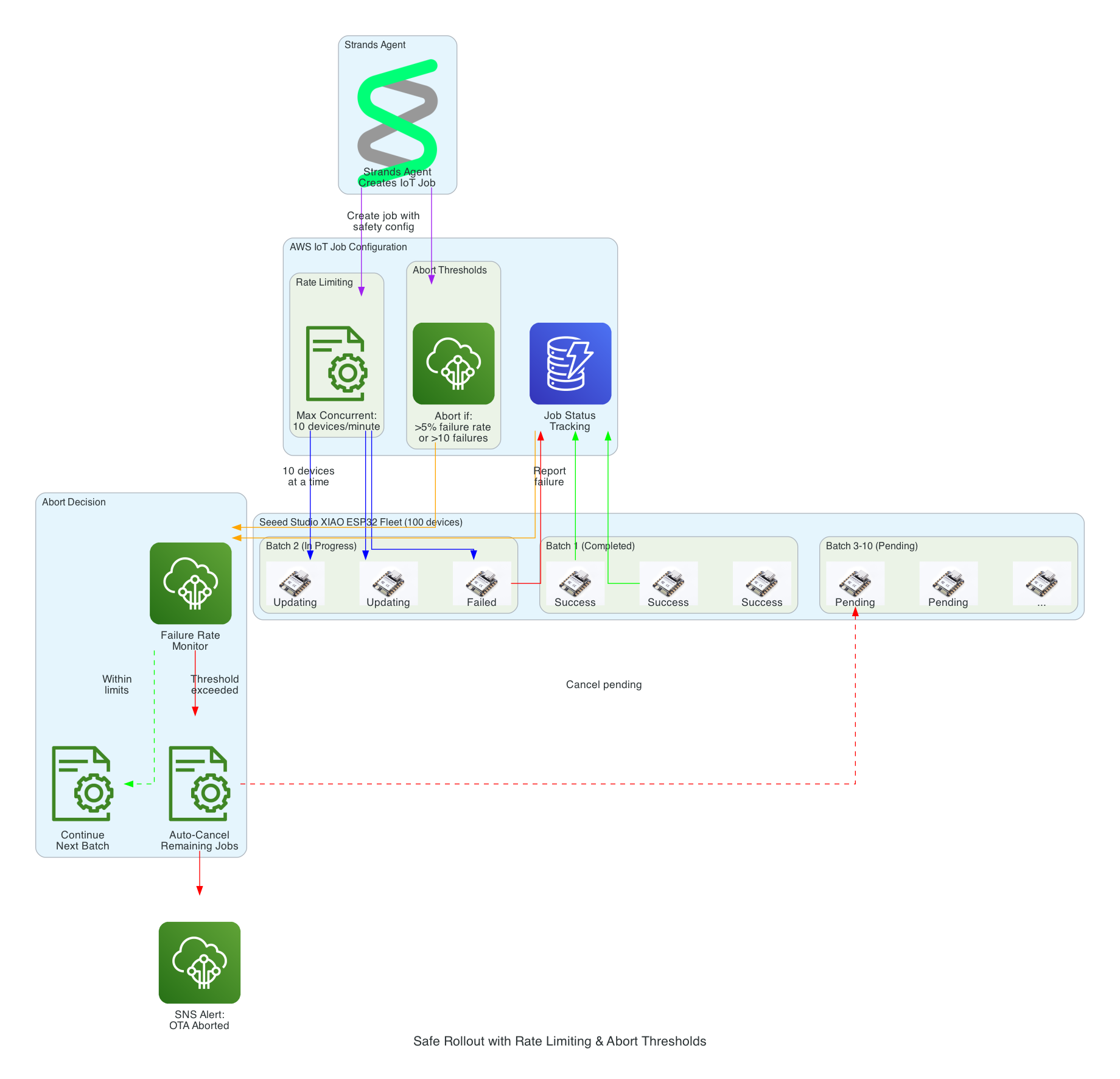
Safe Rollout with Rate Limiting & Abort Thresholds

This diagram illustrates the safety mechanisms that prevent fleet-wide failures during OTA updates by controlling rollout speed and automatically aborting when issues are detected.

Safe Rollout with Rate Limiting

Safety Mechanisms:

  • Rate Limiting - Updates are deployed to a maximum of 10 devices concurrently, preventing network congestion and allowing monitoring
  • Abort Thresholds - Job automatically cancels if failure rate exceeds 5% or more than 10 absolute failures occur
  • Batch Processing - Fleet of 100 devices is updated in batches, with completed, in-progress, and pending states tracked
  • Failure Monitoring - Real-time tracking of success/failure status feeds into abort decision logic
  • Auto-Cancel - When threshold is exceeded, all pending device updates are automatically cancelled
  • SNS Alerts - Operators are immediately notified when an OTA rollout is aborted

Interactive Sequence Diagram

Safe Rollout with Abort Threshold

Rate-limited deployment with automatic abort on failure threshold

0/16
StrandsStrands AgentIoT JobsAWS IoT JobsBatch 1Batch 1 (10 devices)Batch 2Batch 2 (10 devices)MonitorFailure MonitorSNSSNS Alerts0.0sCreateJob: maxConcurrent=10, abortThreshol...Rate limiting config0.1sJob created: 100 devices in queue0.5sDeploy to Batch 1 (devices 1-10)First 10 devices15.0sDevice 1-8: SUCCESS18.0sDevice 9-10: SUCCESS18.5sBatch 1 complete: 10/10 success (0% failure)18.6s✓ Below threshold, continue rollout19.0sDeploy to Batch 2 (devices 11-20)32.0sDevice 11-14: SUCCESS45.0sDevice 15-17: FAILED (network timeout)3 failures!45.5sRunning total: 13 success, 3 failed (18.75%)45.6sCheck: 18.75% > 5% threshold45.7s⚠️ ABORT: Failure threshold exceeded!Stop rollout46.0sCancel pending jobs (devices 18-100)46.5sPublish abort notification47.0sEmail/SMS: "OTA aborted: 3 failures i...
Strands
IoT Jobs
Batch 1
Batch 2
Monitor
SNS
Prevented 84 additional devices from receiving bad firmware
Fleet-wide failure avoided by abort threshold

Source Code

The source code for this project is available on GitHub:

note

This repository is not yet open sourced. It will be made public in a future update.

Cloud-Connected Sphero RVR Robot with AWS IoT Core and Seeed Studio XIAO ESP32S3

· 4 min read
Chiwai Chan
Tinkerer

Seeed Studio XIAO ESP32S3

Sphero RVR

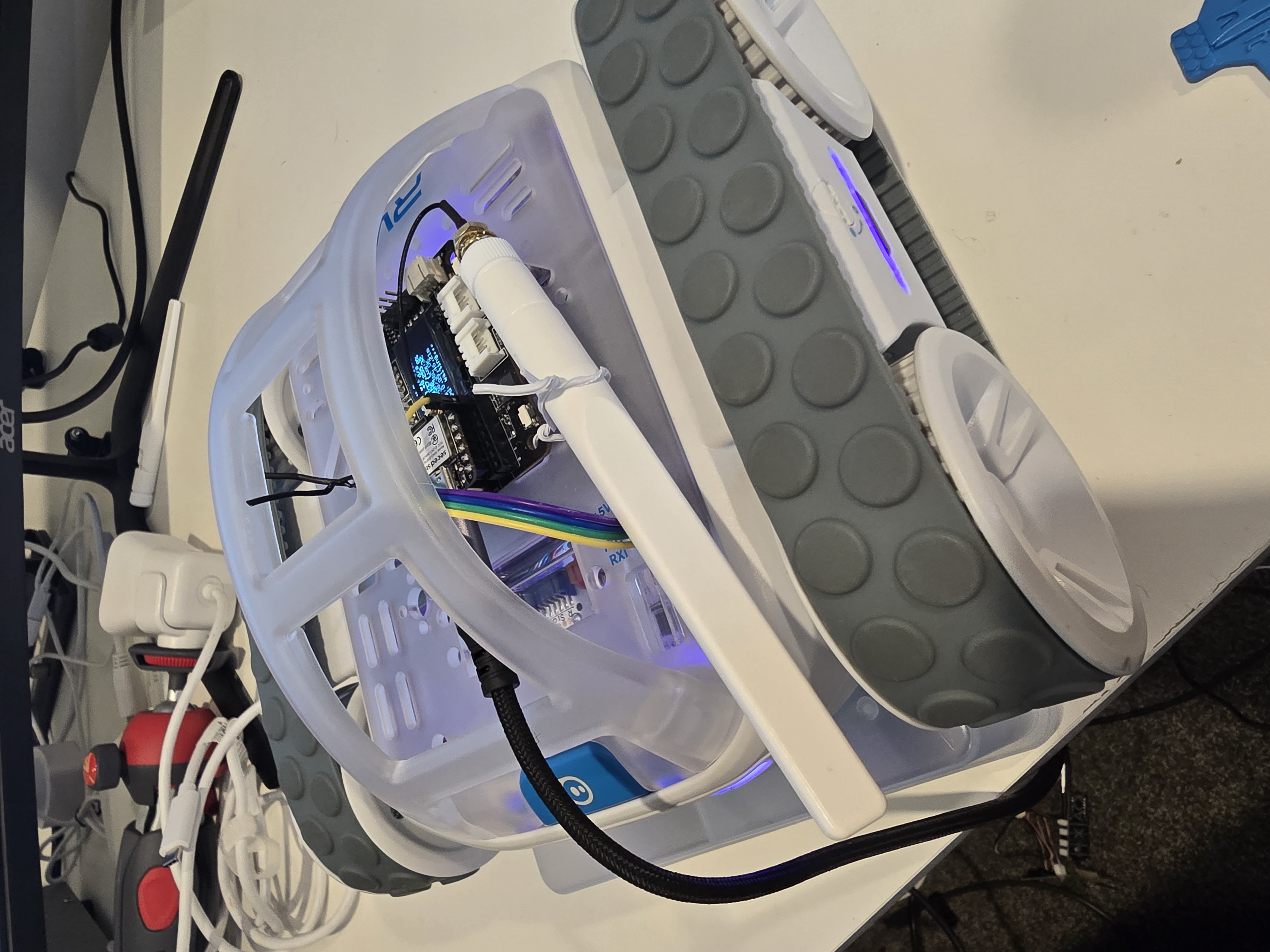
A Sphero RVR integrated with a Seeed Studio XIAO ESP32S3 with telemetry uploaded into, and also, basic drive remote control commands received from any where leveraging AWS IoT Core.

Overview

Lately I have been aiming to go deep on AI Robotics, and last year I have been slowly experimenting more and more with anything that is AI, IoT and Robotics related; with the intention of learning and going as wide and as deep as possible in any pillars I can think of. You can check out my blogs under the Robotics Project to see what I have been up to. This year I want to focus on enabling mobility for my experiments - as in providing wheels for solutions to move around the house, ideally autonomously; starting off with wheel based solutions bought off-shelve, followed by solutions that I build myself from open-sourced projects people have kindly contirbuted online, and then ambitiously designed, 3D Printed and built all from the ground up - perhaps in a couple of years time.

This project uses a Seeed Studio XIAO ESP32S3 microcontroller to communicate with a Sphero RVR robot via UART, while simultaneously connecting to AWS IoT Core over WiFi. The system publishes real-time sensor telemetry and accepts remote drive commands through MQTT.

Hardware Components

ComponentDescription
Seeed Studio XIAO ESP32S3Compact ESP32-S3 microcontroller with WiFi, 8MB flash
Sphero RVRProgrammable robot with motors, IMU, color sensor, encoders
XIAO Expansion BoardProvides OLED display (128x64 SSD1306) for status info

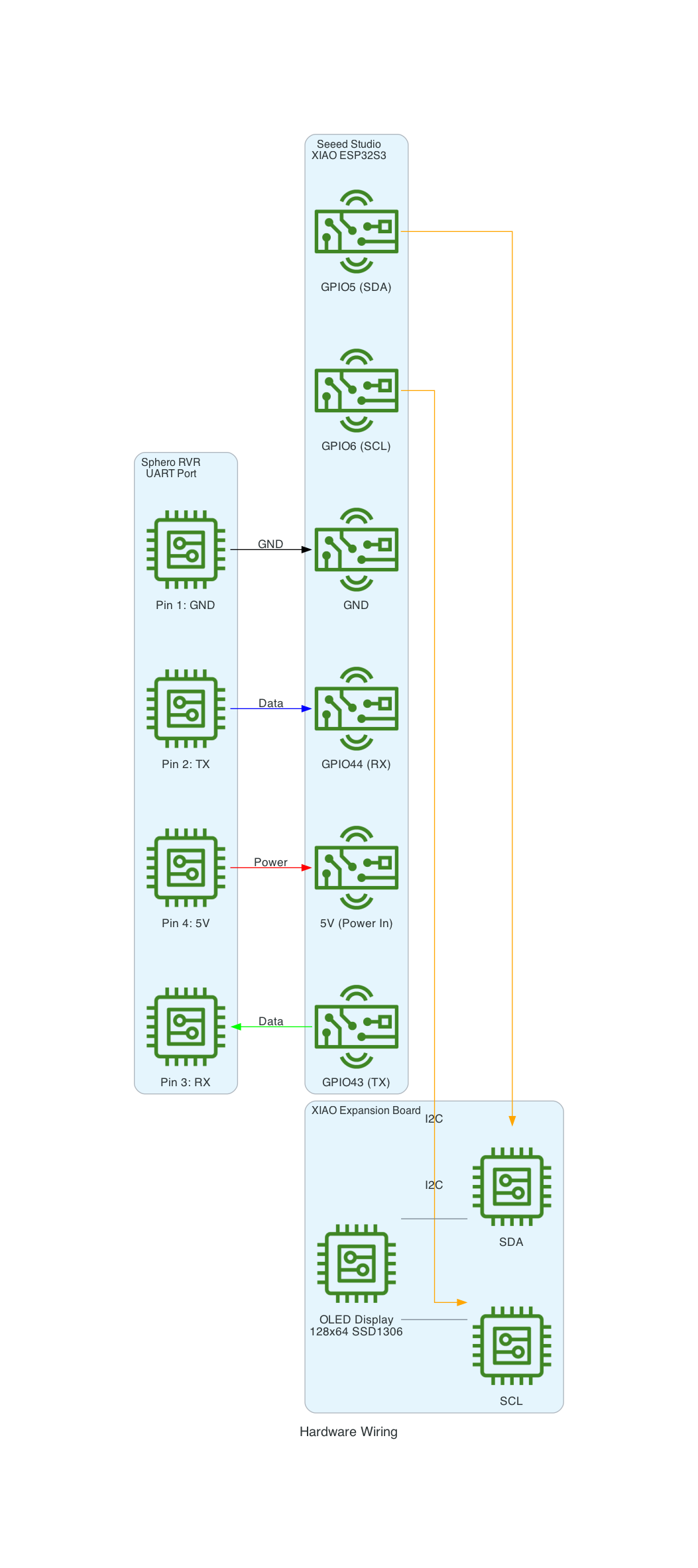
Hardware Wiring

Hardware Wiring

Features

Real-time Telemetry

The system publishes comprehensive sensor data every 60 seconds:

  • IMU Data: Pitch, roll, yaw orientation
  • Accelerometer & Gyroscope: Motion and rotation data
  • Color Sensor: RGB values with confidence
  • Compass: Heading in degrees
  • Ambient Light: Lux measurements
  • Motor Thermal: Temperature and protection status
  • Encoders: Wheel tick counts
  • Position & Velocity: Locator data in meters

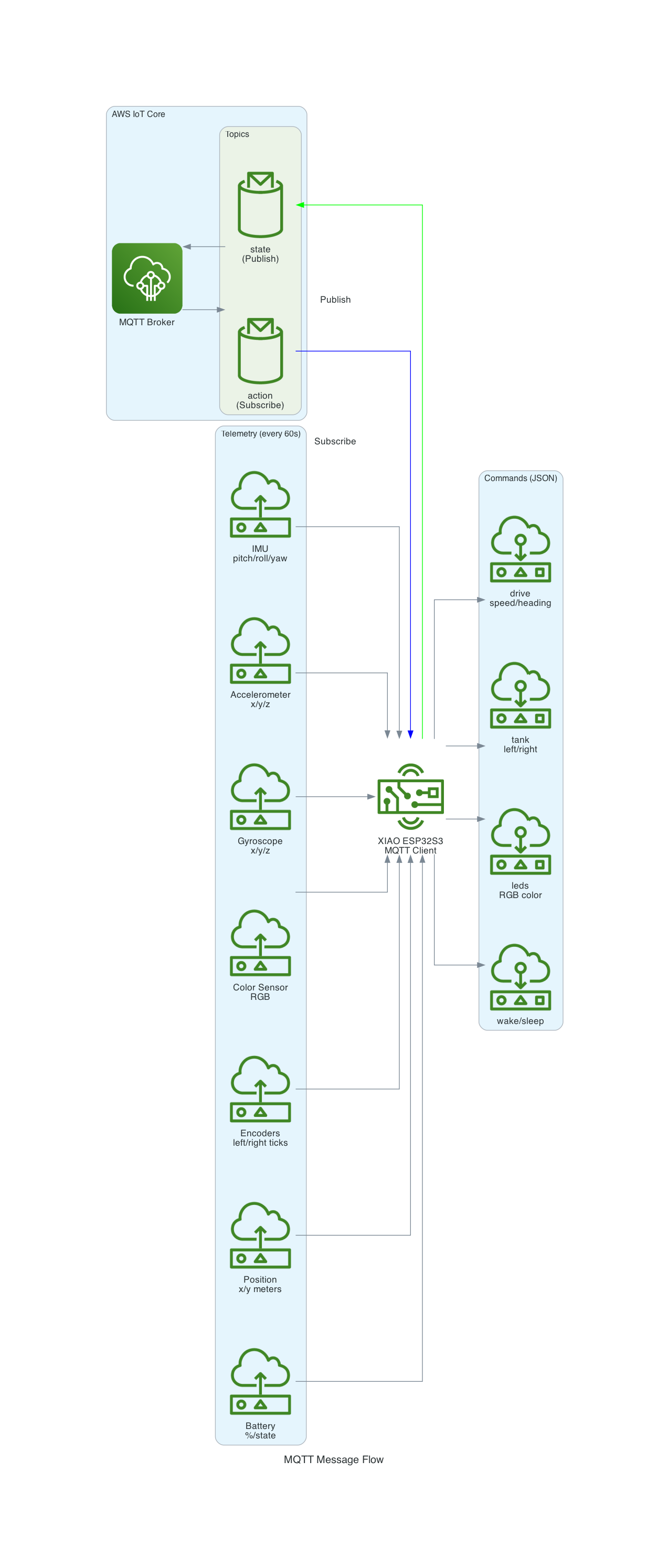
Remote Commands via MQTT

Control the RVR from anywhere using JSON commands:

  • Drive: Speed and heading control
  • Tank: Independent left/right motor control
  • Raw Motors: Direct motor speed control
  • LED Control: Headlights, brakelights, status LEDs
  • Navigation: Reset yaw, reset locator
  • Power: Wake and sleep commands

Local OLED Display

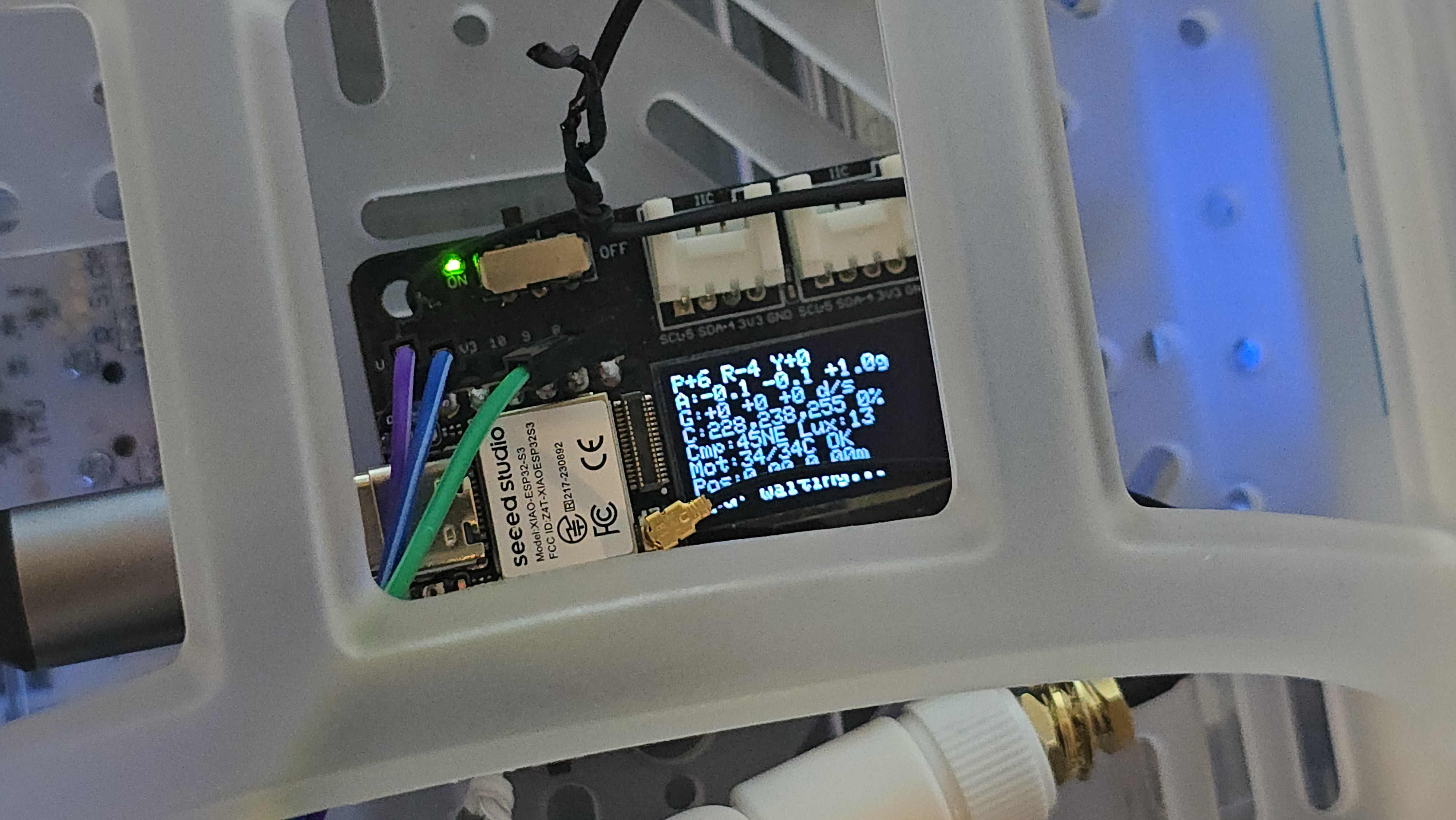
The XIAO Expansion Board's OLED display shows real-time sensor readings for local monitoring.

MQTT Message Flow

MQTT Message Flow

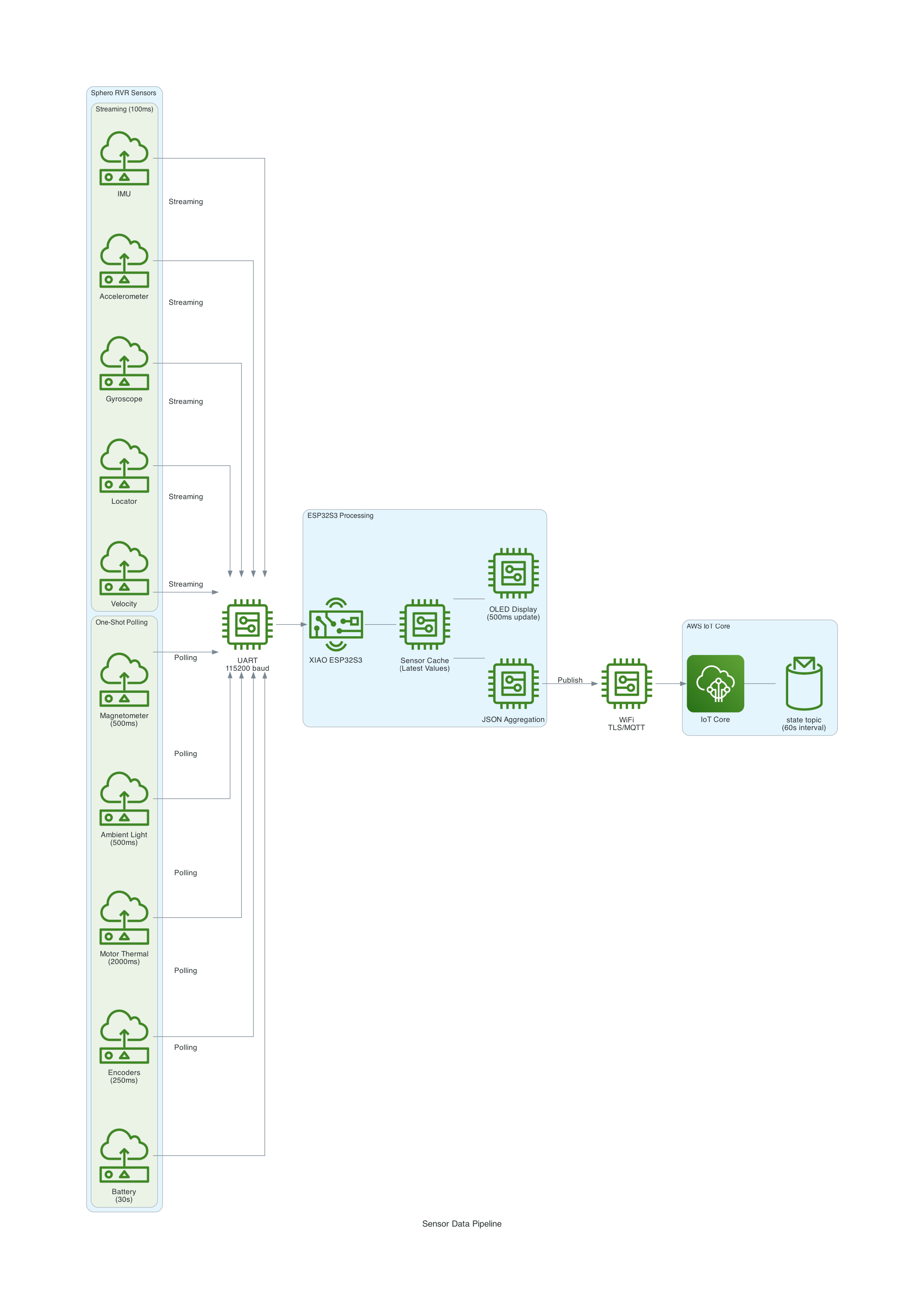
Sensor Data Pipeline

Sensor Data Pipeline

Architecture

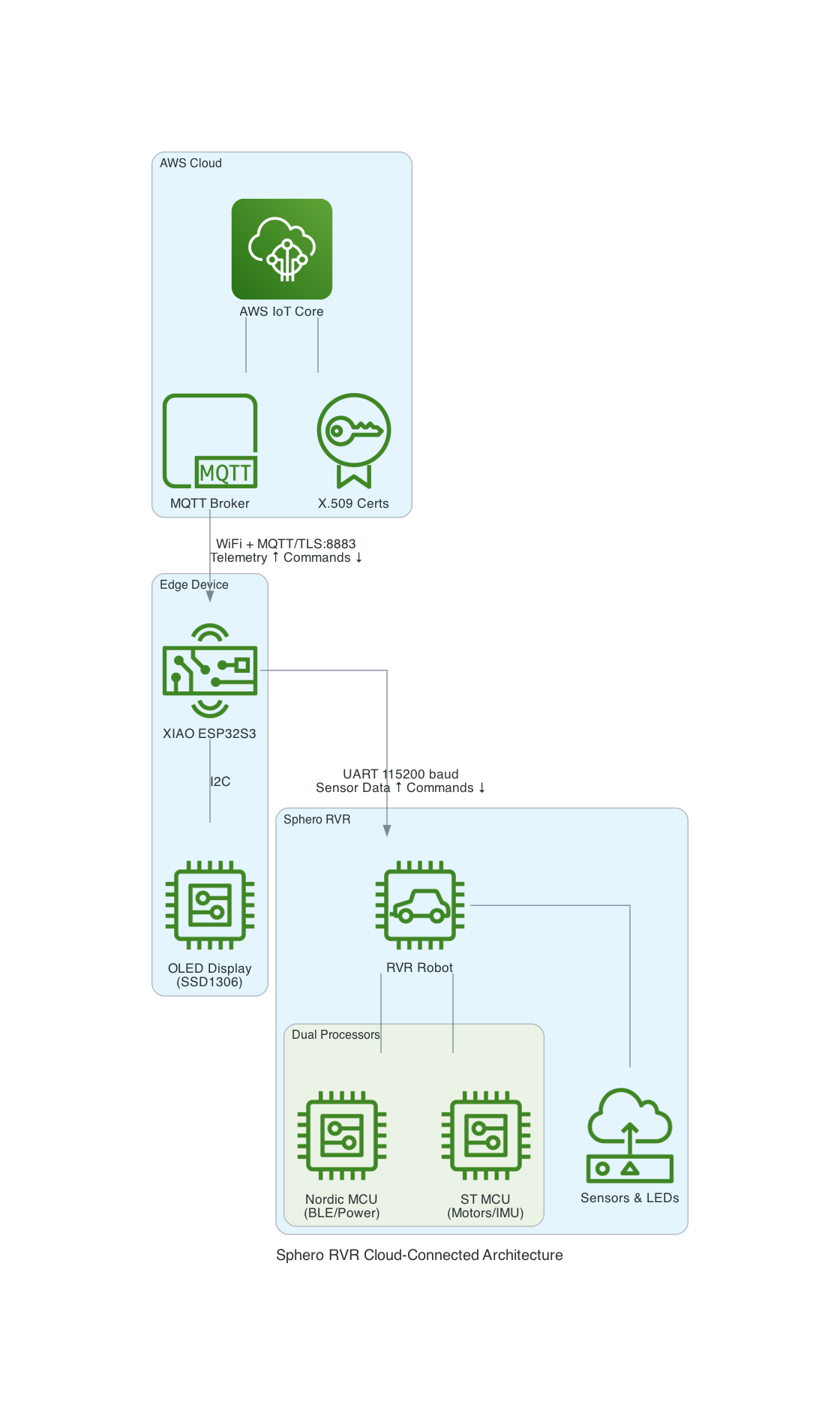
The XIAO ESP32S3 acts as a bridge between the Sphero RVR and AWS IoT Core:

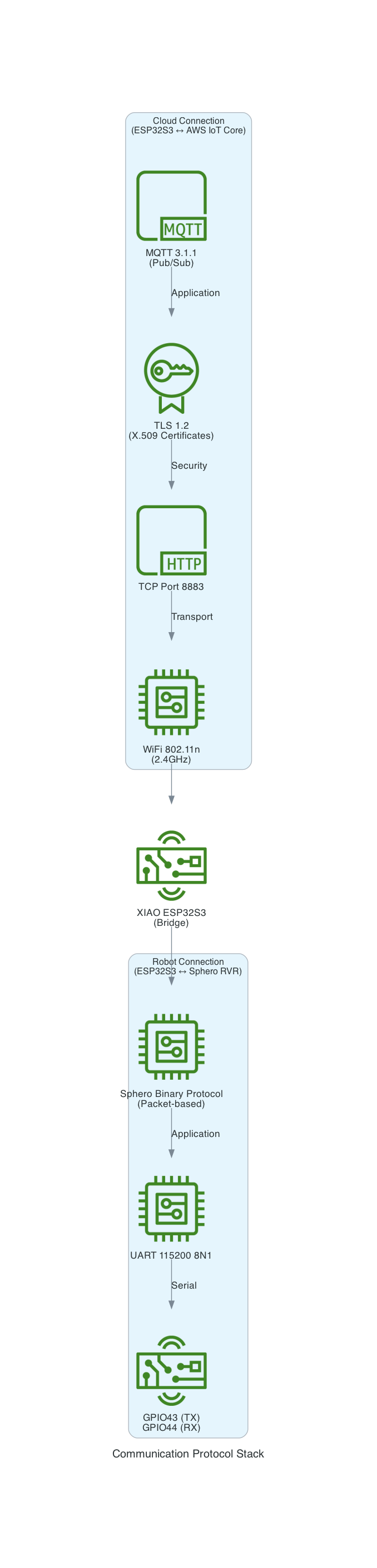
  1. UART Communication: The ESP32S3 communicates with the RVR via UART (GPIO43/44)
  2. WiFi Connection: Connects to local WiFi network
  3. MQTT over TLS: Secure connection to AWS IoT Core with X.509 certificates
  4. Bidirectional: Publishes telemetry and subscribes to command topics

High-Level System Architecture

Communication Protocol Stack

Sphero RVR Protocol

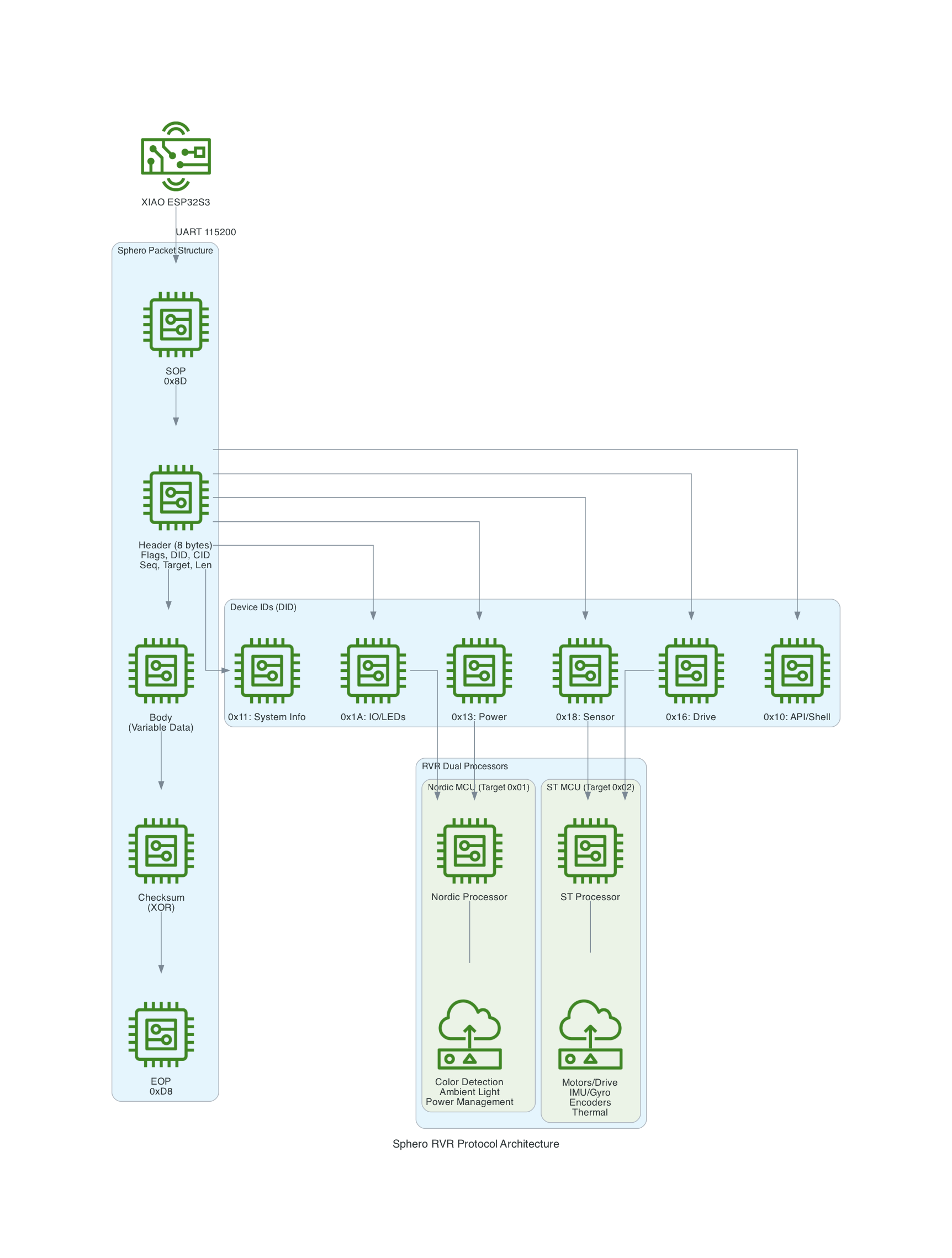
The Sphero RVR uses a binary packet-based protocol over UART. Each packet contains a start-of-packet byte (0x8D), an 8-byte header with device ID and command ID, variable-length data body, checksum, and end-of-packet byte (0xD8). The RVR has two internal processors: Nordic (handles BLE, power, color detection) and ST (handles motors, IMU, encoders).

Sphero RVR Protocol Architecture

Source Code

I ported the code into this project to control the RVR using the UART protocol based on the Sphero SDK.

You can find the source code for this project here: https://github.com/chiwaichan/platformio-aws-iot-seeed-studio-esp32s3-sphero-rvr

Controlling Hugging Face LeRobot SO101 arms over AWS IoT Core using a Seeed Studio XIAO ESP32C3

· One min read
Chiwai Chan
Tinkerer

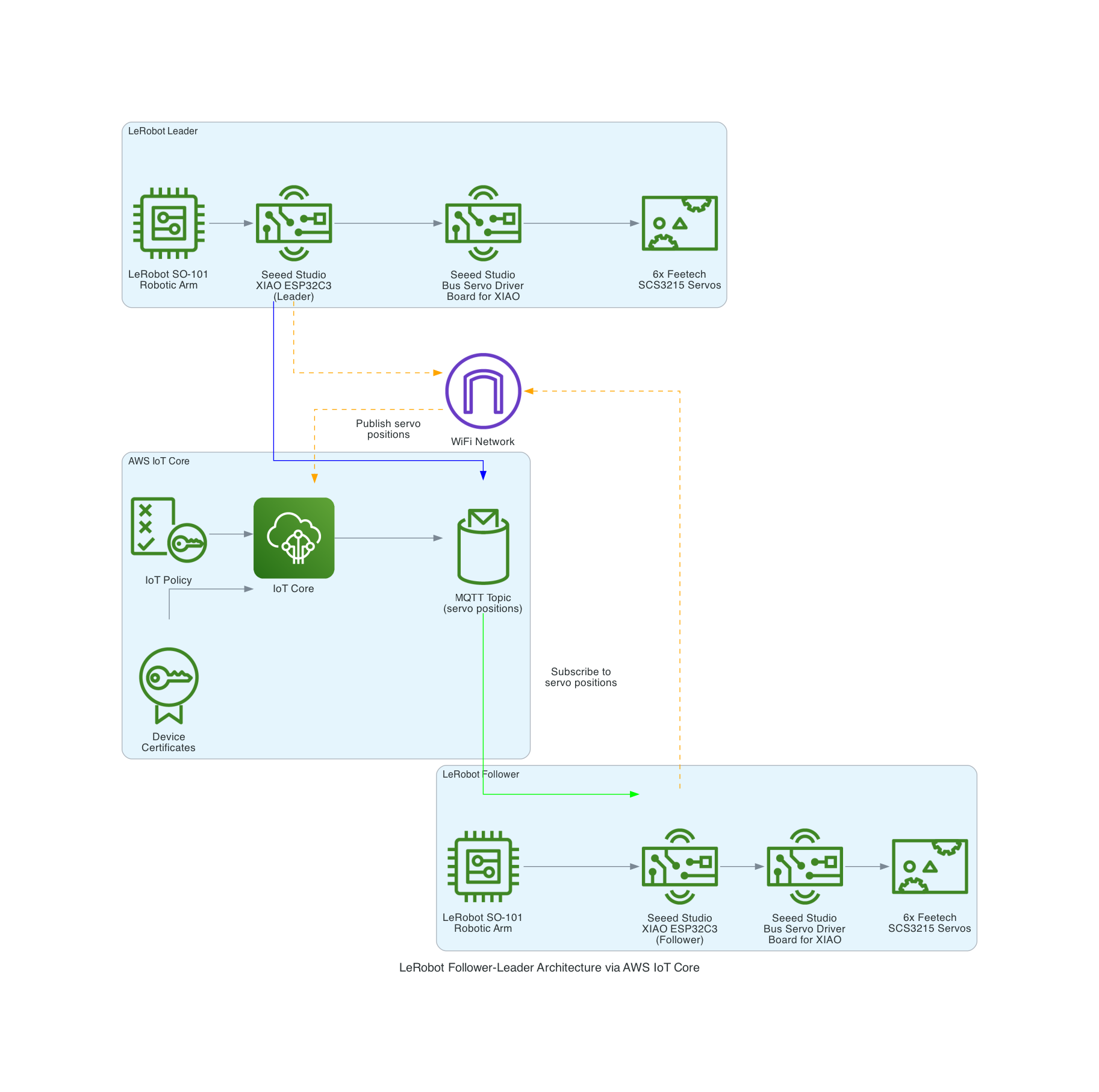
LeRobot Architecture

Seeed Studio XIAO ESP32C3 and Bus Servo Driver Board

The LeRobot Follower arm is subscribed to an IoT Topic that is being published in real-time by the LeRobot Leader arm over AWS IoT Core, using a Seeed Studio XIAO ESP32C3 integrated with a Seeed Studio Bus Servo Driver Board, the driver board is controlling the 6 Feetech 3215 Servos over the UART protocol.

In this video I demonstrate how to control a set of Hugging Face SO-101 arms over AWS IoT Core, without the use of the LeRobot framework, nor using a device such as a Mac nor a device like Nvidia Jetson Orin Nano Super Developer Kit. Only using Seeed Studio XIAO ESP32C3 and AWS IoT.

You can find the source code for this solution here: https://github.com/chiwaichan/aws-iot-core-lerobot-so101

AWS IoT Core – Iron Man – Part 1

· One min read
Chiwai Chan
Tinkerer

FeedMyFurBabies – Send and Receive MQTT messages between AWS IoT Core and your micro-controller – I am switching from Arduino CPP to MicroPython

· 8 min read
Chiwai Chan
Tinkerer

Recently I switched my Cat Feeder project's IaC to AWS CDK in favour of increasing my focus and productivity on building and iterating, rather than constantly mucking around with infrastructure everytime I resume my project after a break; which is rare and far between these days.

Just as with coding IoT microcontrollers such as the ESP32s, I want to get straight back into building every opportunity I get; so I am also switching away from Arduino based microcontroller development written in C++ - I don't have a background in C++ and to be honest this is the aspect I struggled with the most because I tend to forget things after not touching it for 6 months or so.

So I am switching to MicroPython to develop the logic for all my IoT devices going forward, this means I get to use Python - a programming lanaguge I work with frequently so there is less chance of me being forgetful when I use it at least once a month. MicroPython is a lean and efficient implementation of the Python 3 programming language that includes a subset of the Python standard library and is optimized to run on microcontrollers and in constrained environments - a good fit for IoT devices such as the ESP32!

What about all the Arduino hardware and components I already invested in?

Good news is MircoPython is supported on all ESP32 devices - based on the ones I myself have purchased; all I need to do to each ESP32 device is to flash it with a firmware - if you are impatient, you can scroll down and skip to below to the flashing the firmware section. When I first started Arduino, MicroPython was available to use, but that was 2 years ago and there were not as many good blog and tutorial content out there as there is today; I couldn't at the time work out how to control components such as sensors, servos and motors as well as I could with C++ based coding using Arduino; nowdays there are way more content to learn off and I've learnt (by PoCing individual components) enough to switch to MicroPython. As far as I understand it, any components you have for Arduino can be used in MicroPython, provided that there is a library out there that supports it, if there isn't then you can always write your own!

What's covered in this blog?

By the end of this blog, you will be able to send and receive MQTT messages from AWS IoT core using MicroPython, I will also cover the steps involved in flashing a MicroPython firmware image onto an ESP32C3. Although this blog has a focus and example on using an ESP32, this example can be applied to any micro-controllers of any brand or flavours, provided the micro-controller you are using supports MicroPython.

Flashing the MicroPython firmware onto a Seeed Studio XIAO ESP32C3
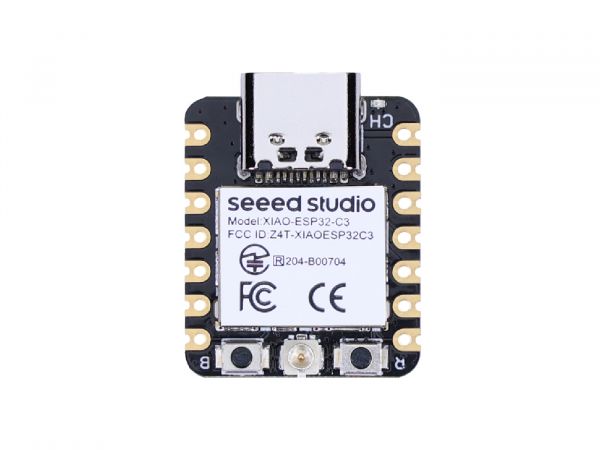
Seeed Studio XIAO ESP32C3

The following instructions works for any generic ESP32C3 devices!

Download the latest firmware from micropython.org

https://micropython.org/download/ESP32_GENERIC_C3/
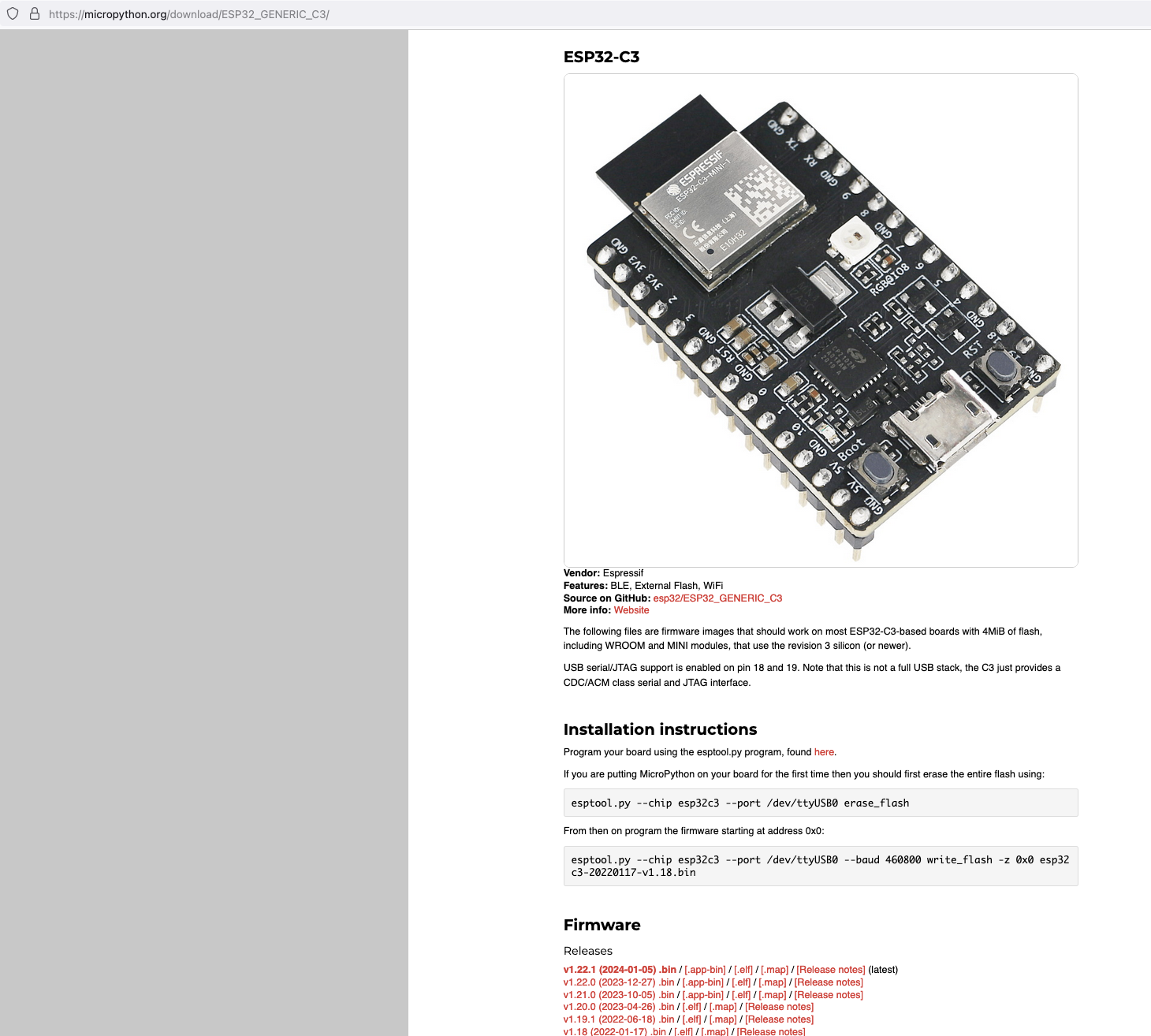
MicroPython firmware esp32c3

Next, I connected my ESP32C3 to my Mac and ran the following command to find the name of the device port

 /dev/ttyUSB0

Find port device

My ESP32C3 is named "/dev/tty.usbmodem142401", the name for your ESP32C3 may be different.

Next, install esptool onto your computer, then run the following commands to flash the MicroPython firmware onto the ESP32C3 using the bin file you've just downloaded.

esptool.py --chip esp32c3 --port /dev/tty.usbmodem142401 erase_flash

esptool.py --chip esp32c3 --port /dev/tty.usbmodem142401 --baud 460800 write_flash -z 0x0 ESP32_GENERIC_C3-20240105-v1.22.1.bin

It should look something like this when you run the commands.
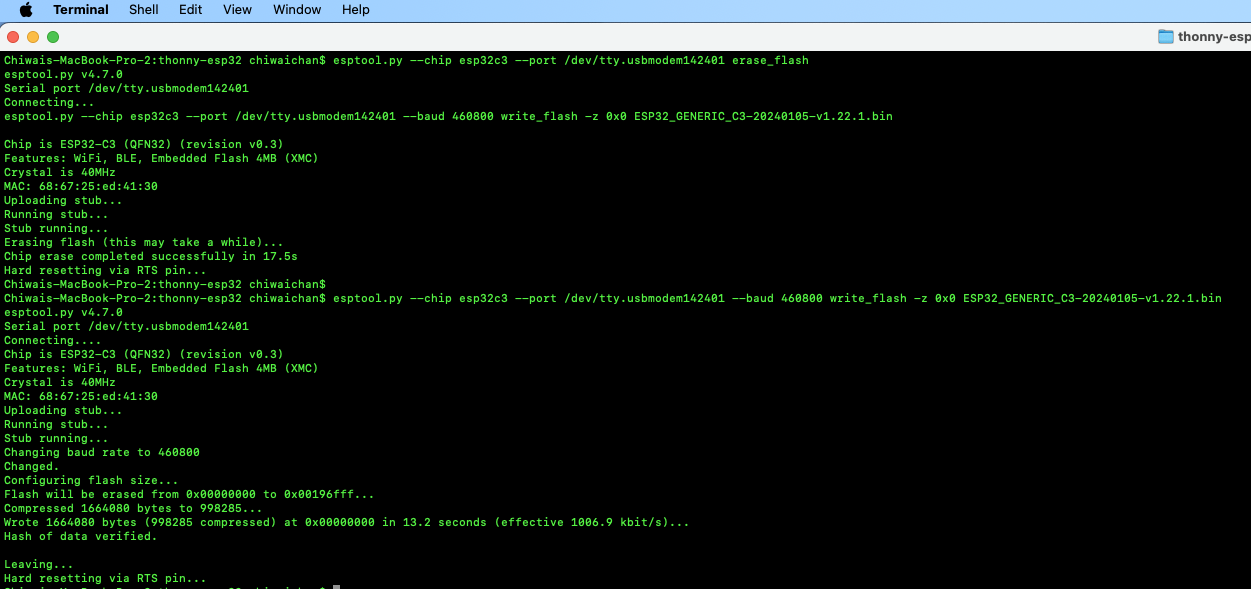
esptool Flashing Firmware

Install Thonny and run it. Then go to Tools -> Options, to configure the ESP32C3 device in Thonny to match the settings shown in the screenshot below.
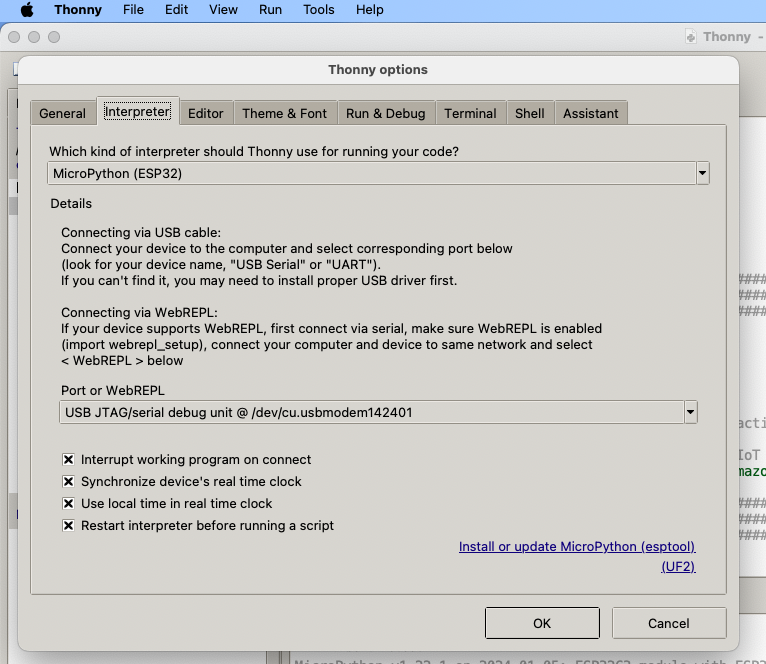
esptool Flashing Firmware

If everything went well, you should see these 2 sections in Thonny: "MicroPython Device" and "Shell", if not then try clicking on the Stop button in the top menu.
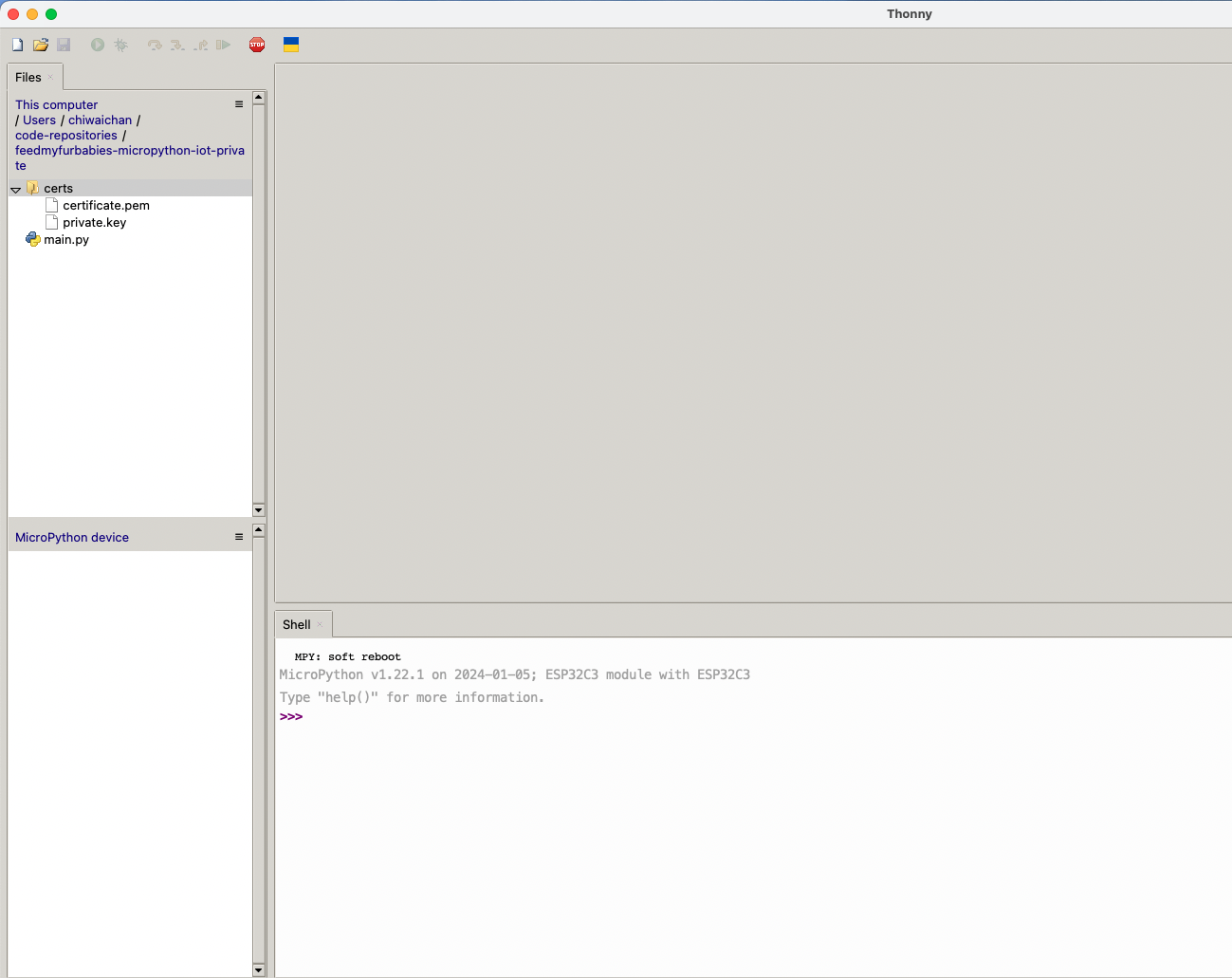
Thonny MicroPython Device

AWS IoT Core Certificates and Keys

In order to send MQTT messages to an AWS IoT Core Topic, or to receive a message from a Topic in reverse, you will need a set of Certificate and Key\s for your micro-controller; as well as the AWS IoT Endpoint specific to your AWS Account and Region.

It's great if you have those with you so you can skip to the next section, if not, do not worry I've got you covered. In a past blog I have a reference architecture accompanied by a GitHub repository on how to deploy resources for an AWS IoT Core solution using AWS CDK, follow that blog to the end and you will have a set of Certificate and Key to use for this MicroPython example; the CDK Stack will deploy all the neccessary resources and policies in AWS IoT Core to enable you to both send and receive MQTT messages to two separate IoT Topics.

Reference AWS IoT Core Architecture: https://chiwaichan.co.nz/blog/2024/02/02/feedmyfurbabies-i-am-switching-to-aws-cdk/

Upload the MicroPython Code to your device

Now lets upload the MicroPython code to your micro-controller and prepare the IoT Certificate and Key so we can use it to authenticate the micro-controller to enable it to send and receive MQTT messages between your micro-controller and IoT Core.

Clone my GitHub repository that contains the MicroPython example code to publish and receive MQTT message with AWS IoT Core: https://github.com/chiwaichan/feedmyfurbabies-micropython-iot

It should look something like this.
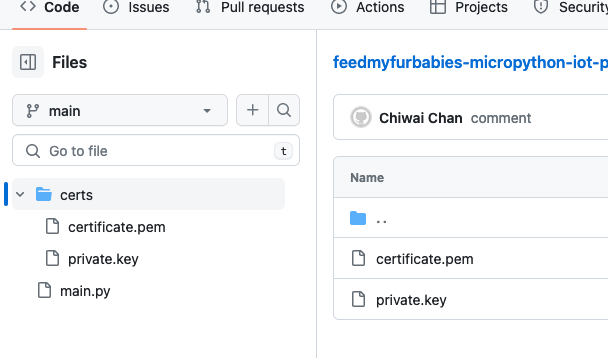
GitHub repo

Copy your Certificate and Key into the respective files shown in the above screenshot; otherwise, if you are using the Certificate and Key from my reference architecture, then you should use the 2 Systems Manager Parameter Store values create by the CDK Stack.

Systems Manager Parameter Store values

Next we convert the Certificate and Key to DER format - converting the files to DER format turns it into a binary format and makes the files more compact, especially neccessary when we run use it on small devices like the ESP32s.

In a terminal go to the certs directory and run the following commands to convert the certificate.pem and private.key files into DER format.

openssl rsa -in private.key -out key.der -outform DER
openssl x509 -in certificate.pem -out cert.der -outform DER

You should see two new files with the DER extension appear in the directory if all goes well; if not, you probably need to install openssl.

Systems Manager Parameter Store values

In Thonny, in the Files explorer, navigate to the GitHub repository's Root directory and open the main.py file. Fill in the values for the variables shown in the screenshot below to match your environment, if you are using my AWS CDK IoT referenece architecture then you are only required to fill in the WIFI details and the AWS IoT Endpoint specific to your AWS Account and Region.
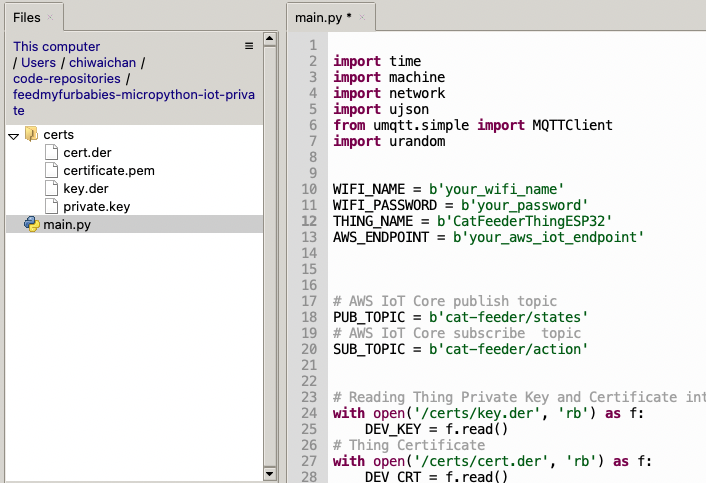
Wifi and iot Core Settings

Select both the certs folder and main.py in the Files explorer, then right click and select "Upload to /" to upload the code to your micro-controller; the files will appear in the "MicroPython Device" file explorer.
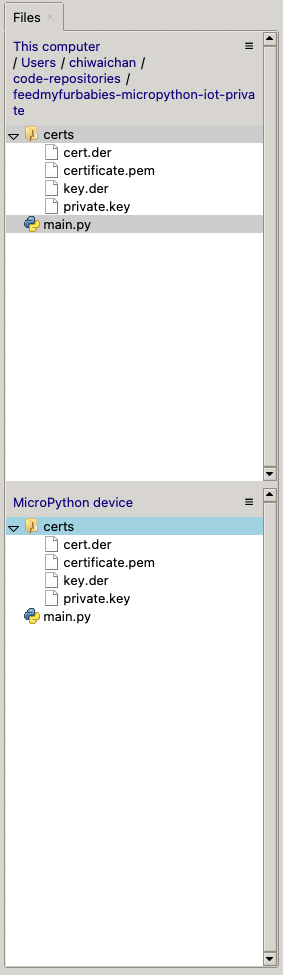
Upload files to Thonny

This is the moment we've been waiting for, lets run the main.py Python script by clicking on the Play Icon in green.
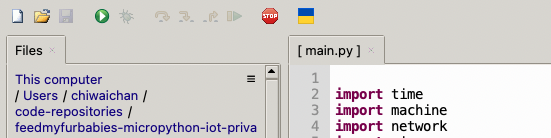
Run main

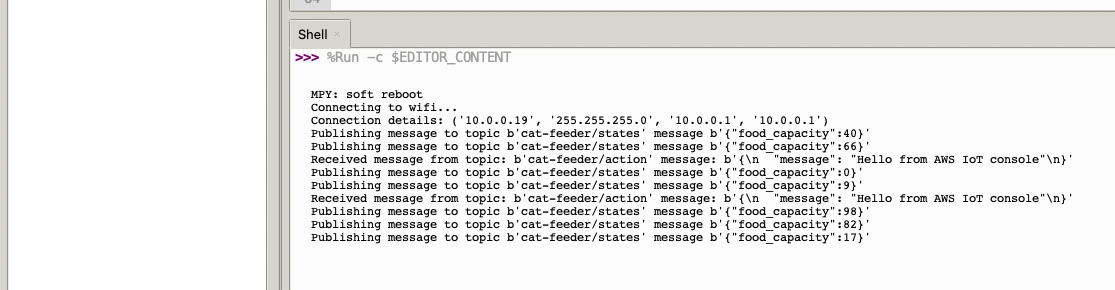
If all goes well you should see some output in the Shell section of Thonny.
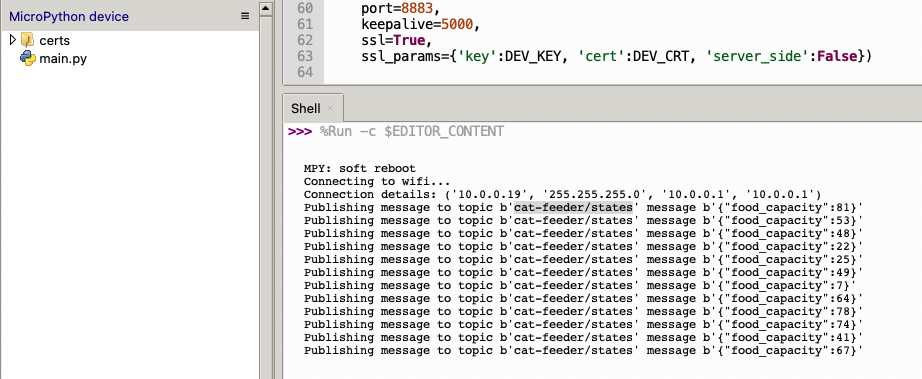
Thonny Shell

The code in the main.py file has a piece of code that is generating a random number for the food_capacity percentage property in the MQTT message; you can customise the message to fit your use case.

But lets verify it is actually received by AWS IoT Core.
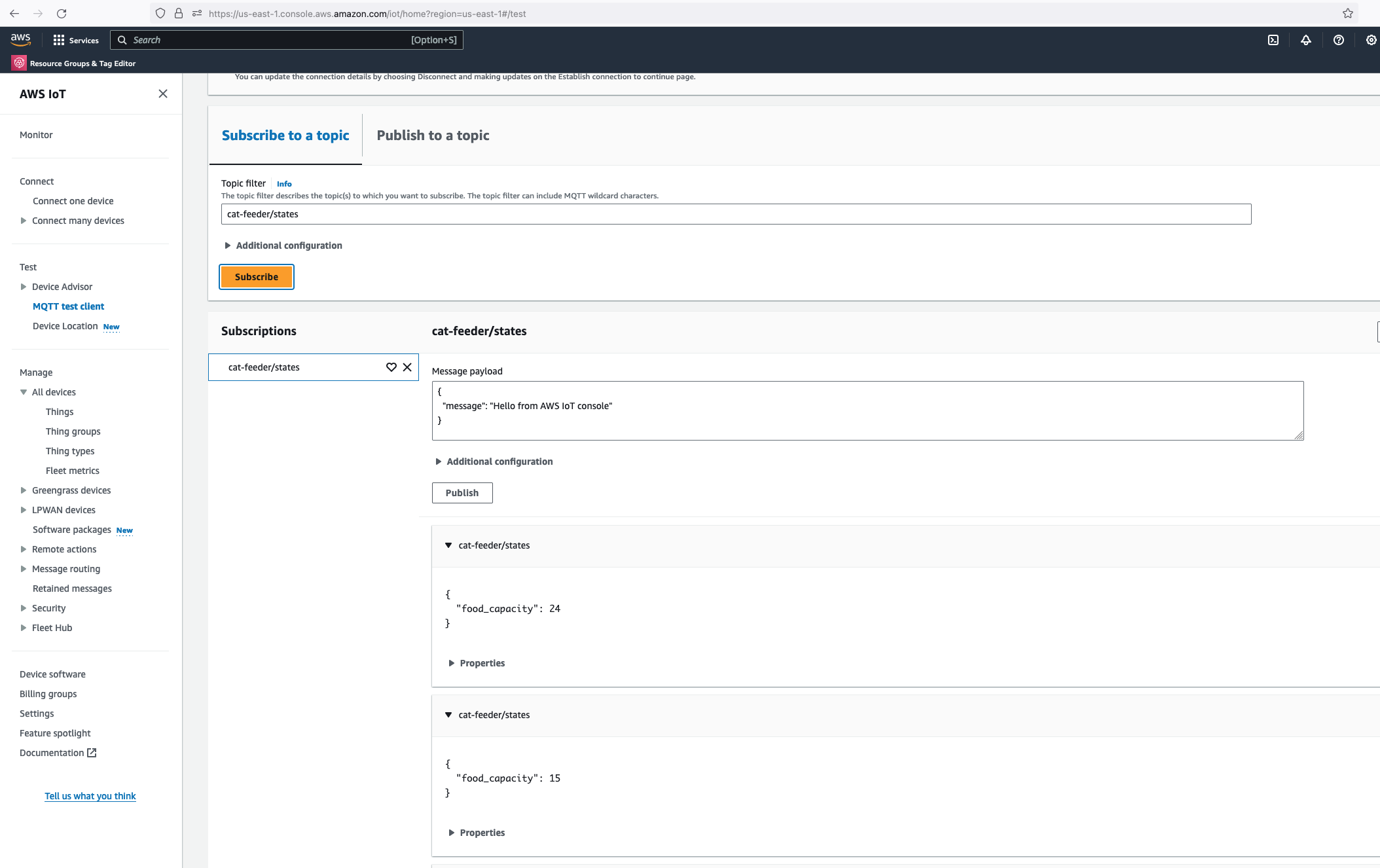
aws iot mqtt test client

Alright, lets go the other way and see if we can receive MQTT messages from AWS IoT Core using the other Topic called "cat-feeder/action" we subscribed to in the MicroPython code.

Lets go back the AWS Console and use the MQTT test client to publish a message.
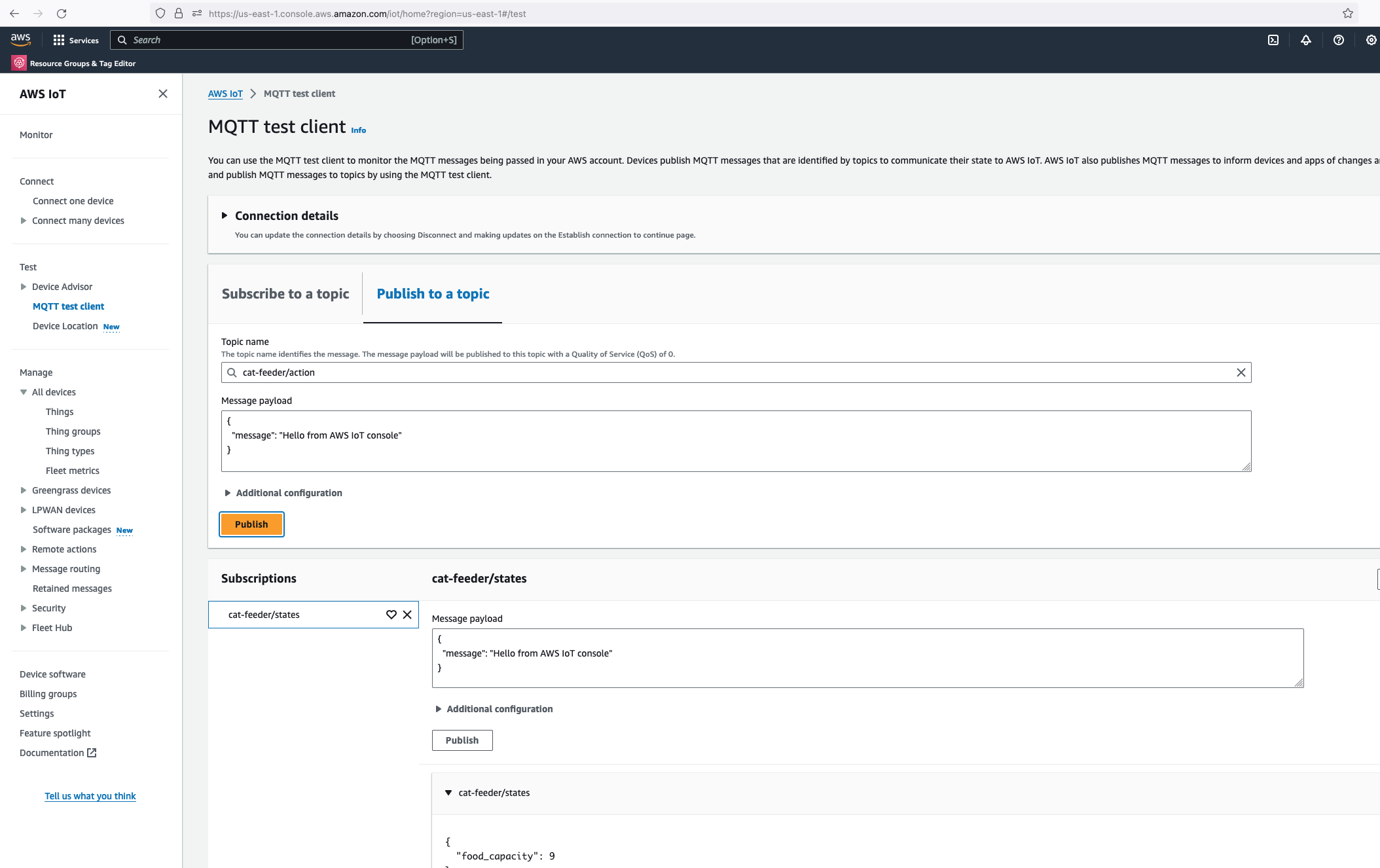
publlish mqtt from aws

thonny message received

In the Thonny Shell we can see the message "Hello from AWS IoT console" sent from the AWS IoT Core side and it being received by the micro-controller.