Real-Time Voice to Sign Language Translation - Part 2: Cloud Infrastructure with AWS CDK, IoT Core, and AppSync

This is Part 2 of a 3-part series covering a real-time voice-to-sign-language translation system. In Part 1, I covered the React frontend that captures speech, processes it with Amazon Nova 2 Sonic, and publishes cleaned sentence text via MQTT. But there is a missing piece — how does the frontend know what the physical hand is actually doing?
The answer is this repository: a small but critical AWS CDK stack that acts as the bridge between the edge device and the React frontend. It routes real-time hand state data from IoT Core to AppSync, enabling the frontend to receive live updates via GraphQL subscriptions — so the 3D hand animation stays synchronised with the physical Amazing Hand — an open-source robotic hand designed by Pollen Robotics and manufactured by Seeed Studio.
The three repositories in the series:
- Part 1 - Frontend and Voice Processing (
amplify-react-nova-sonic-voice-chat-amazing-hand) — React web app that captures speech, streams to Nova 2 Sonic, publishes cleaned sentence text via MQTT - This post (Part 2) - Cloud Infrastructure (
cdk-iot-amazing-hand-streaming) — AWS CDK stack that routes IoT Core messages through Lambda to AppSync for real-time GraphQL subscriptions - Part 3 - Edge AI Agent (
strands-agents-amazing-hands) — Strands Agent powered by Amazon Nova 2 Lite on NVIDIA Jetson that translates sentence text to ASL servo commands, drives the Amazing Hand, and publishes state back
Goals
- Route real-time hand state data from IoT Core MQTT to AppSync using an IoT Rules Engine SQL query and Lambda
- Flatten nested MQTT finger angle payloads into a flat GraphQL schema for the
createHandStatemutation - Enable the React frontend to receive live hand state updates via AppSync
onCreateHandStateGraphQL subscriptions - Extract the device name dynamically from the MQTT topic path using
topic(3)in the IoT Rule SQL - Define all infrastructure as code using AWS CDK in TypeScript
- Integrate with the existing Amplify Gen 2 managed AppSync API and DynamoDB table from Part 1
The Overall System
This diagram shows the complete end-to-end system. Part 2 is the infrastructure highlighted in the middle — the IoT Rule, Lambda, and AppSync connection that enables real-time state feedback from the edge device back to the frontend.
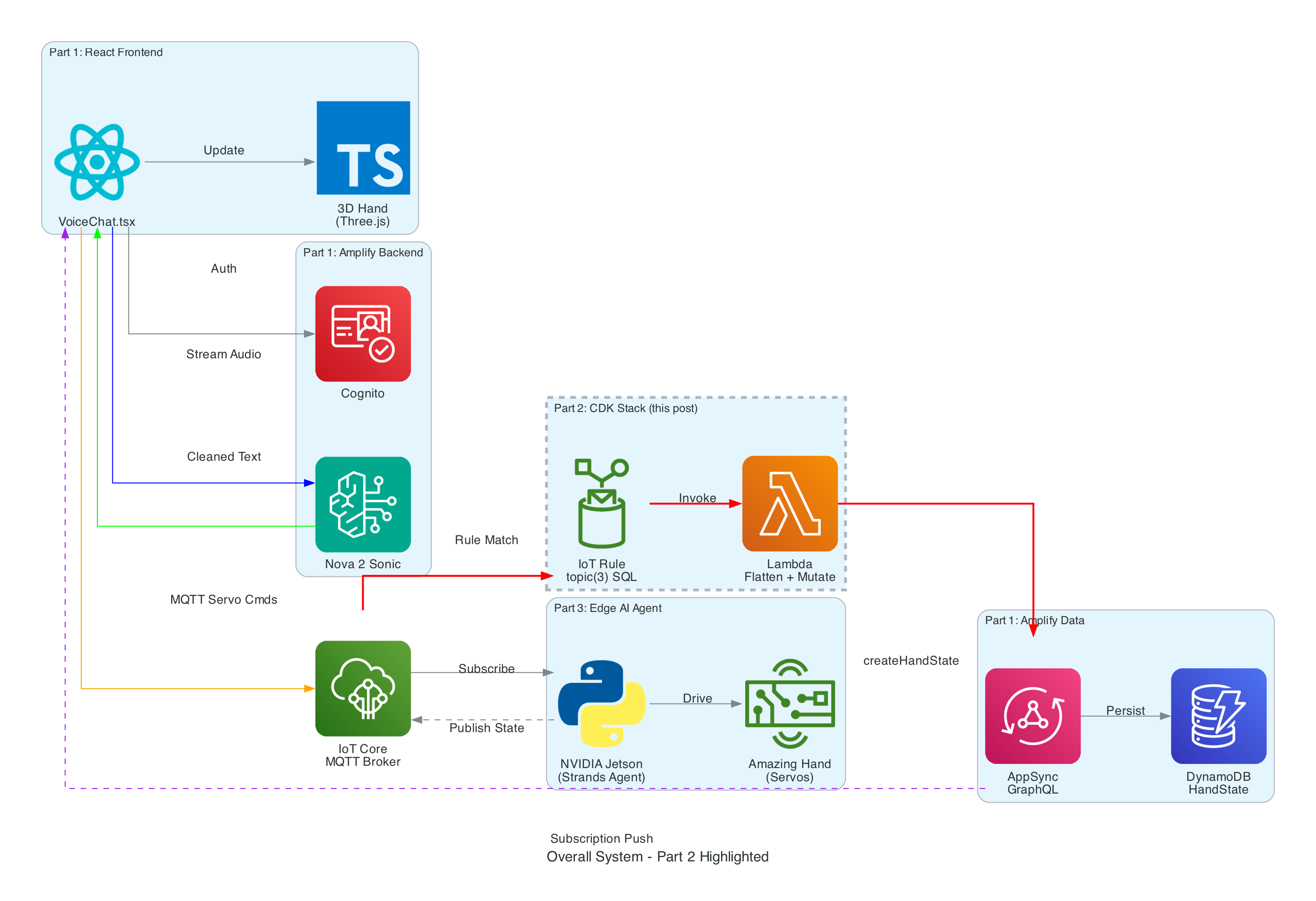
How Part 2 fits in:
- Part 1 (Frontend) publishes cleaned sentence text to
the-project/robotic-hand/{deviceName}/actionand subscribes to AppSynconCreateHandStatefor live updates - Part 3 (Edge Device) receives sentence text, translates it to ASL servo commands via the Strands Agent powered by Amazon Nova 2 Lite, drives the Amazing Hand, and publishes state back to
the-project/robotic-hand/{deviceName}/state - Part 2 (This stack) listens on the
/statetopic, transforms the payload, and pushes it into AppSync — completing the real-time feedback loop
Architecture
The stack is intentionally small — a single IoT Rule, a single Lambda function, and the IAM glue to connect them. The AppSync API and DynamoDB table are managed by the Amplify Gen 2 backend in Part 1, so this stack only needs to call the existing createHandState mutation.
Infrastructure Overview
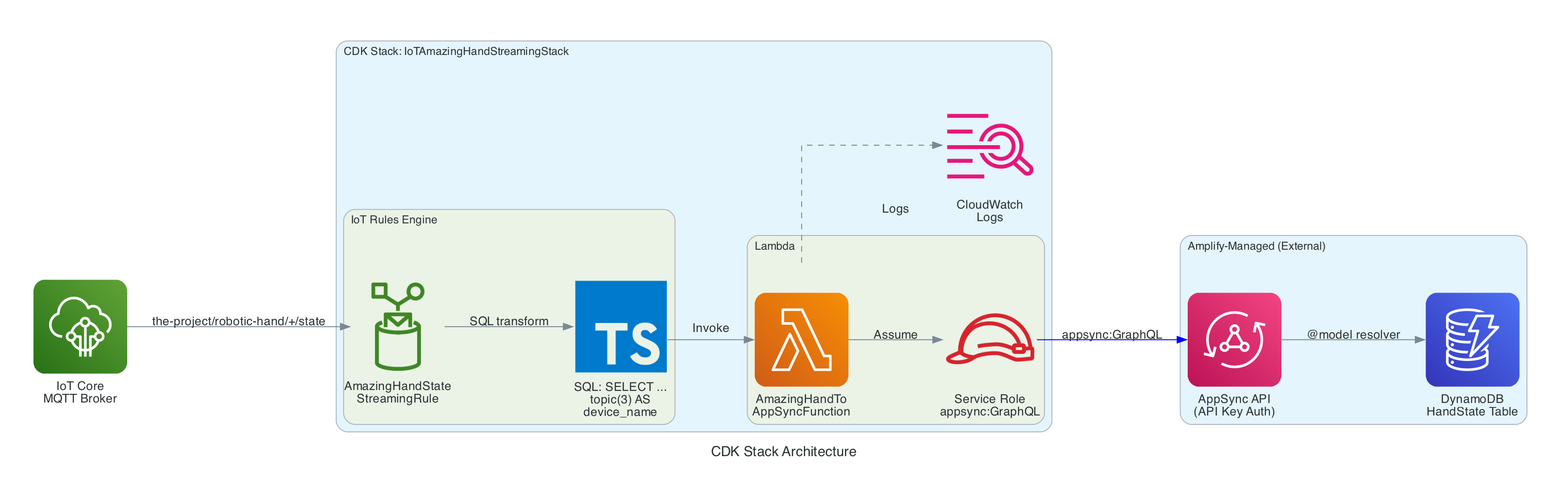
Resources created by this CDK stack:
- IoT Topic Rule (
AmazingHandStateStreamingRule) — Matches MQTT messages onthe-project/robotic-hand/+/stateusing SQLSELECT gesture, letter, ts, fingers, video_url, topic(3) AS device_name, then invokes the Lambda function - Lambda Function (
AmazingHandToAppSyncFunction) — Node.js 18 function that receives the IoT event, flattens the nestedfingersobject into individual angle fields, and calls the AppSynccreateHandStateGraphQL mutation using the Amplify v6 SDK with API Key authentication - Lambda IAM Role — Service role with
AWSLambdaBasicExecutionRolefor CloudWatch Logs and an inline policy grantingappsync:GraphQLon the AppSync API - Lambda Permission — Allows the IoT service (
iot.amazonaws.com) to invoke the Lambda function
Resources managed externally (by Amplify Gen 2 in Part 1):
- AppSync API — GraphQL API with
HandStatemodel,createHandStatemutation, andonCreateHandStatesubscription - DynamoDB Table —
HandStatetable with auto-generated resolvers from the@modeldirective
Data Flow
Interactive Sequence Diagram
IoT Core to AppSync Data Flow
From edge device MQTT publish to React real-time subscription update
How it works
IoT Rules Engine SQL Query
The IoT Rule is the entry point. It listens on the MQTT topic pattern the-project/robotic-hand/+/state where + is a single-level wildcard matching any device name (e.g. XIAOAmazingHandRight).
The SQL query (using AWS IoT SQL version 2016-03-23) selects specific fields from the MQTT payload and enriches them with metadata extracted from the topic path:
SELECT gesture, letter, ts, fingers, video_url, topic(3) AS device_name
FROM 'the-project/robotic-hand/+/state'
gesture— The type of sign being performed (e.g. "fingerspell")letter— The current letter being signed (e.g. "E")ts— Unix timestamp in secondsfingers— Nested JSON object containing servo angles for all four fingers, each with two joint anglesvideo_url— Optional pre-signed S3 URL for video of the hand in actiontopic(3) AS device_name— Extracts the 3rd segment of the MQTT topic path as the device name, so the Lambda does not need to parse the topic itself
MQTT Payload Format
The edge device publishes hand state messages in this format:
{
  "gesture": "fingerspell",
  "letter": "E",
  "ts": 1770550850,
  "fingers": {
    "index": { "angle_1": 45, "angle_2": -45 },
    "middle": { "angle_1": 45, "angle_2": -45 },
    "ring": { "angle_1": 45, "angle_2": -45 },
    "thumb": { "angle_1": 60, "angle_2": -60 }
  },
  "video_url": "https://cc-amazing-video.s3.amazonaws.com/videos/hand_20260228.mp4?..."
}
The fingers object uses a nested structure with angle_1 and angle_2 per finger — representing the two joints of each finger on the Amazing Hand. This nested format is natural for the edge device to produce but needs to be flattened for the GraphQL schema.
Lambda Function — Payload Transformation
The Lambda function (AmazingHandToAppSyncFunction) receives the IoT event with the enriched fields from the SQL query. Its job is to:
- Validate that the
device_namefield exists (required for the GraphQL mutation) - Flatten the nested
fingersobject into individual angle fields:
| MQTT Payload | GraphQL Field |
|---|---|
fingers.index.angle_1 | indexAngle1 |
fingers.index.angle_2 | indexAngle2 |
fingers.middle.angle_1 | middleAngle1 |
fingers.middle.angle_2 | middleAngle2 |
fingers.ring.angle_1 | ringAngle1 |
fingers.ring.angle_2 | ringAngle2 |
fingers.thumb.angle_1 | thumbAngle1 |
fingers.thumb.angle_2 | thumbAngle2 |
- Default missing angle values to
0, missing gesture/letter/videoUrl tonull, and missing timestamp toMath.floor(Date.now() / 1000) - Call AppSync
createHandStatemutation using the Amplify v6 SDK configured with API Key authentication
The Lambda uses the Amplify v6 SDK (aws-amplify@^6.0.0) to call AppSync, configured via environment variables:
Amplify.configure({
  API: {
    GraphQL: {
      endpoint: process.env.APPSYNC_API_URL,
      region: process.env.AWS_REGION,
      defaultAuthMode: 'apiKey',
      apiKey: process.env.APPSYNC_API_KEY
    }
  }
});
GraphQL Mutation
The Lambda calls this mutation to persist the hand state and trigger the real-time subscription:
mutation CreateHandState($input: CreateHandStateInput!) {
  createHandState(input: $input) {
    id
    deviceName
    gesture
    letter
    indexAngle1
    indexAngle2
    middleAngle1
    middleAngle2
    ringAngle1
    ringAngle2
    thumbAngle1
    thumbAngle2
    timestamp
    videoUrl
    createdAt
  }
}
When AppSync receives this mutation, two things happen:
- The hand state record is persisted to DynamoDB via the auto-generated
@modelresolver - The
onCreateHandStatesubscription is triggered, pushing the new record to all subscribed clients — including the React frontend from Part 1, which uses this data to update the 3D hand animation, signed letter history, and video feed in real-time
CDK Stack Definition
The entire stack is defined in approximately 74 lines of TypeScript. The stack accepts the AppSync API URL, API key, and API ID as props, which are injected via environment variables during deployment:
interface IoTStreamingStackProps extends cdk.StackProps {
  appSyncApiUrl: string;
  appSyncApiKey: string;
  appSyncApiId: string;
}
The stack creates the Lambda function with the AppSync connection details as environment variables, grants it appsync:GraphQL permissions scoped to the specific API, creates the IoT Topic Rule with the SQL query, and grants IoT permission to invoke the Lambda.
Two stack outputs are exported for reference:
AmazingHandIoTRuleArn— The IoT Rule ARNAmazingHandLambdaFunctionArn— The Lambda function ARN
CI/CD Pipeline
The project includes a GitHub Actions workflow (.github/workflows/aws-cdk-deploy.yml) that automates deployment:
- Triggers on pushes to
mainanddevbranches - Authenticates using OIDC (no static AWS credentials stored in GitHub)
- Automatically discovers the AppSync configuration by:
- Reading the Amplify App ID from SSM Parameter Store (
/iot/amplify/amazinghand) - Finding the Amplify data CloudFormation stack
- Extracting the AppSync API ID from CloudFormation stack resources, then querying the AppSync API directly for the URL and API key
- Reading the Amplify App ID from SSM Parameter Store (
- Runs
cdk deploywith the discovered values
This means the stack automatically stays connected to the correct AppSync API without manual configuration.
Technical Challenges & Solutions
Challenge 1: Flattening Nested IoT Payloads for GraphQL
Problem: The edge device publishes finger angles in a nested JSON structure (fingers.index.angle_1), but the AppSync GraphQL schema uses flat fields (indexAngle1). The IoT Rules Engine SQL can select nested objects but cannot rename nested fields into flat ones.
Solution: The Lambda function handles the transformation. It receives the nested fingers object from the IoT Rule and manually flattens each field with safe defaults (0 for missing angles, null for optional fields). This keeps the IoT Rule SQL simple and the edge device payload natural.
Challenge 2: Connecting to Amplify-Managed AppSync
Problem: The AppSync API is managed by Amplify Gen 2 in Part 1's repository, not by this CDK stack. The API URL, API key, and API ID change between environments and deployments.
Solution: The CI/CD pipeline automatically discovers the AppSync configuration at deploy time by reading from SSM Parameter Store and CloudFormation stack outputs. For local development, the values are passed via environment variables in deploy.sh. The CDK stack accepts them as typed props, keeping the infrastructure code clean.
Challenge 3: Extracting Device Name from MQTT Topic
Problem: The device name is part of the MQTT topic path (the-project/robotic-hand/XIAOAmazingHandRight/state), not the message payload. The Lambda needs it to set the deviceName field in the GraphQL mutation.
Solution: The IoT Rules Engine SQL function topic(3) extracts the 3rd segment of the topic path and aliases it as device_name. This is passed to the Lambda as part of the event, so the Lambda does not need to parse the topic itself. The wildcard + in the topic filter means this works for any device name without configuration changes.
Getting Started
GitHub Repository: https://github.com/chiwaichan/cdk-iot-amazing-hand-streaming
Prerequisites
- Node.js 18+
- AWS CDK CLI installed (
npm install -g aws-cdk) - AWS CLI configured with credentials
- An existing AppSync API with the
HandStateschema (deployed via Part 1's Amplify Gen 2 backend)
Deployment Steps
- Get AppSync configuration from Part 1's Amplify deployment:
export APPSYNC_API_ID=your_api_id
export APPSYNC_API_URL=https://your-api-id.appsync-api.us-east-1.amazonaws.com/graphql
export APPSYNC_API_KEY=your_api_key
- Clone and Install:
git clone https://github.com/chiwaichan/cdk-iot-amazing-hand-streaming.git
cd cdk-iot-amazing-hand-streaming
npm install
cd lambda/amazing-hand-to-appsync && npm install && cd ../..
- Deploy:
./deploy.sh
This bootstraps CDK (if needed) and deploys the stack with the AppSync configuration.
What's Next
In Part 3, I will cover the edge AI agent (strands-agents-amazing-hands) — a Strands Agent powered by Amazon Nova 2 Lite running on an NVIDIA Jetson that subscribes to the MQTT sentence text published by the frontend in Part 1, translates them into physical servo movements on the Pollen Robotics Amazing Hand for ASL fingerspelling, records video, and publishes hand state back to IoT Core — which this Part 2 stack routes through to AppSync for the frontend to consume.
Summary
This post covered the cloud infrastructure layer of the voice-to-sign-language translation system:
- IoT Rules Engine listens on
the-project/robotic-hand/+/stateand extracts device name from the topic path usingtopic(3) - Lambda function flattens nested finger angle payloads (
fingers.index.angle_1→indexAngle1) and calls the AppSynccreateHandStateGraphQL mutation - AppSync persists to DynamoDB and broadcasts
onCreateHandStatesubscriptions to connected React clients in real-time - CDK stack is intentionally small (~74 lines) — it creates only the IoT Rule, Lambda, and IAM glue, relying on the Amplify-managed AppSync API from Part 1
- CI/CD pipeline automatically discovers AppSync configuration from SSM Parameter Store, CloudFormation stack resources, and direct AppSync API calls — no manual configuration needed
- The stack completes the real-time feedback loop: edge device publishes state → IoT Core → Lambda → AppSync → React frontend updates 3D hand animation