Reachy Mini x Strands Agent on Jetson Thor - Part 12: Robot-State Telemetry to AWS IoT Core

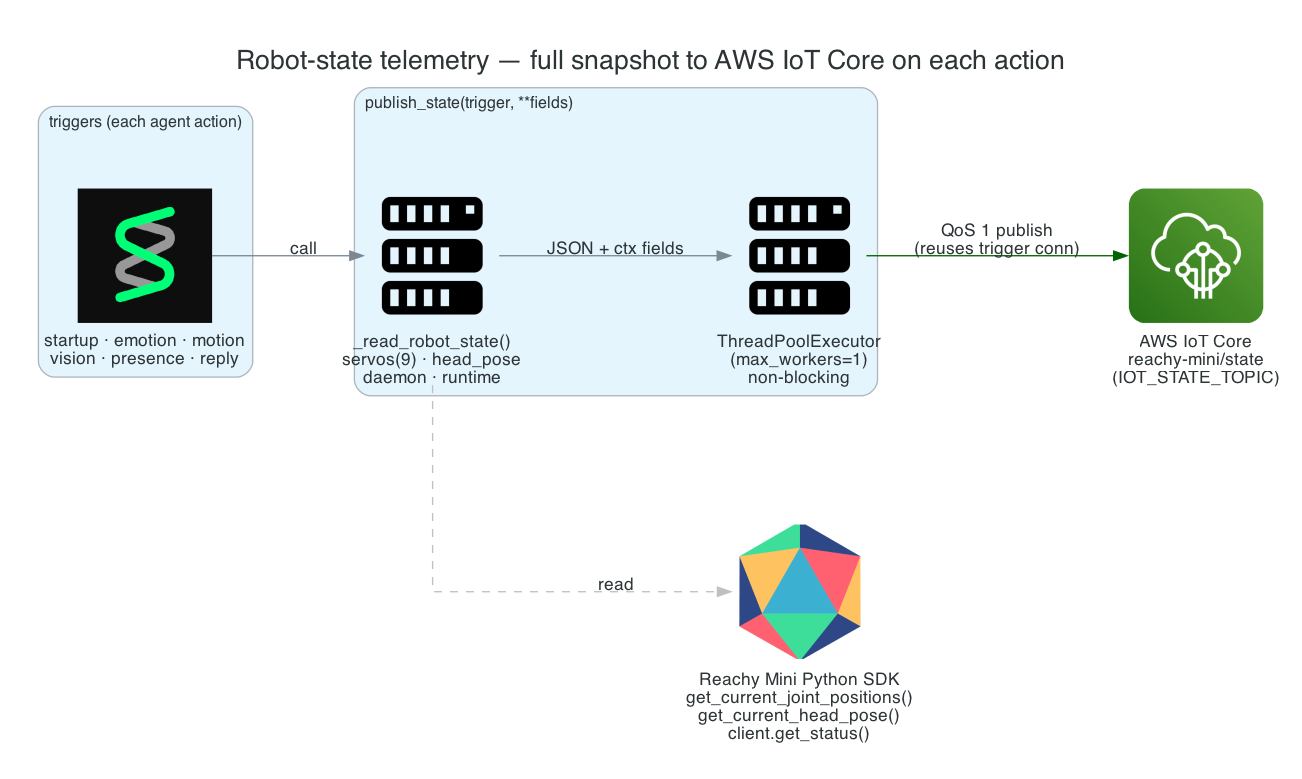
This is Part 12 of the series. The robot now does a lot — moves, looks, emotes, answers, notices presence. I want an external system (a dashboard, a data lake, another robot) to be able to follow exactly what Reachy is doing in near-real-time. So every agent action uploads a full snapshot of the robot's state — servos, head pose, daemon status, runtime flags — to AWS IoT Core.
Two design constraints shape this. First, no second connection and no certificates: telemetry reuses the very same MQTT connection the trigger listener already holds. Second, telemetry must never slow the robot: publishing happens off the calling thread on a single-worker pool, and any failure is swallowed rather than allowed to kill the task that triggered it.
It's also strictly opt-in. With no MQTT configured, publish_state() is a no-op, so a voice-only run is completely unaffected.
Goals
- Upload a full robot-state snapshot on every agent action, tagged with what caused it
- Reuse the trigger's MQTT connection — no second client, no device certs
- Publish non-blocking so telemetry never stalls a task or the MQTT keep-alive
- Make every section of the snapshot fault-tolerant — one unreadable value never drops the message
- Be a no-op when MQTT is off, so voice-only runs are unchanged
The Overall System
When the trigger listener finishes subscribing, it hands its live connection to the telemetry side. From then on, every tool calls publish_state(trigger, **fields), which snapshots the robot, submits the JSON to a single-worker pool, and publishes on that shared connection at QoS 1.
System Components:
publish_state(trigger, **fields)— the entry point every action calls_read_robot_state()— reads every SDK value into a fault-tolerant snapshotset_iot_connection— stores the trigger's live connection + the state topic_publish_pool— a single-workerThreadPoolExecutorthat serialises uploads off-thread- AWS IoT Core — receives the snapshot on
reachy-mini/state(QoS 1)
Interactive Sequence Diagram
Step through one action firing telemetry — snapshot, off-thread submit, publish on the shared connection, and the resilient await that never kills the task.
One Action, One State Snapshot — Non-Blocking
Every tool fires publish_state; the snapshot ships off-thread on the trigger's own connection
Architecture
| Trigger tag | Fired by |
|---|---|
startup | announced once the agent is online |
emotion | playing a named emotion |
motion | nod, shake head, look around, wiggle antennas, spin body, move head |
vision | answering a camera question |
presence | detecting a human or cat |
reply | a spoken agent reply |
Each call publishes a full snapshot, so a subscriber to reachy-mini/state sees the robot's complete state at the moment of every action, tagged with the cause.
How it works
What a snapshot contains
_read_robot_state() reads every hardware and runtime value the SDK exposes, with each section in its own try so one unavailable reading never drops the message:
| Section | Source | Contents |
|---|---|---|
servos | get_current_joint_positions() | 9 joint angles (rad): body_rotation, stewart_1–stewart_6, right_antenna, left_antenna |
head_pose | get_current_head_pose() | position (x/y/z) and rpy (roll/pitch/yaw, derived from the pose matrix via scipy) |
daemon | mini.client.get_status() | robot_name, version, hardware_id, wlan_ip, backend_ready, error, and other flags |
runtime | process state | is_recording, connection_mode, busy, llm_backend |
The IMU is omitted: it's wireless-only and always None on the Lite. publish_state(trigger, **fields) wraps that snapshot with device (the IOT_CLIENT_ID), a ts epoch timestamp, the trigger tag, and any per-action **fields (e.g. emotion_name, presence_count, vision_question), then serialises it as compact JSON.
Reusing the trigger's MQTT connection
There's no second MQTT client and no certificates for telemetry. The same connection the listener opens to receive triggers is reused to upload state. When the listener finishes subscribing, it calls:
set_iot_connection(conn, IOT_STATE_TOPIC or "reachy-mini/state")
That stores the live connection and the IOT_STATE_TOPIC (default reachy-mini/state) in module globals. publish_state() is a no-op while those are unset, so voice-only runs are unaffected and every publish_state(...) call is safe from any tool. _do_publish() sends on that stored connection at QoS 1, mirroring the subscribe side.
Non-blocking publishing
Telemetry must never stall a robot action or the MQTT keep-alive, so publish_state() doesn't send inline. It submits the serialised payload to a single-worker ThreadPoolExecutor:
_publish_pool = ThreadPoolExecutor(max_workers=1, thread_name_prefix="iot-state")
...
_publish_pool.submit(_do_publish, json.dumps(state, separators=(",", ":")))
The single worker serialises uploads so snapshots ship in order, off the calling thread. _do_publish() waits up to 5 seconds for the publish future and swallows any exception — a failed upload logs and is dropped rather than killing the task that triggered it.
Technical Challenges & Solutions
Challenge 1: Telemetry without a second connection or certs
Problem: Standing up a separate MQTT client (with its own certificates and lifecycle) just to publish state would double the connection management on the edge box.
Solution: Reuse the trigger listener's live connection. set_iot_connection hands it to the telemetry side after subscribe, and _do_publish publishes on it at QoS 1 — one connection for both receive and send, no extra certs.
Challenge 2: Telemetry slowing the robot
Problem: A network publish inline with a tool call would block the robot's action — and inside the MQTT event loop would risk the keep-alive.
Solution: publish_state submits to a single-worker ThreadPoolExecutor and returns immediately. Uploads run off-thread and in order; _do_publish bounds the wait at 5 s and swallows errors, so a slow or failed publish never touches the task path.
Challenge 3: One bad reading dropping the whole message
Problem: The SDK exposes many values; if any single read raised, a naive snapshot would lose the entire message.
Solution: _read_robot_state guards each section in its own try, so an unavailable reading degrades to a missing field rather than a dropped snapshot. The IMU, always absent on the Lite, is simply omitted.
Challenge 4: Not disturbing a voice-only run
Problem: Telemetry should add nothing when the cloud paths are off.
Solution: publish_state is a no-op until set_iot_connection has been called — which only happens when the MQTT listener is configured. Voice-only runs make the same publish_state(...) calls everywhere, and they cost nothing.
Getting Started
GitHub Repository: https://github.com/chiwaichan/chiwaichan-reachy-mini-strands-agent-jetson-thor
Enable it and watch the stream
export IOT_ENDPOINT=xxxx-ats.iot.us-east-1.amazonaws.com
export IOT_TOPIC=reachy-mini
export IOT_STATE_TOPIC=reachy-mini/state   # optional; this is the default
./reachy_assistant.sh
Subscribe to reachy-mini/state (for example with the AWS IoT Core MQTT test client) and watch a full snapshot arrive on every action — each tagged with the trigger that caused it.
What's Next
In Part 13 - Interaction Clips to S3, each interaction is recorded to a short MP4, uploaded to S3, and a presigned URL is attached to the reply — so whoever receives the MQTT event can watch exactly what the robot saw.
Summary
This post covered robot-state telemetry:
- Full snapshot per action — servos, head pose, daemon, and runtime, tagged by trigger (
motion,vision,emotion,presence,reply,startup) - Reuses the trigger's connection —
set_iot_connectionshares the listener's MQTT client; no second client, no device certs - Non-blocking — a single-worker
ThreadPoolExecutorships snapshots off-thread, in order, with a bounded wait and swallowed errors - Fault-tolerant —
_read_robot_stateguards each section, so one bad reading never drops the message (and the Lite's absent IMU is omitted) - Opt-in —
publish_stateis a no-op until the MQTT listener is configured, so voice-only runs are unaffected