These are the slides from my talk at the AWS User Group Wellington meet-up on 26 May 2026, walking through how I built a real-time pipeline that listens to spoken commands in the browser and drives a Sphero RVR — exact distances, exact angles — with live telemetry streaming back into the UI.
Tip: click into the slides and use the arrow keys to navigate, or hit the fullscreen button for the best experience.
arduino-aws-iot — ESP32-S3 firmware. The talk focuses on the sphero_rvr device group, including the new maneuver executor (forward, reverse, turn, cancel) layered on top of the existing drive D-pad.
cdk-iot-sphero-rvr-streaming — AWS CDK stack that filters the RVR telemetry MQTT topic, flattens the nested payload in Lambda, and forwards it as a GraphQL mutation to an Amplify-managed AppSync API.
amplify-react-nova-sonic-voice-chat-sphero-rvr — React + AWS Amplify Gen 2 frontend. The same Cognito identity is used for Bedrock streaming, IoT publish, and the AppSync subscription that surfaces live telemetry.
Big thanks to the AWS User Group Wellington organisers and everyone who came along — happy to chat about any of the code, the maneuver framework, or where the project goes next.
This is Part 1 of a 3-part series covering a real-time voice-to-sign-language translation system. The complete solution spans three separate repositories, each responsible for a distinct layer of the system:
This post (Part 1) - Frontend and Voice Processing — The React web app that captures speech, streams it to Amazon Nova 2 Sonic on Bedrock, publishes cleaned sentence text via MQTT, and renders a real-time 3D hand visualisation
Part 3 - Edge AI Agent (strands-agents-amazing-hands) — The Strands Agent powered by Amazon Nova 2 Lite running on an NVIDIA Jetson that receives MQTT sentence text, translates it to ASL servo commands, drives the Pollen Robotics Amazing Hand for fingerspelling, and streams video and state back
In this post, I focus on how speech enters the system, how Amazon Nova 2 Sonic processes and cleans up the spoken input, and how the frontend publishes cleaned sentence text over MQTT — setting the stage for Parts 2 and 3.
The key idea is that Nova 2 Sonic is not used as a chatbot here — it is configured as a dumb speech-to-text relay pipe that cleans up grammar, removes filler words like "um" and "uh", translates non-English speech to English, and forwards the cleaned text via a forced tool invocation (send_text) on every single utterance. The frontend then publishes the cleaned sentence text to AWS IoT Core over MQTT for the edge device to translate into ASL servo commands.
Goals
Capture speech in the browser and stream it to Amazon Nova 2 Sonic via bidirectional streaming — no backend servers required
Use Nova 2 Sonic's forced tool use (send_text) with toolChoice: { any: {} } to relay cleaned text on every utterance, not as a conversational chatbot
Publish cleaned sentence text to AWS IoT Core over MQTT for the edge device to translate into ASL servo commands
Subscribe to real-time hand state updates via GraphQL (AppSync) and synchronise a 3D Three.js hand animation with the physical hand
Use AWS Amplify Gen 2 for infrastructure-as-code backend definition in TypeScript (Cognito, AppSync, IAM policies)
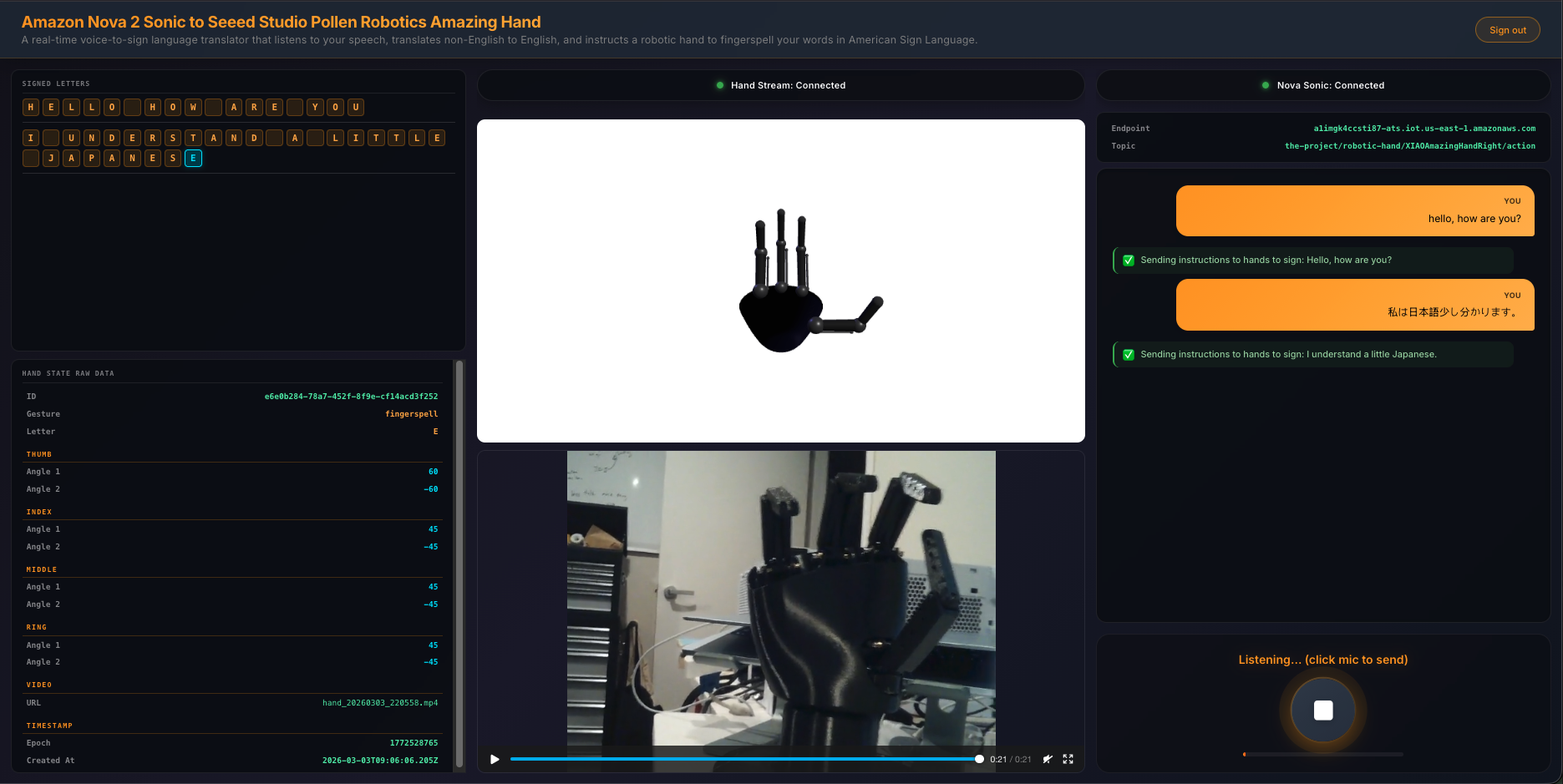
Display a 3-column UI with signed letter history, 3D hand animation with video feed, and live transcript with microphone controls
The Overall System
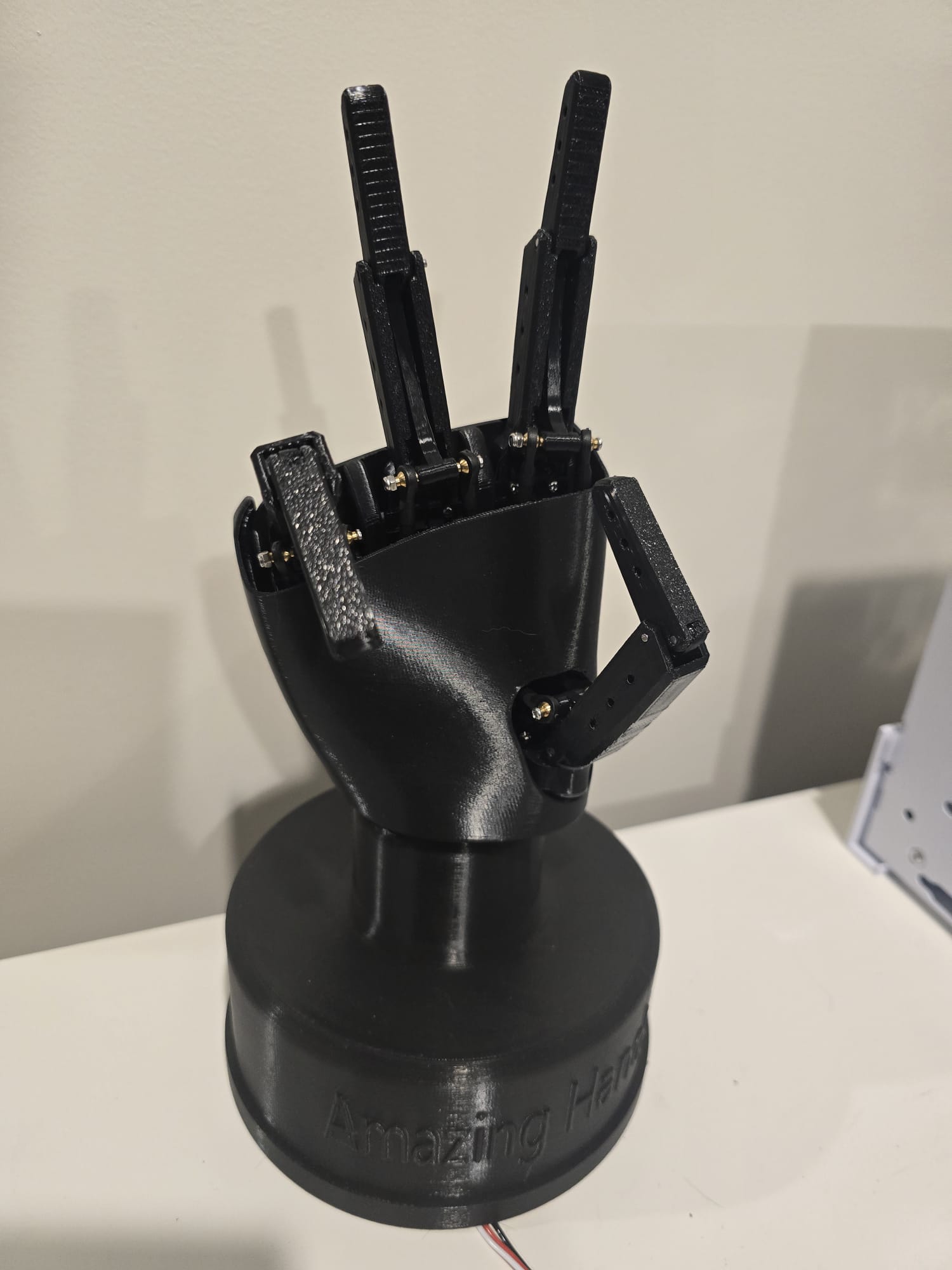
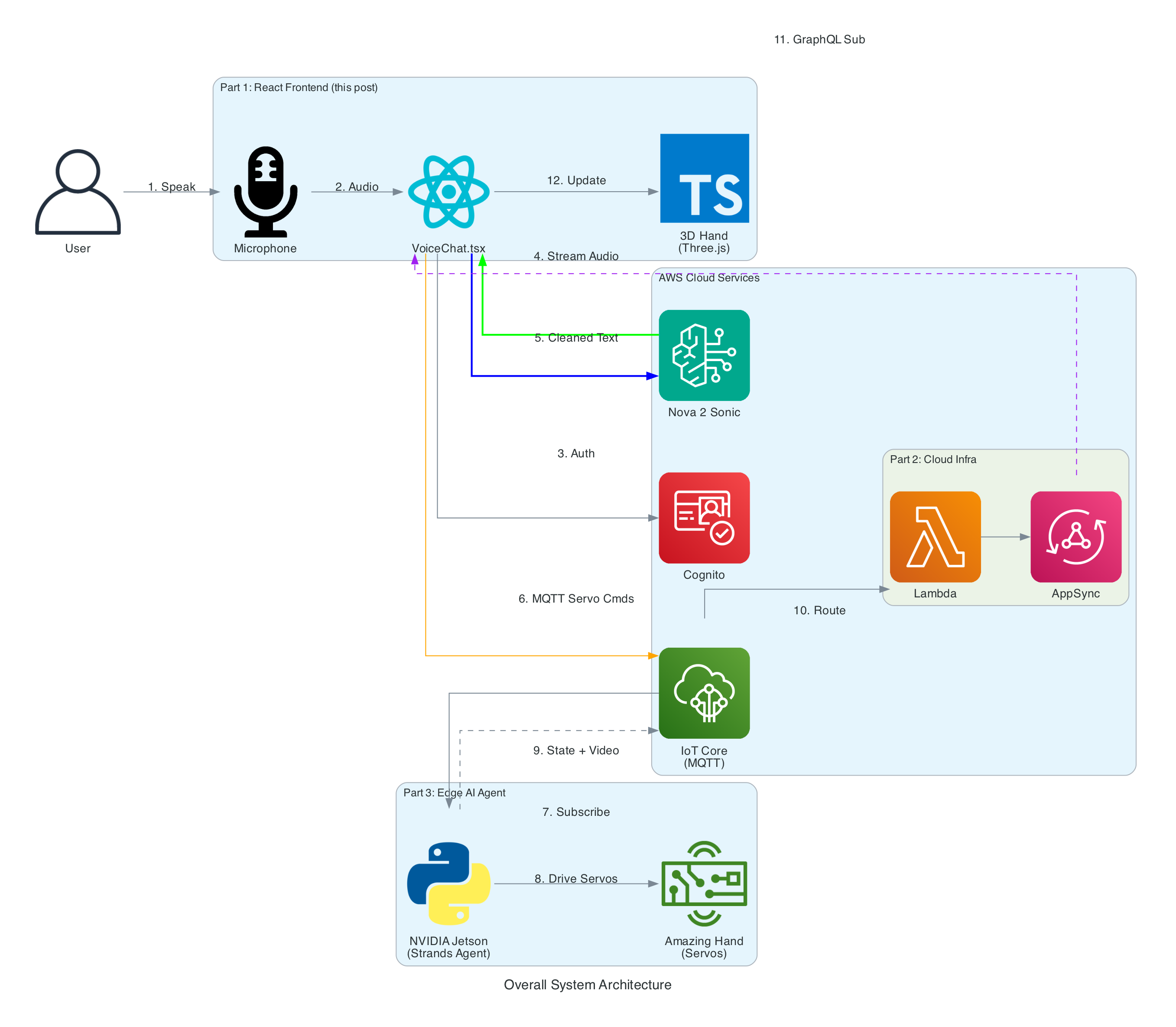
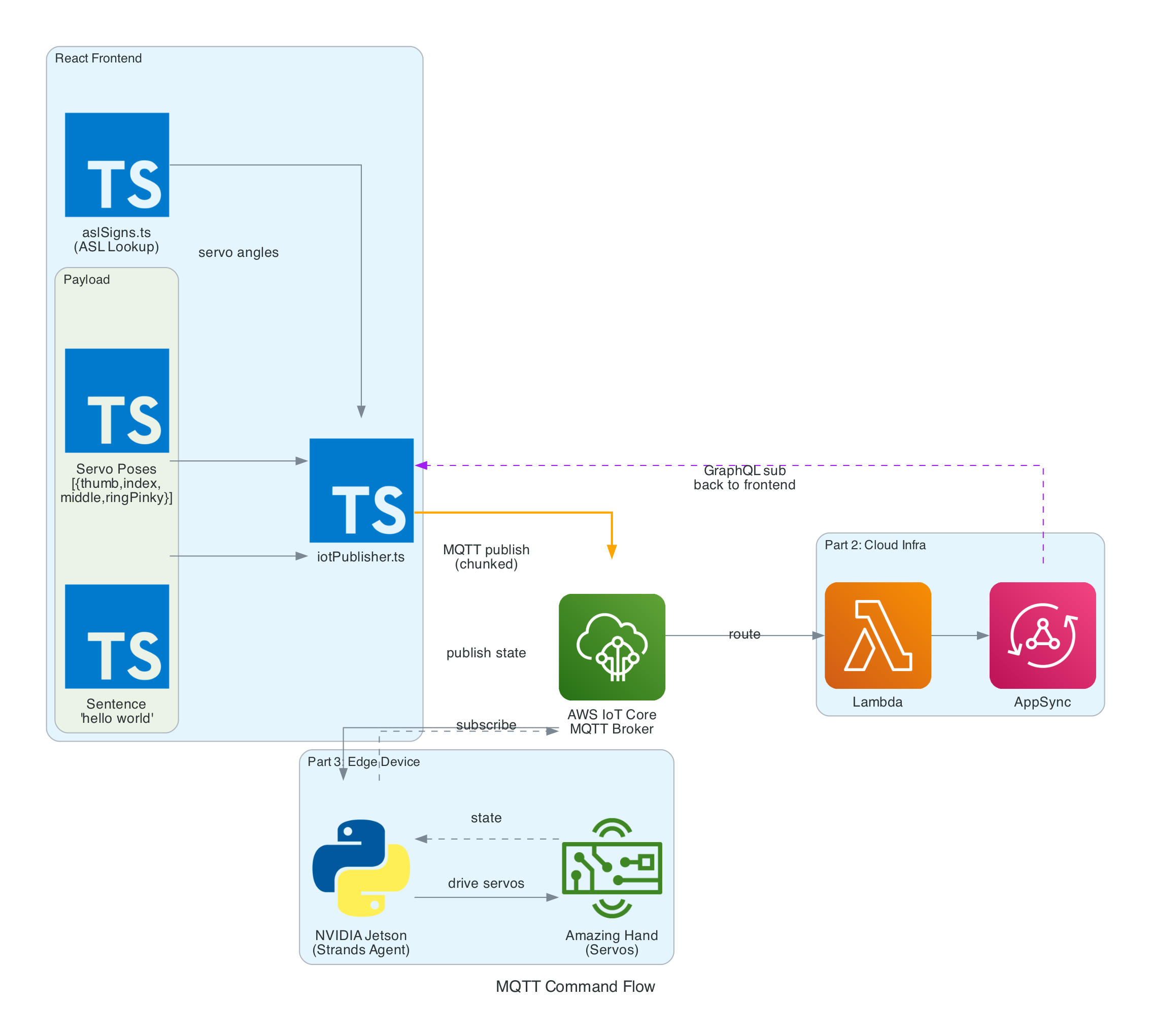
The end-to-end system takes spoken words from a browser microphone all the way through to physical ASL fingerspelling on an Amazing Hand — an open-source robotic hand designed by Pollen Robotics and manufactured by Seeed Studio — passing through cloud AI, IoT messaging, and an edge AI agent along the way.
System Components:
React Frontend (this post) - Captures speech, streams to Bedrock, publishes cleaned sentence text to MQTT, renders 3D hand animation synchronised with the physical hand via GraphQL subscriptions
Cloud Infrastructure (Part 2) - AWS CDK stack with IoT Core rules that route MQTT messages through Lambda to AppSync, enabling real-time GraphQL subscriptions between the edge device and the frontend
Edge AI Agent (Part 3) - Strands Agent powered by Amazon Nova 2 Lite on an NVIDIA Jetson that receives MQTT sentence text, translates it to ASL servo commands, drives the Amazing Hand for fingerspelling letter by letter, records video, and publishes hand state back via IoT Core
From user speech to ASL fingerspelling on the Amazing Hand
0/13
User
Browser
Bedrock
IoT Core
Jetson
Hand
Milestone
Complete
Total: 13 steps across 6 components (3 repos)
Speech → Sentence → Edge AI → ASL Fingerspelling
Architecture
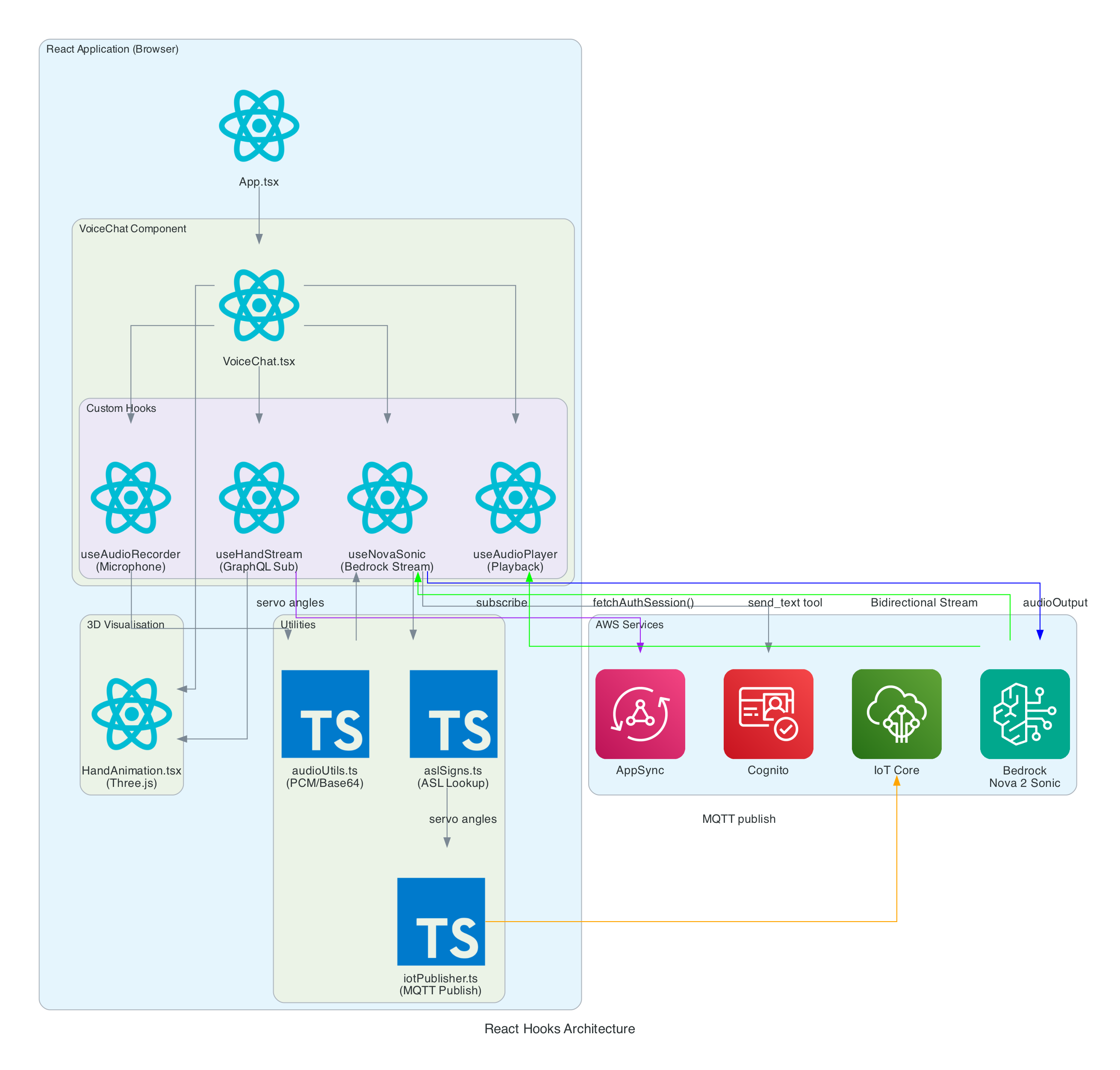
The frontend is built with React 19, Vite 7, and TypeScript 5.9. The application is structured around a main VoiceChat.tsx component that orchestrates four custom hooks, three utility modules, and a Three.js-based hand animation component.
VoiceChat.tsx - Main UI component with a 3-column responsive layout. Coordinates all hooks, renders the transcript feed, microphone controls, signed letter history, hand state data grid, video feed, and 3D animation. Collapses to a single column on screens under 1100px
useNovaSonic - Core hook managing the Bedrock bidirectional stream with InvokeModelWithBidirectionalStreamCommand. Handles authentication via Cognito, the Nova 2 Sonic event protocol (session/prompt/content lifecycle), the async generator input stream with backpressure, and send_text tool use responses. The tool is configured with toolChoice: { any: {} } to force tool invocation on every utterance
useAudioRecorder - Captures microphone input using an inline AudioWorklet running in a separate thread. Accumulates 2048 samples per buffer, resamples from the device sample rate (typically 48kHz) to 16kHz, converts Float32 to PCM16, and Base64 encodes for transmission
useAudioPlayer - Provides audio playback capability (FIFO queue of AudioBuffers at 24kHz). In the current implementation, Nova 2 Sonic's audio output is intentionally discarded since only the cleaned text via tool use is needed — the hook is available but not actively fed audio data
useHandStream - Subscribes to AppSync GraphQL onCreateHandState subscription filtered by device name. Fetches the last 20 hand states on mount and maintains a real-time list of 8 servo angles (thumb, index, middle, ring — each with two joint angles), letters, and video URLs
iotPublisher.ts - Publishes MQTT messages to the topic the-project/robotic-hand/XIAOAmazingHandRight/action. Publishes cleaned sentence text as { id, sentence, ts } payloads and handles IoT policy attachment to the Cognito identity
HandAnimation.tsx - Procedurally generated 3D robotic hand using Three.js with no external 3D models. The palm is built with LatheGeometry (curved cup shape), and each finger has a dual-joint rig (proximal + distal) with synchronised linkage. Uses WebGL rendering with PCFSoftShadowMap shadows, OrbitControls, and industrial-style materials with metalness/roughness
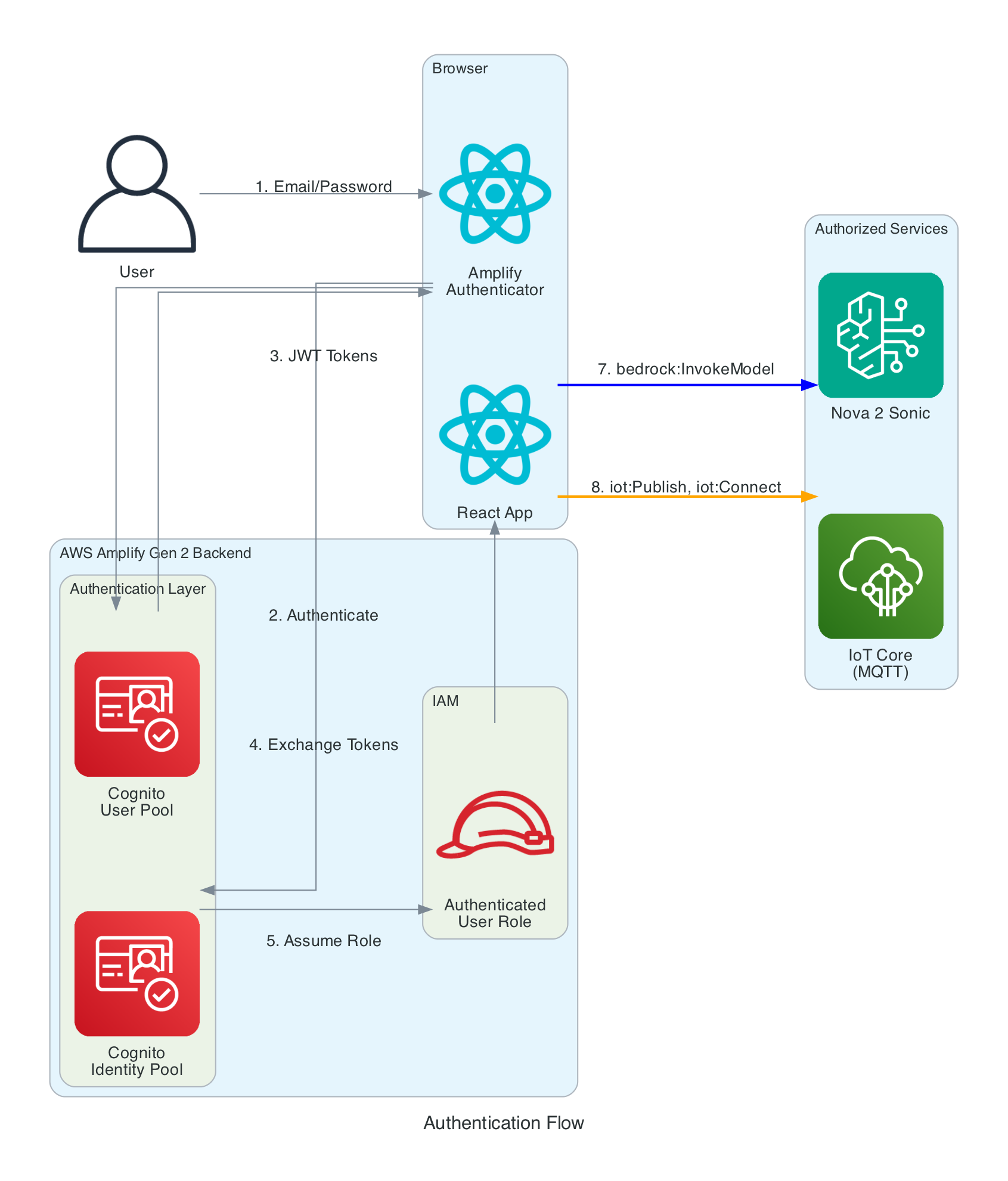
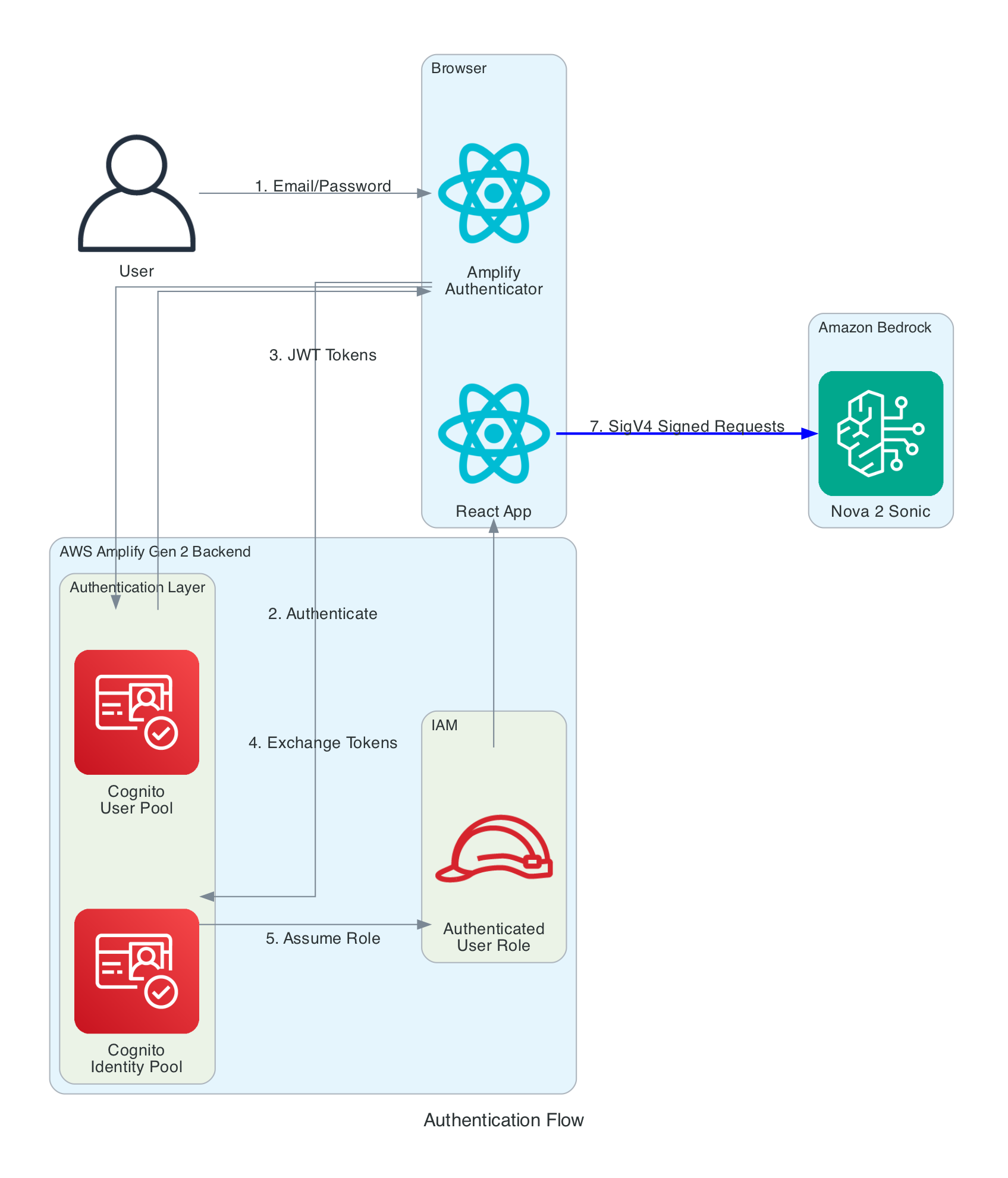
The frontend needs temporary AWS credentials to call both Bedrock (for Nova 2 Sonic streaming) and IoT Core (for MQTT publishing). No long-term credentials are stored in the browser.
Authentication Layers:
Cognito User Pool - Handles user registration and login with email/password. Configured via Amplify Gen 2 defineAuth with preferredUsername as an optional attribute
Cognito Identity Pool - Exchanges JWT tokens from the User Pool for temporary AWS credentials (access key, secret key, session token). Credentials are automatically refreshed by the Amplify SDK before expiration
IAM Role - The authenticated user role grants two sets of permissions: bedrock:InvokeModel and bedrock:InvokeModelWithResponseStream scoped to amazon.nova-2-sonic-v1:0 in us-east-1, and iot:Publish, iot:Connect, iot:DescribeEndpoint, and iot:AttachPolicy for IoT Core MQTT access. An IoT Core policy (RoboticHandPolicy) is also attached to the Cognito identity at runtime to authorise MQTT publishing to the the-project/robotic-hand/* topic pattern
The browser captures audio from the microphone using the Web Audio API and an AudioWorklet running in a separate thread. The AudioWorklet avoids main-thread blocking and processes audio in real-time with echo cancellation and noise suppression enabled.
Input Processing (Recording):
Microphone - Browser calls getUserMedia() to capture audio at the device's native sample rate (typically 48kHz) with mono channel, echo cancellation, and noise suppression enabled
AudioWorklet - An inline AudioCaptureProcessor (loaded as a Blob URL to avoid CORS issues) runs in a separate thread. It accumulates samples in a buffer and posts a Float32Array message to the main thread every 2048 samples
Resample - Linear interpolation resampling converts from 48kHz to 16kHz (Nova 2 Sonic's required input rate). The ratio is calculated dynamically from the actual device sample rate
Float32 to PCM16 - Floating point samples in the range [-1, 1] are converted to 16-bit signed integers. Negative values are multiplied by 0x8000 and positive values by 0x7FFF
Base64 Encode - The binary PCM data is encoded to Base64 text for JSON transmission to Bedrock via a custom uint8ArrayToBase64() utility that iterates bytes into a binary string and then calls btoa()
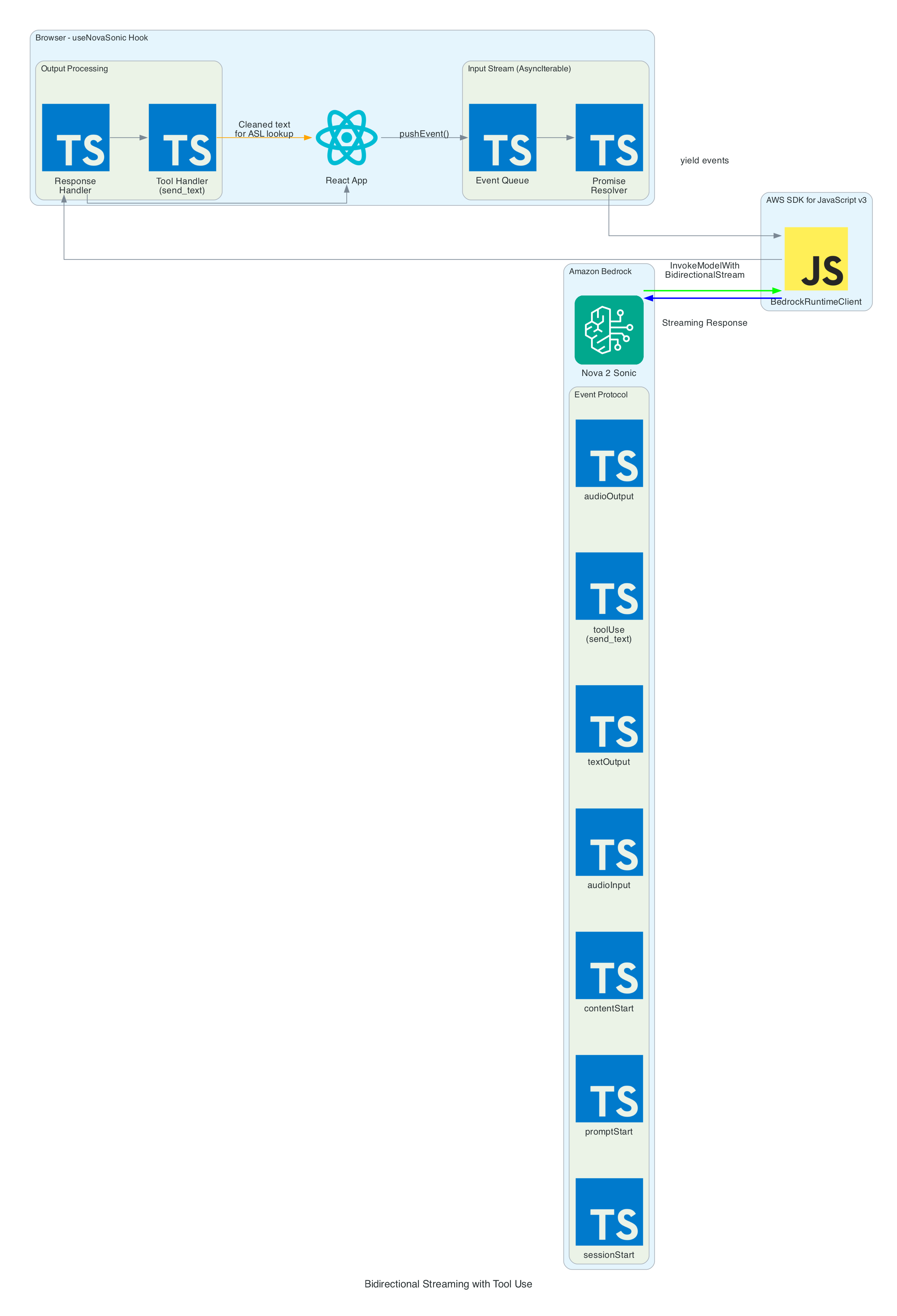
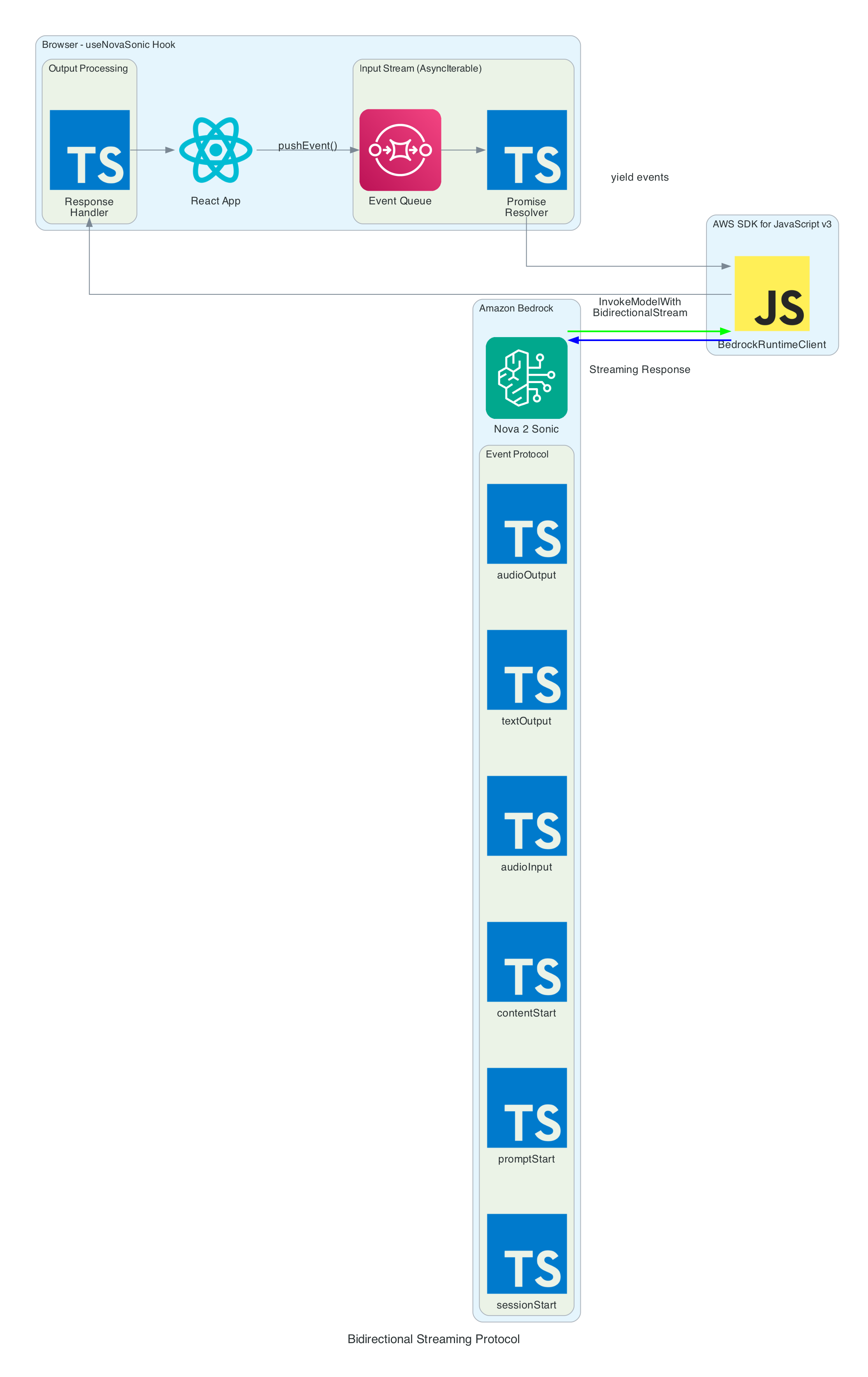
The heart of the system is the bidirectional stream to Amazon Nova 2 Sonic using InvokeModelWithBidirectionalStreamCommand. Nova 2 Sonic is configured not as a chatbot, but as a speech relay that cleans up input and forwards it via forced tool use.
Input Events (sent to Bedrock):
sessionStart - Initialises the session with inference configuration: maxTokens: 1024, topP: 0.9, temperature: 0.7
promptStart - Configures audio output format: audio/lpcm at 24kHz, 16-bit, mono, voice matthew, Base64 encoding. Also defines the send_text tool with toolChoice: { any: {} } to force tool invocation on every utterance
contentStart (TEXT) - Sends the system prompt that instructs Nova 2 Sonic to act as a "dumb speech-to-text relay pipe" — clean up grammar, remove filler words, translate non-English to English, call send_text with the cleaned text, then respond with only "Sent"
contentStart (AUDIO) - Marks the beginning of audio input content
audioInput - Streams Base64-encoded 16kHz PCM audio chunks in real-time as the user speaks
contentEnd / promptEnd / sessionEnd - Lifecycle events to terminate content blocks, prompts, and sessions
Output Events (received from Bedrock):
textOutput - Returns transcribed user speech and the generated AI response text ("Sent")
toolUse - The send_text tool invocation containing the cleaned text in { sentence: "..." } format. This is the primary output — the frontend publishes the sentence to MQTT for the edge device to translate into ASL servo commands
audioOutput - Synthesised voice response as Base64-encoded 24kHz PCM. In the current implementation, audio output is intentionally discarded since only the cleaned text via tool use is needed
Tool Use — send_text:
The tool is defined with toolChoice: { any: {} }, which forces Nova 2 Sonic to call it on every single utterance without exception
The tool accepts a single sentence parameter — the cleaned-up, well-formed sentence
When the tool invocation arrives, the frontend extracts the sentence and publishes it as { id, sentence, ts } to IoT Core via MQTT using publishSentence(). The edge device then translates the sentence into ASL servo commands
A JSON tool result ({ "status": "success", "sentence": "..." }) is sent back to Nova 2 Sonic to complete the tool use cycle
Once the cleaned sentence is extracted from the send_text tool invocation, iotPublisher.ts publishes it to the MQTT topic the-project/robotic-hand/XIAOAmazingHandRight/action via AWS IoT Core.
The payload is a simple JSON object containing:
id - A UUID for the message
sentence - The cleaned sentence text from Nova 2 Sonic
ts - Unix timestamp in seconds
The edge device (covered in Part 3) receives this sentence and is responsible for translating it into ASL servo commands and driving the physical hand.
From Nova 2 Sonic text output to IoT Core sentence publish
0/7
Nova
Hook
VoiceChat
Publisher
IoT Core
Milestone
Sentence Publish Pipeline
Speech → Nova 2 Sonic cleanup → send_text tool use → publishSentence → MQTT to edge device
The browser console logs the performance breakdown for each utterance through the voice-to-IoT pipeline. In this example, the end-to-end time from speech detection to IoT publish is approximately 2.9 seconds — with the majority spent on Speech-to-Text (2228ms) as Nova 2 Sonic processes the audio, followed by Text-to-Tool extraction (423ms) and IoT Publish (243ms):
The frontend subscribes to AppSync's onCreateHandState GraphQL subscription to receive real-time updates from the edge device. Each update includes the device name, current letter being signed, all 8 servo angles (thumb, index, middle, ring — each with two joint angles), a timestamp, and an optional video URL.
On mount, the hook fetches the last 20 hand states to populate the UI immediately. New states arrive in real-time as the edge device publishes them back through IoT Core → Lambda → AppSync. The data is displayed in both the signed letter history panel and the raw hand state data grid.
The HandAnimation.tsx component renders a procedurally generated 3D robotic hand using Three.js — no external 3D models are loaded. The entire hand is built from code:
The palm uses LatheGeometry to create a curved cup shape that tapers from a narrow wrist (radius 0.18) to wide knuckles (radius 0.56)
Each finger has a dual-joint rig with proximal and distal segments, knuckle joints, linkage bars, and fingertips. The thumb is mounted on the side of the palm and rotates on the Z-axis, while the index, middle, and ring fingers are mounted on the front rim and rotate on the X-axis
The distal joint automatically follows the proximal joint at 50% of its angle, simulating a synchronised linkage mechanism
Materials use industrial-style metalness/roughness: dark gray frame (0x2a2a2a), light gray joints (0x888888), and darker gray tips (0x555555)
The scene includes PCFSoftShadowMap shadows, ambient lighting (0.8), directional light (1.0), and a fill light (0.4), with OrbitControls for interactive zoom and rotation
Servo angle updates from the GraphQL subscription drive the finger rotations in real-time, keeping the 3D animation synchronised with the physical Amazing Hand.
The useAudioPlayer hook provides a FIFO queue-based audio playback capability for Web Audio AudioBuffer objects at 24kHz. However, in the current implementation, Nova 2 Sonic's audio output is intentionally discarded — the onAudioOutput callback is set to a no-op since only the cleaned text via the send_text tool use is needed to drive the MQTT pipeline. The hook remains available for future use if audio feedback is desired.
Problem: Loading an AudioWorklet processor from an external JavaScript file fails with CORS errors on some deployments, particularly when using Amplify Hosting.
Solution: Inline the AudioWorklet code as a Blob URL. The processor code is defined as a string, converted to a Blob with type application/javascript, and loaded via URL.createObjectURL(). The object URL is revoked after the module is added:
Problem: Nova 2 Sonic is a conversational model by default — it wants to chat and respond naturally. But in this system, it needs to act as a pure relay, forwarding every single utterance as cleaned text without adding commentary or refusing any messages.
Solution: A combination of system prompt engineering and forced tool use. The system prompt explicitly instructs Nova 2 Sonic to act as a "dumb speech-to-text relay pipe" and never add commentary. The send_text tool is configured with toolChoice: { any: {} }, which forces the model to invoke a tool on every response. After calling the tool, it is instructed to only respond with "Sent".
Problem: The system needs to transmit the user's intent from the frontend to the edge device reliably via IoT Core MQTT.
Solution: Rather than translating text to servo commands on the frontend (which would require large payloads with many servo poses), the frontend publishes only the cleaned sentence text as a compact { id, sentence, ts } JSON payload. The edge device is responsible for translating the sentence into ASL servo commands, keeping the MQTT messages small and the frontend simple.
Enable Nova 2 Sonic in Bedrock Console (us-east-1 region)
Clone and Install:
git clone https://github.com/chiwaichan/amplify-react-nova-sonic-voice-chat-amazing-hand.git cd amplify-react-nova-sonic-voice-chat-amazing-hand npminstall
Start Amplify Sandbox:
npx ampx sandbox
Run Development Server:
npm run dev
Open Application:
Navigate to http://localhost:5173, create an account, and start talking. Note that the full system requires Parts 2 and 3 to be deployed for the physical hand to respond — but the frontend will still capture speech, process it through Nova 2 Sonic, and display the 3D hand animation independently.
What's Next
In Part 2, I will cover the cloud infrastructure layer — the AWS CDK stack (cdk-iot-amazing-hand-streaming) that routes IoT Core MQTT messages through Lambda to AppSync. This is the bridge that enables real-time GraphQL subscriptions, allowing the frontend to receive hand state updates from the edge device as they happen.
In Part 3, I will cover the edge AI agent (strands-agents-amazing-hands) — a Strands Agent powered by Amazon Nova 2 Lite running on an NVIDIA Jetson that subscribes to the MQTT sentence text published by this frontend, translates them into physical servo movements on the Pollen Robotics Amazing Hand for ASL fingerspelling, records video of the hand in action, and publishes state back through IoT Core.
Summary
This post covered the frontend and voice processing layer of a real-time voice-to-sign-language translation system:
Amazon Nova 2 Sonic is used not as a chatbot but as a speech relay — configured via system prompt and toolChoice: { any: {} } forced send_text tool use to clean up grammar, remove filler words, translate to English, and forward every utterance as text
Audio pipeline captures at 48kHz via AudioWorklet, resamples to 16kHz, converts to PCM16 Base64 for Bedrock input. Nova 2 Sonic's audio output is intentionally discarded since only the cleaned text is needed
MQTT publishing sends cleaned sentence text as { id, sentence, ts } to AWS IoT Core for the edge device to translate into ASL servo commands
Real-time feedback via GraphQL subscriptions keeps the 3D Three.js hand animation synchronised with the physical Amazing Hand using 8 servo angles (thumb, index, middle, ring — each with two joints)
Fully serverless frontend using AWS Amplify Gen 2 with Cognito authentication, no backend servers — direct browser-to-Bedrock and browser-to-IoT Core communication
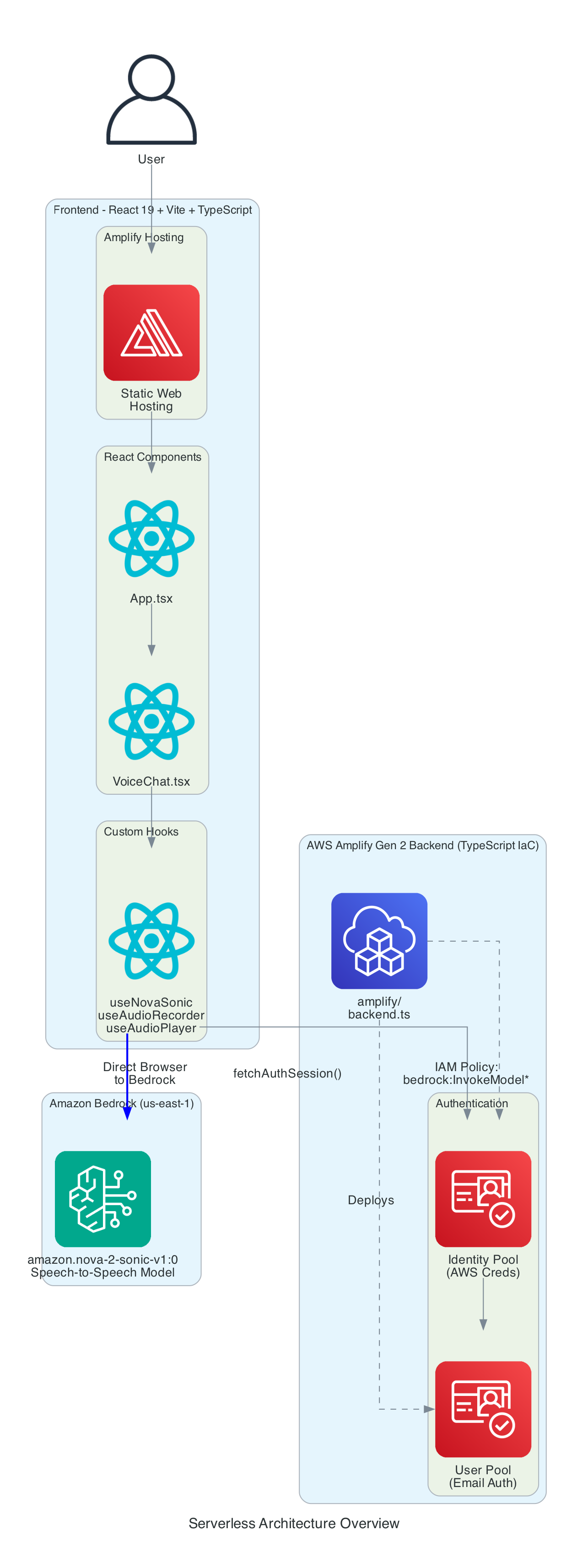
These days I am often creating small generic re-usable building blocks that I can pontentially use across new or existing projects, in this blog I talk about the architecture for a LLM based voice chatbot in a web browser built entirely as a serverless based solution.
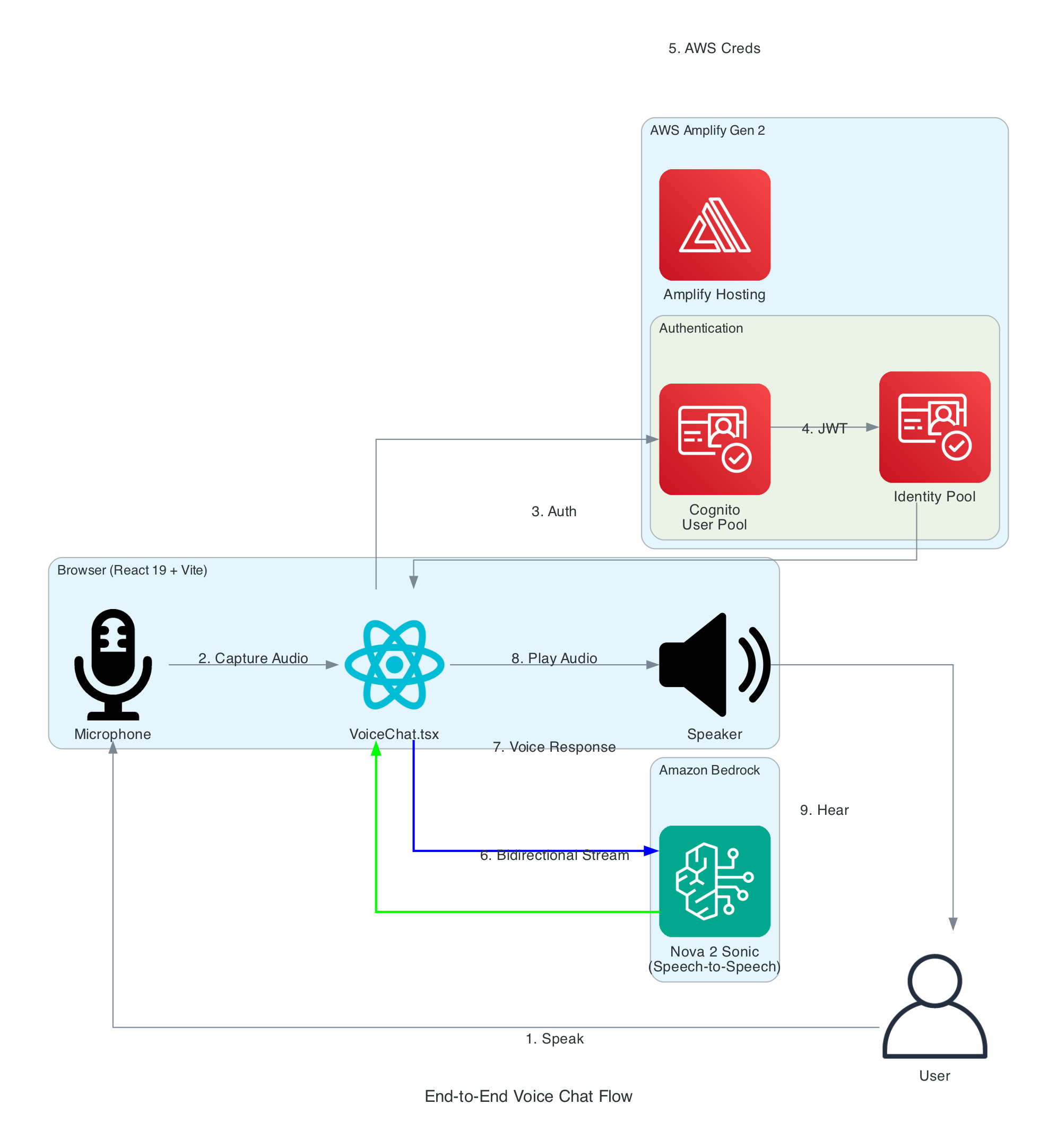
The key component of this solution is using Amazon Nova 2 Sonic, a speech-to-speech foundation model that can understand spoken audio directly and generate voice responses - all through a single bidirectional stream from the browser directly to Amazon Bedrock, with no backend servers required - no EC2 instances and no Containers.
Goals
Enable real-time voice-to-voice conversations with AI using Amazon Nova 2 Sonic
Direct browser-to-Bedrock communication using bidirectional streaming - no Lambda functions or API Gateway required
Use AWS Amplify Gen 2 for infrastructure-as-code backend definition in TypeScript
Implement secure authentication using Cognito User Pool and Identity Pool for temporary AWS credentials
Handle real-time audio capture, processing, and playback entirely in the browser
Must be a completely serverless solution with automatic scaling
Support click-to-talk interaction model for intuitive user experience
Display live transcripts of both user speech and AI responses
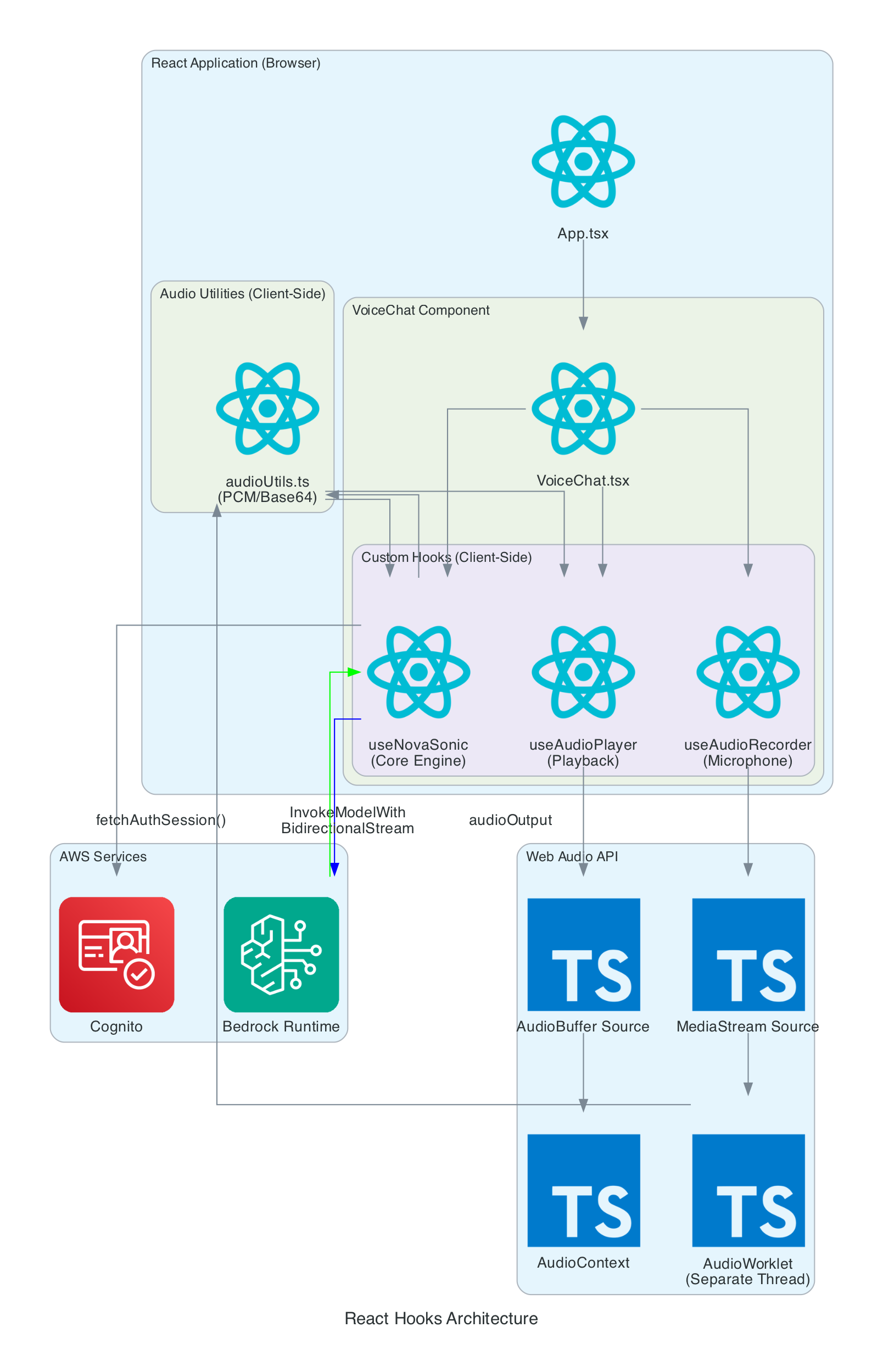
This diagram details the internal architecture of the React application, showing how custom hooks orchestrate audio capture, Bedrock communication, and playback.
Components:
VoiceChat.tsx - Main UI component that coordinates all hooks and renders the interface
I'm starting a new blog series where I will be documenting my build of a full-stack Web and Mobile application using AWS Amplify to implement both the frontend, as well as the backend; whilst developing dependent downstream Services outside of Amplify using AWS Serverless components to implement a Micro-Service architecture using Event-Driven design pattern - where we will break the application up into smaller consumable chunks that works together well.
Since we are creating from scratch a completely new application, I will also incorporate a vital pattern that will reduce complexity throughout the lifetime of the application: we will also be implementing the application using the Event-Sourcing pattern - this pattern ensures every Event ever published within a system is stored within an immutable ledger; this ledger will enable new Data Stores of any Data Store Engine to be created at any given time by replaying the Events in the ledger, of Events created from a start date and time to an end Date and Time.
CQRS is a pattern I will write up about with great detailed in a blog in the near future, CQRS will enable the ability to create mulitple Data Stores with identical data, each Data Store using a unique Data Store Engine instance.
Amplify is an AWS Service that provides any frontend web or mobile developers with no cloud expertise the ability to build and host full-stack applications on AWS. As a frontend developer, you can leverage it to build and integrate AWS Services and components into your frontend without having to deal with the underlying AWS Services; all Services the frontend is built on top of is managed by AWS Amplify - e.g. no need to managed CloudFormation Stacks, S3 Storage or AWS Cognito.
My experience from a while ago was full-stack application development and I have worked under that role for over 10 years, I've used various frontend/backend frameworks, components and patterns.
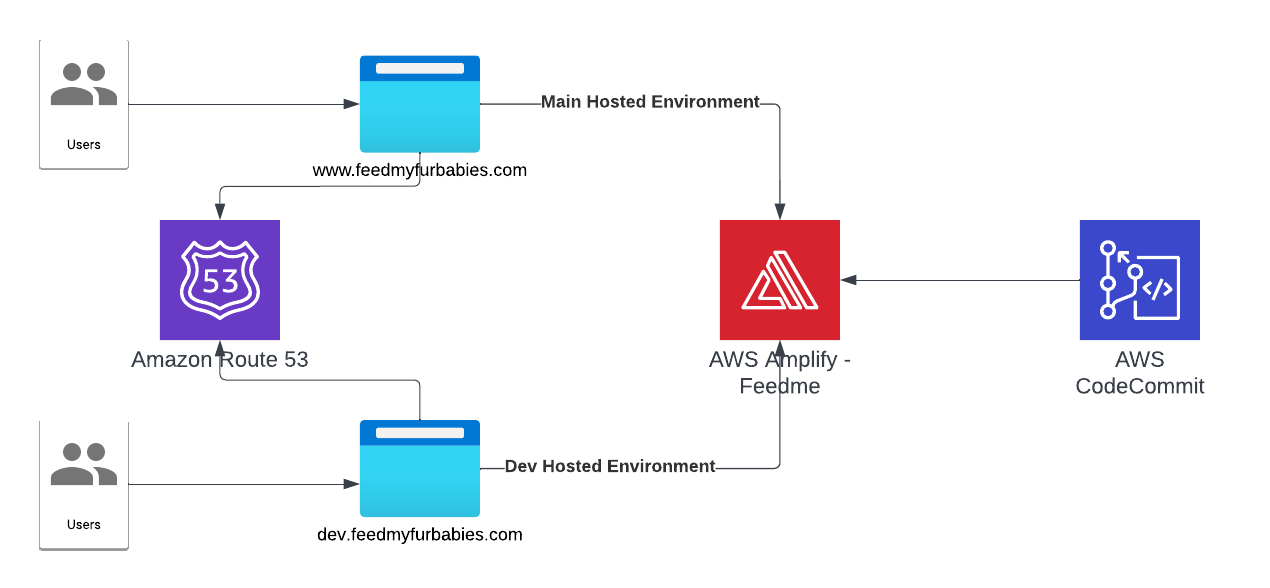
I will be building a website called Feed My Fur Babies where I will provide video streams showing live feeds of my cats from web cams placed in various spots around my house, the website will also provide users with the ability to feed my cats using internet enabled devices like the IoT Cat Feeders I recently put together and watch them hoon on their favorite treats; although I am experienced with building websites from the ground up using AWS Service, I am aiming to build Feed My Fur Babies whilst leveraging as little as possible on that experience - this is so I am building the website as close to the targeted demographics skillset of a typical Amplify as possible, i.e. as a developer with only frontend experience.
Current Architecture State
Update
Let's talk about what was done to get to the current architecture state.
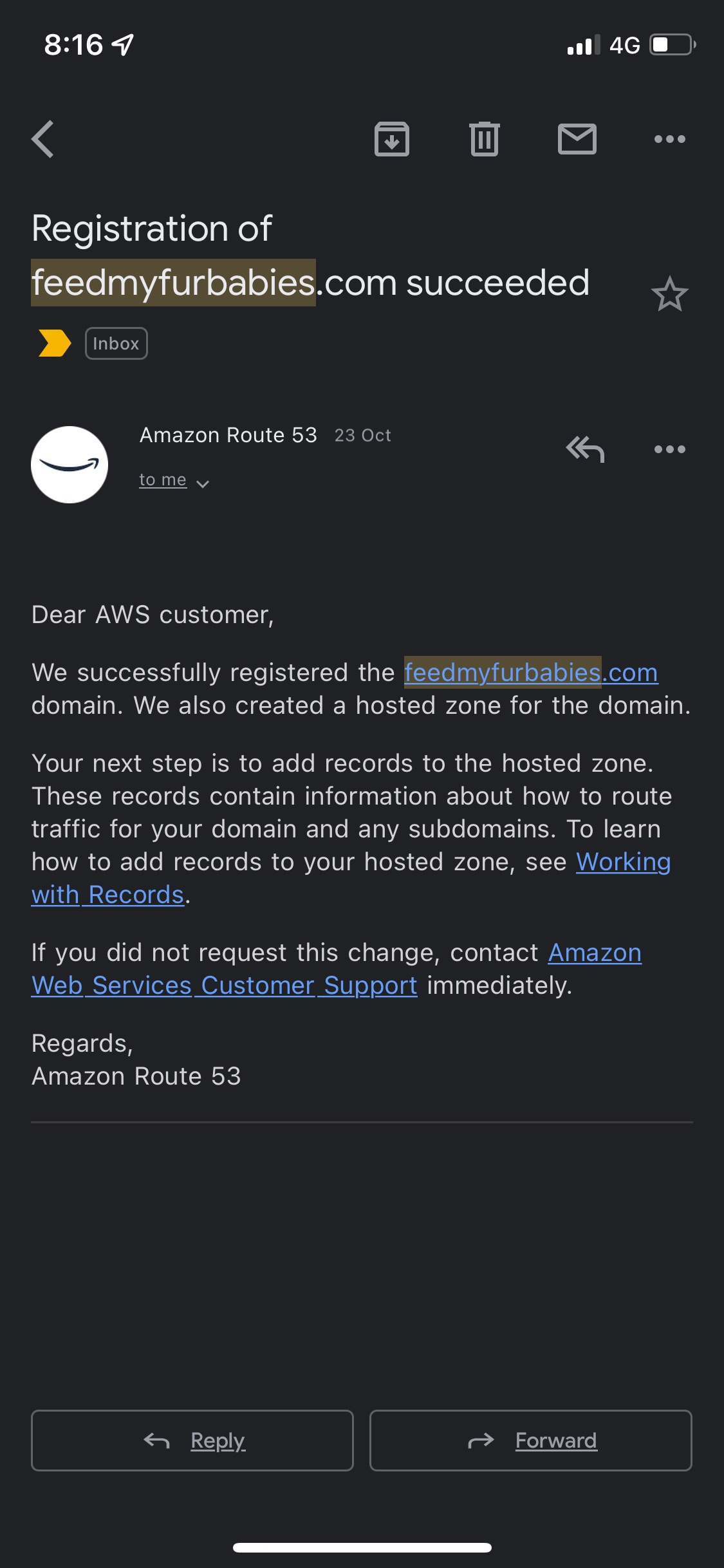
First thing I did was buying the domain feedmyfurbabies.com using AWS Route53.
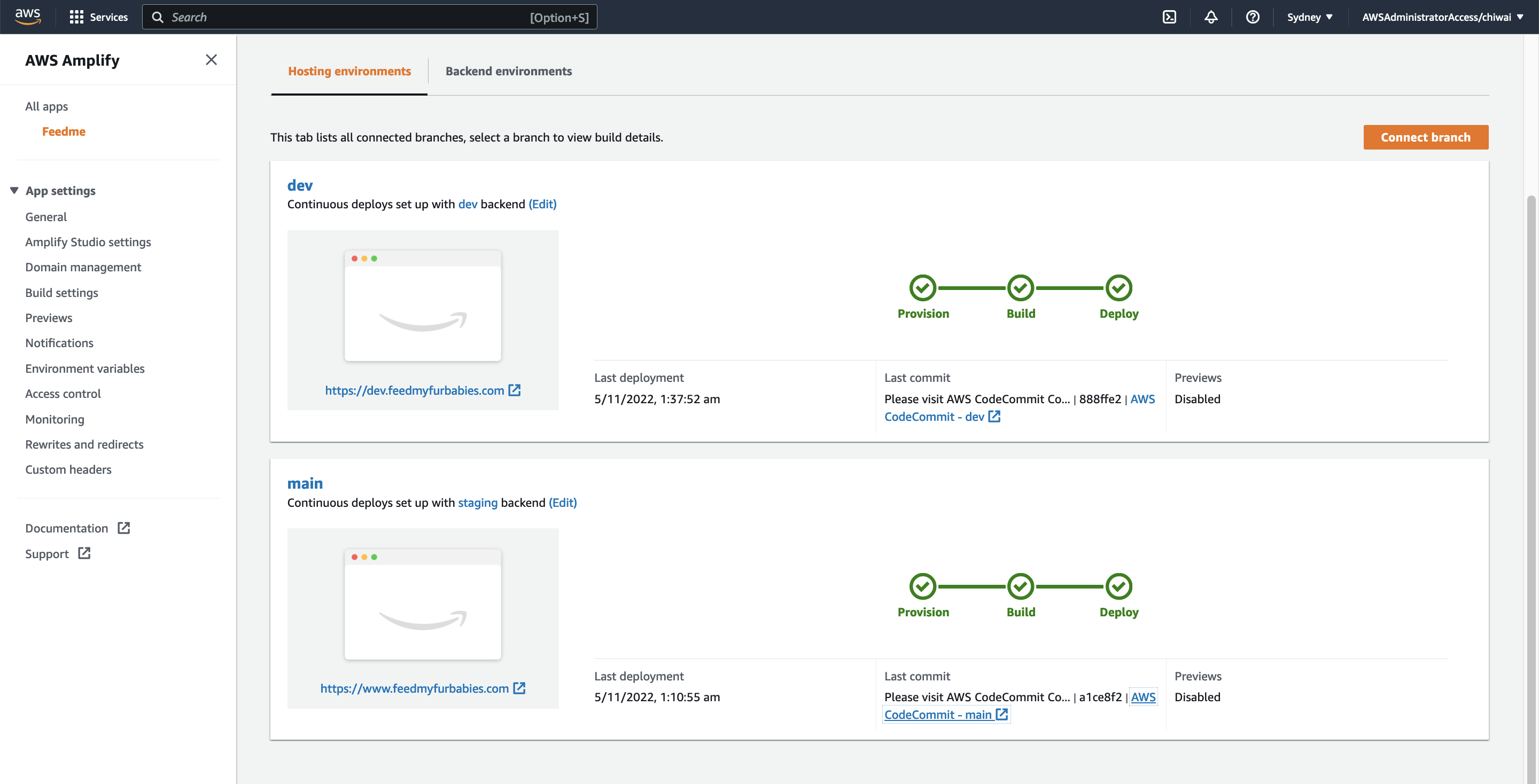
Next, I created a new Amplify App called "Feedme".
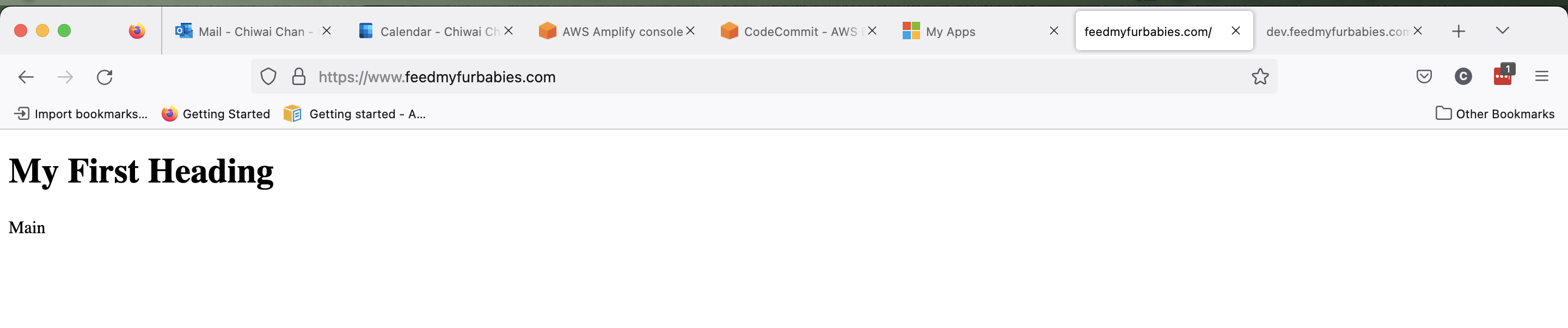
Within the App I created two Hosted Environments: one environment is to host the production environment, the other is to host a development environment. Each Hosted Environment is configured to be built and deployed from a specfic Branch in the shared CodeCommit Repository used to version control the frontend source code.