These days I am often creating small generic re-usable building blocks that I can pontentially use across new or existing projects, in this blog I talk about the architecture for a LLM based voice chatbot in a web browser built entirely as a serverless based solution.
The key component of this solution is using Amazon Nova 2 Sonic, a speech-to-speech foundation model that can understand spoken audio directly and generate voice responses - all through a single bidirectional stream from the browser directly to Amazon Bedrock, with no backend servers required - no EC2 instances and no Containers.
Goals
Enable real-time voice-to-voice conversations with AI using Amazon Nova 2 Sonic
Direct browser-to-Bedrock communication using bidirectional streaming - no Lambda functions or API Gateway required
Use AWS Amplify Gen 2 for infrastructure-as-code backend definition in TypeScript
Implement secure authentication using Cognito User Pool and Identity Pool for temporary AWS credentials
Handle real-time audio capture, processing, and playback entirely in the browser
Must be a completely serverless solution with automatic scaling
Support click-to-talk interaction model for intuitive user experience
Display live transcripts of both user speech and AI responses
Architecture
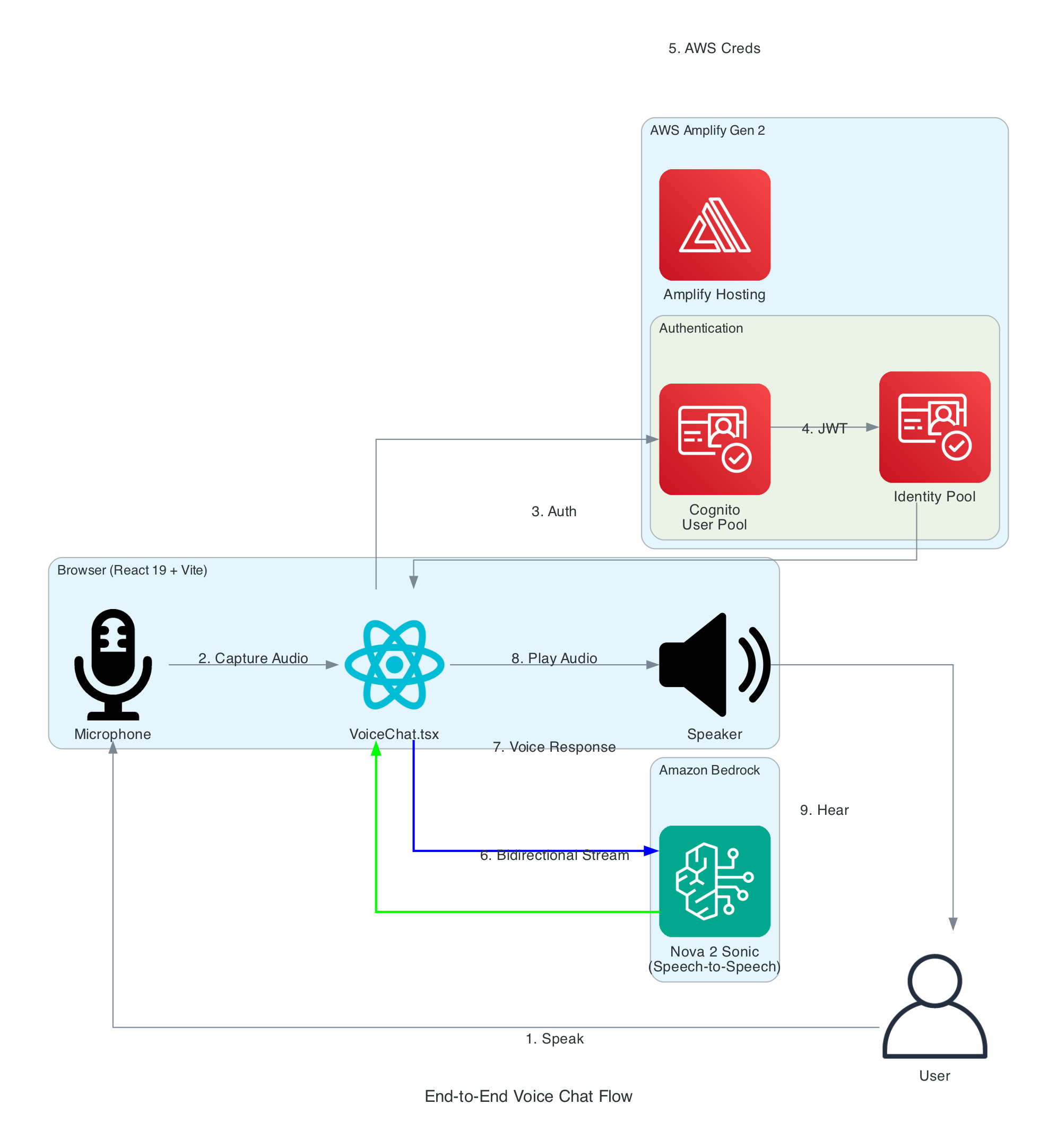
End-to-End Voice Chat Flow
This diagram illustrates the complete flow from a user speaking into their microphone to hearing the AI assistant's voice response.
Flow Steps:
User Speaks - User clicks the microphone button and speaks naturallyAudio Capture - Browser captures audio via Web Audio API at 48kHzAuthentication - React app authenticates with Cognito User PoolToken Exchange - JWT tokens exchanged for Identity Pool credentialsAWS Credentials - Temporary AWS credentials (access key, secret, session token) returnedBidirectional Stream - Audio streamed to Bedrock via InvokeModelWithBidirectionalStreamVoice Response - Nova Sonic processes speech and returns synthesized voice responseAudio Playback - Response audio decoded and played through speakersUser Hears - User hears the AI assistant's natural voice response
Interactive Sequence Diagram
Voice Chat Sequence Flow From user speech to AI voice response via Amazon Nova 2 Sonic
User Browser React App Cognito Bedrock Amazon Bedrock Nova Nova 2 Sonic 0.0s Click microphone button User interaction 0.1s fetchAuthSession() 0.2s Temporary AWS credentials 0.3s InvokeModelWithBidirectionalStream HTTP/2 streaming 0.4s sessionStart + promptStart + contentStart 0.5s Initialize speech-to-speech model 1.0s Speak into microphone Audio capture 1.1s AudioWorklet: capture → resample → PCM → B... 1.2s audioInput events (streaming chunks) Real-time 3.0s Click mic to stop recording 3.1s contentEnd + new contentStart (AUDIO) 3.2s Process audio → transcribe → generate resp... 3.5s textOutput: transcription + response text 3.6s textOutput event 3.7s Synthesize voice response (24kHz) 3.8s audioOutput events (streaming chunks) 3.9s Base64 → PCM → Float32 → AudioBuffer 4.0s Play audio through speakers 5.0s Click mic to continue conversation Same session 5.1s Start recording (session already open) 5.2s New audioInput events (next turn) Repeat cycle Total: 21 steps across 5 components
~4 seconds end-to-end latency
React Hooks Architecture
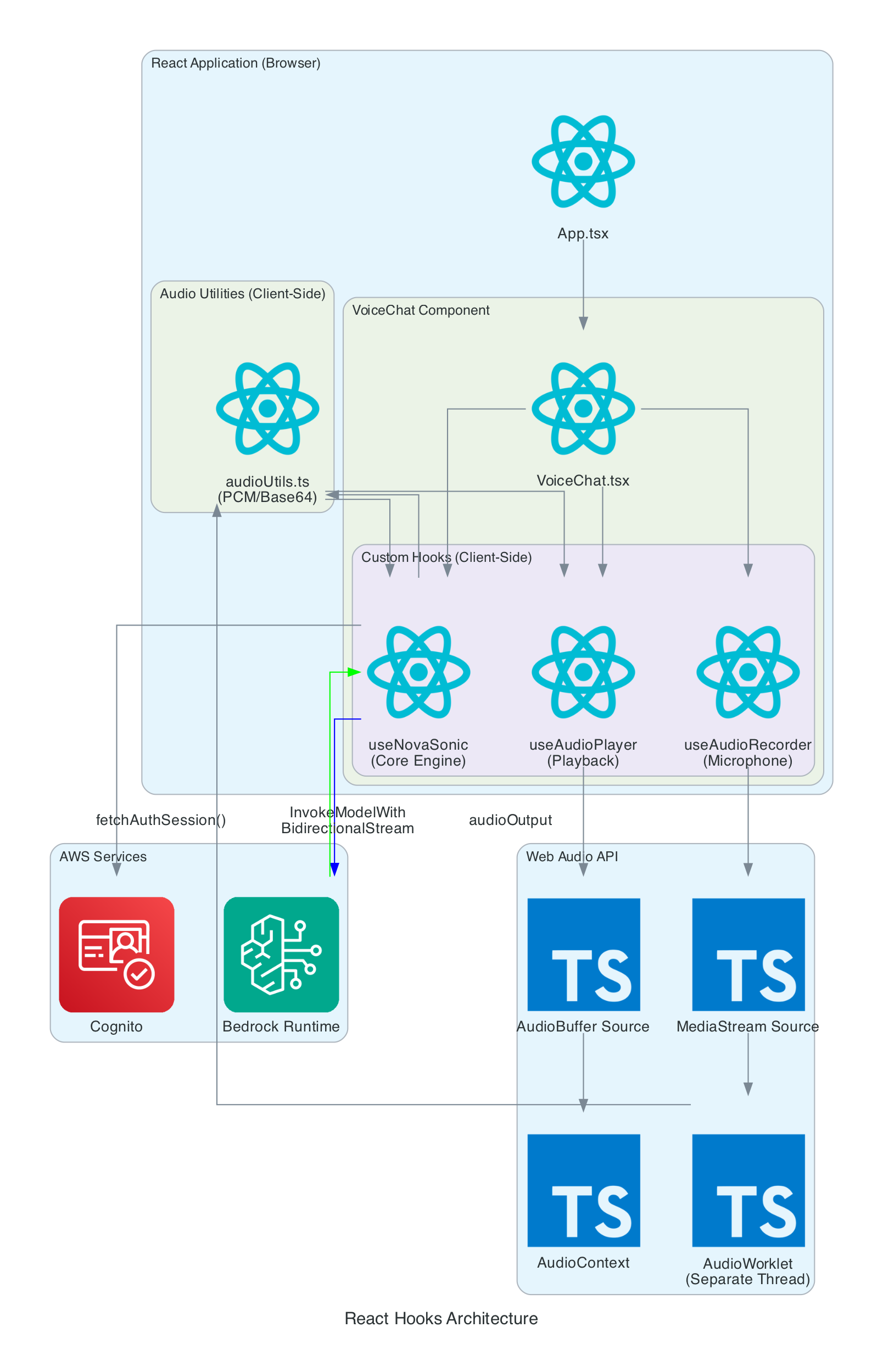
This diagram details the internal architecture of the React application, showing how custom hooks orchestrate audio capture, Bedrock communication, and playback.
Components:
VoiceChat.tsx - Main UI component that coordinates all hooks and renders the interfaceuseNovaSonic - Core hook managing Bedrock bidirectional stream, authentication, and event protocoluseAudioRecorder - Captures microphone input using AudioWorklet in a separate threaduseAudioPlayer - Manages audio playback queue and Web Audio API buffer sourcesaudioUtils.ts - Low-level utilities for PCM conversion, resampling, and Base64 encoding
Data Flow:
Microphone audio captured by useAudioRecorder via MediaStream
AudioWorklet processes samples in real-time (separate thread)
Audio resampled from 48kHz to 16kHz, converted to PCM16, then Base64
useNovaSonic streams audio chunks to BedrockResponse audio received as Base64, decoded to PCM, converted to Float32
useAudioPlayer queues AudioBuffers and plays through AudioContext
Authentication Flow
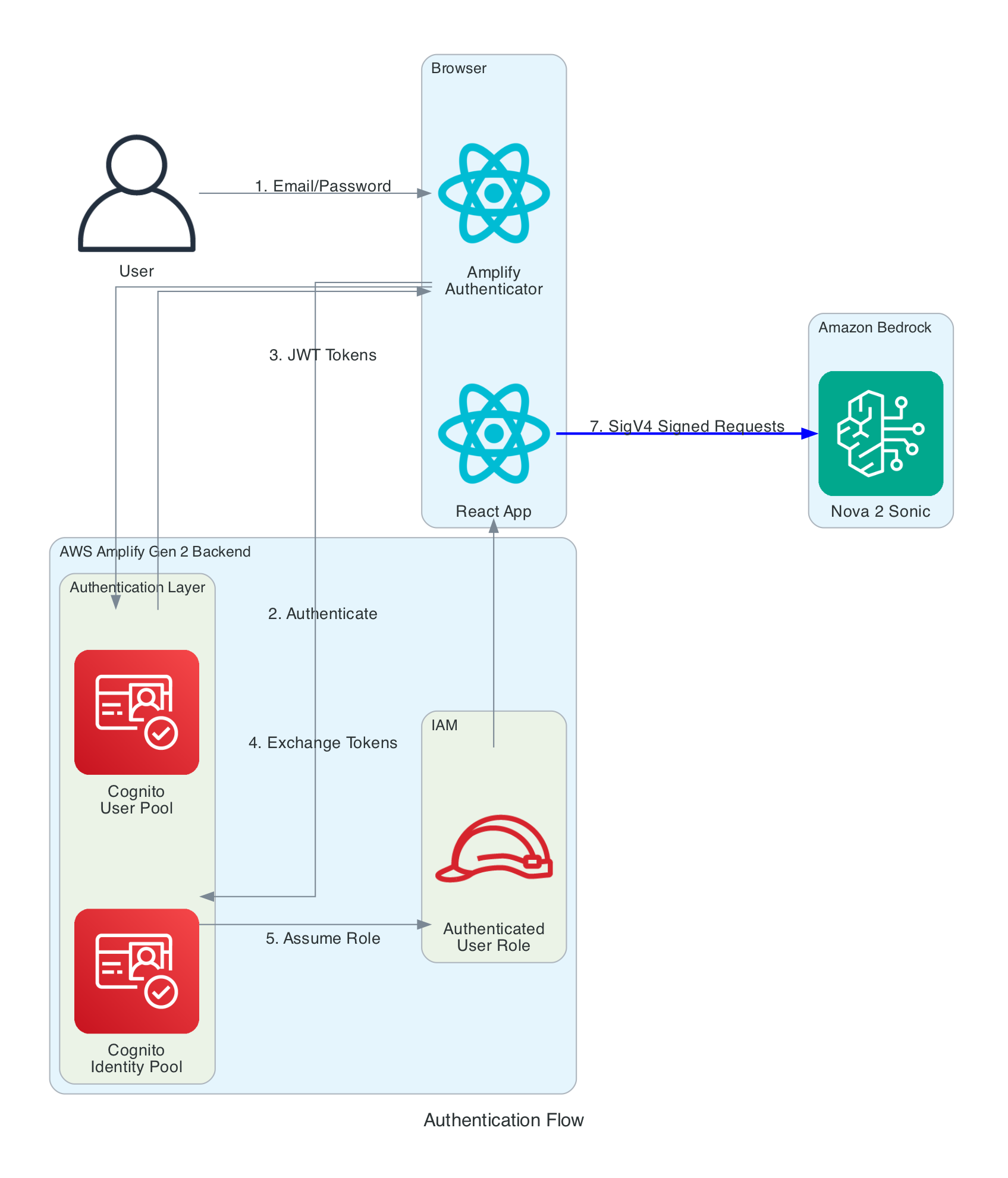
This diagram shows the multi-layer authentication flow that enables secure browser-to-Bedrock communication without exposing long-term credentials.
Authentication Layers:
Cognito User Pool - Handles user registration and login with email/passwordCognito Identity Pool - Exchanges JWT tokens for temporary AWS credentialsIAM Role - Defines permissions for authenticated users (Bedrock invoke access)SigV4 Signing - AWS SDK automatically signs all Bedrock requests
Key Security Features:
No AWS credentials stored in browser - only temporary session credentials
Credentials automatically refreshed by Amplify SDK before expiration
IAM policy scoped to specific Bedrock model (amazon.nova-2-sonic-v1:0)
All communication over HTTPS with TLS 1.2+
Audio Processing Pipeline
This diagram shows the real-time audio processing that converts browser audio to Bedrock's required format and vice versa.
Input Processing (Recording):
Microphone - Browser captures audio at native sample rate (typically 48kHz)AudioWorklet - Processes audio in separate thread, accumulates 2048 samplesResample - Linear interpolation converts 48kHz → 16kHz (Nova Sonic requirement)Float32 → PCM16 - Converts floating point [-1,1] to 16-bit signed integersBase64 Encode - Binary PCM encoded for JSON transmission
Output Processing (Playback):
Base64 Decode - Received audio converted from Base64 to binaryPCM16 → Float32 - 16-bit integers converted to floating pointAudioBuffer - Web Audio API buffer created at 24kHz (Nova Sonic output rate)Queue & Play - Buffers queued and played sequentially through speakers
Interactive Sequence Diagram
Audio Processing Pipeline Real-time audio capture, format conversion, and playback
Mic Microphone Worklet AudioWorklet Utils audioUtils.ts Hook useNovaSonic Bedrock Player useAudioPlayer 0ms getUserMedia() → MediaStream (48kHz Float32) Browser native 20ms process() called ~50x/sec, accumulate 2048 samples 40ms postMessage(Float32Array) To main thread 41ms resampleAudio(48kHz → 16kHz) Linear interp 42ms float32ToPcm16(): [-1,1] → 16-bit signed int 43ms uint8ArrayToBase64(): binary → text 44ms onAudioData(base64String) 45ms audioInput event: { content: base64 } Via SDK 2000ms audioOutput event: { content: base64 } (24kHz) Streaming 2001ms queueAudio(base64String) 2002ms base64ToUint8Array() 2003ms Uint8Array (PCM bytes) 2004ms createAudioBufferFromPcm() 2005ms pcm16ToFloat32(): 16-bit int → [-1,1] 2006ms AudioBuffer (24kHz) 2007ms AudioBufferSourceNode.start() → speakers Audio Format Conversions
Input: 48kHz Float32 → 16kHz PCM16 → Base64 | Output: Base64 → PCM16 → Float32 → 24kHz AudioBuffer
Bidirectional Streaming Protocol
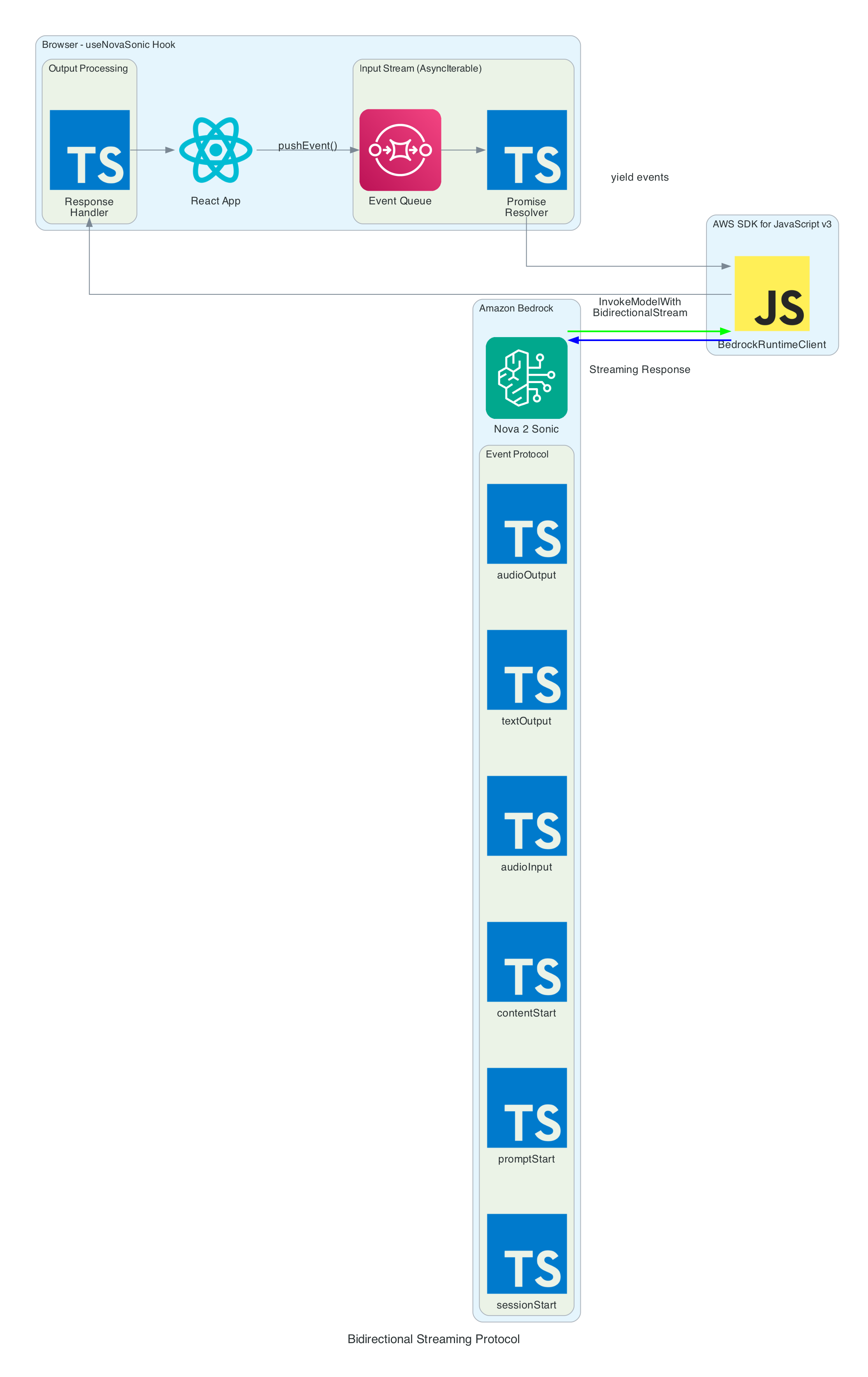
This diagram illustrates how the useNovaSonic hook manages the complex bidirectional streaming protocol with Amazon Bedrock.
Event Protocol:
Nova Sonic uses an event-based protocol where each interaction consists of named sessions, prompts, and content blocks.
Input Events (sent to Bedrock):
sessionStart - Initializes session with inference parameters (maxTokens: 1024, topP: 0.9, temperature: 0.7)promptStart - Defines output audio format (24kHz, LPCM, voice "matthew")contentStart - Marks beginning of content blocks (TEXT for system prompt, AUDIO for user speech)textInput - Sends system prompt text contentaudioInput - Streams user audio chunks as Base64-encoded 16kHz PCMcontentEnd - Marks end of content blockpromptEnd / sessionEnd - Terminates prompt and session
Output Events (received from Bedrock):
contentStart - Marks role transitions (USER for ASR, ASSISTANT for response)textOutput - Returns transcribed user speech and generated AI response textaudioOutput - Returns synthesized voice response as Base64-encoded 24kHz PCMcontentEnd - Marks end of response content
Async Generator Pattern:
The SDK requires input as AsyncIterable<Uint8Array>. The hook implements this using:
Event Queue - Pre-queued initialization events before stream startsPromise Resolver - Backpressure control for yielding events on demandpushEvent() - Adds new events during conversation (audio chunks)
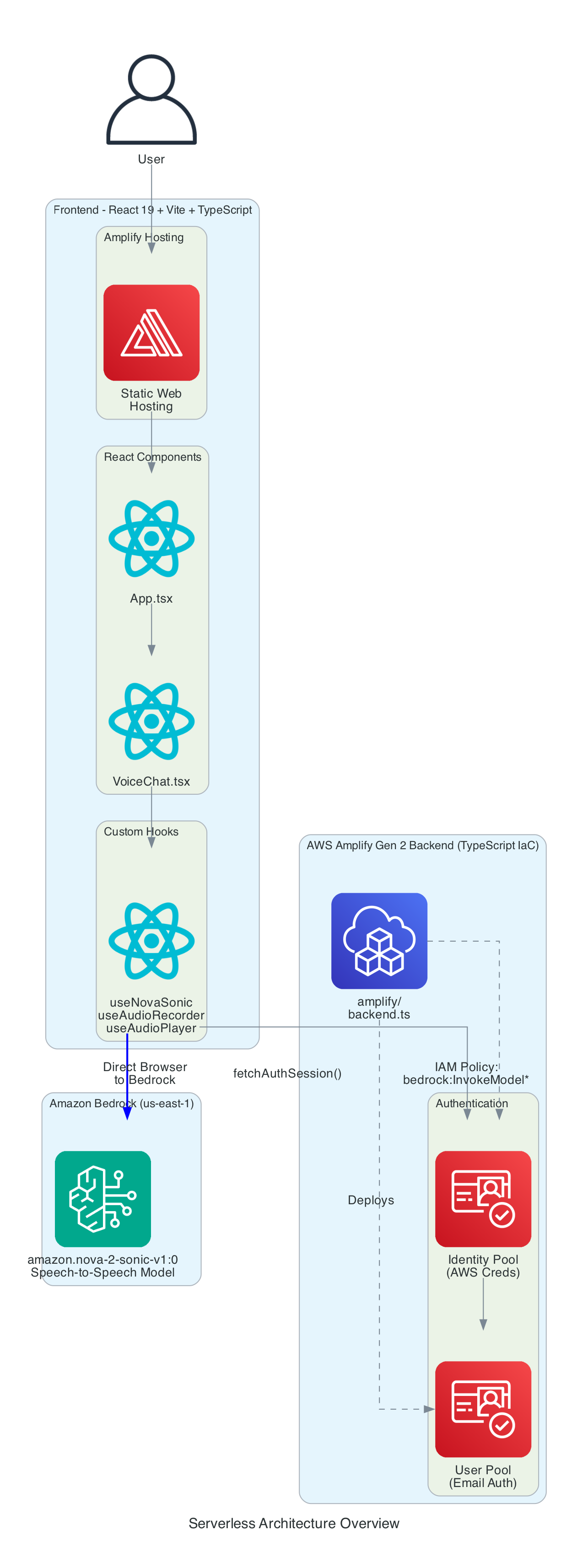
Serverless Architecture Overview
This diagram provides a comprehensive view of all components - the entire solution is serverless with no EC2 instances or containers to manage.
Frontend Stack:
React - Component-based UI frameworkVite - Build tool and dev serverTypeScript - Type-safe developmentAWS Amplify Hosting - Static web hosting with global CDN
Backend Stack (Amplify Gen 2):
amplify/backend.ts - Infrastructure defined in TypeScriptCognito User Pool - Email-based authenticationCognito Identity Pool - AWS credential vendingIAM Policy - Grants bedrock:InvokeModel permission for bidirectional streaming
AI Service:
Amazon Bedrock - Managed foundation model inferenceNova 2 Sonic - Speech-to-speech model (us-east-1)Bidirectional Streaming - Real-time duplex communication
Technical Challenges & Solutions
Challenge 1: AudioWorklet CORS Issues
Problem: Loading AudioWorklet from external file fails with CORS errors on some deployments.
Solution: Inline the AudioWorklet code as a Blob URL:
const blob = new Blob ( [ audioWorkletCode ] , { type : 'application/javascript' } ) ; const workletUrl = URL . createObjectURL ( blob ) ; await audioContext . audioWorklet . addModule ( workletUrl ) ; URL . revokeObjectURL ( workletUrl ) ; Challenge 2: Sample Rate Mismatch
Problem: Browsers capture audio at 48kHz, but Nova Sonic requires 16kHz input.
Solution: Linear interpolation resampling in real-time:
const resampleAudio = ( audioData : Float32Array , sourceSampleRate : number , targetSampleRate : number ) => { const ratio = sourceSampleRate / targetSampleRate ; const newLength = Math . floor ( audioData . length / ratio ) ; const result = new Float32Array ( newLength ) ; for ( let i = 0 ; i < newLength ; i ++ ) { const srcIndex = i * ratio ; const floor = Math . floor ( srcIndex ) ; const ceil = Math . min ( floor + 1 , audioData . length - 1 ) ; const t = srcIndex - floor ; result [ i ] = audioData [ floor ] * ( 1 - t ) + audioData [ ceil ] * t ; } return result ; } ; Problem: AWS SDK requires input as AsyncIterable<Uint8Array>, but events need to be pushed dynamically during the conversation.
Solution: Async generator with event queue and promise-based backpressure:
async function * createInputStream ( ) { while ( isActiveRef . current && ! ctrl . closed ) { while ( ctrl . eventQueue . length > 0 ) { yield ctrl . eventQueue . shift ( ) ; } const nextEvent = await new Promise ( resolve => { ctrl . resolver = resolve ; } ) ; if ( nextEvent === null ) break ; yield nextEvent ; } } Getting Started
GitHub Repository: https://github.com/chiwaichan/amplify-react-amazon-nova-2-sonic-voice-chat
Prerequisites
Node.js 18+
AWS Account with Bedrock access enabled
AWS CLI configured with credentials
Deployment Steps
Enable Nova 2 Sonic in Bedrock Console (us-east-1 region)
Clone and Install:
git clone https://github.com/chiwaichan/amplify-react-amazon-nova-2-sonic-voice-chat.git
cd amplify-react-amazon-nova-2-sonic-voice-chat
npm install
Start Amplify Sandbox:
Run Development Server:
Open Application:
Navigate to http://localhost:5173, create an account, and start talking!
Summary
This architecture provides a reusable building block for voice-enabled AI applications:
Zero backend servers - Direct browser-to-Bedrock communicationReal-time streaming - HTTP/2 bidirectional streaming for low latencySecure authentication - Cognito User Pool + Identity Pool + IAM policiesAudio processing pipeline - Web Audio API, AudioWorklet, PCM conversionInfrastructure as code - AWS Amplify Gen 2 with TypeScript backend definition
The entire interaction happens in real-time: speak naturally, and hear the AI respond within seconds.